Write-Caching - Enable or Disable

How to Enable or Disable Write-Caching for a Storage Device in Windows 7 and Windows 8


   Information
Write caching in a connected storage device refers to the use of high-speed volatile memory to collect write commands sent to data storage devices and cache them until the slower storage media (either physical hard disks or low cost flash memory) can accommodate them. Most devices that use write caching require that power be supplied continuously.

This will show you how to enable write caching to have better performace for a storage device, or disable write caching for quick removal of a storage device without having to use Safely Remove Hardware.


   Tip
If high data transfer performance is your main concern, you should enable both of these settings in OPTION TWO below:
  • In the Removal Policy section, select the Better Performance option.
  • In the Write-caching policy section, select Enable write caching on the device (if the system hardware and storage device support these features).
   Warning
You must be logged into a administrator account to be able to do the steps in this tutorial.


OPTION ONE

Disable Write Caching for Quick Removal


   Note
This option is usually the best choice for storage devices that you are likely to remove from the system frequently, such as USB flash drives, SD, MMC, Compact Flash, or similar memory cards, and other similar externally attached storage devices.

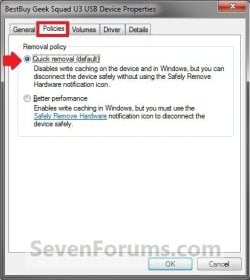
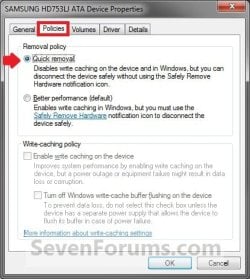
When you select the Quick Removal option, Windows 7 manages commands sent to the device using a method called write-through caching. In write-through caching, the device operates on write commands as if there were no cache. The cache may still provide a small performance benefit, but the emphasis is on treating the data as safely as possible by getting the commands to the storage device. The main benefit is that you can remove the storage device from the system quickly without risking data loss. For example, if a flash drive were to be accidentally pulled out of its port, the data being written to it is much less likely to be lost.

1. Open the Control Panel (icons view) in Windows 7 or Windows 8, and click on the Device Manager icon.

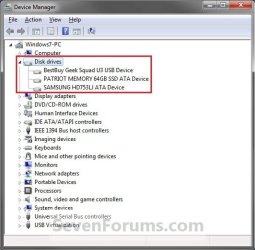
2. In Device Manger, double click on Disk drives to expand it, then double click on the listed storage device that you want to disable write caching for. (See screenshot below)
Drive1.jpg
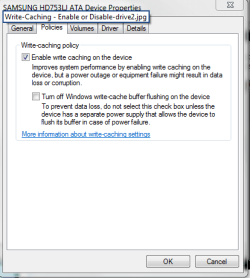
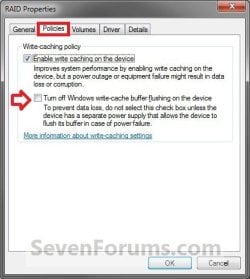
3. Click on the Polices tab. Under the upper Removal policy section, select (dot) Quick removal, or check the Turn off Windows write-cache buffer flushing on the device box, and click on OK. (See screenshot below)
Drive4A.jpgDrive2.jpg
Drive3.jpg
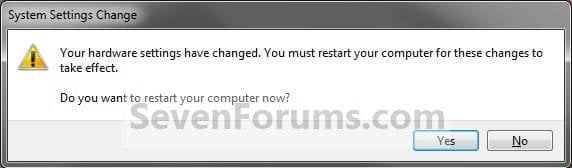
4. Click on Yes to restart the computer to apply. (See screenshot below)
WARNING: This will restart the computer immediately. You should save and close anything else that you are working on first.
Drive4.jpg


OPTION TWO

Enable Write Caching for Better Performance


   Note
This option is usually the best choice for storage devices that must provide the highest possible performance and that you intend to not remove from the system frequently, such as internal hard disk drives. If you choose this option and the device is disconnected from the system before all of the data is written to it (such as if you remove a USB flash drive), you could lose data. When using this option for a storage device (ex: USB flash drive), you must use Safely Remove Hardware to disconnect the device safely to prevent possible data loss.

When you select the Better Performance option, Windows 7 uses a method known as write-back caching. In this method, the storage device itself is allowed to determine whether using the high-speed cache will save time completing the write commands. If it will, the device signals to the computer that the data has been stored successfully even though the data may not actually be present in the storage device yet (such as the hard disk or flash memory). This method markedly increases the throughput of storage operations, which are often a major bottleneck for system performance overall. However, if the power supplied to the device (ex: external hard drive) fails for any reason, any data still in the cache (that the computer system believes is safely stored) could be lost.

By default, Windows uses cache flushing. This means that the system will periodically instruct the storage device to write all data waiting in the cache to the storage device. When you select Turn off Windows write-cache buffer flushing on the device, you turn can turn off these periodic commands to transfer the data. Not all devices support all of these features.

1. Open the Control Panel (icons view) in Windows 7 or Windows 8, and click on the Device Manager icon.

2. In Device Manger, double click on Disk drives to expand it, then double click on the listed storage device that you want to enable write caching for. (See screenshot below)
Drive1.jpg
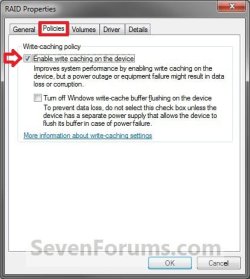
3. Click on the Polices tab. Under the upper Removal policy section, select (dot) Better performance. (See screenshots below)
NOTE: By default, Enable write caching on the device is also checked. If not, then check it as well.
Drive3A.jpgDrive1A.jpg
4. To Turn Off Windows Write-cache Buffer Flushing on the Device
WARNING: To Prevent data loss. Do not check this option unless the storage device has a separate power supply that allows the device to flush it's buffer in case of a power failure.
A) Select (check) the Turn off Windows write-cache buffer flushing on the device box. (See screenshots above)
5. Click on OK. (See screenshot below step 3)

6. Click on Yes to restart the computer to apply. (See screenshot below)
WARNING: This will restart the computer immediately. You should save and close anything else that you are working on first.
Drive4.jpg
That's it,
Shawn


Last edited:
When I installed an OCZ Agility-EX SLC SSD the write caching option was enabled. If I try to disable it I get this message:

---------------------------
AGILITY-EX ATA Device Properties
---------------------------
Windows could not change the write-caching setting for the device. Your device might not support this feature or changing the setting.
---------------------------

This might indicate that write caching is needed by SSD's. Perhaps write caching means something different for SSD's.
 

My Computer

Computer Manufacturer/Model Number
Asus CG5290
OS
Windows 7 x64 RTM Retail
CPU
Intel i7-920 Quad @ 4.0Ghz. Stepping D0.
Motherboard
Asus Rampage II GENE
Memory
9GB DDR3 @ 1600 Mhz. 9-8-8-24-CR1
Graphics Card(s)
XFX ATI HD5870 @ 900/1300
Sound Card
SupremeFX X/Fi HD Audio onboard
Monitor(s) Displays
Samsung 24" WS
Screen Resolution
1920x1200
Hard Drives
OCZ AGILITY-EX (64 GB, SATA-II, SSD SLC NAND Flash)
Hitachi HDT721010SLA360 (1 TB, 7200 RPM, SATA-II)
Cavalry (500 GB, 7200 RPM, eSATA-II)
PSU
Antec TruePower 650 Watts
Case
Ugly but functional.
Cooling
Oversized heat sink, lots and lots of fans.
Keyboard
MS
Mouse
MS wireless explorer
Internet Speed
101/15 - Optimum Online Ultra
Thanks for the tutorial. Increased my speed to USB HDD significantly!

[Edit] Well, it did initially. Transfer speed starts ~3x faster, then tails off to the same speed:(
 
Last edited:

My Computer

Computer Manufacturer/Model Number
Dell Studio 1735
OS
Windows 7 Professional x64
CPU
Intel Core2 T8100 (2.1Ghz)
Motherboard
Dell
Memory
4GB
Hard Drives
2x WD 500GB
Hi Brink, thanx for the tutorial. I just have some questions.


  • Lets say for example I power on my PC and in the windows log-on the PC hung-up (bad driver or 'OC).
Do i lose or corrupt any data in my internal HDDs?
The data should lose or corrupt either the write-caching is on or off?


  • And how about if I'll put the Virtual Memory in a secondary internal HDD where write-caching off.
Do i lose performance?

Thank you in advance.
 

My Computer

Computer type
PC/Desktop
OS
Windows 7 Ultimate x64
CPU
Intel Core i5-2500K @4.5Ghz
Motherboard
Asus Maximus V GENE
Memory
x2 Kingston KHX1600C9D3/4G
Graphics Card(s)
NVIDIA GeForce GTS 250 - 1024MB
Sound Card
SupremeFX III built-in 8-Channel High Definition Audio
Monitor(s) Displays
Samsung Syncmaster P2270
Screen Resolution
1920x1080
Hard Drives
x1 Seagate Barracuda ST3160811AS
x2 Seagate Barracuda ST380817AS
PSU
Corsair TX750
Case
Cooler Master HAF 922 Side Window Model
Cooling
Stock Intel Cooler + Tuniq TX2
Keyboard
Dell SK-8135
Mouse
Logitech G5
Internet Speed
2 Mbps
Other Info
x2 Xbox 360 Wireless Controller for Windows
Logitech Z-5550
Sennheiser HD555
Hello Rjck,

Anytime you lose power suddenly you can lose and risk corrupting only the data that happened to be in the process of being written to the hard drive. Usually restarting the computer sorts it automatically. If not, then running chkdsk can.

Usually the only time you would lose anything that happened to be in the write cache is if you unplugged a external drive with write caching enabled improperly without using "Safely Remove Hardware" first. It's usually best to have write caching enabled for better performance.

If you have a second physical hard drive that's just as fast, and not just another partition on the same hard drive, then you could gain performance by having the virtual memory page file on the second hard drive instead.

Hope this helps,
Shawn
 

My Computer

Computer type
PC/Desktop
Computer Manufacturer/Model Number
Self built custom
OS
64-bit Windows 11 Pro for Workstations
CPU
Intel i7-8700K OC'd to 5 GHz
Motherboard
ASUS ROG Maximus XI Formula Z390
Memory
64 GB (4x16GB) G.SKILL TridentZ RGB DDR4 3600 MHz
Graphics Card(s)
ASUS ROG-STRIX-GTX1080TI-O11G-GAMING
Sound Card
Integrated
Monitor(s) Displays
2 x Samsung Odyssey G7 27"
Screen Resolution
2560x1440
Hard Drives
1TB Samsung 990 PRO M.2,
4TB Samsung 990 PRO PRO M.2,
TerraMaster F8 SSD Plus NAS
PSU
Seasonic Prime Titanium 850W
Case
Thermaltake Core P3
Cooling
Corsair Hydro H115i
Keyboard
Logitech wireless K800
Mouse
Logitech MX Master 4
Internet Speed
2 Gb/s Download and 100 Mb/s Upload
Antivirus
Malwarebyte Anti-Malware Premium
Browser
Google Chrome
Other Info
Logitech Z625 speaker system,
Logitech BRIO 4K Pro webcam,
HP Color LaserJet Pro MFP M477fdn,
APC SMART-UPS RT 1000 XL - SURT1000XLI,
Galaxy S23 Plus phone
Hello Rjck,

Anytime you lose power suddenly you can lose and risk corrupting only the data that happened to be in the process of being written to the hard drive. Usually restarting the computer sorts it automatically. If not, then running chkdsk can.

Usually the only time you would lose anything that happened to be in the write cache is if you unplugged a external drive with write caching enabled improperly without using "Safely Remove Hardware" first. It's usually best to have write caching enabled for better performance.

If you have a second physical hard drive that's just as fast, and not just another partition on the same hard drive, then you could gain performance by having the virtual memory page file on the second hard drive instead.

Hope this helps,
Shawn

Thanx alot 4 the quick response... ;)
 

My Computer

Computer type
PC/Desktop
OS
Windows 7 Ultimate x64
CPU
Intel Core i5-2500K @4.5Ghz
Motherboard
Asus Maximus V GENE
Memory
x2 Kingston KHX1600C9D3/4G
Graphics Card(s)
NVIDIA GeForce GTS 250 - 1024MB
Sound Card
SupremeFX III built-in 8-Channel High Definition Audio
Monitor(s) Displays
Samsung Syncmaster P2270
Screen Resolution
1920x1080
Hard Drives
x1 Seagate Barracuda ST3160811AS
x2 Seagate Barracuda ST380817AS
PSU
Corsair TX750
Case
Cooler Master HAF 922 Side Window Model
Cooling
Stock Intel Cooler + Tuniq TX2
Keyboard
Dell SK-8135
Mouse
Logitech G5
Internet Speed
2 Mbps
Other Info
x2 Xbox 360 Wireless Controller for Windows
Logitech Z-5550
Sennheiser HD555
You're most welcome Rjck. :)
 

My Computer

Computer type
PC/Desktop
Computer Manufacturer/Model Number
Self built custom
OS
64-bit Windows 11 Pro for Workstations
CPU
Intel i7-8700K OC'd to 5 GHz
Motherboard
ASUS ROG Maximus XI Formula Z390
Memory
64 GB (4x16GB) G.SKILL TridentZ RGB DDR4 3600 MHz
Graphics Card(s)
ASUS ROG-STRIX-GTX1080TI-O11G-GAMING
Sound Card
Integrated
Monitor(s) Displays
2 x Samsung Odyssey G7 27"
Screen Resolution
2560x1440
Hard Drives
1TB Samsung 990 PRO M.2,
4TB Samsung 990 PRO PRO M.2,
TerraMaster F8 SSD Plus NAS
PSU
Seasonic Prime Titanium 850W
Case
Thermaltake Core P3
Cooling
Corsair Hydro H115i
Keyboard
Logitech wireless K800
Mouse
Logitech MX Master 4
Internet Speed
2 Gb/s Download and 100 Mb/s Upload
Antivirus
Malwarebyte Anti-Malware Premium
Browser
Google Chrome
Other Info
Logitech Z625 speaker system,
Logitech BRIO 4K Pro webcam,
HP Color LaserJet Pro MFP M477fdn,
APC SMART-UPS RT 1000 XL - SURT1000XLI,
Galaxy S23 Plus phone
Hey Brink. You should add that you need to be logged in as admin in order to do these changes. The policies tab wont be there on a standard user. Thanks!

OR

You have to click the change settings and give it Admin rights.

Also, i have a question: Below is my Policies tab. What am i missing?
 

Attachments

  • disk management.PNG
    disk management.PNG
    32.8 KB · Views: 7,625

My Computer

Computer Manufacturer/Model Number
Acer Veriton m261 (modded)
OS
Win 7 pro 64-bit, Ubuntu 9.10 64-bit
CPU
Intel Core 2 Duo 2.60 Ghz
Motherboard
Whatever came with the system
Memory
4 gb ddr2 667 Mhz
Graphics Card(s)
NVidia Geforce 9400 GS 1 gb ddr2 550 mhz GPU
Sound Card
Intergrated
Monitor(s) Displays
samsung SyncMaster 2494 24"
Screen Resolution
1080p
Hard Drives
80gb - IDE
750gb - SATA II
PSU
whatever came with the system
Case
whatever came with the system
Cooling
whatever came with the system
Keyboard
Apple Aluminium (Awesome)
Mouse
Some awesome Dell mouse, really good.
Internet Speed
100mbps
Hello Coolness,

Note added. You're not missing anything in your screenshot. What you see and have available is dependent on the chipset driver and the hard drive.
 

My Computer

Computer type
PC/Desktop
Computer Manufacturer/Model Number
Self built custom
OS
64-bit Windows 11 Pro for Workstations
CPU
Intel i7-8700K OC'd to 5 GHz
Motherboard
ASUS ROG Maximus XI Formula Z390
Memory
64 GB (4x16GB) G.SKILL TridentZ RGB DDR4 3600 MHz
Graphics Card(s)
ASUS ROG-STRIX-GTX1080TI-O11G-GAMING
Sound Card
Integrated
Monitor(s) Displays
2 x Samsung Odyssey G7 27"
Screen Resolution
2560x1440
Hard Drives
1TB Samsung 990 PRO M.2,
4TB Samsung 990 PRO PRO M.2,
TerraMaster F8 SSD Plus NAS
PSU
Seasonic Prime Titanium 850W
Case
Thermaltake Core P3
Cooling
Corsair Hydro H115i
Keyboard
Logitech wireless K800
Mouse
Logitech MX Master 4
Internet Speed
2 Gb/s Download and 100 Mb/s Upload
Antivirus
Malwarebyte Anti-Malware Premium
Browser
Google Chrome
Other Info
Logitech Z625 speaker system,
Logitech BRIO 4K Pro webcam,
HP Color LaserJet Pro MFP M477fdn,
APC SMART-UPS RT 1000 XL - SURT1000XLI,
Galaxy S23 Plus phone
Hello Coolness,

Note added. You're not missing anything in your screenshot. What you see and have available is dependent on the chipset driver and the hard drive.
Alright, thanks!
 

My Computer

Computer Manufacturer/Model Number
Acer Veriton m261 (modded)
OS
Win 7 pro 64-bit, Ubuntu 9.10 64-bit
CPU
Intel Core 2 Duo 2.60 Ghz
Motherboard
Whatever came with the system
Memory
4 gb ddr2 667 Mhz
Graphics Card(s)
NVidia Geforce 9400 GS 1 gb ddr2 550 mhz GPU
Sound Card
Intergrated
Monitor(s) Displays
samsung SyncMaster 2494 24"
Screen Resolution
1080p
Hard Drives
80gb - IDE
750gb - SATA II
PSU
whatever came with the system
Case
whatever came with the system
Cooling
whatever came with the system
Keyboard
Apple Aluminium (Awesome)
Mouse
Some awesome Dell mouse, really good.
Internet Speed
100mbps
You're welcome. :)
 

My Computer

Computer type
PC/Desktop
Computer Manufacturer/Model Number
Self built custom
OS
64-bit Windows 11 Pro for Workstations
CPU
Intel i7-8700K OC'd to 5 GHz
Motherboard
ASUS ROG Maximus XI Formula Z390
Memory
64 GB (4x16GB) G.SKILL TridentZ RGB DDR4 3600 MHz
Graphics Card(s)
ASUS ROG-STRIX-GTX1080TI-O11G-GAMING
Sound Card
Integrated
Monitor(s) Displays
2 x Samsung Odyssey G7 27"
Screen Resolution
2560x1440
Hard Drives
1TB Samsung 990 PRO M.2,
4TB Samsung 990 PRO PRO M.2,
TerraMaster F8 SSD Plus NAS
PSU
Seasonic Prime Titanium 850W
Case
Thermaltake Core P3
Cooling
Corsair Hydro H115i
Keyboard
Logitech wireless K800
Mouse
Logitech MX Master 4
Internet Speed
2 Gb/s Download and 100 Mb/s Upload
Antivirus
Malwarebyte Anti-Malware Premium
Browser
Google Chrome
Other Info
Logitech Z625 speaker system,
Logitech BRIO 4K Pro webcam,
HP Color LaserJet Pro MFP M477fdn,
APC SMART-UPS RT 1000 XL - SURT1000XLI,
Galaxy S23 Plus phone
I just wanted to add that I have had problem with Western Digital External HD (book looking one) and Patriot USB flash memory. While both claim to work with Windows 7, they do not unless properly configured. My WD hard drive kept disconnecting every couple seconds with numerous AutoPlay windows poping up. Then Windows claimed it would perform better if plugged in into USB2.0 port even though it was plugged into USB2.0. Same goes for Patriot USB memory. After hours of troubleshooting, reinstalling drivers. I narrow it down to these Policies check boxes. I mean I reinstalled drivers. I looked into USB power settings, I reinstalled USB drivers, even reinstalled windows. So if you have frequent disconnects or slow speeds with your external device, these two policies settings are the option to look into first.
 
Last edited:

My Computer

Computer Manufacturer/Model Number
Clone
OS
Win 7 x64
CPU
Phenom x4 9950 black (no overclocking)
Motherboard
Asus Crosshair Formula II
Memory
G.Skill 2x1GBx2
Graphics Card(s)
EVGA GTX 9800+
Sound Card
SoundFX onboard
Monitor(s) Displays
Dell CRT
Screen Resolution
800 x 640
Hard Drives
1TB WD Black in RAID-0 then in RAID-1 now run only one as my system never stable
PSU
Corsair 750W
Case
Antec oversize case
Cooling
Arctic Freeze x64 CPU, 2x120mm fans,
Keyboard
Microsoft wireless
Mouse
Microsoft wireless
Internet Speed
Comcast broadband
Other Info
System was never stable. its my 2nd PSU went from 500 to 750W, 2nd RAM went from Corsair to G.Skill. I also replaced stock CPU cooling with aftermarket.
Hi, I have a question , I use my PC for gaming , and I use a Raid 0 configuration, the question is, it´s better if I enable the write-back cache or leave it disabled?

Thanks for your help....
 

My Computer

Computer Manufacturer/Model Number
Widows 7 Ultimate X64
OS
Windows 7 x64
CPU
Intel Core i7 930
Motherboard
Asus P6T
Memory
6 GB OCZ Platinum DDR3 1600 MHZ Triple Channel
Graphics Card(s)
EVGA GTX 285 SSC SLI
Sound Card
Integrated Asus
Monitor(s) Displays
ViewSonic 22"
Screen Resolution
1680 * 1050
Hard Drives
2 Western Digital SATA II 3GB/s 16mb Cache RAID 0 and 1 Seagate 500 GB SATA II 32MB Cache
PSU
Thermaltake Toughpower Modular 750W
Case
Cooler Master HAF 922
Cooling
Thermaltake Frio
Keyboard
Turbo Media Wireless
Mouse
Microsoft IntelliEye USB
Internet Speed
2 MB
Other Info
Genius Eye 312 WebCam
Helllo Orgasmatron, and welcome to Seven Forums.

It's usually best to have write-caching enabled for better performance.

Hope this helps,
Shawn
 

My Computer

Computer type
PC/Desktop
Computer Manufacturer/Model Number
Self built custom
OS
64-bit Windows 11 Pro for Workstations
CPU
Intel i7-8700K OC'd to 5 GHz
Motherboard
ASUS ROG Maximus XI Formula Z390
Memory
64 GB (4x16GB) G.SKILL TridentZ RGB DDR4 3600 MHz
Graphics Card(s)
ASUS ROG-STRIX-GTX1080TI-O11G-GAMING
Sound Card
Integrated
Monitor(s) Displays
2 x Samsung Odyssey G7 27"
Screen Resolution
2560x1440
Hard Drives
1TB Samsung 990 PRO M.2,
4TB Samsung 990 PRO PRO M.2,
TerraMaster F8 SSD Plus NAS
PSU
Seasonic Prime Titanium 850W
Case
Thermaltake Core P3
Cooling
Corsair Hydro H115i
Keyboard
Logitech wireless K800
Mouse
Logitech MX Master 4
Internet Speed
2 Gb/s Download and 100 Mb/s Upload
Antivirus
Malwarebyte Anti-Malware Premium
Browser
Google Chrome
Other Info
Logitech Z625 speaker system,
Logitech BRIO 4K Pro webcam,
HP Color LaserJet Pro MFP M477fdn,
APC SMART-UPS RT 1000 XL - SURT1000XLI,
Galaxy S23 Plus phone
Thanks Shawn for your quick response, one thing , enable this feature on the HHD don´t decrease the performance in the games ?
Because, if I enabled this , I don´t gonna have all the Cache for the game.
 

My Computer

Computer Manufacturer/Model Number
Widows 7 Ultimate X64
OS
Windows 7 x64
CPU
Intel Core i7 930
Motherboard
Asus P6T
Memory
6 GB OCZ Platinum DDR3 1600 MHZ Triple Channel
Graphics Card(s)
EVGA GTX 285 SSC SLI
Sound Card
Integrated Asus
Monitor(s) Displays
ViewSonic 22"
Screen Resolution
1680 * 1050
Hard Drives
2 Western Digital SATA II 3GB/s 16mb Cache RAID 0 and 1 Seagate 500 GB SATA II 32MB Cache
PSU
Thermaltake Toughpower Modular 750W
Case
Cooler Master HAF 922
Cooling
Thermaltake Frio
Keyboard
Turbo Media Wireless
Mouse
Microsoft IntelliEye USB
Internet Speed
2 MB
Other Info
Genius Eye 312 WebCam
It shouldn't, but you can always disable it if it does.
 

My Computer

Computer type
PC/Desktop
Computer Manufacturer/Model Number
Self built custom
OS
64-bit Windows 11 Pro for Workstations
CPU
Intel i7-8700K OC'd to 5 GHz
Motherboard
ASUS ROG Maximus XI Formula Z390
Memory
64 GB (4x16GB) G.SKILL TridentZ RGB DDR4 3600 MHz
Graphics Card(s)
ASUS ROG-STRIX-GTX1080TI-O11G-GAMING
Sound Card
Integrated
Monitor(s) Displays
2 x Samsung Odyssey G7 27"
Screen Resolution
2560x1440
Hard Drives
1TB Samsung 990 PRO M.2,
4TB Samsung 990 PRO PRO M.2,
TerraMaster F8 SSD Plus NAS
PSU
Seasonic Prime Titanium 850W
Case
Thermaltake Core P3
Cooling
Corsair Hydro H115i
Keyboard
Logitech wireless K800
Mouse
Logitech MX Master 4
Internet Speed
2 Gb/s Download and 100 Mb/s Upload
Antivirus
Malwarebyte Anti-Malware Premium
Browser
Google Chrome
Other Info
Logitech Z625 speaker system,
Logitech BRIO 4K Pro webcam,
HP Color LaserJet Pro MFP M477fdn,
APC SMART-UPS RT 1000 XL - SURT1000XLI,
Galaxy S23 Plus phone
Ok Shawn, sorry for asking so much, I use Intel Rapid Storage, so I just need to enable the write-back cache form Intel software, or in the HHD Device Manager to ?
 

My Computer

Computer Manufacturer/Model Number
Widows 7 Ultimate X64
OS
Windows 7 x64
CPU
Intel Core i7 930
Motherboard
Asus P6T
Memory
6 GB OCZ Platinum DDR3 1600 MHZ Triple Channel
Graphics Card(s)
EVGA GTX 285 SSC SLI
Sound Card
Integrated Asus
Monitor(s) Displays
ViewSonic 22"
Screen Resolution
1680 * 1050
Hard Drives
2 Western Digital SATA II 3GB/s 16mb Cache RAID 0 and 1 Seagate 500 GB SATA II 32MB Cache
PSU
Thermaltake Toughpower Modular 750W
Case
Cooler Master HAF 922
Cooling
Thermaltake Frio
Keyboard
Turbo Media Wireless
Mouse
Microsoft IntelliEye USB
Internet Speed
2 MB
Other Info
Genius Eye 312 WebCam
It no problem at all. You can do it from either location. It doesn't matter. :)
 

My Computer

Computer type
PC/Desktop
Computer Manufacturer/Model Number
Self built custom
OS
64-bit Windows 11 Pro for Workstations
CPU
Intel i7-8700K OC'd to 5 GHz
Motherboard
ASUS ROG Maximus XI Formula Z390
Memory
64 GB (4x16GB) G.SKILL TridentZ RGB DDR4 3600 MHz
Graphics Card(s)
ASUS ROG-STRIX-GTX1080TI-O11G-GAMING
Sound Card
Integrated
Monitor(s) Displays
2 x Samsung Odyssey G7 27"
Screen Resolution
2560x1440
Hard Drives
1TB Samsung 990 PRO M.2,
4TB Samsung 990 PRO PRO M.2,
TerraMaster F8 SSD Plus NAS
PSU
Seasonic Prime Titanium 850W
Case
Thermaltake Core P3
Cooling
Corsair Hydro H115i
Keyboard
Logitech wireless K800
Mouse
Logitech MX Master 4
Internet Speed
2 Gb/s Download and 100 Mb/s Upload
Antivirus
Malwarebyte Anti-Malware Premium
Browser
Google Chrome
Other Info
Logitech Z625 speaker system,
Logitech BRIO 4K Pro webcam,
HP Color LaserJet Pro MFP M477fdn,
APC SMART-UPS RT 1000 XL - SURT1000XLI,
Galaxy S23 Plus phone
Thanks for help, I appreciate it.
 

My Computer

Computer Manufacturer/Model Number
Widows 7 Ultimate X64
OS
Windows 7 x64
CPU
Intel Core i7 930
Motherboard
Asus P6T
Memory
6 GB OCZ Platinum DDR3 1600 MHZ Triple Channel
Graphics Card(s)
EVGA GTX 285 SSC SLI
Sound Card
Integrated Asus
Monitor(s) Displays
ViewSonic 22"
Screen Resolution
1680 * 1050
Hard Drives
2 Western Digital SATA II 3GB/s 16mb Cache RAID 0 and 1 Seagate 500 GB SATA II 32MB Cache
PSU
Thermaltake Toughpower Modular 750W
Case
Cooler Master HAF 922
Cooling
Thermaltake Frio
Keyboard
Turbo Media Wireless
Mouse
Microsoft IntelliEye USB
Internet Speed
2 MB
Other Info
Genius Eye 312 WebCam
You're most welcome. :)
 

My Computer

Computer type
PC/Desktop
Computer Manufacturer/Model Number
Self built custom
OS
64-bit Windows 11 Pro for Workstations
CPU
Intel i7-8700K OC'd to 5 GHz
Motherboard
ASUS ROG Maximus XI Formula Z390
Memory
64 GB (4x16GB) G.SKILL TridentZ RGB DDR4 3600 MHz
Graphics Card(s)
ASUS ROG-STRIX-GTX1080TI-O11G-GAMING
Sound Card
Integrated
Monitor(s) Displays
2 x Samsung Odyssey G7 27"
Screen Resolution
2560x1440
Hard Drives
1TB Samsung 990 PRO M.2,
4TB Samsung 990 PRO PRO M.2,
TerraMaster F8 SSD Plus NAS
PSU
Seasonic Prime Titanium 850W
Case
Thermaltake Core P3
Cooling
Corsair Hydro H115i
Keyboard
Logitech wireless K800
Mouse
Logitech MX Master 4
Internet Speed
2 Gb/s Download and 100 Mb/s Upload
Antivirus
Malwarebyte Anti-Malware Premium
Browser
Google Chrome
Other Info
Logitech Z625 speaker system,
Logitech BRIO 4K Pro webcam,
HP Color LaserJet Pro MFP M477fdn,
APC SMART-UPS RT 1000 XL - SURT1000XLI,
Galaxy S23 Plus phone
Is the performance boost noticable on a SATA HD with the caching enabled? I'm seeing 29/200 on HD Tune as the number of unsafe shut down count.
 

My Computer

Computer type
PC/Desktop
Computer Manufacturer/Model Number
Asus P6X58D-E, Lenovo
OS
Windows 7, Windows 10 Pro
CPU
Intel Core i7 930
Motherboard
Asus X58 P6X58D-E
Memory
G.SKILL F3-12800CL9T-6GBNQ 6GB DDR3 3X2GB DDR3-1600 CL 9-9-9
Graphics Card(s)
ATI Radeon HD 5700
Hard Drives
Seagate Barracuda 1TB x2 SATA3 6GB/S 7200RPM 64MB
WD 1TB SATA3
PSU
Coolermaster Silent Pro 700W Modular Power Supply
Back
Top