
Write Caching

baarod

New member
Guru
VIP
Local time
6:07 PM
Messages
1,519
Location
Chicago
So, it's time I asked a question. I've got this awesome little 7eeePC you've probably read about as I babble on about it like a schoolgirl in many of my posts and I'd like to show of it's WEI score to convince folks it's not quite as castrated as some have insinuated. Only, the machine will not complete system assessment complaining about write caching not being enabled. I try to enable it but
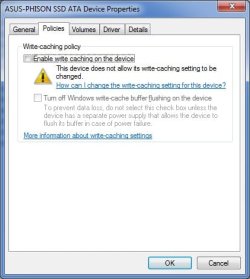
Untitled.jpg
In order to shoehorn 7057 into under 3GB of space some things had to go. Like help. Can anyone tell me what that link there says or how I might fix this?
 

My Computer

Computer type
Laptop
Computer Manufacturer/Model Number
Apple
OS
El Capitan / Windows 10
CPU
i7-4980HQ
Memory
16GB
Graphics Card(s)
Iris 5200
You could try to update the mainboard bios if there's a new version available. It won't definitely fix it to be able, but there is a decent chance. Also, the controller drivers should be updated to latest, if they are not already.
 

My Computer

Computer Manufacturer/Model Number
self built
OS
7600.20510 x86
CPU
P4 550 3.4 GHz HT running at 3.5 GHz
Motherboard
MSI PM8M3-V (MS-7211 v1.x) Micro-ATX mainboard
Memory
OCZ 2 GB(2x1GB) DDR400mHz running @ 414 mHz
Graphics Card(s)
HIS Radeon HD 3850 IceQ 3 Turbo HDMI Dual DL-DVI AGP
Sound Card
MOTU Traveler firewire studio interface 192 kHz 24 bit
Monitor(s) Displays
22" widescreen Acer X223W LCD, 17" Compaq P75 CRT
Screen Resolution
1680x1050 and 1280x1024
Hard Drives
SATA I x2 WD, 400 GB and 120 GB, SATA 2 WD Caviar Black 1 TB
PSU
350W generic
Case
Cybertronpc, it glows blue
Cooling
stock cpu fan, Ice-Q 3 gpu and system, many case fans
Keyboard
Logitch Classical Keyboard 200
Mouse
Logitech Mediaplay cordless
Internet Speed
1792/448 kbits/sec
Other Info
SATA II PCI fake RAID adapter, 1 GB Readyboost, original ATI Remote Wonder (even works with WMC perfectly), Logitech Rumblepad 2 game controller x2
the more information link?


it actually says not a thing baarod. dont think windows got around to that part..... but i'm on 7000
 

My Computer

Computer Manufacturer/Model Number
CUSTOM
OS
XP/win7 x86 build 7127
CPU
Athlon64 X2 DUAL 4200+ 2.21ghz
Motherboard
ASUS K8 PRO SLI
Memory
2GB Dual Chan DDR2 Corsair
Graphics Card(s)
Nvidia 6800GT
Sound Card
nvidia
Monitor(s) Displays
19' LCD
Screen Resolution
1280x1024
Hard Drives
WD 250, 2x500, 2x1TB IDE/USB
WD 250 SATA (system)
SEAGATE 120 Sata
PSU
coolermaster 450
Case
SUPERFLOWER
Cooling
1 HDD bay fan, 5x80mm Case Fans, AEROGATE II Fan/Temp
Keyboard
MS wireless
Mouse
MS Wireless
Internet Speed
fassssssssst
the more information link?


it actually says not a thing baarod. dont think windows got around to that part..... but i'm on 7000

See! I knew it! Microsoft doesn't even know :D

They just don't want sevenforums members to know what a l33t WEI you can get on a $180 netbook and some m4d h4x0r sk1llz :p

I found some evidence that the Intel Matrix Storage Manager would allow write caching but to no avail -- each version I've tried fails claiming minimal hardware requirements not met regardless of the compatibility settings I run it under.
 

My Computer

Computer type
Laptop
Computer Manufacturer/Model Number
Apple
OS
El Capitan / Windows 10
CPU
i7-4980HQ
Memory
16GB
Graphics Card(s)
Iris 5200
See! I knew it! Microsoft doesn't even know :D

They just don't want sevenforums members to know what a l33t WEI you can get on a $180 netbook and some m4d h4x0r sk1llz :p

:roflmao:
 

My Computer

Computer Manufacturer/Model Number
CUSTOM
OS
XP/win7 x86 build 7127
CPU
Athlon64 X2 DUAL 4200+ 2.21ghz
Motherboard
ASUS K8 PRO SLI
Memory
2GB Dual Chan DDR2 Corsair
Graphics Card(s)
Nvidia 6800GT
Sound Card
nvidia
Monitor(s) Displays
19' LCD
Screen Resolution
1280x1024
Hard Drives
WD 250, 2x500, 2x1TB IDE/USB
WD 250 SATA (system)
SEAGATE 120 Sata
PSU
coolermaster 450
Case
SUPERFLOWER
Cooling
1 HDD bay fan, 5x80mm Case Fans, AEROGATE II Fan/Temp
Keyboard
MS wireless
Mouse
MS Wireless
Internet Speed
fassssssssst
:roflmao:

Laugh now but when I get this solved I'll bet I get above a 3 overall and 6-7 on some tests which should put some $1000 laptops to shame!
 

My Computer

Computer type
Laptop
Computer Manufacturer/Model Number
Apple
OS
El Capitan / Windows 10
CPU
i7-4980HQ
Memory
16GB
Graphics Card(s)
Iris 5200
I had the same problem with my WEI & SSD on 7057 but on 7068 it's fine ;)
 

My Computer

Computer type
PC/Desktop
OS
Windows 11
You could try to update the mainboard bios if there's a new version available. It won't definitely fix it to be able, but there is a decent chance. Also, the controller drivers should be updated to latest, if they are not already.

Updated BIOS from 703 to 804. Intel(R) 82801GBM/GHM (ICH7-M Family) Serial ATA Storage Controller - 27C4 using Native Windows 7 build 7068 driver -- reluctant to change as it will update every other working driver. Do you know a way to update only the disk controller driver?

Also, the SSD appears to attach directly to the PCI-E bus rather than the ATA bus provided by the Intel chipset. That leads me to believe there may be a "hidden" secondary controller?
 

My Computer

Computer type
Laptop
Computer Manufacturer/Model Number
Apple
OS
El Capitan / Windows 10
CPU
i7-4980HQ
Memory
16GB
Graphics Card(s)
Iris 5200
I had the same problem with my WEI & SSD on 7057 but on 7068 it's fine ;)

My issue persists with 7068. What's your hardware spec?
 

My Computer

Computer type
Laptop
Computer Manufacturer/Model Number
Apple
OS
El Capitan / Windows 10
CPU
i7-4980HQ
Memory
16GB
Graphics Card(s)
Iris 5200
Funny thing, well after I last posted, I realized that this concerns a SSD instead of a HDD. Anyhow, I suggested what I did about the bios because I had a motherboard which didn't let me enable write caching and that's the advice I found. Problem was that I already was on the latest bios. Then the board died. Replaced with what I have now in my specs (lol E-Bay new, $22 plus $11 shipping...best $33 I ever spent), updated to that board's latest bios and now I can and have it enabled (for SATA 150 drives).

Not sure about updating only one driver. I guess you can try extracting all of the drivers from an install package, then use the device manager to install just the new right driver you'd want from it. Manually create a restore point beforehand in case things go sour.
 

My Computer

Computer Manufacturer/Model Number
self built
OS
7600.20510 x86
CPU
P4 550 3.4 GHz HT running at 3.5 GHz
Motherboard
MSI PM8M3-V (MS-7211 v1.x) Micro-ATX mainboard
Memory
OCZ 2 GB(2x1GB) DDR400mHz running @ 414 mHz
Graphics Card(s)
HIS Radeon HD 3850 IceQ 3 Turbo HDMI Dual DL-DVI AGP
Sound Card
MOTU Traveler firewire studio interface 192 kHz 24 bit
Monitor(s) Displays
22" widescreen Acer X223W LCD, 17" Compaq P75 CRT
Screen Resolution
1680x1050 and 1280x1024
Hard Drives
SATA I x2 WD, 400 GB and 120 GB, SATA 2 WD Caviar Black 1 TB
PSU
350W generic
Case
Cybertronpc, it glows blue
Cooling
stock cpu fan, Ice-Q 3 gpu and system, many case fans
Keyboard
Logitch Classical Keyboard 200
Mouse
Logitech Mediaplay cordless
Internet Speed
1792/448 kbits/sec
Other Info
SATA II PCI fake RAID adapter, 1 GB Readyboost, original ATI Remote Wonder (even works with WMC perfectly), Logitech Rumblepad 2 game controller x2
Back
Top