Solved Writing in bold is cut top and bottom

q33ny

New member
Local time
4:21 AM
Messages
7
Hi all,

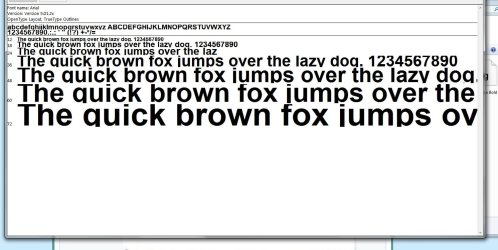
I've been dealing with this annoying thing for quite a while and I think is getting worse and worse. As you can see from the attachment the rows are one on top of another, and if I past this in word they are the same even if I increase the space between the rows. However if I unbold it, everything is OK. I've tried to uninstall/install graphic card drivers and look on forums, but with no luck until now. So here I am in need of help as reinstalling Windows for this is out of the question.
 

Attachments

  • Untitled.jpg
    Untitled.jpg
    5.5 KB · Views: 43

My Computer My Computer

At a glance

West Midlands
Computer type
PC/Desktop
OS
West Midlands
What font are you using? Is it one you downloaded and installed or a system font?

Where (what programs) does this occur in? Word, Notepad, Wordpad, ????
 

My Computer My Computer

At a glance

Windows 10 Pro X64Intel Quad Core i7-4770 @ 3.4Ghz16.0GB PC3-12800 DDR3 SDRAM 1600 MHzIntel Integrated HD Graphics
Computer type
PC/Desktop
Computer Manufacturer/Model Number
Lenovo IdeaCenter 450
OS
Windows 10 Pro X64
CPU
Intel Quad Core i7-4770 @ 3.4Ghz
Memory
16.0GB PC3-12800 DDR3 SDRAM 1600 MHz
Graphics Card(s)
Intel Integrated HD Graphics
Sound Card
Realtek HD Audio
Monitor(s) Displays
HP 22" LCD
Screen Resolution
1680 x 1050
Hard Drives
250GB Samsung EVO SATA-3 SSD
2TB Seagate ST2000DM001 SATA-2
1.5TB Seagate ST3150041AS SATA
Keyboard
Dell USB
Mouse
Lenovo USB
Internet Speed
Cable via Road Runner 3MB Upload, 30MB Download
Antivirus
Windows Defender, MBAM Pro, MBAE
Browser
Seamonkey
Other Info
UEFI/GPT
PLDS DVD-RW DH16AERSH
It is default font, I think Arial and it is like this everywhere, windows programs, word, web. Bitdefender notifications, some game online, microsoft word.....
 

My Computer My Computer

At a glance

West Midlands
Computer type
PC/Desktop
OS
West Midlands

My Computer My Computer

At a glance

Microsoft Windows 7 Enterprise 64-bit 7601 Mu...Intel(R) Core(TM) i5-2400 CPU @ 3.10GHz6.00 GBIntel(R) HD Graphics
Computer type
PC/Desktop
Computer Manufacturer/Model Number
(Work) Dell Optiplex 990
OS
Microsoft Windows 7 Enterprise 64-bit 7601 Multiprocessor Free Service Pack 1
CPU
Intel(R) Core(TM) i5-2400 CPU @ 3.10GHz
Motherboard
Dell Inc. 06D7TR
Memory
6.00 GB
Graphics Card(s)
Intel(R) HD Graphics
Sound Card
(1) Intel(R) Display Audio (2) High Definition Audio Devic
Monitor(s) Displays
Dell E1910Hc
Screen Resolution
1366 x 768 x 32 bits (4294967296 colors) @ 59 Hz
Hard Drives
WDC WD5000AAKX-753CA1 ATA Device
Keyboard
Dell
Mouse
Dell
Internet Speed
D: 100 Mbps U: 100
Antivirus
TrendMicro
Browser
Firefox | IE10

My Computer My Computer

At a glance

Win 7 Pro x64 / Win 10 ProIntel(R) Core(TM) i7-3630QM CPU @ 2.40GHz12 GB(1) Intel(R) HD Graphics 4000 (2) NVIDIA GeFo...
Computer type
Laptop
Computer Manufacturer/Model Number
Sager NP9170
OS
Win 7 Pro x64 / Win 10 Pro
CPU
Intel(R) Core(TM) i7-3630QM CPU @ 2.40GHz
Motherboard
CLEVO P170EM
Memory
12 GB
Graphics Card(s)
(1) Intel(R) HD Graphics 4000 (2) NVIDIA GeForce GTX 675M
Sound Card
(1) Realtek High Definition Audio (2) Intel(R) Display Aud
Monitor(s) Displays
17.3
Screen Resolution
1920x1080
Hard Drives
(1) Samsung 860 EVO 500GB(OS) (1) Samsung 860 EVO 500GB(Data)
Keyboard
Backlite
Antivirus
MSE, Malwarebytes Pro
Browser
Firefox
Other Info
DESKTOP: Custom-built.
OS: Win 10 Pro x64.
CASE: Rosewill R5.
CPU: Intel I5 4670K CPU @ 3.40GHz.
CPU COOLER: Cool Master Hyper 212 EVO.
MOTHERBOARD: Asus Z87-A.
MEMORY: Kingston HyperX 2x4 GB.
GPU: Nvidia Geforce 650 TI.
PSU: Corsair TX750.
DRIVES: (1) Samsung 840 120 GB SSD (2) Western Digital blue 500 GB 7200 RPM.
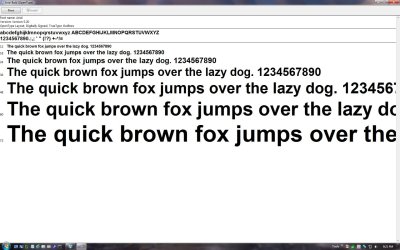
Thank you for you effort but nothing of this works. And beside the registry I've already tried the rest but just to make sure I've just tried now and nothing.....
Just a reminder, I have this problem on default font but only when is bold. If I past that text in word and unbold it, it looks OK.
If I have Arial Bold and make it also Italic, it looks ok. So now I know definitely it is a problem with Arial Bold.
 

Attachments

  • Untitled.jpg
    Untitled.jpg
    8.1 KB · Views: 18

My Computer My Computer

At a glance

West Midlands
Computer type
PC/Desktop
OS
West Midlands
Maybe a corrupted font then. Try running SFC /SCANNOW and see if it fixes anything.
Needs to be run from a Elevated Command Prompt.
 

My Computer My Computer

At a glance

Windows 10 Pro X64Intel Quad Core i7-4770 @ 3.4Ghz16.0GB PC3-12800 DDR3 SDRAM 1600 MHzIntel Integrated HD Graphics
Computer type
PC/Desktop
Computer Manufacturer/Model Number
Lenovo IdeaCenter 450
OS
Windows 10 Pro X64
CPU
Intel Quad Core i7-4770 @ 3.4Ghz
Memory
16.0GB PC3-12800 DDR3 SDRAM 1600 MHz
Graphics Card(s)
Intel Integrated HD Graphics
Sound Card
Realtek HD Audio
Monitor(s) Displays
HP 22" LCD
Screen Resolution
1680 x 1050
Hard Drives
250GB Samsung EVO SATA-3 SSD
2TB Seagate ST2000DM001 SATA-2
1.5TB Seagate ST3150041AS SATA
Keyboard
Dell USB
Mouse
Lenovo USB
Internet Speed
Cable via Road Runner 3MB Upload, 30MB Download
Antivirus
Windows Defender, MBAM Pro, MBAE
Browser
Seamonkey
Other Info
UEFI/GPT
PLDS DVD-RW DH16AERSH
Beginning verification phase of system scan.
Verification 100% complete.

Windows Resource Protection did not find any integrity violations.

Didn't fix it.

And is this a new command, I have more than 10 years in IT and never seen this command anywhere.
 

My Computer My Computer

At a glance

West Midlands
Computer type
PC/Desktop
OS
West Midlands
No, been around for quite a while. In Win 7 it's paired (sort of) with SURT (System Update Readiness Tool) and in 8, 8.1 and 10 it's paired with DISM (Deployment Image Servicing and Management).

Unfortunately it did not find anything to fix on your computer.

Look at Control Panel, Fonts. Double click on Ariel then Ariel Bold, see what they look like there.

Edited
 

My Computer My Computer

At a glance

Windows 10 Pro X64Intel Quad Core i7-4770 @ 3.4Ghz16.0GB PC3-12800 DDR3 SDRAM 1600 MHzIntel Integrated HD Graphics
Computer type
PC/Desktop
Computer Manufacturer/Model Number
Lenovo IdeaCenter 450
OS
Windows 10 Pro X64
CPU
Intel Quad Core i7-4770 @ 3.4Ghz
Memory
16.0GB PC3-12800 DDR3 SDRAM 1600 MHz
Graphics Card(s)
Intel Integrated HD Graphics
Sound Card
Realtek HD Audio
Monitor(s) Displays
HP 22" LCD
Screen Resolution
1680 x 1050
Hard Drives
250GB Samsung EVO SATA-3 SSD
2TB Seagate ST2000DM001 SATA-2
1.5TB Seagate ST3150041AS SATA
Keyboard
Dell USB
Mouse
Lenovo USB
Internet Speed
Cable via Road Runner 3MB Upload, 30MB Download
Antivirus
Windows Defender, MBAM Pro, MBAE
Browser
Seamonkey
Other Info
UEFI/GPT
PLDS DVD-RW DH16AERSH
My Ariel Bold looks like htis:

Ariel Bold.jpg
 

My Computer My Computer

At a glance

Windows 10 Pro X64Intel Quad Core i7-4770 @ 3.4Ghz16.0GB PC3-12800 DDR3 SDRAM 1600 MHzIntel Integrated HD Graphics
Computer type
PC/Desktop
Computer Manufacturer/Model Number
Lenovo IdeaCenter 450
OS
Windows 10 Pro X64
CPU
Intel Quad Core i7-4770 @ 3.4Ghz
Memory
16.0GB PC3-12800 DDR3 SDRAM 1600 MHz
Graphics Card(s)
Intel Integrated HD Graphics
Sound Card
Realtek HD Audio
Monitor(s) Displays
HP 22" LCD
Screen Resolution
1680 x 1050
Hard Drives
250GB Samsung EVO SATA-3 SSD
2TB Seagate ST2000DM001 SATA-2
1.5TB Seagate ST3150041AS SATA
Keyboard
Dell USB
Mouse
Lenovo USB
Internet Speed
Cable via Road Runner 3MB Upload, 30MB Download
Antivirus
Windows Defender, MBAM Pro, MBAE
Browser
Seamonkey
Other Info
UEFI/GPT
PLDS DVD-RW DH16AERSH
I should have looked here first because only Arial Bold is like this.
 

Attachments

  • Untitled.jpg
    Untitled.jpg
    112.4 KB · Views: 1

My Computer My Computer

At a glance

West Midlands
Computer type
PC/Desktop
OS
West Midlands
All done. Delete my font, install different version (I had v5.01.2x and I found on the internet V3, older but at least it works, 4 now) and now it looks OK. Thank you guys.
 

My Computer My Computer

At a glance

West Midlands
Computer type
PC/Desktop
OS
West Midlands
Could you please post the web site you found version 3 from?
 

My Computer My Computer

At a glance

Windows 10 Pro. 64/ version 1709 Windows 7 Pr...Intel i7-6800K @ 4.3Corsair Platinum 16 gig @2400EVGA GTX 1070 OC
Computer type
PC/Desktop
Computer Manufacturer/Model Number
Home made Desktop
OS
Windows 10 Pro. 64/ version 1709 Windows 7 Pro/64
CPU
Intel i7-6800K @ 4.3
Motherboard
ASUS X-99 Deluxe II
Memory
Corsair Platinum 16 gig @2400
Graphics Card(s)
EVGA GTX 1070 OC
Monitor(s) Displays
Asus 27" LED LCD/VE278Q
Screen Resolution
1920-1080 or 1280-720 HDMI
Hard Drives
INTEL SSD 730-240 Gb Sata 3.0/
PSU
EVGA Platium 1200W
Case
Phanteks Luxe Tempered Glass 8 fans/ one radiator
Cooling
XSPC/ Water Cooled CPU
Keyboard
Das 4 Professional
Mouse
Logitech M705/MX Anywhere 2-S
Internet Speed
100 mbits
Antivirus
Microsoft Security Essentials/ Malwarebytes Premium 3.0/ SAS
Browser
I.E. 11 default/Firefox/ ISP Time Warner Cable/Spectrum
Other Info
LG BluRay Burner/
Sound system-KLipsch-THX/
Icy Dock ssd Hot Swap bays.
Back
Top