Wrong CPU Logo

TrueTenacity

New member
Local time
2:19 AM
Messages
2
Hi there,

I've noticed a little glitch with using windows 7, it's not affecting performance or anything, just a little annoying really...

I'm running windows 7 Ultimate x64...

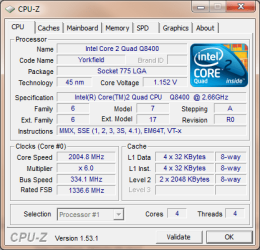
I'm using an Intel Core 2 Quad Q8400 cpu...

But when I open the system properties window, it shows the cpu logo for a Core 2 Duo cpu... (as per the screenshot)

Anyone know cow to correct this?
 

Attachments

  • System.png
    System.png
    58.7 KB · Views: 274
  • CPU.png
    CPU.png
    17.9 KB · Views: 51

My Computer

OS
Windows 7 Ultimate x64
CPU
Intel Core 2 Quad Q8400
Motherboard
MSI P43T-C51
Memory
2x 2GB DDR3
Graphics Card(s)
MSI GeForce GTS250 512MB
Welcome to seven forums: I'm sure their has to be a way to change the icon,cause it lists your CPU correctly. I would try and contact one of the GFX team members for help. Fabe
 

My Computer

Computer Manufacturer/Model Number
Self Built
OS
Windows 7 ultimate 64 bit / XP Home sp3
CPU
intel Core 2 Duo E8400 3.0ghz
Motherboard
Asus P5ND bios 1401
Memory
8 gigs 1066 OCZ Fata1ty
Graphics Card(s)
EVGA GTX 580 Call of Duty Black Ops Edition
Sound Card
Creative Soundblaster Audigy 2zs
Monitor(s) Displays
Asus 24in LCD's 2MS X2
Screen Resolution
1920x1080p @60Hz
Hard Drives
WD Caviar 500 Black/ WD Caviar 200 Blue
PSU
OCZ 700W GameXtreme
Case
NZXT Apollo
Cooling
Corsair H50 CPU/120mm x3 /60mm x2 /Corsair Dominator Ram
Keyboard
Logitech Bluetooth Wireless MX5000
Mouse
Logitech Bluetooth Wireless MX1000
Internet Speed
Download 19.83 Upload 0.97
Other Info
Logitech Z2300 Speakers/ Bose Noise Cancelling Headphones/Avermedia PCI-e Hybrid TV Bravo/Epson NX415 all in one/ 4 Port Powered USB Hub/ LG 10x Bluray Burner /TSST Corp DVDRW External
The image you show is actually supplied by your system builder - it is a BMP image misnamed OEMLOGO.SYS and is located in the C:\Windows - as long as you keep the size and colour depth the same as the original you can have whatever image you want here
 

My Computers

System One System Two

  • Computer type
    PC/Desktop
    Computer Manufacturer/Model Number
    ChillBlast - Custom to my design
    OS
    Windows 11 Pro x64 [Latest Release and Release Preview]
    CPU
    Ryzen 9 5950X, 3.8 - 5.2 MHz
    Motherboard
    Asus Prime X570-Pro
    Memory
    64GB [2 x 32GB] DDR4 3200MHz
    Graphics Card(s)
    4GB NVIDIA GEFORCE GTX 1650 Ti
    Sound Card
    On-board SPDIF to 5.1 System + HDMI [5.1 system]
    Monitor(s) Displays
    32" UHD 32 Bit HDR Monitor + 43" UHD 4K 32Bit HDR TV
    Screen Resolution
    2 x 3840 x 2160 @60Hz
    Hard Drives
    1TB M2 SSD OS, 500GB Fast Access SSD, 2 x 8TB Data + Various Externals from 1TB to 4TB, 10TB NAS
    PSU
    NZXT C750 80 PLUS Gold 750W Modular PSU
    Case
    Workstation Case [Matt Black]
    Cooling
    NZXT Kraken X63 280mm CPU Cooler +2x Quiet Case fans
    Keyboard
    Logitech Wireless MX Keys & K400 + others
    Mouse
    Logitech Wireless MX Master 3S
    Internet Speed
    920 MB Down 50 MB Up
    Antivirus
    BitDefender Total Security Pro
    Browser
    Chrome (always run latest Non-Beta)
    Other Info
    Also run ...
    Laptop - Quad 8GB - Windows 10 Pro x64
    Nexus 7 Android tablet x2
    Samsung 10.2" tablet
    Blackview TAB 8 4G Android Tablet c/w Keyboard
    Wacom Intuos Pro Medium Pen Pad
    Wacom Intuos Pro Small Pen Pad
    Wacom Expresskeys Remote
    Loopdeck+ Graphics Controller
    Shuttle Pro v2 Control
  • Computer type
    Laptop
    System Manufacturer/Model Number
    Dell XPS 17 10750H
    OS
    Windows 11 Pro x64 Latest RP
    CPU
    Intel I7 10750H 5.0GHz
    Motherboard
    Dell XPS
    Memory
    32GB [2x16GB] DDR4 2933 MHz
    Graphics Card(s)
    nVidia GTX1650Ti 4 GB GDDR6
    Sound Card
    Stock [Realtek] 4 Speaker
    Monitor(s) Displays
    17" IPS UHD+ Infinity Edge Touchscreen
    Screen Resolution
    3840 x 2400
    Hard Drives
    2TB M2 NVMe, 4TB External + various 500GB & 1TB External NVMe (also have access to spinner HDD from
    PSU
    Stock
    Case
    Stock XPS Aluminium & Carbon Fibre
    Cooling
    Stock - Active Fan Control
    Keyboard
    Backlit + Various Logitech
    Mouse
    Stock Track Pad + Logitech MX Trackball
    Internet Speed
    72 MB Down 18MB Up
    Browser
    Chrome
    Other Info
    Also run ...
    Laptop - Quad 8GB - Windows 10 Pro x64
    Nexus 7 Android tablet x2
    10.2" tablet
    Sony Z3 Android Smartphone
    Wacom Intuos Pro Medium Pen Pad
    Wacom Intuos Pro Small Pen Pad
    Wacom Expresskeys Remote
    Loopdeck+ Graphics Controller
    Shuttle Pro v2 Control Pad
    10TB NAS
Awesome!

I thought it was an icon depicting the cpu powering the system...

Thanks for the help :-)
 

My Computer

OS
Windows 7 Ultimate x64
CPU
Intel Core 2 Quad Q8400
Motherboard
MSI P43T-C51
Memory
2x 2GB DDR3
Graphics Card(s)
MSI GeForce GTS250 512MB
Have you changed the CPU since you got the machine? Maybe it's a left over BMP image from the last CPU.

As Barman says, you can easily change this, but why did it happen. That's what I'm wondering.
 

My Computer

Computer Manufacturer/Model Number
Keeps changing - (Custom)
OS
Windows 7 Professional x64
CPU
Intel Core i7 860
Motherboard
Gigabyte GA-P55-UD4P
Memory
4GB DDR3 Mushkin 1600Mhz @ 7-8-7-20
Graphics Card(s)
MSI GTS250 1GB DDR3 Twin Frozr
Sound Card
Onboard realtek
Monitor(s) Displays
Samsung SyncMaster 24" P2450 + Samsung 20" 2033
Screen Resolution
1920 X 1080 and 1600 X 900 (#2 system 1440 X 900)
Hard Drives
Patriot Inferno 120GB SSD + 3 WD Blue 640GB drives
PSU
Corsair 750 HX Modular
Case
Lancool PC-K62
Cooling
Cooler Master TX3 CPU cooler and 4-140mm and 1-120mm case
Keyboard
Gigabyte USB keyboard
Mouse
Microsoft wireless laser mouse 5000
Internet Speed
7 Mb down 1.5 up
Other Info
System #2: AMD Phenom II X6 1055T (Freezer 7 Pro cooler) - Gigabyte 880GMA-UD2H - WD 500GB Black - 9500GT (1GB) 500W OCZ modular PSU - Antec 200 case. System #3 (LapTop) Core 2 Duo T6670 - 320GB 7200RPM HD - 4GB DDR3 RAM.
but why did it happen. That's what I'm wondering.

Because some moron somewhere picked the wrong icon. I wish these were the only problems we'd had to deal with.
 

My Computer

Computer Manufacturer/Model Number
HP, Dell, Gateway, Toshiba - 4 laptops and 2 desktops
OS
Vista, Windows7, Mint Mate, Zorin, Windows 8
CPU
from 1.6GHz Duo to i7
Monitor(s) Displays
2x HP w2207
Hard Drives
5x HDD, 7x SSD, 12x Externals
Keyboard
with trackball - no mices
Mouse
Trackball mice
Internet Speed
DSL 6000
Back
Top