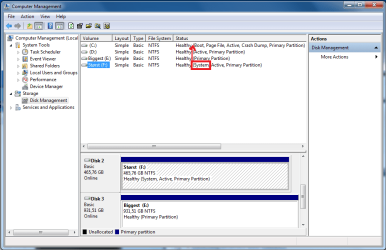
Wrong disk is system disk

Prof Chaos

New member
Local time
11:03 PM
Messages
6
Hello!

Is it a problem that not my C: disk with my OS is the "System" disk?!(See Attachment)
And if it is, how can I change it?!

Thanks,
Prof. Chaos!
 

Attachments

  • hmmm.png
    hmmm.png
    29.7 KB · Views: 196

My Computer

OS
Windows 7 Pro
CPU
Intel Quad Q6600 2.40
Motherboard
MSI
Memory
MSI P7N SLI Platinum
Graphics Card(s)
XFX GeForce GTX 285
Monitor(s) Displays
Samsung 26"
Hard Drives
WD - 1tb, 500gb, 320gb
VelociRaptor 150gb
Hello Prof Chaos, welcome to Seven Forums!


A couple questions, is an OS on F:, does the PC boot ok with it the way it is?


It you wanted/needed to correct it to have C: as "System, Active" you will need to mark C: as active and then you will need to run a startup repair as many as 3 separate times with system restarts between the repairs to mark C: as "System, Active" but answer the questions above first.


Partition - Mark as Active

Startup Repair

System Repair Disc - Create
 

My Computer

Computer Manufacturer/Model Number
* BFK Customs *
OS
W 7 64-bit Ultimate
CPU
Intel Q9550 Yorkfield
Motherboard
ASUS P5Q Pro
Memory
8GB Dominator 8500C5D
Graphics Card(s)
ATI : XFX 5870
Sound Card
Realtek HD Audio 7-1
Monitor(s) Displays
1x 47" LCD HDMI & 3x 26" LCD HDMI
Screen Resolution
1920x1080P & 1920x1200
Hard Drives
1x 80GB Intel X25-M G2 SSD : 1x 500GB & 1x 640GB WD Caviar Black(s)
PSU
Corsair 620HX
Case
Cooler Master RC-690
Cooling
Tuniq Tower 120, 2x 140mm and 3x 120mm case fans
Keyboard
Microsoft 500
Mouse
Razer Diamondback 3G
Internet Speed
14 Mb/s
Other Info
1x Koutech 3Gb/s SATA HDD Hot Swap Rack
Thank you.

The booting of the OS works fine. No OS on F:, that's why it's a bit weird.
 

My Computer

OS
Windows 7 Pro
CPU
Intel Quad Q6600 2.40
Motherboard
MSI
Memory
MSI P7N SLI Platinum
Graphics Card(s)
XFX GeForce GTX 285
Monitor(s) Displays
Samsung 26"
Hard Drives
WD - 1tb, 500gb, 320gb
VelociRaptor 150gb
If you want you can use the info above to set C: as "System, Active" doing it now may save you a hard way to go later, especially if you ever have to do any kind of repair to the OS. ;)
 

My Computer

Computer Manufacturer/Model Number
* BFK Customs *
OS
W 7 64-bit Ultimate
CPU
Intel Q9550 Yorkfield
Motherboard
ASUS P5Q Pro
Memory
8GB Dominator 8500C5D
Graphics Card(s)
ATI : XFX 5870
Sound Card
Realtek HD Audio 7-1
Monitor(s) Displays
1x 47" LCD HDMI & 3x 26" LCD HDMI
Screen Resolution
1920x1080P & 1920x1200
Hard Drives
1x 80GB Intel X25-M G2 SSD : 1x 500GB & 1x 640GB WD Caviar Black(s)
PSU
Corsair 620HX
Case
Cooler Master RC-690
Cooling
Tuniq Tower 120, 2x 140mm and 3x 120mm case fans
Keyboard
Microsoft 500
Mouse
Razer Diamondback 3G
Internet Speed
14 Mb/s
Other Info
1x Koutech 3Gb/s SATA HDD Hot Swap Rack
Why do i have to do it 3 times? I did it once, but that was because i forgot to change 1st priority boot in Bios.
 

My Computer

OS
Windows 7 Pro
CPU
Intel Quad Q6600 2.40
Motherboard
MSI
Memory
MSI P7N SLI Platinum
Graphics Card(s)
XFX GeForce GTX 285
Monitor(s) Displays
Samsung 26"
Hard Drives
WD - 1tb, 500gb, 320gb
VelociRaptor 150gb
If one startup repair will write the boot files to the C:\Windows partition then that's fine, most times it takes as many as 3 times to completely finish the process; have a look at the C: to see it has been marked it as "System, Active" if so you're done, if not do it till it completes.
 

My Computer

Computer Manufacturer/Model Number
* BFK Customs *
OS
W 7 64-bit Ultimate
CPU
Intel Q9550 Yorkfield
Motherboard
ASUS P5Q Pro
Memory
8GB Dominator 8500C5D
Graphics Card(s)
ATI : XFX 5870
Sound Card
Realtek HD Audio 7-1
Monitor(s) Displays
1x 47" LCD HDMI & 3x 26" LCD HDMI
Screen Resolution
1920x1080P & 1920x1200
Hard Drives
1x 80GB Intel X25-M G2 SSD : 1x 500GB & 1x 640GB WD Caviar Black(s)
PSU
Corsair 620HX
Case
Cooler Master RC-690
Cooling
Tuniq Tower 120, 2x 140mm and 3x 120mm case fans
Keyboard
Microsoft 500
Mouse
Razer Diamondback 3G
Internet Speed
14 Mb/s
Other Info
1x Koutech 3Gb/s SATA HDD Hot Swap Rack
Ok, thank you very much! :)
 

My Computer

OS
Windows 7 Pro
CPU
Intel Quad Q6600 2.40
Motherboard
MSI
Memory
MSI P7N SLI Platinum
Graphics Card(s)
XFX GeForce GTX 285
Monitor(s) Displays
Samsung 26"
Hard Drives
WD - 1tb, 500gb, 320gb
VelociRaptor 150gb
You're welcome, glad I could help!
 

My Computer

Computer Manufacturer/Model Number
* BFK Customs *
OS
W 7 64-bit Ultimate
CPU
Intel Q9550 Yorkfield
Motherboard
ASUS P5Q Pro
Memory
8GB Dominator 8500C5D
Graphics Card(s)
ATI : XFX 5870
Sound Card
Realtek HD Audio 7-1
Monitor(s) Displays
1x 47" LCD HDMI & 3x 26" LCD HDMI
Screen Resolution
1920x1080P & 1920x1200
Hard Drives
1x 80GB Intel X25-M G2 SSD : 1x 500GB & 1x 640GB WD Caviar Black(s)
PSU
Corsair 620HX
Case
Cooler Master RC-690
Cooling
Tuniq Tower 120, 2x 140mm and 3x 120mm case fans
Keyboard
Microsoft 500
Mouse
Razer Diamondback 3G
Internet Speed
14 Mb/s
Other Info
1x Koutech 3Gb/s SATA HDD Hot Swap Rack
Just to assure you that Bare Foot Kid is leading you in the right direction, I went through a similar situation a few months ago. I didn't have the benefit of good advice like this and was discouraged when it didn't work...at first. Out of desperation I ran it again. And again. It wasn't until the third try that I was fixed up. :)
 

My Computer

Computer Manufacturer/Model Number
Self
OS
Main - Windows 7 Pro SP1 64-Bit; 2nd - Windows Server 2008 R2
CPU
Main - Core i7 2600K; 2nd - Core i7 920
Motherboard
Main - Asus P8Z68-V Pro/Gen3; 2nd - Gigabyte GA-EX58-UDR3
Memory
Main - 16GB Corsair Vengeance; 2nd - 12GB Corsair Vengeance
Graphics Card(s)
Main - XFX Radeon 6870 1GB; 2nd - XFX Radeon 4870 1GB
Sound Card
Both: Onboard Realtek Azalia
Monitor(s) Displays
Main - Hann 25" + I-INC 25" + Acer 23"; 2nd - Upgrading Soon
Screen Resolution
Main - 1920x1080 (All Three Monitors); 2nd - Upgrading Soon
Hard Drives
Main - (1) Crucial M4 128GB (Boot)
Main - (1) Seagate 2TB 64MB Cache (Data)
Main - (1) Seagate 2TB 64MB Cache (Data Backup)
2nd - (1) Intel X25-M SSD 80GB (Boot)
2nd - (3) Seagate 1TB 32MB Cache (Data Backup)
2nd - (1) Seagate 320GB (Because)
PSU
Main - OCZ 600W Modular; 2nd - OCZ 600W
Case
Main - Thermaltake Element G; 2nd - NZXT something or other
Cooling
Main - Corsair H80; 2nd - Prolimatech Megahalems
Keyboard
Main - Razer Reclusa; 2nd - Old MS Keyboard
Mouse
Main - Logitech MX Revolution; 2nd - Old MS Mouse
Internet Speed
20Mbps Time-Warner Cable
ok. Didn't work for me... So i plugged out the disk that was the "system" disk, then i did the boot repair! And it works! :)
 
Last edited:

My Computer

OS
Windows 7 Pro
CPU
Intel Quad Q6600 2.40
Motherboard
MSI
Memory
MSI P7N SLI Platinum
Graphics Card(s)
XFX GeForce GTX 285
Monitor(s) Displays
Samsung 26"
Hard Drives
WD - 1tb, 500gb, 320gb
VelociRaptor 150gb
Glad you got it sorted, thanks for the update.
 

My Computer

Computer Manufacturer/Model Number
* BFK Customs *
OS
W 7 64-bit Ultimate
CPU
Intel Q9550 Yorkfield
Motherboard
ASUS P5Q Pro
Memory
8GB Dominator 8500C5D
Graphics Card(s)
ATI : XFX 5870
Sound Card
Realtek HD Audio 7-1
Monitor(s) Displays
1x 47" LCD HDMI & 3x 26" LCD HDMI
Screen Resolution
1920x1080P & 1920x1200
Hard Drives
1x 80GB Intel X25-M G2 SSD : 1x 500GB & 1x 640GB WD Caviar Black(s)
PSU
Corsair 620HX
Case
Cooler Master RC-690
Cooling
Tuniq Tower 120, 2x 140mm and 3x 120mm case fans
Keyboard
Microsoft 500
Mouse
Razer Diamondback 3G
Internet Speed
14 Mb/s
Other Info
1x Koutech 3Gb/s SATA HDD Hot Swap Rack
No problem. :)
Don't like it when people figure things out and never post the answer.
 

My Computer

OS
Windows 7 Pro
CPU
Intel Quad Q6600 2.40
Motherboard
MSI
Memory
MSI P7N SLI Platinum
Graphics Card(s)
XFX GeForce GTX 285
Monitor(s) Displays
Samsung 26"
Hard Drives
WD - 1tb, 500gb, 320gb
VelociRaptor 150gb
Back
Top