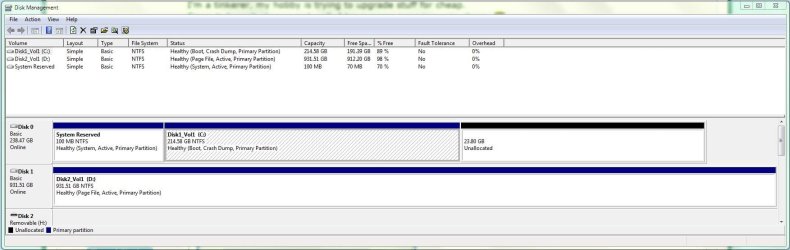
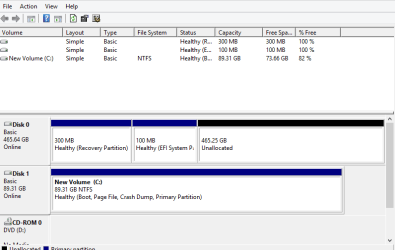
Wrong drive is System and Active

I also read this from gregrocker;
You are only moving the System boot files from SysReserved into the Windows 7 partition so that it will boot on its own.

Using EasyBCD only partly does the job because the Recovery console is not written to F8 tools menu.

This is why I gave you the method which has worked successfully and completely countless times here in three years.

Just to check, reboot your computer now and tap the F8 key when you see the BIOS screen.

so i restored using the bcd backup and would rather use technical support :( problems still unsolved
 

My Computer

Computer type
PC/Desktop
OS
64
Storage drive is showing as a System partition

How can I get System onto Windows 7 from the Storage?

http://i.imgur.com/staxhTX.png

Also Windows Explorer does not show the Storage drive is this because it has no Label I think so?
 

My Computer

Computer type
PC/Desktop
OS
64
As long as the bootmgr is on C, there is really no problem with an active D. It would only be a problem if D were first in the bootsequence because then you get a 'bootmgr missing'.
 

My Computer

Computer Manufacturer/Model Number
HP, Dell, Gateway, Toshiba - 4 laptops and 2 desktops
OS
Vista, Windows7, Mint Mate, Zorin, Windows 8
CPU
from 1.6GHz Duo to i7
Monitor(s) Displays
2x HP w2207
Hard Drives
5x HDD, 7x SSD, 12x Externals
Keyboard
with trackball - no mices
Mouse
Trackball mice
Internet Speed
DSL 6000
The correct method is always to mark target partition Active, unplug all other HDs to run Startup Repair up to 3 separate times until Win7 starts and holds the System Active flags.

After repair plug back in other HD's after WIn7 HD making sure WIn7 HD remains set first to boot in BIOS setup, mark any other Active partition Inactive.
 
Last edited:
As long as the bootmgr is on C, there is really no problem with an active D. It would only be a problem if D were first in the bootsequence because then you get a 'bootmgr missing'.

+1

There have been several recent posts about "active" vs "inactive" lately. That prompted me to look at my two drives.
 

Attachments

  • Capture01.JPG
    Capture01.JPG
    101.1 KB · Views: 9

My Computer

Computer type
PC/Desktop
Computer Manufacturer/Model Number
Custom, Dell and Lenono LT's
OS
Win8/8.1,Win7-U64, Vista U64, uncounted Linux distor's
CPU
AMD and Intell, 9590, 8350, i5 3570k
Motherboard
CFVFZ, GA990FXA, Z77e-itx
Memory
Corsair G Skill
Graphics Card(s)
Crossfired Sapphire HD 7950 Vapor-X, ASUS R9 280X TOP
Sound Card
Realtek ALC889
Monitor(s) Displays
ViewSonic VX2770SMH 27" / ViewSonic VX2433 LCD 24"
Screen Resolution
1080i HD
Hard Drives
Samsung SSD 840 Pro
OCZ Agility 3's
OCZ Vector's
WD's Blue, red, green, Velociraptors
Seagate USB3 & Hybrid's
ASUS Blu-Ray
ASUS DVD
PSU
Corsair AX1200i, Seasonice 850 Gold
Case
Cooler Master HAF 922 & HAF 932, Lian Li Train case.
Cooling
Air, Glacer 240L expanded, custom EK loop with duel D5's
Keyboard
Microsoft SideWinder X4 USB Keyboard / Logitech 250 PS2
Mouse
Logitech G500 / MS wireless 5000
Internet Speed
Best of 5ms / 75+ dn / 12+ up More or less.
Antivirus
MS esentials-MalwareBytes
Browser
Firefox Chromebook
As long as the bootmgr is on C, there is really no problem with an active D. It would only be a problem if D were first in the bootsequence because then you get a 'bootmgr missing'.

+1

There have been several recent posts about "active" vs "inactive" lately. That prompted me to look at my two drives.

This is incorrect based on everything we know here since before Win7 was even released. Only the OS boot partition should be marked Active to point the installer or repair utility to where the boot files are to be for install or repair. Any other partition marked Active is not only superfluous but can derail the boot files to it - plus it is absolutely unecessary as what reason could possibly exist to have a random non-bootable partition marked Active?

So you'd want to Mark D Partition as Inactive - Windows 7 Forums
 
As long as the bootmgr is on C, there is really no problem with an active D. It would only be a problem if D were first in the bootsequence because then you get a 'bootmgr missing'.

+1

There have been several recent posts about "active" vs "inactive" lately. That prompted me to look at my two drives.

This is incorrect based on everything we know here since before Win7 was even released. Only the OS boot partition should be marked Active to point the installer or repair utility to where the boot files are to be for install or repair. Any other partition marked Active is not only superfluous but can derail the boot files to it - plus it is absolutely unecessary as what reason could possibly exist to have a random non-bootable partition marked Active?

So you'd want to Mark D Partition as Inactive - Windows 7 Forums

:ditto: Greg, & be on Disk 0.
 

My Computer

OS
ME/XP/Vista/Win7
Thanks Ray. But it is sometimes difficult for consumers to determine how to plug in their SSD to the port required for best performance while also assuring it's Disk0.

But the point remains: Any preceding primary partition, especially if marked Active, may steal the OS boot files when repairs or reinstall are done. So it's always best to have the OS HD in DIsk0 slot, or if you cannot do this make sure data partitions on DISK0 are Logical which cannot receive System boot files or be made Active.
 
+1

There have been several recent posts about "active" vs "inactive" lately. That prompted me to look at my two drives.

This is incorrect based on everything we know here since before Win7 was even released. Only the OS boot partition should be marked Active to point the installer or repair utility to where the boot files are to be for install or repair. Any other partition marked Active is not only superfluous but can derail the boot files to it - plus it is absolutely unecessary as what reason could possibly exist to have a random non-bootable partition marked Active?

So you'd want to Mark D Partition as Inactive - Windows 7 Forums

:ditto: Greg, & be on Disk 0.

Why?
 

My Computer

Computer type
PC/Desktop
Computer Manufacturer/Model Number
Custom, Dell and Lenono LT's
OS
Win8/8.1,Win7-U64, Vista U64, uncounted Linux distor's
CPU
AMD and Intell, 9590, 8350, i5 3570k
Motherboard
CFVFZ, GA990FXA, Z77e-itx
Memory
Corsair G Skill
Graphics Card(s)
Crossfired Sapphire HD 7950 Vapor-X, ASUS R9 280X TOP
Sound Card
Realtek ALC889
Monitor(s) Displays
ViewSonic VX2770SMH 27" / ViewSonic VX2433 LCD 24"
Screen Resolution
1080i HD
Hard Drives
Samsung SSD 840 Pro
OCZ Agility 3's
OCZ Vector's
WD's Blue, red, green, Velociraptors
Seagate USB3 & Hybrid's
ASUS Blu-Ray
ASUS DVD
PSU
Corsair AX1200i, Seasonice 850 Gold
Case
Cooler Master HAF 922 & HAF 932, Lian Li Train case.
Cooling
Air, Glacer 240L expanded, custom EK loop with duel D5's
Keyboard
Microsoft SideWinder X4 USB Keyboard / Logitech 250 PS2
Mouse
Logitech G500 / MS wireless 5000
Internet Speed
Best of 5ms / 75+ dn / 12+ up More or less.
Antivirus
MS esentials-MalwareBytes
Browser
Firefox Chromebook
Allocating the Disk0 port to the OS disk is nice to have - but not a neccessity. Very often you do not have that option - e.g. your 6Mb ports for your SSD may be ports 4 & 5 on the mobo. And if you know that, there are many ways to operate with that setup.
 

My Computer

Computer Manufacturer/Model Number
HP, Dell, Gateway, Toshiba - 4 laptops and 2 desktops
OS
Vista, Windows7, Mint Mate, Zorin, Windows 8
CPU
from 1.6GHz Duo to i7
Monitor(s) Displays
2x HP w2207
Hard Drives
5x HDD, 7x SSD, 12x Externals
Keyboard
with trackball - no mices
Mouse
Trackball mice
Internet Speed
DSL 6000

My Computer

Computer type
PC/Desktop
Computer Manufacturer/Model Number
Skylake Special #666
OS
Windows 10 Pro x64
CPU
Intel Core i7 6700K
Motherboard
Asus Sabertooth Z170 Mark 1
Memory
GSkill TridentZ RGB 16GB 3600 16-16-16-36
Graphics Card(s)
EVGA GTX 980 Ti SC x2
Sound Card
Realtek High Definition
Monitor(s) Displays
AOC G2460PG
Screen Resolution
1920 x 1080 144Hz
Hard Drives
Samsung 860 Pro 256GB, Seagate Barracuda 4TB x2
PSU
EVGA 1000 P2, EVGA White Custom Braided Cables
Case
Corsair Vengeance C70 Gunmetal Black
Cooling
Corsair H100i v2, Corsair ML120 x2, Thermal Grizzly Kryonaut
Keyboard
Logitech G910 Orion Spectrum
Mouse
Logitech G700s
Internet Speed
Verizon Fios Quantum Gateway 75/75
Antivirus
Windows Defender, Malwarebytes Free 3.8.3
Browser
Chrome
Other Info
Corsair SP120 x4, LG Blu-ray Drive, Durabrand HT-395 100 Watt Dolby Digital Amp, Corsair H2100 Wireless 7.1 Headset
Allocating the Disk0 port to the OS disk is nice to have - but not a necessity. Very often you do not have that option - e.g. your 6Mb ports for your SSD may be ports 4 & 5 on the mobo. And if you know that, there are many ways to operate with that setup.

+1

That is what I understood. I questioned theog's Disk 0 only comment.
 

My Computer

Computer type
PC/Desktop
Computer Manufacturer/Model Number
Custom, Dell and Lenono LT's
OS
Win8/8.1,Win7-U64, Vista U64, uncounted Linux distor's
CPU
AMD and Intell, 9590, 8350, i5 3570k
Motherboard
CFVFZ, GA990FXA, Z77e-itx
Memory
Corsair G Skill
Graphics Card(s)
Crossfired Sapphire HD 7950 Vapor-X, ASUS R9 280X TOP
Sound Card
Realtek ALC889
Monitor(s) Displays
ViewSonic VX2770SMH 27" / ViewSonic VX2433 LCD 24"
Screen Resolution
1080i HD
Hard Drives
Samsung SSD 840 Pro
OCZ Agility 3's
OCZ Vector's
WD's Blue, red, green, Velociraptors
Seagate USB3 & Hybrid's
ASUS Blu-Ray
ASUS DVD
PSU
Corsair AX1200i, Seasonice 850 Gold
Case
Cooler Master HAF 922 & HAF 932, Lian Li Train case.
Cooling
Air, Glacer 240L expanded, custom EK loop with duel D5's
Keyboard
Microsoft SideWinder X4 USB Keyboard / Logitech 250 PS2
Mouse
Logitech G500 / MS wireless 5000
Internet Speed
Best of 5ms / 75+ dn / 12+ up More or less.
Antivirus
MS esentials-MalwareBytes
Browser
Firefox Chromebook
As long as you know what you`re doing and know your way around the bios, you can connect them anyway you want.

But I like to connect them in the way they`re stacked in the case, if the MB permits. Always putting the OD in the last numbered port.
 

My Computer

Computer type
PC/Desktop
Computer Manufacturer/Model Number
Skylake Special #666
OS
Windows 10 Pro x64
CPU
Intel Core i7 6700K
Motherboard
Asus Sabertooth Z170 Mark 1
Memory
GSkill TridentZ RGB 16GB 3600 16-16-16-36
Graphics Card(s)
EVGA GTX 980 Ti SC x2
Sound Card
Realtek High Definition
Monitor(s) Displays
AOC G2460PG
Screen Resolution
1920 x 1080 144Hz
Hard Drives
Samsung 860 Pro 256GB, Seagate Barracuda 4TB x2
PSU
EVGA 1000 P2, EVGA White Custom Braided Cables
Case
Corsair Vengeance C70 Gunmetal Black
Cooling
Corsair H100i v2, Corsair ML120 x2, Thermal Grizzly Kryonaut
Keyboard
Logitech G910 Orion Spectrum
Mouse
Logitech G700s
Internet Speed
Verizon Fios Quantum Gateway 75/75
Antivirus
Windows Defender, Malwarebytes Free 3.8.3
Browser
Chrome
Other Info
Corsair SP120 x4, LG Blu-ray Drive, Durabrand HT-395 100 Watt Dolby Digital Amp, Corsair H2100 Wireless 7.1 Headset
Allocating the Disk0 port to the OS disk is nice to have - but not a neccessity. Very often you do not have that option - e.g. your 6Mb ports for your SSD may be ports 4 & 5 on the mobo. And if you know that, there are many ways to operate with that setup.


UEFI Windows Boot Manager on Disk 0 = first Sata port.
Windows 8.1 OS on SSD, Disk 1 = last Sata port.

Capture Active 001.PNG
 

My Computer

OS
ME/XP/Vista/Win7
Ray, that's normal if you did not disconnect Disk0 when you installed the OS on the SSD. The installer always seems to grab the first disk for the system partition.
 

My Computer

Computer Manufacturer/Model Number
HP, Dell, Gateway, Toshiba - 4 laptops and 2 desktops
OS
Vista, Windows7, Mint Mate, Zorin, Windows 8
CPU
from 1.6GHz Duo to i7
Monitor(s) Displays
2x HP w2207
Hard Drives
5x HDD, 7x SSD, 12x Externals
Keyboard
with trackball - no mices
Mouse
Trackball mice
Internet Speed
DSL 6000
Which was exactly his point, and mine. It is worth making the effort to have the OS HD is DISK0 to avoid this - but I recognized that this cannot always be done with SSD porting especially.

If not then format all of the data partitions on Disk0 Logical so they cannot have System boot files written to them.
 
Ray, that's normal if you did not disconnect Disk0 when you installed the OS on the SSD. The installer always seems to grab the first disk for the system partition.

NO, this is not normal, the HDD was Pre-reset for the UEFI Windows Boot Manager on Disk 0.
Which you can also do for Legacy install.
 

My Computer

OS
ME/XP/Vista/Win7
Back
Top