wrong memory showing in Control panel and also in BIOS

Sunitamishra

New member
Local time
8:17 PM
Messages
1
hi all,

I Installed windows 7 64bit, but in my control panel/system it shows "Installed memory (RAM): 4.0GB (3.0GB usable)”. My system is running slow. please suggest a solution for this. I am using -
- DG41BI
- Core 2 Quad 3.0ghz
- DDR3 800MHZ 4GB
I am unable to play games on my pc. it hangs so many times in between. also start up is late at times
 

My Computer My Computer

OS
windows 7 ultimate
hi all,

I Installed windows 7 64bit, but in my control panel/system it shows "Installed memory (RAM): 4.0GB (3.0GB usable)”. My system is running slow. please suggest a solution for this. I am using -
- DG41BI
- Core 2 Quad 3.0ghz
- DDR3 800MHZ 4GB
I am unable to play games on my pc. it hangs so many times in between. also start up is late at times


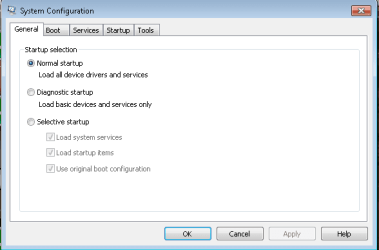
Type configsys in search. go to the advanced tab. Check for "max memory" it should be unchecked.


Let us know if that doesnt fix it


ken
 

My Computer My Computer

Computer Manufacturer/Model Number
HP Pavillion dv-7 1005 Tx
OS
Win 8 Release candidate 8400
CPU
[email protected]
Memory
4 gigs
Graphics Card(s)
Nvidia 9600M
Sound Card
HD built-in
Monitor(s) Displays
17" Wxga
Screen Resolution
1440x900
Cooling
none
Internet Speed
45Mb down 5Mb up
hi all,

I Installed windows 7 64bit, but in my control panel/system it shows "Installed memory (RAM): 4.0GB (3.0GB usable)”. My system is running slow. please suggest a solution for this. I am using -
- DG41BI
- Core 2 Quad 3.0ghz
- DDR3 800MHZ 4GB
I am unable to play games on my pc. it hangs so many times in between. also start up is late at times


Type configsys in search. go to the advanced tab. Check for "max memory" it should be unchecked.


Let us know if that doesnt fix it


ken
Can't find it :s I've got the x32
 

My Computer My Computer

Computer Manufacturer/Model Number
Self built
OS
Windows 7 Ultimate 64bit
CPU
AMD Phenom II x4 965BE
Motherboard
MSI 785GT-E63
Memory
8gb Corsair XMS2 800mhz
Graphics Card(s)
NX8800GTS-OC 512
Sound Card
SB750
Monitor(s) Displays
Acer H243H
Screen Resolution
1920x1080
Hard Drives
Seagate 2TB
PSU
520w Raw Deal+
Case
Raidmax ATX-238WU Tornado
Cooling
Extra cooling
Keyboard
Logitech G501
Mouse
Logitech G501
Internet Speed
ADSL 12mb
From the start bar, enter msconfig then hit enter ... ;)
 

My Computer My Computer

Computer type
PC/Desktop
Computer Manufacturer/Model Number
LENOVO K450 @3.0GHZ
OS
64-bit Windows 8.1 Pro
CPU
Core(TM) i5 CPU 4330 Haswell @ 3.20GHz
Motherboard
LENOVO
Memory
12.00 GB
Graphics Card(s)
Intel(R) HD Graphics
Sound Card
Intel HD integtrated
Monitor(s) Displays
HP 25' ISP Monitor
Screen Resolution
1900/1020
Hard Drives
(1) ST1000DM003-1CH162 (2) Generic STORAGE DEVICE USB Device (3) Generic STORAGE DEVICE USB Device
Internet Speed
100mb down/10mb up
From the start bar, enter msconfig then hit enter ... ;)
Hmm, can't find any advanced tab, or anything that says Memory :p
 

My Computer My Computer

Computer Manufacturer/Model Number
Self built
OS
Windows 7 Ultimate 64bit
CPU
AMD Phenom II x4 965BE
Motherboard
MSI 785GT-E63
Memory
8gb Corsair XMS2 800mhz
Graphics Card(s)
NX8800GTS-OC 512
Sound Card
SB750
Monitor(s) Displays
Acer H243H
Screen Resolution
1920x1080
Hard Drives
Seagate 2TB
PSU
520w Raw Deal+
Case
Raidmax ATX-238WU Tornado
Cooling
Extra cooling
Keyboard
Logitech G501
Mouse
Logitech G501
Internet Speed
ADSL 12mb

My Computer My Computer

Computer Manufacturer/Model Number
Samsung NP530U4B-S02IN
OS
Windows® 8 Pro (64-bit)
CPU
Intel® Core™ i5 Processor 2467M (1.60GHz, 3MB L3 Cache)
Motherboard
Samsung Electronics
Memory
6GB DDR3 System Memory at 1,333MHz (on BD 4GB + 2GB x 1)
Graphics Card(s)
AMD Radeon™ HD7550M 1GB DDR3 (Ext. Graphic)
Sound Card
Realtek High Definition Audio
Monitor(s) Displays
35.56cm (14.0) SuperBright 300nit HD LED Display
Screen Resolution
1366x768
Hard Drives
1TB S-ATA II Hard Drive (5400RPM) with ExpressCache 16GB SSD
Internet Speed
sucks
Antivirus
Microsoft Security Essentials
Browser
Google Chrome (Sync enabled)
Nothing here :(
 

Attachments

  • sfdgsdsss.png
    sfdgsdsss.png
    5.2 KB · Views: 28

My Computer My Computer

Computer Manufacturer/Model Number
Self built
OS
Windows 7 Ultimate 64bit
CPU
AMD Phenom II x4 965BE
Motherboard
MSI 785GT-E63
Memory
8gb Corsair XMS2 800mhz
Graphics Card(s)
NX8800GTS-OC 512
Sound Card
SB750
Monitor(s) Displays
Acer H243H
Screen Resolution
1920x1080
Hard Drives
Seagate 2TB
PSU
520w Raw Deal+
Case
Raidmax ATX-238WU Tornado
Cooling
Extra cooling
Keyboard
Logitech G501
Mouse
Logitech G501
Internet Speed
ADSL 12mb

My Computer My Computer

Computer Manufacturer/Model Number
Samsung NP530U4B-S02IN
OS
Windows® 8 Pro (64-bit)
CPU
Intel® Core™ i5 Processor 2467M (1.60GHz, 3MB L3 Cache)
Motherboard
Samsung Electronics
Memory
6GB DDR3 System Memory at 1,333MHz (on BD 4GB + 2GB x 1)
Graphics Card(s)
AMD Radeon™ HD7550M 1GB DDR3 (Ext. Graphic)
Sound Card
Realtek High Definition Audio
Monitor(s) Displays
35.56cm (14.0) SuperBright 300nit HD LED Display
Screen Resolution
1366x768
Hard Drives
1TB S-ATA II Hard Drive (5400RPM) with ExpressCache 16GB SSD
Internet Speed
sucks
Antivirus
Microsoft Security Essentials
Browser
Google Chrome (Sync enabled)
ok to the memory issue as far as the os goes windows will always leave one gig unused in my case im runing 8 gigs windows is using 6.94 instead of the whole 8
my system runs fine you want more performance on 64 bit throw in 4 more gigs and really max it out
 

My Computer My Computer

Computer type
PC/Desktop
Computer Manufacturer/Model Number
CoreI7-6700K MrFingerIII Special Builds
OS
Windows 10 Home Premium 64bit sp1
CPU
Intel I7-6700K @ 4.6 Ghz 1.344 volts everyday OC
Motherboard
Asrock Fatality K6 Z170 Socket 1151
Memory
32GB G-Skill TridentZ 3200mhz 16-18-18-38 DDR4
Graphics Card(s)
Sli Gigabyte Windforce GTX 980 G1
Sound Card
AC97 Creative Rage Tactic 3D Headphones Bluetooth
Monitor(s) Displays
27" Asus ROG Swift PG278Q G-Sync 48" Vizio Smart HD TV
Screen Resolution
2560x1440p 27"- 48" Currently Gaming at 2560x1440p Res 2K
Hard Drives
250GB Samsung Evo840SSD Seagate baracuda 500 GB WD Mybook 500Gb 1TB Seagate Barracuda
PSU
HX1050w Corsair Silver 80plus certified crosfire/sli
Case
Enthod Pro Full Tower
Cooling
Corsair H110i GT 280 mm High Performance WaterBlock
Keyboard
Logitech wireless keyboard
Mouse
Logitech wireless mouse
Internet Speed
Cox Cable 100+ mb
Antivirus
WebRoot Spysweeper with Antivirus
Browser
IE-10, Chrome, Opera
Other Info
My Other Rig is a AMD FX8320E @4.6Ghz 16GB Ballistic Sport Ram
Mobo Asrock Fatality 990FX 120GB OCZ SSD 1TB Seagate Barracuda Corsair H75 Cooling PSU Corsair CX750
GPU GTX Gigabyte 970G1
@ Sunitamishra

Contact your PC manufacturer or motherboard manufacturer to get the proper procedure on how to update your BIOS to the latest. If your BIOS is already the latest and your BIOS/Windows still shows 3GB useable it's a BIOS/chipset limitation with your motherboard; you cannot do anything about it until your computer/motherboard manufacturer decides to fix/update this via BIOS update.

As for your computer hanging and running slow, it maybe just a conscious thing that's going on in your head or you have a bad install of Windows. I was running 4GB (3GB useable) on my Acer Veriton without a hitch.

If it indeed is a bad Windows install, a re-installation is highly advised and this time with 32-bit if that's still an option.

Let us know your results. :p
 

My Computer My Computer

OS
Windows 7 Professional
CPU
Intel Core i7-2670QM
Memory
Samsung 8GB
Graphics Card(s)
NVIDIA GT 555M
Hard Drives
Intel 525 120GB | HGST Travelstar 1TB
Mouse
CM Storm Xornet | Microsoft Sculpt Comfort
Internet Speed
25 Mbps | 600 Kbps
Other Info
Centrino 6205 | Seagate Backup Plus 1TB
Back
Top