Wubi Install Fails...

Nizz

New member
Local time
1:15 AM
Messages
106
Hi guys...

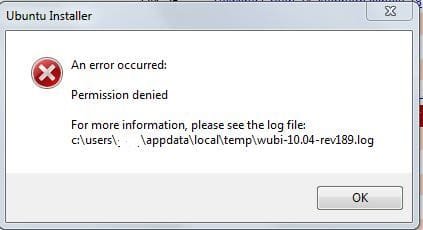
Iv been trying to install Ubuntu using Wubi on my computer so that i can check it out as there are many people saying that it is amazing etc and i always thought that Linux was useless... but i want to see for my self... so i got the install files off the internet and wubi came with so then i double clicked Wubi and it installs off the cd {a CD has been burnt} but then i get this error message...

The second one is a screen shot of how far the installation gets.... i have tried all of the solutions in this thread...

Wubi Install Fails

and now i am getting really amped to check it out.... please help...
thanks...
Nizz
 

Attachments

  • dceern.jpg
    dceern.jpg
    18.2 KB · Views: 10
  • osy834.jpg
    osy834.jpg
    22.3 KB · Views: 10

My Computer

Computer Manufacturer/Model Number
Self Built
OS
Windows 7 Professional 64bit + Ubuntu in Virtual Box

CPU
Intel Quad Core 9550
Motherboard
ASUS P5Q SE2
Memory
2048MB Transend
Graphics Card(s)
Powercolor Radeon HD4870
Sound Card
Onboard
Monitor(s) Displays
Fujitsu Siemens Scaleoview L17-7 TFT
Screen Resolution
1280x1024
Hard Drives
500GB Seagate Barracuda
1TB Segate Barracuda
PSU
Huntkey 600W
Case
Achielles
Cooling
3x Fans
Keyboard
Microsoft Reculsa
Mouse
Microsoft Sidewinder 3X
Internet Speed
4MB
Other Info
TEC 5.1 Surround Sound
Free Mouse Pad :P
Run the wubi installer as administrator...
 

My Computer

Computer type
PC/Desktop
Computer Manufacturer/Model Number
LENOVO K450 @3.0GHZ
OS
64-bit Windows 8.1 Pro
CPU
Core(TM) i5 CPU 4330 Haswell @ 3.20GHz
Motherboard
LENOVO
Memory
12.00 GB
Graphics Card(s)
Intel(R) HD Graphics
Sound Card
Intel HD integtrated
Monitor(s) Displays
HP 25' ISP Monitor
Screen Resolution
1900/1020
Hard Drives
(1) ST1000DM003-1CH162 (2) Generic STORAGE DEVICE USB Device (3) Generic STORAGE DEVICE USB Device
Internet Speed
100mb down/10mb up

My Computer

Computer Manufacturer/Model Number
Samsung NP530U4B-S02IN
OS
Windows® 8 Pro (64-bit)
CPU
Intel® Core™ i5 Processor 2467M (1.60GHz, 3MB L3 Cache)
Motherboard
Samsung Electronics
Memory
6GB DDR3 System Memory at 1,333MHz (on BD 4GB + 2GB x 1)
Graphics Card(s)
AMD Radeon™ HD7550M 1GB DDR3 (Ext. Graphic)
Sound Card
Realtek High Definition Audio
Monitor(s) Displays
35.56cm (14.0) SuperBright 300nit HD LED Display
Screen Resolution
1366x768
Hard Drives
1TB S-ATA II Hard Drive (5400RPM) with ExpressCache 16GB SSD
Internet Speed
sucks
Antivirus
Microsoft Security Essentials
Browser
Google Chrome (Sync enabled)
Run the wubi installer as administrator...

I already tried that....

@Dinesh - Do you have any experience in this aspect as the download is quite big and it took like 8 hours to download last night? I wanna try everything before having to re-download.
 

My Computer

Computer Manufacturer/Model Number
Self Built
OS
Windows 7 Professional 64bit + Ubuntu in Virtual Box
CPU
Intel Quad Core 9550
Motherboard
ASUS P5Q SE2
Memory
2048MB Transend
Graphics Card(s)
Powercolor Radeon HD4870
Sound Card
Onboard
Monitor(s) Displays
Fujitsu Siemens Scaleoview L17-7 TFT
Screen Resolution
1280x1024
Hard Drives
500GB Seagate Barracuda
1TB Segate Barracuda
PSU
Huntkey 600W
Case
Achielles
Cooling
3x Fans
Keyboard
Microsoft Reculsa
Mouse
Microsoft Sidewinder 3X
Internet Speed
4MB
Other Info
TEC 5.1 Surround Sound
Free Mouse Pad :P
Run the wubi installer as administrator...

I already tried that....

@Dinesh - Do you have any experience in this aspect as the download is quite big and it took like 8 hours to download last night? I wanna try everything before having to re-download.
Go to c:\users\username\appdata\local\temp\wubi-10.004-rev189.log and post the log.
 

My Computer

Computer Manufacturer/Model Number
Samsung NP530U4B-S02IN
OS
Windows® 8 Pro (64-bit)
CPU
Intel® Core™ i5 Processor 2467M (1.60GHz, 3MB L3 Cache)
Motherboard
Samsung Electronics
Memory
6GB DDR3 System Memory at 1,333MHz (on BD 4GB + 2GB x 1)
Graphics Card(s)
AMD Radeon™ HD7550M 1GB DDR3 (Ext. Graphic)
Sound Card
Realtek High Definition Audio
Monitor(s) Displays
35.56cm (14.0) SuperBright 300nit HD LED Display
Screen Resolution
1366x768
Hard Drives
1TB S-ATA II Hard Drive (5400RPM) with ExpressCache 16GB SSD
Internet Speed
sucks
Antivirus
Microsoft Security Essentials
Browser
Google Chrome (Sync enabled)
Here is the Log....
 

My Computer

Computer Manufacturer/Model Number
Self Built
OS
Windows 7 Professional 64bit + Ubuntu in Virtual Box
CPU
Intel Quad Core 9550
Motherboard
ASUS P5Q SE2
Memory
2048MB Transend
Graphics Card(s)
Powercolor Radeon HD4870
Sound Card
Onboard
Monitor(s) Displays
Fujitsu Siemens Scaleoview L17-7 TFT
Screen Resolution
1280x1024
Hard Drives
500GB Seagate Barracuda
1TB Segate Barracuda
PSU
Huntkey 600W
Case
Achielles
Cooling
3x Fans
Keyboard
Microsoft Reculsa
Mouse
Microsoft Sidewinder 3X
Internet Speed
4MB
Other Info
TEC 5.1 Surround Sound
Free Mouse Pad :P
I would suggest you to 1st download the ubuntu .iso file and then save it to desktop. Then use any free program like SlySoft Virtual CloneDrive to mount the .iso so that it comes up as a DVD drive. Then Run wubi and it must work. ;)
 

My Computer

Computer Manufacturer/Model Number
Samsung NP530U4B-S02IN
OS
Windows® 8 Pro (64-bit)
CPU
Intel® Core™ i5 Processor 2467M (1.60GHz, 3MB L3 Cache)
Motherboard
Samsung Electronics
Memory
6GB DDR3 System Memory at 1,333MHz (on BD 4GB + 2GB x 1)
Graphics Card(s)
AMD Radeon™ HD7550M 1GB DDR3 (Ext. Graphic)
Sound Card
Realtek High Definition Audio
Monitor(s) Displays
35.56cm (14.0) SuperBright 300nit HD LED Display
Screen Resolution
1366x768
Hard Drives
1TB S-ATA II Hard Drive (5400RPM) with ExpressCache 16GB SSD
Internet Speed
sucks
Antivirus
Microsoft Security Essentials
Browser
Google Chrome (Sync enabled)
I would suggest you to 1st download the ubuntu .iso file and then save it to desktop. Then use any free program like SlySoft Virtual CloneDrive to mount the .iso so that it comes up as a DVD drive. Then Run wubi and it must work. ;)

Well how is that any different from running the install off of the disk that was made?
 

My Computer

Computer Manufacturer/Model Number
Self Built
OS
Windows 7 Professional 64bit + Ubuntu in Virtual Box
CPU
Intel Quad Core 9550
Motherboard
ASUS P5Q SE2
Memory
2048MB Transend
Graphics Card(s)
Powercolor Radeon HD4870
Sound Card
Onboard
Monitor(s) Displays
Fujitsu Siemens Scaleoview L17-7 TFT
Screen Resolution
1280x1024
Hard Drives
500GB Seagate Barracuda
1TB Segate Barracuda
PSU
Huntkey 600W
Case
Achielles
Cooling
3x Fans
Keyboard
Microsoft Reculsa
Mouse
Microsoft Sidewinder 3X
Internet Speed
4MB
Other Info
TEC 5.1 Surround Sound
Free Mouse Pad :P

My Computer

Computer Manufacturer/Model Number
Black_Box (homebuilt)
OS
windows 7 RTM x64
CPU
Phenom II 965 Quad Core 3.4Ghz
Motherboard
Asus M4A79T Deluxe
Memory
Mushkin Blackline 8GB (4x2gb)
Graphics Card(s)
XFX Radeon 5970 Black Edition
Sound Card
onboard
Monitor(s) Displays
Dell 2408WPF-main Dell E248WFP-secondary
Screen Resolution
1920x1200-main 1920x1200-secondary
Hard Drives
OCZ Vertex Limited Edition 100GB (OS)
x1 WD Black Edition 500GB drive (Storage)
PSU
XFX 850w Black Edition (Modular)
Case
Mountian Mods H2go
Cooling
CoolITSystems ECO A.L.C.
Keyboard
Logitech MX 5500 wireless keyboard
Mouse
Razor Copperhead
Internet Speed
16Mb down/2Mb up Wowway Cable Internet
don't redownload the iso, according to the log file its fine, I am guessing your issue lies with Wubi. I would recommend trying another app to get ubunti running within windows.

Installing Ubuntu inside Windows using VirtualBox

Yeah that works... im busy using it now and it is nice not to have to restart every time i want to change the operating system... but why did the wubi fail?

What can you do with Ubuntu?
 

My Computer

Computer Manufacturer/Model Number
Self Built
OS
Windows 7 Professional 64bit + Ubuntu in Virtual Box
CPU
Intel Quad Core 9550
Motherboard
ASUS P5Q SE2
Memory
2048MB Transend
Graphics Card(s)
Powercolor Radeon HD4870
Sound Card
Onboard
Monitor(s) Displays
Fujitsu Siemens Scaleoview L17-7 TFT
Screen Resolution
1280x1024
Hard Drives
500GB Seagate Barracuda
1TB Segate Barracuda
PSU
Huntkey 600W
Case
Achielles
Cooling
3x Fans
Keyboard
Microsoft Reculsa
Mouse
Microsoft Sidewinder 3X
Internet Speed
4MB
Other Info
TEC 5.1 Surround Sound
Free Mouse Pad :P
Back
Top