Solved Wubi

geniulmalefic

Push the limits!
Member
VIP
Local time
4:16 AM
Messages
186
Location
Look behind you...
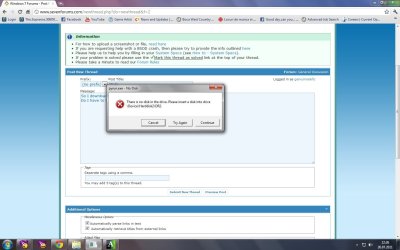
So I downloaded Wubi today,and when I double click it it gave me an errror.
Do I have to have a usab stick or a cd with ubuntu to be able to install it?
 

Attachments

  • Untitled.jpg
    Untitled.jpg
    108.8 KB · Views: 64

My Computer

Computer Manufacturer/Model Number
AMD Athlon 64x2 dual core 4400+
OS
Windows 7 Enterprise x64
CPU
2,3GHz
Motherboard
ASUS
Memory
2GB DDR2
Graphics Card(s)
ATI Radeon HD 2400
Sound Card
Realtek
Monitor(s) Displays
Benq G900W
Screen Resolution
1440x900
Hard Drives
160 GB

My Computer

Computer type
Laptop
Computer Manufacturer/Model Number
Sager NP9170
OS
Win 7 Pro x64 / Win 10 Pro
CPU
Intel(R) Core(TM) i7-3630QM CPU @ 2.40GHz
Motherboard
CLEVO P170EM
Memory
12 GB
Graphics Card(s)
(1) Intel(R) HD Graphics 4000 (2) NVIDIA GeForce GTX 675M
Sound Card
(1) Realtek High Definition Audio (2) Intel(R) Display Aud
Monitor(s) Displays
17.3
Screen Resolution
1920x1080
Hard Drives
(1) Samsung 860 EVO 500GB(OS) (1) Samsung 860 EVO 500GB(Data)
Keyboard
Backlite
Antivirus
MSE, Malwarebytes Pro
Browser
Firefox
Other Info
DESKTOP: Custom-built.
OS: Win 10 Pro x64.
CASE: Rosewill R5.
CPU: Intel I5 4670K CPU @ 3.40GHz.
CPU COOLER: Cool Master Hyper 212 EVO.
MOTHERBOARD: Asus Z87-A.
MEMORY: Kingston HyperX 2x4 GB.
GPU: Nvidia Geforce 650 TI.
PSU: Corsair TX750.
DRIVES: (1) Samsung 840 120 GB SSD (2) Western Digital blue 500 GB 7200 RPM.

My Computer

Computer Manufacturer/Model Number
AMD Athlon 64x2 dual core 4400+
OS
Windows 7 Enterprise x64
CPU
2,3GHz
Motherboard
ASUS
Memory
2GB DDR2
Graphics Card(s)
ATI Radeon HD 2400
Sound Card
Realtek
Monitor(s) Displays
Benq G900W
Screen Resolution
1440x900
Hard Drives
160 GB
I'm going to suggest that you try downloading the Wubi.exe again Download | Ubuntu the one you have now made be corrupt.
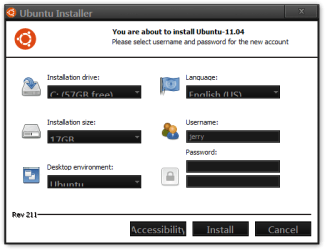
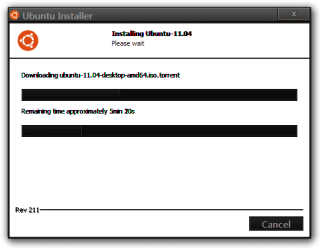
I downloaded it yesterday and got that first window change the settings to what I wanted and followed through and I'd say in 20 to 30 min that's with a cable broadband service I had it up and going.
If that doesn't help maybe somebody else is will read this and help.
Or go here Installation & Upgrades - Ubuntu Forums and tell them You are trying to install Wubi That's what the download site says to do.
Jerry

 

My Computer

Computer type
Laptop
Computer Manufacturer/Model Number
Sager NP9170
OS
Win 7 Pro x64 / Win 10 Pro
CPU
Intel(R) Core(TM) i7-3630QM CPU @ 2.40GHz
Motherboard
CLEVO P170EM
Memory
12 GB
Graphics Card(s)
(1) Intel(R) HD Graphics 4000 (2) NVIDIA GeForce GTX 675M
Sound Card
(1) Realtek High Definition Audio (2) Intel(R) Display Aud
Monitor(s) Displays
17.3
Screen Resolution
1920x1080
Hard Drives
(1) Samsung 860 EVO 500GB(OS) (1) Samsung 860 EVO 500GB(Data)
Keyboard
Backlite
Antivirus
MSE, Malwarebytes Pro
Browser
Firefox
Other Info
DESKTOP: Custom-built.
OS: Win 10 Pro x64.
CASE: Rosewill R5.
CPU: Intel I5 4670K CPU @ 3.40GHz.
CPU COOLER: Cool Master Hyper 212 EVO.
MOTHERBOARD: Asus Z87-A.
MEMORY: Kingston HyperX 2x4 GB.
GPU: Nvidia Geforce 650 TI.
PSU: Corsair TX750.
DRIVES: (1) Samsung 840 120 GB SSD (2) Western Digital blue 500 GB 7200 RPM.
I'm going to suggest that you try downloading the Wubi.exe again Download | Ubuntu the one you have now made be corrupt.
I downloaded it yesterday and got that first window change the settings to what I wanted and followed through and I'd say in 20 to 30 min that's with a cable broadband service I had it up and going.
If that doesn't help maybe somebody else is will read this and help.
Or go here Installation & Upgrades - Ubuntu Forums and tell them You are trying to install Wubi That's what the download site says to do.
Jerry

Thanks Jerry.
 

My Computer

Computer Manufacturer/Model Number
AMD Athlon 64x2 dual core 4400+
OS
Windows 7 Enterprise x64
CPU
2,3GHz
Motherboard
ASUS
Memory
2GB DDR2
Graphics Card(s)
ATI Radeon HD 2400
Sound Card
Realtek
Monitor(s) Displays
Benq G900W
Screen Resolution
1440x900
Hard Drives
160 GB
You're Welcome post back if you can what your outcome is.
Jerry
 

My Computer

Computer type
Laptop
Computer Manufacturer/Model Number
Sager NP9170
OS
Win 7 Pro x64 / Win 10 Pro
CPU
Intel(R) Core(TM) i7-3630QM CPU @ 2.40GHz
Motherboard
CLEVO P170EM
Memory
12 GB
Graphics Card(s)
(1) Intel(R) HD Graphics 4000 (2) NVIDIA GeForce GTX 675M
Sound Card
(1) Realtek High Definition Audio (2) Intel(R) Display Aud
Monitor(s) Displays
17.3
Screen Resolution
1920x1080
Hard Drives
(1) Samsung 860 EVO 500GB(OS) (1) Samsung 860 EVO 500GB(Data)
Keyboard
Backlite
Antivirus
MSE, Malwarebytes Pro
Browser
Firefox
Other Info
DESKTOP: Custom-built.
OS: Win 10 Pro x64.
CASE: Rosewill R5.
CPU: Intel I5 4670K CPU @ 3.40GHz.
CPU COOLER: Cool Master Hyper 212 EVO.
MOTHERBOARD: Asus Z87-A.
MEMORY: Kingston HyperX 2x4 GB.
GPU: Nvidia Geforce 650 TI.
PSU: Corsair TX750.
DRIVES: (1) Samsung 840 120 GB SSD (2) Western Digital blue 500 GB 7200 RPM.
You're Welcome post back if you can what your outcome is.
Jerry

Downloading wubi.exe again,didn't worked,same error.
 

My Computer

Computer Manufacturer/Model Number
AMD Athlon 64x2 dual core 4400+
OS
Windows 7 Enterprise x64
CPU
2,3GHz
Motherboard
ASUS
Memory
2GB DDR2
Graphics Card(s)
ATI Radeon HD 2400
Sound Card
Realtek
Monitor(s) Displays
Benq G900W
Screen Resolution
1440x900
Hard Drives
160 GB

My Computer

Computer type
Laptop
Computer Manufacturer/Model Number
Hewlett-Packard/G62-107SA Notebook
OS
Microsoft Windows 7 Home Premium 64-bit Service Pack 1
CPU
Intel(R) Core(TM) i3 CPU M 330 @ 2.13GHz
Motherboard
Hewlett-Packard 1425
Memory
8 GB DDR3
Graphics Card(s)
Intel(R) HD Graphics
Sound Card
Realtek High Definition Audio
Monitor(s) Displays
Builtin
Screen Resolution
1366 x 768 x 32 bits (4294967296 colors) @ 60 Hz
Hard Drives
250 GB SATA Hard Disk Drive 7200 rpm
2TB Seagate GoFlex USB 2 Drive
1TB Iomega Prestige USB 2 Drive
1.5TB Iomega Prestige USB 2 Drive (Samsung)
2TB WD MyBook Live NAS.
Mouse
Logitech Anywhere MX
Internet Speed
152 Mbs download 10 Mbs upload
Antivirus
Norton 360
Browser
Chrome
I did some checking and this is a known bug from what I have read I am guessing you may have a external hard drive or a thumb drive or a card reader hooked to a USB port you need to use the safety remove drive on the taskbar, it looks like you get that error because it thinks they are other drives.
Also I read that if you hit the continue button several times it will go through all the drives and then it will install.
Here are some references that I looked at.
https://bugs.launchpad.net/ubuntu/+bug/365881
[wubi] Weird Error message: pyrun.exe - No Disk - Ubuntu Forums
[wubi] Wubi 9.04 problem "Windows - No Disk" - Ubuntu Forums
Jerry
 

My Computer

Computer type
Laptop
Computer Manufacturer/Model Number
Sager NP9170
OS
Win 7 Pro x64 / Win 10 Pro
CPU
Intel(R) Core(TM) i7-3630QM CPU @ 2.40GHz
Motherboard
CLEVO P170EM
Memory
12 GB
Graphics Card(s)
(1) Intel(R) HD Graphics 4000 (2) NVIDIA GeForce GTX 675M
Sound Card
(1) Realtek High Definition Audio (2) Intel(R) Display Aud
Monitor(s) Displays
17.3
Screen Resolution
1920x1080
Hard Drives
(1) Samsung 860 EVO 500GB(OS) (1) Samsung 860 EVO 500GB(Data)
Keyboard
Backlite
Antivirus
MSE, Malwarebytes Pro
Browser
Firefox
Other Info
DESKTOP: Custom-built.
OS: Win 10 Pro x64.
CASE: Rosewill R5.
CPU: Intel I5 4670K CPU @ 3.40GHz.
CPU COOLER: Cool Master Hyper 212 EVO.
MOTHERBOARD: Asus Z87-A.
MEMORY: Kingston HyperX 2x4 GB.
GPU: Nvidia Geforce 650 TI.
PSU: Corsair TX750.
DRIVES: (1) Samsung 840 120 GB SSD (2) Western Digital blue 500 GB 7200 RPM.
I did some checking and this is a known bug from what I have read I am guessing you may have a external hard drive or a thumb drive or a card reader hooked to a USB port you need to use the safety remove drive on the taskbar, it looks like you get that error because it thinks they are other drives.
Also I read that if you hit the continue button several times it will go through all the drives and then it will install.
Here are some references that I looked at.
https://bugs.launchpad.net/ubuntu/+bug/365881
[wubi] Weird Error message: pyrun.exe - No Disk - Ubuntu Forums
[wubi] Wubi 9.04 problem "Windows - No Disk" - Ubuntu Forums
Jerry

Yeah,managed to proceed to the installation menu,by clicking the Continue button like a maniac.
Thanks!
 

My Computer

Computer Manufacturer/Model Number
AMD Athlon 64x2 dual core 4400+
OS
Windows 7 Enterprise x64
CPU
2,3GHz
Motherboard
ASUS
Memory
2GB DDR2
Graphics Card(s)
ATI Radeon HD 2400
Sound Card
Realtek
Monitor(s) Displays
Benq G900W
Screen Resolution
1440x900
Hard Drives
160 GB
I did some checking and this is a known bug from what I have read I am guessing you may have a external hard drive or a thumb drive or a card reader hooked to a USB port you need to use the safety remove drive on the taskbar, it looks like you get that error because it thinks they are other drives.
Also I read that if you hit the continue button several times it will go through all the drives and then it will install.
Here are some references that I looked at.
https://bugs.launchpad.net/ubuntu/+bug/365881
[wubi] Weird Error message: pyrun.exe - No Disk - Ubuntu Forums
[wubi] Wubi 9.04 problem "Windows - No Disk" - Ubuntu Forums
Jerry

Yeah,managed to proceed to the installation menu,by clicking the Continue button like a maniac.
Thanks!
You're Welcome enjoy wubi it's good way to try ubuntu.
Jerry
 

My Computer

Computer type
Laptop
Computer Manufacturer/Model Number
Sager NP9170
OS
Win 7 Pro x64 / Win 10 Pro
CPU
Intel(R) Core(TM) i7-3630QM CPU @ 2.40GHz
Motherboard
CLEVO P170EM
Memory
12 GB
Graphics Card(s)
(1) Intel(R) HD Graphics 4000 (2) NVIDIA GeForce GTX 675M
Sound Card
(1) Realtek High Definition Audio (2) Intel(R) Display Aud
Monitor(s) Displays
17.3
Screen Resolution
1920x1080
Hard Drives
(1) Samsung 860 EVO 500GB(OS) (1) Samsung 860 EVO 500GB(Data)
Keyboard
Backlite
Antivirus
MSE, Malwarebytes Pro
Browser
Firefox
Other Info
DESKTOP: Custom-built.
OS: Win 10 Pro x64.
CASE: Rosewill R5.
CPU: Intel I5 4670K CPU @ 3.40GHz.
CPU COOLER: Cool Master Hyper 212 EVO.
MOTHERBOARD: Asus Z87-A.
MEMORY: Kingston HyperX 2x4 GB.
GPU: Nvidia Geforce 650 TI.
PSU: Corsair TX750.
DRIVES: (1) Samsung 840 120 GB SSD (2) Western Digital blue 500 GB 7200 RPM.
I did some checking and this is a known bug from what I have read I am guessing you may have a external hard drive or a thumb drive or a card reader hooked to a USB port you need to use the safety remove drive on the taskbar, it looks like you get that error because it thinks they are other drives.
Also I read that if you hit the continue button several times it will go through all the drives and then it will install.
Here are some references that I looked at.
https://bugs.launchpad.net/ubuntu/+bug/365881
[wubi] Weird Error message: pyrun.exe - No Disk - Ubuntu Forums
[wubi] Wubi 9.04 problem "Windows - No Disk" - Ubuntu Forums
Jerry

Yeah,managed to proceed to the installation menu,by clicking the Continue button like a maniac.
Thanks!
You're Welcome enjoy wubi it's good way to try ubuntu.
Jerry

Install it,looks great,but I have 2 problems.
1ST I have a dial up connection/broadband connection,I don't know how to make an internet connection in Ubuntu
2nd it recognize only 2 disk drive
c and d,I install it on e,what's the problem?
 

My Computer

Computer Manufacturer/Model Number
AMD Athlon 64x2 dual core 4400+
OS
Windows 7 Enterprise x64
CPU
2,3GHz
Motherboard
ASUS
Memory
2GB DDR2
Graphics Card(s)
ATI Radeon HD 2400
Sound Card
Realtek
Monitor(s) Displays
Benq G900W
Screen Resolution
1440x900
Hard Drives
160 GB
I would not be able to begin to tell you how to fix that.
I would suggest going here Ubuntu Forums and asking their.
Jerry
 

My Computer

Computer type
Laptop
Computer Manufacturer/Model Number
Sager NP9170
OS
Win 7 Pro x64 / Win 10 Pro
CPU
Intel(R) Core(TM) i7-3630QM CPU @ 2.40GHz
Motherboard
CLEVO P170EM
Memory
12 GB
Graphics Card(s)
(1) Intel(R) HD Graphics 4000 (2) NVIDIA GeForce GTX 675M
Sound Card
(1) Realtek High Definition Audio (2) Intel(R) Display Aud
Monitor(s) Displays
17.3
Screen Resolution
1920x1080
Hard Drives
(1) Samsung 860 EVO 500GB(OS) (1) Samsung 860 EVO 500GB(Data)
Keyboard
Backlite
Antivirus
MSE, Malwarebytes Pro
Browser
Firefox
Other Info
DESKTOP: Custom-built.
OS: Win 10 Pro x64.
CASE: Rosewill R5.
CPU: Intel I5 4670K CPU @ 3.40GHz.
CPU COOLER: Cool Master Hyper 212 EVO.
MOTHERBOARD: Asus Z87-A.
MEMORY: Kingston HyperX 2x4 GB.
GPU: Nvidia Geforce 650 TI.
PSU: Corsair TX750.
DRIVES: (1) Samsung 840 120 GB SSD (2) Western Digital blue 500 GB 7200 RPM.

My Computer

Computer Manufacturer/Model Number
AMD Athlon 64x2 dual core 4400+
OS
Windows 7 Enterprise x64
CPU
2,3GHz
Motherboard
ASUS
Memory
2GB DDR2
Graphics Card(s)
ATI Radeon HD 2400
Sound Card
Realtek
Monitor(s) Displays
Benq G900W
Screen Resolution
1440x900
Hard Drives
160 GB
Back
Top