
WUSB600N = How do I stop Windows 7 from auto installing

Skyburnbright

New member
Local time
10:14 PM
Messages
2
I have a Linksys WUSB600N wireless network adapter. I used it in Vista using Linksys's driver for it, and it worked great. Now Windows 7 has installed it's own driver for it and... well, the driver sucks. Frequent connection drops, bad signal strength, etc etc. I've been trying to uninstall the driver Windows installed and get the Linksys one, but no matter what I do it always reinstalls the driver as soon as it detects the device again after I uninstall it.

I've searched around this forum and tried many things... setting Windows Update not to automatically install drivers, using safe mode, etc etc, nothing works. Windows is being particularly stubborn about wanting to install it's own horrible driver.

Anybody know of a fix for this? Thanks.
 

My Computer My Computer

OS
Windows 7
CPU
Intel Core 2 Duo E8400 4.0GHZ
Motherboard
ASUS P5Q PRO
Memory
G.SKILL 4GB DDR2-1066
Graphics Card(s)
nVidia EVGA GTX 260 Core 216 896mb
Sound Card
Auzentech X-Fi Prelude
Monitor(s) Displays
Benq FP241VW 24"
Screen Resolution
1920 x 1200
Hard Drives
1 x Western Digital SE16 500GB
PSU
Corsair HX 750
Case
Coolermaster Stacker 832
Cooling
Arctic Cooling Freezer 7 Pro
Keyboard
Logitech G15 2nd gen
Mouse
Logitech G5
Internet Speed
20mb/s
Unplug the adapter, install the drivers, and then plug it in.

~Lordbob
 

My Computer My Computer

Computer Manufacturer/Model Number
Hera
OS
Windows 7 Ultimate x64, Mint 9
CPU
Intel i5-2500k
Motherboard
ASUS P8P67 Pro
Memory
2x 4Gb Corsair VENGEANCE DDR3-1600
Graphics Card(s)
NVidia GeForce N260GTX Twin Frozr
Sound Card
Realtek HD OnBoard Audio
Monitor(s) Displays
ASUS 24" Monitor
Screen Resolution
1920x1080
Hard Drives
G.SKILL Phoenix Series 60GB SATA II MLC Internal Solid State Drive (SSD)
SAMSUNG Spinpoint F3R 1TB 7200 RPM 32MB Cache SATA II
PSU
Cooler Master Real Power Pro 750W
Case
Cooler Master Haf 932
Cooling
Fans
Keyboard
Razer Tarantula
Mouse
Razer Lachesis
Internet Speed
not fast enough
If Lordbob's method did not work:

Uninstall it through device manager and then search for and delete the driver file/s in the C:\windows\Winsxs folder.
 

My Computer My Computer

Computer type
PC/Desktop
Computer Manufacturer/Model Number
Systems by SmartEyeball
OS
8 Pro x64
CPU
i7 3770K 4.6GHz
Motherboard
ASUS P8Z77 WS
Memory
16GB G.Skill Trident X 2666mhz
Graphics Card(s)
x2 EVGA 780 Ti Superclocked SLI
Sound Card
SB X-FI Surround 5.1 PRO USB / ATH-AD900 Headphones
Monitor(s) Displays
x3 Dell U2410 / 58" Samsung
Screen Resolution
5760*1200/ 1920*1200
Hard Drives
2x Intel 520 240GB (RAID 0) * 2x WD Caviar Blacks 2TB (RAID 0) * 2TB WD Caviar Black * Sony Optirac DVD
PSU
Silverstone Strider Evolution 1200W
Case
Thermaltake Level 10 GT Snow Edition
Cooling
Noctua NH-D14
Keyboard
Topre Realforce // Ducky Shine MX Black // Filco Ninja TKL
Mouse
Thermaltake Theron (Highly Recommended) + Razer Imperator
Antivirus
MSE
Browser
IE, FF, WaterFox
Other Info
GT Extreme V2 Sim Racing Cockpit + 40" LCD and K/B Mouse stand ▼
Fanatec CSR Elite Wheel + Clubsport V1 Pedals + CSR shifter/7G-H ▼Saitek X52 Pro ▼ TrackIR 5 Pro
Buttkicker v2 Seat Rumbler with Dedicated 5.1 and Sub Woofer attached to frame ▼
=
Bloody Big Grin
I have a WUSB600N, had bad problems in 7022 with it. The W7 driver works fine with it, all you need to do is go to the driver properties and under power management stop allowing Windows to put it to sleep. You also have to make sure you do the same for the USB hub it's plugged into. Btw running 7229 x32 upgrade on that comp and it works fine.
 

My Computer My Computer

Computer Manufacturer/Model Number
Dell Laptop Studio 1537
OS
Windows 7 x64 7229
CPU
Intel Core 2 Duo CPU T6400
Memory
4 GB
Graphics Card(s)
Mobile Intel 45 Chipset
In general, with Windows Seven and Vista (NOT XP), the built in wireless drivers are just as good (or as with Linksys, better). I have had no problems with them.

~Lordbob
 

My Computer My Computer

Computer Manufacturer/Model Number
Hera
OS
Windows 7 Ultimate x64, Mint 9
CPU
Intel i5-2500k
Motherboard
ASUS P8P67 Pro
Memory
2x 4Gb Corsair VENGEANCE DDR3-1600
Graphics Card(s)
NVidia GeForce N260GTX Twin Frozr
Sound Card
Realtek HD OnBoard Audio
Monitor(s) Displays
ASUS 24" Monitor
Screen Resolution
1920x1080
Hard Drives
G.SKILL Phoenix Series 60GB SATA II MLC Internal Solid State Drive (SSD)
SAMSUNG Spinpoint F3R 1TB 7200 RPM 32MB Cache SATA II
PSU
Cooler Master Real Power Pro 750W
Case
Cooler Master Haf 932
Cooling
Fans
Keyboard
Razer Tarantula
Mouse
Razer Lachesis
Internet Speed
not fast enough
Thanks guys. In the end I just ended up upgrading to Windows 7 build 7229, and since then the adapter has worked amazingly. I think they improved their wireless driver or something between builds.

Appreciate all the suggestions though thanks for the help :)
 

My Computer My Computer

OS
Windows 7
CPU
Intel Core 2 Duo E8400 4.0GHZ
Motherboard
ASUS P5Q PRO
Memory
G.SKILL 4GB DDR2-1066
Graphics Card(s)
nVidia EVGA GTX 260 Core 216 896mb
Sound Card
Auzentech X-Fi Prelude
Monitor(s) Displays
Benq FP241VW 24"
Screen Resolution
1920 x 1200
Hard Drives
1 x Western Digital SE16 500GB
PSU
Corsair HX 750
Case
Coolermaster Stacker 832
Cooling
Arctic Cooling Freezer 7 Pro
Keyboard
Logitech G15 2nd gen
Mouse
Logitech G5
Internet Speed
20mb/s
How can I tell what build I am running??? I am having the same issues as above. Thanks
 

My Computer My Computer

Computer Manufacturer/Model Number
ASuS
OS
Windows 7 Ultimate Service Pack 1
CPU
Intel Core I7 Extreme 980X
Motherboard
Asus Rampage III Extreme
Memory
OCZ 12GB DDR3 Triple Channel
Graphics Card(s)
ATI Radeon HD 5970 PCI-E
Sound Card
on board
Monitor(s) Displays
Dell 3007QDP
Screen Resolution
2560x1600
Hard Drives
Too many to post.
PSU
Corsair 1000w
Case
Mountain Mod
Cooling
All Water cooled
Click :orb: , type winver to search field and press enter to see the version and build information.
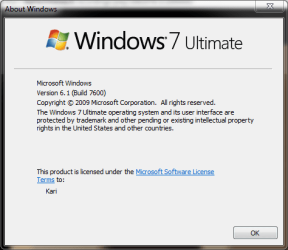
If you have bought Windows 7, it is build 7600. Oldest build still working is the release candidate RC build 7100.

Kari
 

Attachments

  • winver.PNG
    winver.PNG
    11.3 KB · Views: 164

My Computer My Computer

Computer type
Laptop
Computer Manufacturer/Model Number
HP ENVY 17-1150eg
OS
Windows 10 Pro x64 EN-GB
CPU
1.6 GHz Intel Core i7-720QM Processor
Memory
6 GB
Graphics Card(s)
ATI Mobility Radeon HD 5850 Graphics
Sound Card
Beats sound system with integrated subwoofer
Monitor(s) Displays
17" laptop display, 22" LED and 32" Full HD TV through HDMI
Screen Resolution
1600*900 (1), 1920*1080 (2&3)
Hard Drives
Internal: 2 x 500 GB SATA Hard Disk Drive 7200 rpm
External: 2TB for backups, 3TB USB3 network drive for media
Cooling
As Envy runs a bit warm, I have it on a Cooler Master pad
Keyboard
Logitech diNovo Media Desktop Laser (bluetooth)
Mouse
Logitech Performance Mouse MX
Internet Speed
50/10 Mbps VDSL
Antivirus
Windows Defender 4.3.9431.0
Browser
Maxthon 3.5.2., IE11
I have a WUSB600N, had bad problems in 7022 with it. The W7 driver works fine with it, all you need to do is go to the driver properties and under power management stop allowing Windows to put it to sleep. You also have to make sure you do the same for the USB hub it's plugged into. Btw running 7229 x32 upgrade on that comp and it works fine.

Wow!!!
This is a hot topic over at the Linksys forums. I loaded the RAlink drivers but was still having problems. I upgraded my system tonight but I will definately try this trick if things dont get any better.
 

My Computer My Computer

Computer Manufacturer/Model Number
Homebuilt nicknamed FrankenPooter
OS
Win7 64bit
CPU
Pentium Dual 6500
Motherboard
Biostar G41-M7
Memory
4 GB (hence the 64 bit)
Graphics Card(s)
Radeon 9500SE (But I'll see what I get for Xmas)
Sound Card
Onboard sound (because I'm lame - but I do use Winamp)
Monitor(s) Displays
Generic POC (piece o' crap)
Hard Drives
360GB IDE (I refuse to call it a PATA)
PSU
450W (came with the case)
Case
Neon (with an eerie greenish glow)
Cooling
2 fans in the case and a monster realcool on the CPU
Back
Top