WUSB600N + Win 7 Auto-Installing Own Drivers

SleazyC

New member
Local time
8:14 PM
Messages
2
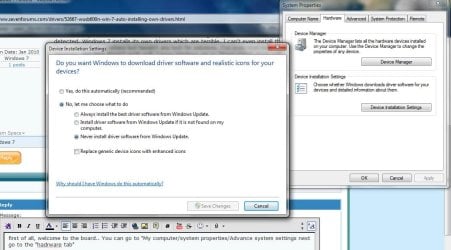
I use a Linksys WUSB600N wireless adapter and I'm having a problem with it. Every time my adapter is detected, Windows 7 installs its own drivers which are terrible. I can't even install the drivers I want! I have searched everywhere but haven't any luck for solutions. I've even tried installing my drivers over Windows', but that doesn't work well. I have Windows set to "Never install driver software from Windows Update" but it still does.

The setup.exe for my drivers requires the adapter to be plugged in to finish installation, but I can't do that with Windows' drivers inevitably going to install first. Nor can I manually install drivers with the Device Manager if it also requires the adapter to be plugged in. I'm guessing the DriverStore is causing Windows to auto-install these faulty drivers?

I would greatly appreciate any help/advice!
 
Last edited:

My Computer My Computer

OS
Windows 7
first of all, welcome to the board.. You can go to "My computer/system properties/Advance system settings nest go to the "hardware tab/device installation settings" and you will see something like this, select the best option for you, restart the system. Unistall your current driver and go ahead and install your own driver file.

best regards
 

Attachments

  • Untitled-1.jpg
    Untitled-1.jpg
    83.9 KB · Views: 290

My Computer My Computer

Computer Manufacturer/Model Number
HP a6720f
OS
7 Ultimate x64 RTM 7600.16385
CPU
AMD Phenom 9550 @ 2.20ghz
Motherboard
Asus M2N78-LA
Memory
4x2GB DDR2 Patriot Viper 800mhz
Graphics Card(s)
GeForce 9400 GT 512MB
Sound Card
Onboard Realtek Hi-Definition ALC 888S chipset
Monitor(s) Displays
Samsung P2370HD 23" 1080P HDTV
Screen Resolution
1920x1080
Hard Drives
Western Digital 640GB; Samsung 1 TB; WD 500GB; Seagate Portable 250gb;
Keyboard
Logitech LX310 Wireless Internet Keyboard
Mouse
Logitech LX310 Wireless Laser Mouse
Internet Speed
7Mbps/384Kbps
Thanks for the welcome, Martin. But I've tried that before as I mentioned somewhere in my first post and Windows is still auto-installing its own updates.
 

My Computer My Computer

OS
Windows 7
how about unistalling the driver then restart on safe mode to apply new driver?
 

My Computer My Computer

Computer Manufacturer/Model Number
HP a6720f
OS
7 Ultimate x64 RTM 7600.16385
CPU
AMD Phenom 9550 @ 2.20ghz
Motherboard
Asus M2N78-LA
Memory
4x2GB DDR2 Patriot Viper 800mhz
Graphics Card(s)
GeForce 9400 GT 512MB
Sound Card
Onboard Realtek Hi-Definition ALC 888S chipset
Monitor(s) Displays
Samsung P2370HD 23" 1080P HDTV
Screen Resolution
1920x1080
Hard Drives
Western Digital 640GB; Samsung 1 TB; WD 500GB; Seagate Portable 250gb;
Keyboard
Logitech LX310 Wireless Internet Keyboard
Mouse
Logitech LX310 Wireless Laser Mouse
Internet Speed
7Mbps/384Kbps
Back
Top