X-Fi Platinum working really bad

Idolator

New member
Local time
10:00 AM
Messages
3
Hello guys! first time for me asking for computer solutions on a forum so please point out if i'm doing anything wrong.

Anyways i'm having some problems with my X-Fi Platinum card and can't for the life of me find out what's wrong.

The sound is working but it's reaaally low, Have to crank the speakers(Z-5500) halfway to have a normal volume but this results in alot of static sounds when no sound is playing which is really annoying.

And i have to use Stereo settings aswell cause if i use 5.1 i get the words most awful BOOM from the bass unit.

I have the latest drivers, windows 7 64bit and even tried downloading some windows 7 specific tools but nothing seems to work.

And also my microphone seems to have taken a beating about this since when i speak people tell me it sounds like i'm sitting on a airport runway with a Boeing 747 taking off right next to me.

Anyways if anyone would take some time out of their life and help me i would really appreciate it.

Thanks in Advance
 

My Computer My Computer

OS
Windows 7
CPU
Intel(r) core(tm) i7 CPU 920@ 2.67GHz
Memory
4gb corsair ram 1.667
Graphics Card(s)
ATI Radeon 4890
Sound Card
Creative X-FI Platinum
Monitor(s) Displays
Viewsonic 19"
PSU
Corsair 650watt
Cooling
1x 250mm fan, 2x 80mm
Idolator, welcome to the forums.

One thing to check first,


Don't know how or why, but occasionally after installing the drivers, the individual speaker levels will be lower than the main volume.

Also are you connected to the speakers via digital or analogue?

For the mic have a poke around in the Windows settings. Make sure the mic boost is enabled, try different levels, and on the Advanced tab try a lower setting or two and see if that helps.
 

My Computer My Computer

Computer type
PC/Desktop
Computer Manufacturer/Model Number
Me
OS
Win 7 Ultimate x64
CPU
FX-8350 @ 4.6 GHz so far
Motherboard
Asus M5A97 EVO
Memory
ADATA XPG V1 Series Black 8GB DDR3 1600
Graphics Card(s)
Sapphire R9 270x Dual-X
Sound Card
Xonar DGX w/ Corsair Vengence 1300
Monitor(s) Displays
Acer S232HL Abid
Screen Resolution
1920x1080
Hard Drives
120 GB OCZ Vertex 3
500 GB Seagate 7200.12
PSU
Antec Earthwatts 650W Green
Case
Antec Three Hundred
Cooling
Cooler Master 212 EVO
Keyboard
Logitech G510
Mouse
Logitech G500s
Internet Speed
35000/3000
If you can't get anything to work I would recommend trying the daniel K drivers. IMO Creative has done a piss poor job and putting out quality drivers. I haven't had one to work yet. But daniel K's work great. Try this if you can't get it resolved using creative's drivers.

SB X-Fi Series Support Pack 2.0 by Daniel.K - Guru3D.com Forums
 

My Computer My Computer

Computer Manufacturer/Model Number
Home built
OS
Windows 7 Home Premium x64
CPU
AMD Phenom II X4 945
Motherboard
ASUS M4N98TD EVO AM3 NVIDIA nForce 980a SLI
Memory
8 GB G-Skill 1.5v DDR 3 1333Mhz
Graphics Card(s)
(2) MSI 512MB GTS 250 SLI
Sound Card
Soundblaster Audigy 2 platinum
Monitor(s) Displays
Samsung 2255BW 22"
Screen Resolution
1650 x 1050
Hard Drives
2 WD 250GB 7500RPM
PSU
Antec TP-750. The ultimate bang for the buck PSU
Case
Raidmax
Cooling
Sycthe Slipstream cooling fans(4)
Keyboard
Zboard Merc
Mouse
Logitech MX-518
Internet Speed
3MB
Other Info
LG Blu-Ray/DVD combo drive/LG DVD-RW w/ lightscribe
hehe sorry for maybe being retarded but what's the difference between analog and digital connectors for the speakers?^^
 

My Computer My Computer

OS
Windows 7
CPU
Intel(r) core(tm) i7 CPU 920@ 2.67GHz
Memory
4gb corsair ram 1.667
Graphics Card(s)
ATI Radeon 4890
Sound Card
Creative X-FI Platinum
Monitor(s) Displays
Viewsonic 19"
PSU
Corsair 650watt
Cooling
1x 250mm fan, 2x 80mm
Good question, I've only seen analog plugs on speakers themselves. I've seen digital inputs to amps but I guess things change.
 

My Computer My Computer

Computer Manufacturer/Model Number
Home built
OS
Windows 7 Home Premium x64
CPU
AMD Phenom II X4 945
Motherboard
ASUS M4N98TD EVO AM3 NVIDIA nForce 980a SLI
Memory
8 GB G-Skill 1.5v DDR 3 1333Mhz
Graphics Card(s)
(2) MSI 512MB GTS 250 SLI
Sound Card
Soundblaster Audigy 2 platinum
Monitor(s) Displays
Samsung 2255BW 22"
Screen Resolution
1650 x 1050
Hard Drives
2 WD 250GB 7500RPM
PSU
Antec TP-750. The ultimate bang for the buck PSU
Case
Raidmax
Cooling
Sycthe Slipstream cooling fans(4)
Keyboard
Zboard Merc
Mouse
Logitech MX-518
Internet Speed
3MB
Other Info
LG Blu-Ray/DVD combo drive/LG DVD-RW w/ lightscribe
With the z5500 if you use the digital connection, the speakers are doing the decoding using their own built-in DAC. If using analogue it is using the DAC on the sound card. In your case the X-Fi has a much better DAC on it, hence better sound when using the analogue connection.
 

My Computer My Computer

Computer type
PC/Desktop
Computer Manufacturer/Model Number
Me
OS
Win 7 Ultimate x64
CPU
FX-8350 @ 4.6 GHz so far
Motherboard
Asus M5A97 EVO
Memory
ADATA XPG V1 Series Black 8GB DDR3 1600
Graphics Card(s)
Sapphire R9 270x Dual-X
Sound Card
Xonar DGX w/ Corsair Vengence 1300
Monitor(s) Displays
Acer S232HL Abid
Screen Resolution
1920x1080
Hard Drives
120 GB OCZ Vertex 3
500 GB Seagate 7200.12
PSU
Antec Earthwatts 650W Green
Case
Antec Three Hundred
Cooling
Cooler Master 212 EVO
Keyboard
Logitech G510
Mouse
Logitech G500s
Internet Speed
35000/3000
and how would i go by using this analog connection? :P
 

My Computer My Computer

OS
Windows 7
CPU
Intel(r) core(tm) i7 CPU 920@ 2.67GHz
Memory
4gb corsair ram 1.667
Graphics Card(s)
ATI Radeon 4890
Sound Card
Creative X-FI Platinum
Monitor(s) Displays
Viewsonic 19"
PSU
Corsair 650watt
Cooling
1x 250mm fan, 2x 80mm
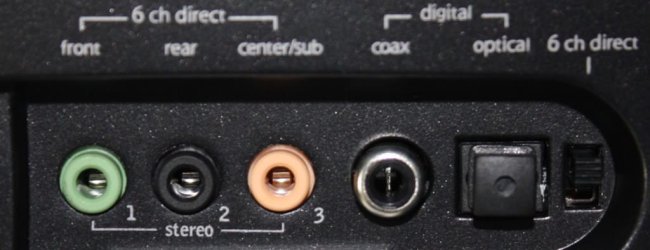
You have a X-Fi Platinum sound card hooked up to Logitech Z-5500 that is a nice setup, but i you need to check the rear of the sound card if all speaker inputs are properly connected in the sound card.....you'd be surprised how many people insert in the wrong area of the sound card.
if you output the signal via a digital connection that would be done via digital optical output (sound card) to your Z-5500's (optical input).
Configure your 5.1* playback to properly output sound to your Z-5500's and i guarantee it will sound great:)
 

Attachments

  • z5500_control_centre.jpg
    z5500_control_centre.jpg
    46.6 KB · Views: 440
Last edited:

My Computer My Computer

Computer Manufacturer/Model Number
custom of course...built by grimreaper
OS
Windows 7 Ultimate X64
CPU
Intel Core 2 Quad Q9650 3.0GHz (3.6GHz 24/7) maxed 4.05GHz
Motherboard
EVGA 790i Ultra SLi Model#132-CK-NF79-A1 BIOS P10
Memory
8GB OCZ DDR3 PC3-14400 @ 1800MHz NVIDIA SLi-Ready
Graphics Card(s)
2XBFG GeForce GTX 280 OC Edition SLi'd
Sound Card
SoundBlaster X-Fi Titanium Fatal1ty Pro Series
Monitor(s) Displays
Samsung 52" 1080P LCD HDTV (LN52B550)
Screen Resolution
1920X1080 @ 60Hz
Hard Drives
3xWestern Digital WD1001FALS Caviar Black 1TB Hard Drive(s) RAID 0 x2 encased in 3xMasscool KuFormula SHF1 HDD Cooler(s)
PSU
ThermalTake ToughPower 1200W P/N:W0133RU Modularized
Case
ThermalTake P/N: VH6000BWS Armor Full-Tower
Cooling
ThermalTake SpinQ P/N: P0466 CPU Cooler
Keyboard
Logitech cordless Y-RAJ56A piece of ****
Mouse
Logitech G7 Laser Cordless mouse black
Internet Speed
10 Mbps DL-1Mbps UL wirelessly DWA-552 extreme N
Other Info
1XSamsung DVD burner SH-S223Q/BEBN SATA
1XSamsung DVD burner SH-S223L/BEBN SATA
1XLG GGW-H20L Blu-Ray burner
4XCooler Master 120mm Blue LED SickleFlow 2000 RPM
1XBelkin UPS F6C1500TWRK) backup power supply

Back
Top