x2 4200 vs. x2 5200 BE

dorian hawkmoon

New member
Member
VIP
Local time
11:05 PM
Messages
398
I want to upgrade from 4200 X2 to 5200 X2 Black editions, what are the pros and cons of gaming, encoding and heat? It would be a lot of help to know guys...thanx!

PS. Is there such a thing as 5200+ black edition at all? My friend suggested it. Will 5200 fit my mobo? Please answer guys
 
Last edited:

My Computer My Computer

At a glance

Windows 10 Pro (x64)AMD RYZEN 7 1700+Stock Wraith SpireCorsair 8GB (1 x 8 GB) DDR4 Vengeance LPX 240...SAPPHIRE RX 470 4GB (Platinum Edition)
Computer type
PC/Desktop
Computer Manufacturer/Model Number
Self built
OS
Windows 10 Pro (x64)
CPU
AMD RYZEN 7 1700+Stock Wraith Spire
Motherboard
ASUS PRIME B350M-A
Memory
Corsair 8GB (1 x 8 GB) DDR4 Vengeance LPX 2400Mhz
Graphics Card(s)
SAPPHIRE RX 470 4GB (Platinum Edition)
Monitor(s) Displays
BenQ VZ2250H
Screen Resolution
1920x1080
Hard Drives
120GB Samsung 750 Evo (OS/Programs)+1TB ST Firecuda (Games/Creative Applications)+1TB WD Green (Storage)
PSU
Antec VP650PM
Case
Coolermaster K380 Mid-Tower
Cooling
Side:Antec F19 120mm+Rear:Tt ISGC Fan12
Keyboard
Logitech K200
Mouse
Dragonwar Ele-G9 Thor
Internet Speed
Slow by 21st Century Standards :(
Antivirus
Bitdefender Internet Security and MBAM
Browser
Firefox
Other Info
Creative Inspire T3130
Echoooooooooo..........
 

My Computer My Computer

At a glance

Windows 10 Pro (x64)AMD RYZEN 7 1700+Stock Wraith SpireCorsair 8GB (1 x 8 GB) DDR4 Vengeance LPX 240...SAPPHIRE RX 470 4GB (Platinum Edition)
Computer type
PC/Desktop
Computer Manufacturer/Model Number
Self built
OS
Windows 10 Pro (x64)
CPU
AMD RYZEN 7 1700+Stock Wraith Spire
Motherboard
ASUS PRIME B350M-A
Memory
Corsair 8GB (1 x 8 GB) DDR4 Vengeance LPX 2400Mhz
Graphics Card(s)
SAPPHIRE RX 470 4GB (Platinum Edition)
Monitor(s) Displays
BenQ VZ2250H
Screen Resolution
1920x1080
Hard Drives
120GB Samsung 750 Evo (OS/Programs)+1TB ST Firecuda (Games/Creative Applications)+1TB WD Green (Storage)
PSU
Antec VP650PM
Case
Coolermaster K380 Mid-Tower
Cooling
Side:Antec F19 120mm+Rear:Tt ISGC Fan12
Keyboard
Logitech K200
Mouse
Dragonwar Ele-G9 Thor
Internet Speed
Slow by 21st Century Standards :(
Antivirus
Bitdefender Internet Security and MBAM
Browser
Firefox
Other Info
Creative Inspire T3130
I checked the specs on your motherboard and the manufacturer says it will support the 5200 with the proper BIOS. According to AMD, it isn't available in a Black Edition.

Here's the thing. You aren't going to get much of an improvement in going with the 5200 over the 4200. It's only really a jump of about 500 MHz, and in most cases, you won't see a big huge difference. You will see some, and if the 5200 is really cheap, then it might be a good buy. But if the CPU is expensive, it might be a better idea to save up and upgrade the motherboard to something a bit newer and get a better CPU at that time.

There are some 5000 series Athlons available in Black Editions, and IIRC, they are the 65W Brisbane cores which overclock fairly well. But if you buy the BE with the intent of overclocking, make sure you have good cooling and airflow in your case. An o/c'ed CPU puts out much more heat than stock, and you'll kill it fast without proper cooling.
 

My Computer My Computer

At a glance

Win 7 Pro x64/Win 10 Pro x64 dual bootAMD FX 8350 Vishera @ 420016 GB Mushkin Blackline DDR3-2400 @ 1866 (9-1...XFX Radeon R9 280 Double D Black Edition
Computer type
PC/Desktop
Computer Manufacturer/Model Number
Mellon Labs (custom build)
OS
Win 7 Pro x64/Win 10 Pro x64 dual boot
CPU
AMD FX 8350 Vishera @ 4200
Motherboard
ASUS M5A97 R2.0
Memory
16 GB Mushkin Blackline DDR3-2400 @ 1866 (9-10-10-10-31)
Graphics Card(s)
XFX Radeon R9 280 Double D Black Edition
Sound Card
Realtek HD Audio on MB. Sounds great.
Monitor(s) Displays
Acer 24", Acer 22"
Screen Resolution
3840 x 1080
Hard Drives
1 x Mushkin Chronos 120 GB SSD (Win 10)
1 x Samsung 850 EVO 250 GB SSD (Win 7)
1 x WD 1TB SATA Blue
1 x WD 1TB SATA Green
PSU
Corsair TX-750
Case
CoolerMaster HAF 912+
Cooling
Coolermaster Seidon 240M Liquid AIO. 6 case fans
Keyboard
Logitech G710+
Mouse
Logitech G500s
Internet Speed
Much better since I got fiber, but still way overpriced.
Antivirus
MSE, Malware Bytes for scanning
Browser
Firefox
Other Info
Corsair VOID USB headphones.

A Mellon Labs X-1 - LCD Smartie driven system status display.

Brought to you by the letter E
Here's the thing. You aren't going to get much of an improvement in going with the 5200 over the 4200.
I agree with this. Unless somebody is giving away this CPU, I'm not sure I would make that upgrade. Get more RAM or an SSD...which would really make a difference.
 

My Computer My Computer

At a glance

Windows 7 Ultimate x64Intel Q9550 2.83Ghz OC'd to 3.40Ghz8GB G.Skill PI DDR2-800, 4-4-4-12 timingsEVGA 1280MB Nvidia GeForce GTX570
Computer Manufacturer/Model Number
Self-Built in July 2009
OS
Windows 7 Ultimate x64
CPU
Intel Q9550 2.83Ghz OC'd to 3.40Ghz
Motherboard
Gigabyte GA-EP45-UD3R rev. 1.1, F12 BIOS
Memory
8GB G.Skill PI DDR2-800, 4-4-4-12 timings
Graphics Card(s)
EVGA 1280MB Nvidia GeForce GTX570
Sound Card
Realtek ALC899A 8 channel onboard audio
Monitor(s) Displays
23" Acer x233H
Screen Resolution
1920x1080
Hard Drives
Intel X25-M 80GB Gen 2 SSD
Western Digital 1TB Caviar Black, 32MB cache. WD1001FALS
PSU
Corsair 620HX modular
Case
Antec P182
Cooling
stock
Keyboard
ABS M1 Mechanical
Mouse
Logitech G9 Laser Mouse
Internet Speed
15/2 cable modem
Other Info
Windows and Linux enthusiast. Logitech G35 Headset.
I want to upgrade from 4200 X2 to 5200 X2 Black editions, what are the pros and cons of gaming, encoding and heat? It would be a lot of help to know guys...thanx!

PS. Is there such a thing as 5200+ black edition at all? My friend suggested it. Will 5200 fit my mobo? Please answer guys

Ok, we have the same motherboard... and I would suggest caution about simply looking for the fastest chip... ASUS is famous for supporting boards up to only a certain level of chip... and often that is based on BIOS revisions...

Here's the CPU page for that (our) board...

ASUSTeK Computer Inc.-Support-

Select the motherboard with the pulldowns...
Just be sure your chip is on this list before ou purchase.

Also note the bios revision levels... You may have to flash the bios to get the CPU support you need... But frankly, I'd choose a different chip before I went off willy nilly flashing the bios... A bad flash can trash the motherboard and I'm betting that's not what you want...

Cooling wise, unless you are overclocking, the AMD supplied heat sink should be just fine. But do keep in mind you may have to increase air circulation in your case to eliminate the added heat from a faster CPU... This is usually no problem, add a fan, clean things up, etc.

Hope this helps....
 

My Computer My Computer

At a glance

XP Pro SP3 X86 / Win7 Pro X86Amd 64 x2 4200 (2.4ghz)Kingston DDR2 800 2gbNvidia GF-8400
Computer Manufacturer/Model Number
Homebrew
OS
XP Pro SP3 X86 / Win7 Pro X86
CPU
Amd 64 x2 4200 (2.4ghz)
Motherboard
Asus M2N-MX SE Plus
Memory
Kingston DDR2 800 2gb
Graphics Card(s)
Nvidia GF-8400
Sound Card
Realtek on Motherboard
Monitor(s) Displays
Acer x-193bw
Screen Resolution
1440 x 900
Hard Drives
Western Digital 500g
PSU
350watt In-Win
Case
In-Win
Cooling
Air
Keyboard
yes
Mouse
yes
Internet Speed
5mpbs
Other Info
Also ASRock ION 330 as HTPC (on XP).
Acer Aspire as GP netbook (on XP).
Thanks for the opinions guys...:D

The matter is the 5200+ is almost a giveaway:p, my friend is upgrading and is giving away for a really low price! I was just worried about the BIOS and the socket.
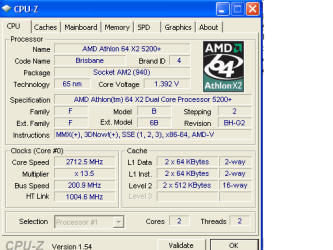
I'm giving a screen shot..what'll be the boons (even little ones? or the cons?)
 

Attachments

  • 2.png
    2.png
    9.8 KB · Views: 75

My Computer My Computer

At a glance

Windows 10 Pro (x64)AMD RYZEN 7 1700+Stock Wraith SpireCorsair 8GB (1 x 8 GB) DDR4 Vengeance LPX 240...SAPPHIRE RX 470 4GB (Platinum Edition)
Computer type
PC/Desktop
Computer Manufacturer/Model Number
Self built
OS
Windows 10 Pro (x64)
CPU
AMD RYZEN 7 1700+Stock Wraith Spire
Motherboard
ASUS PRIME B350M-A
Memory
Corsair 8GB (1 x 8 GB) DDR4 Vengeance LPX 2400Mhz
Graphics Card(s)
SAPPHIRE RX 470 4GB (Platinum Edition)
Monitor(s) Displays
BenQ VZ2250H
Screen Resolution
1920x1080
Hard Drives
120GB Samsung 750 Evo (OS/Programs)+1TB ST Firecuda (Games/Creative Applications)+1TB WD Green (Storage)
PSU
Antec VP650PM
Case
Coolermaster K380 Mid-Tower
Cooling
Side:Antec F19 120mm+Rear:Tt ISGC Fan12
Keyboard
Logitech K200
Mouse
Dragonwar Ele-G9 Thor
Internet Speed
Slow by 21st Century Standards :(
Antivirus
Bitdefender Internet Security and MBAM
Browser
Firefox
Other Info
Creative Inspire T3130
Hey, if it's really cheap...

It looks like the board will support it, but as mentioned above, make sure the BIOS is up to the task. If you need to reflash, you'll need to do it BEFORE putting in the 5200, or it most likely won't boot, or run properly if it does. Reflashing is best avoided if you can, as it's not something you want to mess up. :D
 

My Computer My Computer

At a glance

Win 7 Pro x64/Win 10 Pro x64 dual bootAMD FX 8350 Vishera @ 420016 GB Mushkin Blackline DDR3-2400 @ 1866 (9-1...XFX Radeon R9 280 Double D Black Edition
Computer type
PC/Desktop
Computer Manufacturer/Model Number
Mellon Labs (custom build)
OS
Win 7 Pro x64/Win 10 Pro x64 dual boot
CPU
AMD FX 8350 Vishera @ 4200
Motherboard
ASUS M5A97 R2.0
Memory
16 GB Mushkin Blackline DDR3-2400 @ 1866 (9-10-10-10-31)
Graphics Card(s)
XFX Radeon R9 280 Double D Black Edition
Sound Card
Realtek HD Audio on MB. Sounds great.
Monitor(s) Displays
Acer 24", Acer 22"
Screen Resolution
3840 x 1080
Hard Drives
1 x Mushkin Chronos 120 GB SSD (Win 10)
1 x Samsung 850 EVO 250 GB SSD (Win 7)
1 x WD 1TB SATA Blue
1 x WD 1TB SATA Green
PSU
Corsair TX-750
Case
CoolerMaster HAF 912+
Cooling
Coolermaster Seidon 240M Liquid AIO. 6 case fans
Keyboard
Logitech G710+
Mouse
Logitech G500s
Internet Speed
Much better since I got fiber, but still way overpriced.
Antivirus
MSE, Malware Bytes for scanning
Browser
Firefox
Other Info
Corsair VOID USB headphones.

A Mellon Labs X-1 - LCD Smartie driven system status display.

Brought to you by the letter E
Thanks for the clarification :)...still I'm worried to hell, as I don't want to mess with the BIOS :confused: . If it'd be any help I'm giving info abt my BIOS :


Property Value
BIOS Vendor American Megatrends Inc.
BIOS Version 0302
BIOS Date 12/04/2007
BIOS Size 1024 KB
BIOS Starting Segment F000h
DMI Version 2.5
Characteristics - supports ISA
- supports PCI
- supports Plug-and-Play
- supports APM
- upgradeable (Flash) BIOS
- allows BIOS shadowing
- ESCD support is available
- supports booting from CD-ROM
- supports selectable boot
- BIOS ROM is socketed
- supports Enhanced Disk Drive specification
- supports INT 13 5.25-inch/1.2M floppy services
- supports INT 13 3.5-inch/720K floppy services
- supports INT 13 3.5-inch/2.88M floppy services
- supports INT 05 print-screen
- supports INT 09 and 8042 keyboard services
- supports INT 14 serial services
- supports INT 17 printer services
- supports INT 10 CGA/Mono video services
- supports ACPI
- supports legacy USB
- supports booting from LS-120
- supports booting from ATAPI ZIP drive
- BIOS Boot Specification supported
- Enable Targeted Content Distribution
 

My Computer My Computer

At a glance

Windows 10 Pro (x64)AMD RYZEN 7 1700+Stock Wraith SpireCorsair 8GB (1 x 8 GB) DDR4 Vengeance LPX 240...SAPPHIRE RX 470 4GB (Platinum Edition)
Computer type
PC/Desktop
Computer Manufacturer/Model Number
Self built
OS
Windows 10 Pro (x64)
CPU
AMD RYZEN 7 1700+Stock Wraith Spire
Motherboard
ASUS PRIME B350M-A
Memory
Corsair 8GB (1 x 8 GB) DDR4 Vengeance LPX 2400Mhz
Graphics Card(s)
SAPPHIRE RX 470 4GB (Platinum Edition)
Monitor(s) Displays
BenQ VZ2250H
Screen Resolution
1920x1080
Hard Drives
120GB Samsung 750 Evo (OS/Programs)+1TB ST Firecuda (Games/Creative Applications)+1TB WD Green (Storage)
PSU
Antec VP650PM
Case
Coolermaster K380 Mid-Tower
Cooling
Side:Antec F19 120mm+Rear:Tt ISGC Fan12
Keyboard
Logitech K200
Mouse
Dragonwar Ele-G9 Thor
Internet Speed
Slow by 21st Century Standards :(
Antivirus
Bitdefender Internet Security and MBAM
Browser
Firefox
Other Info
Creative Inspire T3130
Ok here's a snip from the ASUS CPU page for the M2N-MX SE Plus...

Capture.JPG

It looks like the 52OO+ chip will be ok without flashing your bios.

However the actual speed difference isn't that great... As in you might need benchmarking programs to see it...

Still, having a spare CPU chip (the old one) isn't such a bad idea...
 

My Computer My Computer

At a glance

XP Pro SP3 X86 / Win7 Pro X86Amd 64 x2 4200 (2.4ghz)Kingston DDR2 800 2gbNvidia GF-8400
Computer Manufacturer/Model Number
Homebrew
OS
XP Pro SP3 X86 / Win7 Pro X86
CPU
Amd 64 x2 4200 (2.4ghz)
Motherboard
Asus M2N-MX SE Plus
Memory
Kingston DDR2 800 2gb
Graphics Card(s)
Nvidia GF-8400
Sound Card
Realtek on Motherboard
Monitor(s) Displays
Acer x-193bw
Screen Resolution
1440 x 900
Hard Drives
Western Digital 500g
PSU
350watt In-Win
Case
In-Win
Cooling
Air
Keyboard
yes
Mouse
yes
Internet Speed
5mpbs
Other Info
Also ASRock ION 330 as HTPC (on XP).
Acer Aspire as GP netbook (on XP).
Ok, if it doesn't involve flashing my mobo to a crisp, I'm all for it!! I'll give it a try, and let you guys know abt. the results, thanks for the help :thumbsup:
 

My Computer My Computer

At a glance

Windows 10 Pro (x64)AMD RYZEN 7 1700+Stock Wraith SpireCorsair 8GB (1 x 8 GB) DDR4 Vengeance LPX 240...SAPPHIRE RX 470 4GB (Platinum Edition)
Computer type
PC/Desktop
Computer Manufacturer/Model Number
Self built
OS
Windows 10 Pro (x64)
CPU
AMD RYZEN 7 1700+Stock Wraith Spire
Motherboard
ASUS PRIME B350M-A
Memory
Corsair 8GB (1 x 8 GB) DDR4 Vengeance LPX 2400Mhz
Graphics Card(s)
SAPPHIRE RX 470 4GB (Platinum Edition)
Monitor(s) Displays
BenQ VZ2250H
Screen Resolution
1920x1080
Hard Drives
120GB Samsung 750 Evo (OS/Programs)+1TB ST Firecuda (Games/Creative Applications)+1TB WD Green (Storage)
PSU
Antec VP650PM
Case
Coolermaster K380 Mid-Tower
Cooling
Side:Antec F19 120mm+Rear:Tt ISGC Fan12
Keyboard
Logitech K200
Mouse
Dragonwar Ele-G9 Thor
Internet Speed
Slow by 21st Century Standards :(
Antivirus
Bitdefender Internet Security and MBAM
Browser
Firefox
Other Info
Creative Inspire T3130
Done

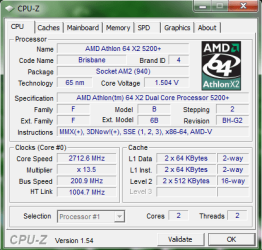
I went and did it...at first the BIOS couldn't take it and had to reflash upgrade with the latest BIOS rom cd. Seems fine now. Although I want an opinion of you guys abt. the core voltage, it jumps to and fro from 1.488 to 1.504 V. in comparison from when it was my friend's (page 1 scrnsht) Here's a screen-shot.

Should I be worried abt. the processor health on this mobo and/or abt. the ram, mobo And processor in case of over voltage, can such a thing happen? It seems to run fine though. Temp seems normal for my country heat.
 

Attachments

  • 2.png
    2.png
    19.1 KB · Views: 6
Last edited:

My Computer My Computer

At a glance

Windows 10 Pro (x64)AMD RYZEN 7 1700+Stock Wraith SpireCorsair 8GB (1 x 8 GB) DDR4 Vengeance LPX 240...SAPPHIRE RX 470 4GB (Platinum Edition)
Computer type
PC/Desktop
Computer Manufacturer/Model Number
Self built
OS
Windows 10 Pro (x64)
CPU
AMD RYZEN 7 1700+Stock Wraith Spire
Motherboard
ASUS PRIME B350M-A
Memory
Corsair 8GB (1 x 8 GB) DDR4 Vengeance LPX 2400Mhz
Graphics Card(s)
SAPPHIRE RX 470 4GB (Platinum Edition)
Monitor(s) Displays
BenQ VZ2250H
Screen Resolution
1920x1080
Hard Drives
120GB Samsung 750 Evo (OS/Programs)+1TB ST Firecuda (Games/Creative Applications)+1TB WD Green (Storage)
PSU
Antec VP650PM
Case
Coolermaster K380 Mid-Tower
Cooling
Side:Antec F19 120mm+Rear:Tt ISGC Fan12
Keyboard
Logitech K200
Mouse
Dragonwar Ele-G9 Thor
Internet Speed
Slow by 21st Century Standards :(
Antivirus
Bitdefender Internet Security and MBAM
Browser
Firefox
Other Info
Creative Inspire T3130
One of two things likely happening,

1. Being mis-reported from the bios. If you haven't double check what it shows for teh vcore in the bios hardware monitoring section (it should show the vcore in addition to the rest of the voltage readings), and compare to what it shows in CPU-Z.

2. The vcore is set to auto in the bios and is running higher than the rated vcore (happens a lot on Asus motherboards).

If you haven't seen it here are the specs for that CPU,

AMD Processors for Desktops: AMD Phenom?, AMD Athlon? FX, AMD Athlon? X2 Dual-Core, AMD Athlon?, and AMD Sempron? Processor

For #1 if what it shows in the bios is at or near 1.325-1.375V, then there is nothing to do but remember the difference when checking with monitoring software.

For #1 and #2 if it is showing the same as in CPU-Z, then you need to go into Advanced section of the bios and under "AMD Overclocking Configuration", manually set the vcore to either 1.35 or 1.375V.
 

My Computer My Computer

At a glance

Win 7 Ultimate x64FX-8350 @ 4.6 GHz so farADATA XPG V1 Series Black 8GB DDR3 1600Sapphire R9 270x Dual-X
Computer type
PC/Desktop
Computer Manufacturer/Model Number
Me
OS
Win 7 Ultimate x64
CPU
FX-8350 @ 4.6 GHz so far
Motherboard
Asus M5A97 EVO
Memory
ADATA XPG V1 Series Black 8GB DDR3 1600
Graphics Card(s)
Sapphire R9 270x Dual-X
Sound Card
Xonar DGX w/ Corsair Vengence 1300
Monitor(s) Displays
Acer S232HL Abid
Screen Resolution
1920x1080
Hard Drives
120 GB OCZ Vertex 3
500 GB Seagate 7200.12
PSU
Antec Earthwatts 650W Green
Case
Antec Three Hundred
Cooling
Cooler Master 212 EVO
Keyboard
Logitech G510
Mouse
Logitech G500s
Internet Speed
35000/3000
Hardware monitoring in BIOS shows the same fluctuation. Should I set it to 1.375V?
A diffrnt question, my Q-Fan is disabled in BIOS, is it wise to enable it on my entry level mobo? Or leave it alone?
 

My Computer My Computer

At a glance

Windows 10 Pro (x64)AMD RYZEN 7 1700+Stock Wraith SpireCorsair 8GB (1 x 8 GB) DDR4 Vengeance LPX 240...SAPPHIRE RX 470 4GB (Platinum Edition)
Computer type
PC/Desktop
Computer Manufacturer/Model Number
Self built
OS
Windows 10 Pro (x64)
CPU
AMD RYZEN 7 1700+Stock Wraith Spire
Motherboard
ASUS PRIME B350M-A
Memory
Corsair 8GB (1 x 8 GB) DDR4 Vengeance LPX 2400Mhz
Graphics Card(s)
SAPPHIRE RX 470 4GB (Platinum Edition)
Monitor(s) Displays
BenQ VZ2250H
Screen Resolution
1920x1080
Hard Drives
120GB Samsung 750 Evo (OS/Programs)+1TB ST Firecuda (Games/Creative Applications)+1TB WD Green (Storage)
PSU
Antec VP650PM
Case
Coolermaster K380 Mid-Tower
Cooling
Side:Antec F19 120mm+Rear:Tt ISGC Fan12
Keyboard
Logitech K200
Mouse
Dragonwar Ele-G9 Thor
Internet Speed
Slow by 21st Century Standards :(
Antivirus
Bitdefender Internet Security and MBAM
Browser
Firefox
Other Info
Creative Inspire T3130
I would, then leave it there for a few days and test things out to make sure it is stable there (it should be). Also with that much drop in voltage you should see lower CPU temps; I saw around 5-6°C drop on my last CPU that was over-volted on the auto setting after manually setting it to what it should have been.

As for Q-Fan, unless you can hear the CPU fan over anything else, I would just leave it alone.
 

My Computer My Computer

At a glance

Win 7 Ultimate x64FX-8350 @ 4.6 GHz so farADATA XPG V1 Series Black 8GB DDR3 1600Sapphire R9 270x Dual-X
Computer type
PC/Desktop
Computer Manufacturer/Model Number
Me
OS
Win 7 Ultimate x64
CPU
FX-8350 @ 4.6 GHz so far
Motherboard
Asus M5A97 EVO
Memory
ADATA XPG V1 Series Black 8GB DDR3 1600
Graphics Card(s)
Sapphire R9 270x Dual-X
Sound Card
Xonar DGX w/ Corsair Vengence 1300
Monitor(s) Displays
Acer S232HL Abid
Screen Resolution
1920x1080
Hard Drives
120 GB OCZ Vertex 3
500 GB Seagate 7200.12
PSU
Antec Earthwatts 650W Green
Case
Antec Three Hundred
Cooling
Cooler Master 212 EVO
Keyboard
Logitech G510
Mouse
Logitech G500s
Internet Speed
35000/3000
OK. thanks for helping out :).
I presume the BIOS problem occured and the Vcore fluctuation cause my mobo previously housed already a 4200+ (previous cache memory/voltage?) and/or it had an old BIOS. Presuming I intend to go with a newer mobo with the same processor these problems will not occur anymore?
 

My Computer My Computer

At a glance

Windows 10 Pro (x64)AMD RYZEN 7 1700+Stock Wraith SpireCorsair 8GB (1 x 8 GB) DDR4 Vengeance LPX 240...SAPPHIRE RX 470 4GB (Platinum Edition)
Computer type
PC/Desktop
Computer Manufacturer/Model Number
Self built
OS
Windows 10 Pro (x64)
CPU
AMD RYZEN 7 1700+Stock Wraith Spire
Motherboard
ASUS PRIME B350M-A
Memory
Corsair 8GB (1 x 8 GB) DDR4 Vengeance LPX 2400Mhz
Graphics Card(s)
SAPPHIRE RX 470 4GB (Platinum Edition)
Monitor(s) Displays
BenQ VZ2250H
Screen Resolution
1920x1080
Hard Drives
120GB Samsung 750 Evo (OS/Programs)+1TB ST Firecuda (Games/Creative Applications)+1TB WD Green (Storage)
PSU
Antec VP650PM
Case
Coolermaster K380 Mid-Tower
Cooling
Side:Antec F19 120mm+Rear:Tt ISGC Fan12
Keyboard
Logitech K200
Mouse
Dragonwar Ele-G9 Thor
Internet Speed
Slow by 21st Century Standards :(
Antivirus
Bitdefender Internet Security and MBAM
Browser
Firefox
Other Info
Creative Inspire T3130
The Vcore fluctuation can be from a couple of things, and it's not always BIOS related:

1. The system PSU may not be strong enough. Most PSUs don't put out their advertised Wattage, and if they do, it's usually a maximum that can't be sustained very long. You may be right at the edge of what your PSU can deliver right now. If you go into the BIOS and look at the +12V and 5V rails, and they fluctuate a lot, it's usually a good indication that your PSU isn't up to the job.

2. The sensor chip may not be reading the voltage sensor correctly.

3. You have a possible MOSFET problem. This is potentially serious, or possibly not. In the worst case scenario, the MOSFETs are weakened or failing, and no longer are able to supply a stable voltage to the CPU. Over time, the voltage drift will get larger, or the FETs will fail altogether and either cut off the Vcore, or short out and raise it to 3.3V or higher. In that case, it's bye bye CPU.

4. Your capacitors are beginning to fail.

It's not worth panicking about number 3, because there isn't much you can do about it, other than replace the motherboard. Unless you have access to surface mount soldering tools, and some technical know-how, you can't fix it. A half decent motherboard is relatively inexpensive, so having a tech repair it for you may not be cost effective.

First off, check your power supply in the BIOS, and then with some monitoring software. Speedfan does a nice job of voltages. Keep an eye on the drifting. If it starts to get worse, I would suggest a new board.
 

My Computer My Computer

At a glance

Win 7 Pro x64/Win 10 Pro x64 dual bootAMD FX 8350 Vishera @ 420016 GB Mushkin Blackline DDR3-2400 @ 1866 (9-1...XFX Radeon R9 280 Double D Black Edition
Computer type
PC/Desktop
Computer Manufacturer/Model Number
Mellon Labs (custom build)
OS
Win 7 Pro x64/Win 10 Pro x64 dual boot
CPU
AMD FX 8350 Vishera @ 4200
Motherboard
ASUS M5A97 R2.0
Memory
16 GB Mushkin Blackline DDR3-2400 @ 1866 (9-10-10-10-31)
Graphics Card(s)
XFX Radeon R9 280 Double D Black Edition
Sound Card
Realtek HD Audio on MB. Sounds great.
Monitor(s) Displays
Acer 24", Acer 22"
Screen Resolution
3840 x 1080
Hard Drives
1 x Mushkin Chronos 120 GB SSD (Win 10)
1 x Samsung 850 EVO 250 GB SSD (Win 7)
1 x WD 1TB SATA Blue
1 x WD 1TB SATA Green
PSU
Corsair TX-750
Case
CoolerMaster HAF 912+
Cooling
Coolermaster Seidon 240M Liquid AIO. 6 case fans
Keyboard
Logitech G710+
Mouse
Logitech G500s
Internet Speed
Much better since I got fiber, but still way overpriced.
Antivirus
MSE, Malware Bytes for scanning
Browser
Firefox
Other Info
Corsair VOID USB headphones.

A Mellon Labs X-1 - LCD Smartie driven system status display.

Brought to you by the letter E
The fluctuation could also be caused by Cool and Quiet, which I'm pretty sure is enabled by default on most if not all Asus motherboards. As for it reading higher than the specs for the CPU say, Asus boards are well known for overvolting the CPU when the vcore setting is left on auto.

To give one example of how it overvolts the CPU, I had it happen to me with my current motherboard and a x2 7750 (according to spec is 1.05-1.325V, range to account for CnQ). With the vcore set to auto, both in the bios and any monitoring software it showed as running at around 1.43V or so, a far cry from the 1.325V the spec says. I had to manually set it to get it to run at the proper volts. Once I did that the bios and monitoring software showed the proper values, and an added bonus it dropped something like 7-8°C from the idle and load temps.
 

My Computer My Computer

At a glance

Win 7 Ultimate x64FX-8350 @ 4.6 GHz so farADATA XPG V1 Series Black 8GB DDR3 1600Sapphire R9 270x Dual-X
Computer type
PC/Desktop
Computer Manufacturer/Model Number
Me
OS
Win 7 Ultimate x64
CPU
FX-8350 @ 4.6 GHz so far
Motherboard
Asus M5A97 EVO
Memory
ADATA XPG V1 Series Black 8GB DDR3 1600
Graphics Card(s)
Sapphire R9 270x Dual-X
Sound Card
Xonar DGX w/ Corsair Vengence 1300
Monitor(s) Displays
Acer S232HL Abid
Screen Resolution
1920x1080
Hard Drives
120 GB OCZ Vertex 3
500 GB Seagate 7200.12
PSU
Antec Earthwatts 650W Green
Case
Antec Three Hundred
Cooling
Cooler Master 212 EVO
Keyboard
Logitech G510
Mouse
Logitech G500s
Internet Speed
35000/3000
The fluctuation is only 16 mV. I think fluctuations by CnQ would be larger. In the area of 100 to 200 mV. If I enable CnQ on my PC, the voltage range is 1.15 to 1.36. A difference of 210 mV. Very different than what the OP is experiencing. Of course, my board isn't an ASUS, so I might be wrong.
 

My Computer My Computer

At a glance

Win 7 Pro x64/Win 10 Pro x64 dual bootAMD FX 8350 Vishera @ 420016 GB Mushkin Blackline DDR3-2400 @ 1866 (9-1...XFX Radeon R9 280 Double D Black Edition
Computer type
PC/Desktop
Computer Manufacturer/Model Number
Mellon Labs (custom build)
OS
Win 7 Pro x64/Win 10 Pro x64 dual boot
CPU
AMD FX 8350 Vishera @ 4200
Motherboard
ASUS M5A97 R2.0
Memory
16 GB Mushkin Blackline DDR3-2400 @ 1866 (9-10-10-10-31)
Graphics Card(s)
XFX Radeon R9 280 Double D Black Edition
Sound Card
Realtek HD Audio on MB. Sounds great.
Monitor(s) Displays
Acer 24", Acer 22"
Screen Resolution
3840 x 1080
Hard Drives
1 x Mushkin Chronos 120 GB SSD (Win 10)
1 x Samsung 850 EVO 250 GB SSD (Win 7)
1 x WD 1TB SATA Blue
1 x WD 1TB SATA Green
PSU
Corsair TX-750
Case
CoolerMaster HAF 912+
Cooling
Coolermaster Seidon 240M Liquid AIO. 6 case fans
Keyboard
Logitech G710+
Mouse
Logitech G500s
Internet Speed
Much better since I got fiber, but still way overpriced.
Antivirus
MSE, Malware Bytes for scanning
Browser
Firefox
Other Info
Corsair VOID USB headphones.

A Mellon Labs X-1 - LCD Smartie driven system status display.

Brought to you by the letter E

My Computer My Computer

At a glance

Win 7 Ultimate x64FX-8350 @ 4.6 GHz so farADATA XPG V1 Series Black 8GB DDR3 1600Sapphire R9 270x Dual-X
Computer type
PC/Desktop
Computer Manufacturer/Model Number
Me
OS
Win 7 Ultimate x64
CPU
FX-8350 @ 4.6 GHz so far
Motherboard
Asus M5A97 EVO
Memory
ADATA XPG V1 Series Black 8GB DDR3 1600
Graphics Card(s)
Sapphire R9 270x Dual-X
Sound Card
Xonar DGX w/ Corsair Vengence 1300
Monitor(s) Displays
Acer S232HL Abid
Screen Resolution
1920x1080
Hard Drives
120 GB OCZ Vertex 3
500 GB Seagate 7200.12
PSU
Antec Earthwatts 650W Green
Case
Antec Three Hundred
Cooling
Cooler Master 212 EVO
Keyboard
Logitech G510
Mouse
Logitech G500s
Internet Speed
35000/3000
I wonder if the 5200's CnQ profile is really all that developed? Some of the older AMD chips didn't have it at all, and the 5000 series is fairly old in CPU terms.

I just checked at CPU World, and the 5200 does have CnQ, but the Vcore range is pretty small 1.3 to 1.35 for one of the Brisbane cores, and it's pretty typical of the others. If CnQ is going to work on that one, the variance is only about 50 mV, assuming it doesn't go below the minimum. I would think that on the 5200, it probably only lowers the multiplier. That would be my guess, anyway.

The newer generation stuff, like Athlon II's and Phenom II's, are quite aggressive in power consumption, depending on the motherboard. My Foxconn doesn't really lower the voltage as much as I'd like, and it likes to overvolt, too, but it does do the job.
 

My Computer My Computer

At a glance

Win 7 Pro x64/Win 10 Pro x64 dual bootAMD FX 8350 Vishera @ 420016 GB Mushkin Blackline DDR3-2400 @ 1866 (9-1...XFX Radeon R9 280 Double D Black Edition
Computer type
PC/Desktop
Computer Manufacturer/Model Number
Mellon Labs (custom build)
OS
Win 7 Pro x64/Win 10 Pro x64 dual boot
CPU
AMD FX 8350 Vishera @ 4200
Motherboard
ASUS M5A97 R2.0
Memory
16 GB Mushkin Blackline DDR3-2400 @ 1866 (9-10-10-10-31)
Graphics Card(s)
XFX Radeon R9 280 Double D Black Edition
Sound Card
Realtek HD Audio on MB. Sounds great.
Monitor(s) Displays
Acer 24", Acer 22"
Screen Resolution
3840 x 1080
Hard Drives
1 x Mushkin Chronos 120 GB SSD (Win 10)
1 x Samsung 850 EVO 250 GB SSD (Win 7)
1 x WD 1TB SATA Blue
1 x WD 1TB SATA Green
PSU
Corsair TX-750
Case
CoolerMaster HAF 912+
Cooling
Coolermaster Seidon 240M Liquid AIO. 6 case fans
Keyboard
Logitech G710+
Mouse
Logitech G500s
Internet Speed
Much better since I got fiber, but still way overpriced.
Antivirus
MSE, Malware Bytes for scanning
Browser
Firefox
Other Info
Corsair VOID USB headphones.

A Mellon Labs X-1 - LCD Smartie driven system status display.

Brought to you by the letter E
Back
Top