- Local time
- 5:14 PM
- Messages
- 269
Sorry if this is in the wrong posting area, but I think it is in the correct one.
So I read in an earlier post that the proper way to update the chipset of your board is to use the run command with -overall at the end.
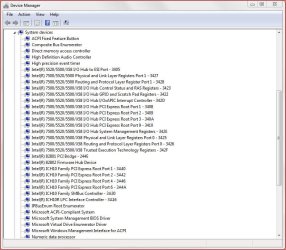
So I just got some new SSD's and have them in RAID0. So I started loading all my drivers, but I may be slipping here. Asus P6T Deluxe v2, I thought there was an entry in the Device Manager called QPI or something like that.
Q1 - After this new install I do not see it so I am wondering; am I losing it?
I did check ALL the Intel entries and they all had Microsoft drivers 6.1.7601.17514. I got the latest chipset for the board which is 9.3.0.1019. I did what the instructions said on how to install and now I have more questions.
Q2 - After install, shutdown then restart, in the device manager I see that only the Intel 5520/5500/X58 I/O Hub items got changed. Should the Intel ICH10 items have changed too or no?
Q3 - After the install, when I checked on the driver version for all of the I/O Hub items, they say 9.1.1.1026 dated 2-8-2010. The driver package I used was 9.3.0.1019 dated 5-3-2012. Did something go wrong? I got this version 9.3.0.1019 from the Intel website and I check the "this applies to" which the X58 is an Intel 6 series.
Q4 - Does anyone else have this board and had this problem? Or is this not a problem?
Q5 - Whoever has this board, what latest chipset are you using? Is it the same I got?
I look forward to your responses, I have read other posts not only here, but other sites as well and there seems to be some sort of installation issue, but I am coming here because in the past, this is where the answers to my past computer issues were solved. Thanks to all of you.
So I read in an earlier post that the proper way to update the chipset of your board is to use the run command with -overall at the end.
So I just got some new SSD's and have them in RAID0. So I started loading all my drivers, but I may be slipping here. Asus P6T Deluxe v2, I thought there was an entry in the Device Manager called QPI or something like that.
Q1 - After this new install I do not see it so I am wondering; am I losing it?
I did check ALL the Intel entries and they all had Microsoft drivers 6.1.7601.17514. I got the latest chipset for the board which is 9.3.0.1019. I did what the instructions said on how to install and now I have more questions.
Q2 - After install, shutdown then restart, in the device manager I see that only the Intel 5520/5500/X58 I/O Hub items got changed. Should the Intel ICH10 items have changed too or no?
Q3 - After the install, when I checked on the driver version for all of the I/O Hub items, they say 9.1.1.1026 dated 2-8-2010. The driver package I used was 9.3.0.1019 dated 5-3-2012. Did something go wrong? I got this version 9.3.0.1019 from the Intel website and I check the "this applies to" which the X58 is an Intel 6 series.
Q4 - Does anyone else have this board and had this problem? Or is this not a problem?
Q5 - Whoever has this board, what latest chipset are you using? Is it the same I got?
I look forward to your responses, I have read other posts not only here, but other sites as well and there seems to be some sort of installation issue, but I am coming here because in the past, this is where the answers to my past computer issues were solved. Thanks to all of you.
My Computer
- Computer type
- PC/Desktop
- Computer Manufacturer/Model Number
- Home Built
- OS
- Windows 10 Pro 64-bit
- CPU
- Core I7-6700
- Motherboard
- Asus Maximus VIII Hero
- Memory
- 8GB Corsair Dominator
- Graphics Card(s)
- Asus STRIX GTX 980Ti
- Monitor(s) Displays
- Asus PG278Q, Dell U2410
- Screen Resolution
- 2560 x 1440, 1920 x 1200
- Hard Drives
- 1 x Samsung 950 Pro 512GB
1 x 1TB HGST
- PSU
- 750W Seasonic
- Case
- Antec 900 v3
- Cooling
- Stock
- Internet Speed
- Cable Internet