x64 issues: big freeze, sfc reports error

z4kn4f3in

New member
Local time
7:28 AM
Messages
7
Hi !

I'm having some issues with my computer since a couple of weeks, big freeze in different games (like 10sec) and when playing video (i've only seen the problem on big mkv file).
So i did a full check, nod32 scan, ccleaner, glary, defrag with perfectdisk, chkdsk... Nothing change it ! Then i ran sfc /scannow and i'm having a couple of error in the report:

Code:
2011-12-17 13:49:06, Info                  CSI    00000129 [SR] Cannot repair member file [l:38{19}]"NlsLexicons000a.dll" of Microsoft-Windows-NaturalLanguage6, Version = 6.1.7601.17514, pA = PROCESSOR_ARCHITECTURE_AMD64 (9), Culture neutral, VersionScope = 1 nonSxS, PublicKeyToken = {l:8 b:31bf3856ad364e35}, Type neutral, TypeName neutral, PublicKey neutral in the store, hash mismatch
2011-12-17 13:49:43, Info                  CSI    0000012a [SR] Cannot repair member file [l:38{19}]"NlsLexicons000a.dll" of Microsoft-Windows-NaturalLanguage6, Version = 6.1.7601.17514, pA = PROCESSOR_ARCHITECTURE_AMD64 (9), Culture neutral, VersionScope = 1 nonSxS, PublicKeyToken = {l:8 b:31bf3856ad364e35}, Type neutral, TypeName neutral, PublicKey neutral in the store, hash mismatch
2011-12-17 13:49:43, Info                  CSI    0000012b [SR] This component was referenced by [l:202{101}]"Microsoft-Windows-Foundation-Package~31bf3856ad364e35~amd64~~6.1.7601.17514.WindowsFoundationDelivery"
2011-12-17 13:50:19, Info                  CSI    0000012c [SR] Could not reproject corrupted file [ml:520{260},l:46{23}]"\??\C:\Windows\System32"\[l:38{19}]"NlsLexicons000a.dll"; source file in store is also corrupted

2011-12-17 13:54:51, Info                  CSI    000002f3 [SR] Cannot repair member file [l:38{19}]"NlsLexicons000a.dll" of Microsoft-Windows-NaturalLanguage6, Version = 6.1.7601.17514, pA = PROCESSOR_ARCHITECTURE_AMD64 (9), Culture neutral, VersionScope = 1 nonSxS, PublicKeyToken = {l:8 b:31bf3856ad364e35}, Type neutral, TypeName neutral, PublicKey neutral in the store, hash mismatch
2011-12-17 13:55:08, Info                  CSI    000002f4 [SR] Cannot repair member file [l:38{19}]"NlsLexicons000a.dll" of Microsoft-Windows-NaturalLanguage6, Version = 6.1.7601.17514, pA = PROCESSOR_ARCHITECTURE_AMD64 (9), Culture neutral, VersionScope = 1 nonSxS, PublicKeyToken = {l:8 b:31bf3856ad364e35}, Type neutral, TypeName neutral, PublicKey neutral in the store, hash mismatch
2011-12-17 13:55:08, Info                  CSI    000002f5 [SR] This component was referenced by [l:202{101}]"Microsoft-Windows-Foundation-Package~31bf3856ad364e35~amd64~~6.1.7601.17514.WindowsFoundationDelivery"
2011-12-17 13:55:43, Info                  CSI    000002f6 [SR] Could not reproject corrupted file [ml:520{260},l:46{23}]"\??\C:\Windows\System32"\[l:38{19}]"NlsLexicons000a.dll"; source file in store is also corrupted

Can this be related to my problem? (i've ran it 3 times and it doesn't change)
I'm gonna do a memtest tonight, if it's negative i don't know what else to do.. a full reinstall may solve the problem, but i don't want to lose all my settings...

It's really a weird ânyway, i don't see any pattern in it: sometime it does freeze, sometime it does not... i've only noticed that the problem seem to appear when using intensively the computer, like a couple of hour but again it's not all the time. (i've checked CPU/GPU temp and it's normal.)

So if anyone has an idea or a suggestion... Share it please :)

Have a nice day, and don't be too cruel with my english: i'm french ;p
Zak.

Config:
i7-920
6go DDR3
GTX285
Windows 7 Pro x64.
 

My Computer My Computer

OS
Windows 7 Pro x64
Hello z4kn4f3in, and welcome to Sevenforums!

First, I really recommend you stop the use of CCleaner and other such programs. It is all but useless, and sometimes causes more problems than it fixes if you aren't completely sure of what you are doing. Windows has its own cleaners, and it is a slimmed version of Vista; there really is no need to increase the risk of corruption in your computer with the minimal benefit CCleaner and other 3rd party "optimizers" provide.


Try running startup repair 3 times: http://www.sevenforums.com/tutorials/681-startup-repair.html


Have you done a disk check: http://www.sevenforums.com/tutorials/433-disk-check.html


Reliability monitor: http://www.sevenforums.com/tutorials/2270-reliabilty-monitor.html

SFC scannow, use option 3 to see how to read the "SFC" scan results from the CBS.LOG: http://www.sevenforums.com/tutorials/1538-sfc-scannow-command-system-file-checker.html

Failing to find what is wrong, try a repair install: http://www.sevenforums.com/tutorials/3413-repair-install.html
 

My Computer My Computer

Computer type
PC/Desktop
Computer Manufacturer/Model Number
Custom Asus Build
OS
Microsoft Windows 8.1 Pro 64-bit
CPU
Intel(R) Core(TM) i3-4130 CPU @ 3.40GHz
Motherboard
B85M-E
Memory
8.00 GB
Graphics Card(s)
None
Sound Card
Realtek High Definition Audio
Monitor(s) Displays
Asus 23.6" Monitor
Screen Resolution
1920 x 1080 x 32 bits (4294967296 colors) @ 60 Hz
Hard Drives
INTEL SSDSC2BW180A4
Samsung SSD 840 PRO Series
PSU
Seasonic S12II-380Bronze
Case
Lian Li
Cooling
Fan, Passive
Keyboard
Logitech K120
Mouse
Microsoft Touch Mouse
Internet Speed
4ms Ping, 19.0 Mbps Download, 19.0 Mbps Upload
Antivirus
Eset Endpoint
Browser
Internet Explorer, Chrome
Hello DustSailor, thanks for replying.

About CCleaner, i know it doesn't do anything "extra", but it's cool to clean temp file/internet cache/and other thing in one click ;) I'll try to stop using it if it can cause other problem, i didn't know about that.

For the other things you wrote, i've tried Startup repair : it didn't find any error.
I've run /chkdsk and it didn't find error too.

I didn't know about the reliabilty monitor, and it's a little scary: i have an index of ~1 for the last year :p Same errors repeating again and again : SearchIndexer.exe: fonctionnement arrêté.
So i disabled the windows search services: Hope that it'll solve the continuous error.
Screenshot of the monitor :
ImageShack® - Online Photo and Video Hosting

Yesterday, i was playing BF3 and my computer crash: complete screen freeze with sound freeze too. I see that the error is reported in the realibilty monitor, and it created a dump: can i use it to see what causes the crash? (maybe it's related to my problem)
screenshot:
ImageShack® - Online Photo and Video Hosting

About the /sfc scannow, i've already did it 3 times and it says again again that it can't repair the file. The report i've posted yesterday is after using the command "/findstr ...".

I've done the Memtest too and it didn't find any error after 5 hour of run.
So i guess i'll do the repair install if you don't have any other thing to try, it's better than doing nothing.. But i'm not sure it'll solve the problem, maybe it's hardware related. I would like to know about the dmp file first, maybe it can be usefull.

Thanks again for your remarks !
Zak.
 

My Computer My Computer

OS
Windows 7 Pro x64
CCleaner is one of the safer ones. If you don't use the registry section you should be ok.
 

My Computer My Computer

Computer type
Laptop
Computer Manufacturer/Model Number
Hewlett-Packard/G62-107SA Notebook
OS
Microsoft Windows 7 Home Premium 64-bit Service Pack 1
CPU
Intel(R) Core(TM) i3 CPU M 330 @ 2.13GHz
Motherboard
Hewlett-Packard 1425
Memory
8 GB DDR3
Graphics Card(s)
Intel(R) HD Graphics
Sound Card
Realtek High Definition Audio
Monitor(s) Displays
Builtin
Screen Resolution
1366 x 768 x 32 bits (4294967296 colors) @ 60 Hz
Hard Drives
250 GB SATA Hard Disk Drive 7200 rpm
2TB Seagate GoFlex USB 2 Drive
1TB Iomega Prestige USB 2 Drive
1.5TB Iomega Prestige USB 2 Drive (Samsung)
2TB WD MyBook Live NAS.
Mouse
Logitech Anywhere MX
Internet Speed
152 Mbs download 10 Mbs upload
Antivirus
Norton 360
Browser
Chrome
ok kado897 ^^
I've run chkdsk /f /r this time (only did with /f last time) on my windows partition, and it found and replaced some corrupted clusters in 3 dll files of the system32 folder.
Maybe it'll solve the problem, to be continued ^^
 

My Computer My Computer

OS
Windows 7 Pro x64
z4kn4f3in,

Here is a link to another post about CCleaner that I posted, and here are some quotes from others on that thread about it: http://www.sevenforums.com/software/203194-google-search.html#post1704763

More is NOT always best.
What you are doing is overkill & certainly not recommended.

If you ever think your Registry needs to be cleaned, repaired, boosted, tuned-up, cured, tweaked, fixed, or optimized it shouldn't.

Note - IMO - there is no reliable way for a third party program to know whether any particular key is invalid, redundant or neither.
Some registry cleaners may not know for sure whether a key is still being used by Windows or what detrimental effects removing it may have.
This has led to examples of registry cleaners causing loss of functionality and/or system instability.
Current accepted wisdom with win 7 is to NOT use a cleaner at all.

It may be safer, but it is also needless in most cases. But your choice I won't force the issue.

Let me know anything further.

Also, you did the Startup-Repair 3 times, right?
 

My Computer My Computer

Computer type
PC/Desktop
Computer Manufacturer/Model Number
Custom Asus Build
OS
Microsoft Windows 8.1 Pro 64-bit
CPU
Intel(R) Core(TM) i3-4130 CPU @ 3.40GHz
Motherboard
B85M-E
Memory
8.00 GB
Graphics Card(s)
None
Sound Card
Realtek High Definition Audio
Monitor(s) Displays
Asus 23.6" Monitor
Screen Resolution
1920 x 1080 x 32 bits (4294967296 colors) @ 60 Hz
Hard Drives
INTEL SSDSC2BW180A4
Samsung SSD 840 PRO Series
PSU
Seasonic S12II-380Bronze
Case
Lian Li
Cooling
Fan, Passive
Keyboard
Logitech K120
Mouse
Microsoft Touch Mouse
Internet Speed
4ms Ping, 19.0 Mbps Download, 19.0 Mbps Upload
Antivirus
Eset Endpoint
Browser
Internet Explorer, Chrome
Yesterday, i was playing BF3 and my computer crash: complete screen freeze with sound freeze too. I see that the error is reported in the realibilty monitor, and it created a dump: can i use it to see what causes the crash? (maybe it's related to my problem)
screenshot:
ImageShack® - Online Photo and Video Hosting

Zak.

Zac,

The screen shot is very hard to see but appears to be a stop error of 0x124 which is a general hardware error .
I suggest you check out all below.

BTW,
You say a DMP was created.


> We do need the DMP file as it contains the only record of the sequence of events leading up to the crash, what drivers were loaded, and what was responsible.

You may be able to get the DMP files without crashing by booting into safe mode (F8) with networking.

To enable us to assist you with your computer's BSOD symptoms, upload the contents of your "\Windows\Minidump" folder.

The procedure:
* Copy the contents of \Windows\Minidump to another (temporary) location somewhere on your machine.
* Zip up the copy.
* Attach the ZIP archive to your post using the "paperclip" (file attachments) button.
*If the files are too large please upload them to a file sharing service like "Rapidshare" and put a link to them in your reply.
To ensure minidumps are enabled:
* Go to Start, in the Search Box type: sysdm.cpl, press Enter.
* Under the Advanced tab, click on the Startup and Recovery Settings... button.
* Ensure that Automatically restart is unchecked.
* Under the Write Debugging Information header select Small memory dump (256 kB) in the dropdown box (the 256kb varies).
* Ensure that the Small Dump Directory is listed as %systemroot%\Minidump.
* OK your way out.
* Reboot if changes have been made.

>
FYI
A "stop 0x124" is fundamentally different to many other types of bluescreens because it stems from a hardware complaint.

Stop 0x124 minidumps contain very little practical information, and it is therefore necessary to approach the problem as a case of hardware in an unknown state of distress
Some generic advice.

If you are overclocking STOP.
Return to the default settings at least for now.


You can read more on this error and what to try here...
http://www.sevenforums.com/crash-lockup-debug-how/35349-stop-0x124-what-means-what-try.html
 

My Computer My Computer

Computer Manufacturer/Model Number
LAPTOP. HP Pavilion dv7-4010TX .
OS
Win 7 Ultimate 64-bit. SP1.
CPU
Intel i7 -720QM.[1.6GHz Turbo Boost 2.8GHz. 6MB Cache.]
Memory
8 DDR 3 RAM. 1066MHZ
Graphics Card(s)
ATI 1024 MB. DDR3. Radeon HD5650
Monitor(s) Displays
17.3" High Definition Brightview LCD. LED Backlit.
Screen Resolution
1600 x 900.
Hard Drives
640GB
Case
Laptop / notebook.
Mouse
Logitech Anywhere mouse. MX.
Internet Speed
ADSL [ but too slow ]
Yes DustSailor, i did it and it found no error.
About CCleaner, i'm not a fanboy or anything else ;p I don't use the registry cleaner, it's just for cleaning the temp files ! And i use it once per month.

Ok JMH, i'll upload the dmp file tonight. (GMT ;p)
My CPU was overclocked (i7920 @ 3.4ghz) but i've reseted to default settings since i've problems.
 

My Computer My Computer

OS
Windows 7 Pro x64
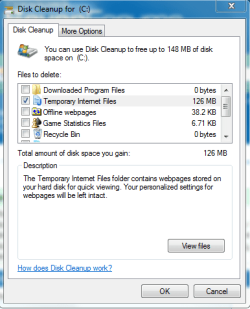
I don't use the registry cleaner, it's just for cleaning the temp files ! And i use it once per month.
You can use Disk cleanup to do this:
Capture.PNG

Also, let us know how the computer does with the OC reset back to normal.
 

My Computer My Computer

Computer type
PC/Desktop
Computer Manufacturer/Model Number
Custom Asus Build
OS
Microsoft Windows 8.1 Pro 64-bit
CPU
Intel(R) Core(TM) i3-4130 CPU @ 3.40GHz
Motherboard
B85M-E
Memory
8.00 GB
Graphics Card(s)
None
Sound Card
Realtek High Definition Audio
Monitor(s) Displays
Asus 23.6" Monitor
Screen Resolution
1920 x 1080 x 32 bits (4294967296 colors) @ 60 Hz
Hard Drives
INTEL SSDSC2BW180A4
Samsung SSD 840 PRO Series
PSU
Seasonic S12II-380Bronze
Case
Lian Li
Cooling
Fan, Passive
Keyboard
Logitech K120
Mouse
Microsoft Touch Mouse
Internet Speed
4ms Ping, 19.0 Mbps Download, 19.0 Mbps Upload
Antivirus
Eset Endpoint
Browser
Internet Explorer, Chrome
Here is the dmp file. I didn't have the time to play since Saturday when i've reset my bios settings and repair the corrupted cluster, so i don't know if the problem is solve.

Anyway, I've checked the event viewer today, and i don't have any more searchIndexer error. But now i've something else... TaskScheduler Event 413:

"Le service du Planificateur de tâches n’a pas pu charger de tâches au démarrage du service. Données supplémentaires*: Valeur de l’erreur*: 2147549183."

Any clue what this is? I'm getting tired of all the errors ;p
But thanks for ur assists ;)

Edit: when i try to launch the task scheduler, the same error keeps repeating, i'll try to trad it :
"The selected task << {0} >> doesn't exist. To see the actual task list, hit the refresh button".
When i close the window, the same window pop again.
 

Attachments

My Computer My Computer

OS
Windows 7 Pro x64

My Computer My Computer

Computer Manufacturer/Model Number
LAPTOP. HP Pavilion dv7-4010TX .
OS
Win 7 Ultimate 64-bit. SP1.
CPU
Intel i7 -720QM.[1.6GHz Turbo Boost 2.8GHz. 6MB Cache.]
Memory
8 DDR 3 RAM. 1066MHZ
Graphics Card(s)
ATI 1024 MB. DDR3. Radeon HD5650
Monitor(s) Displays
17.3" High Definition Brightview LCD. LED Backlit.
Screen Resolution
1600 x 900.
Hard Drives
640GB
Case
Laptop / notebook.
Mouse
Logitech Anywhere mouse. MX.
Internet Speed
ADSL [ but too slow ]
Hmm no, i've bought it 3 years ago ;p and it was in kit, i assemble it myself, so no warranty.
Maybe it's due to the overclock, but it'll be strange since i've done it 2 and a half years ago.

I've already done the MemTest86+ test, no error. I'll try the stress test of CPU & GPU.
 

My Computer My Computer

OS
Windows 7 Pro x64
Overclocks wear out computers faster, so I would think your hardwear is starting to fail. Even if it was a good clock
 

My Computer My Computer

Computer type
PC/Desktop
Computer Manufacturer/Model Number
Custom Asus Build
OS
Microsoft Windows 8.1 Pro 64-bit
CPU
Intel(R) Core(TM) i3-4130 CPU @ 3.40GHz
Motherboard
B85M-E
Memory
8.00 GB
Graphics Card(s)
None
Sound Card
Realtek High Definition Audio
Monitor(s) Displays
Asus 23.6" Monitor
Screen Resolution
1920 x 1080 x 32 bits (4294967296 colors) @ 60 Hz
Hard Drives
INTEL SSDSC2BW180A4
Samsung SSD 840 PRO Series
PSU
Seasonic S12II-380Bronze
Case
Lian Li
Cooling
Fan, Passive
Keyboard
Logitech K120
Mouse
Microsoft Touch Mouse
Internet Speed
4ms Ping, 19.0 Mbps Download, 19.0 Mbps Upload
Antivirus
Eset Endpoint
Browser
Internet Explorer, Chrome
"Le service du Planificateur de tâches n’a pas pu charger de tâches au démarrage du service. Données supplémentaires*: Valeur de l’erreur*: 2147549183."
The french means this, according to Google - "The Task Scheduler service failed to load tasks when starting the service. Additional Data: 2147549183."

Does this help you out any: Troubleshooting Task Scheduler

Also, this may help you out if you read through it: http://social.technet.microsoft.com...l/thread/1f677dd3-bdb7-4650-9164-d8e2c66b7708

:warn: Be very careful in the registry!
 

My Computer My Computer

Computer type
PC/Desktop
Computer Manufacturer/Model Number
Custom Asus Build
OS
Microsoft Windows 8.1 Pro 64-bit
CPU
Intel(R) Core(TM) i3-4130 CPU @ 3.40GHz
Motherboard
B85M-E
Memory
8.00 GB
Graphics Card(s)
None
Sound Card
Realtek High Definition Audio
Monitor(s) Displays
Asus 23.6" Monitor
Screen Resolution
1920 x 1080 x 32 bits (4294967296 colors) @ 60 Hz
Hard Drives
INTEL SSDSC2BW180A4
Samsung SSD 840 PRO Series
PSU
Seasonic S12II-380Bronze
Case
Lian Li
Cooling
Fan, Passive
Keyboard
Logitech K120
Mouse
Microsoft Touch Mouse
Internet Speed
4ms Ping, 19.0 Mbps Download, 19.0 Mbps Upload
Antivirus
Eset Endpoint
Browser
Internet Explorer, Chrome
So i've played a little yesterday, and i didn't have a new crash with 0x124 error, but i'm still having small freeze regularly... (every 1 or 2mn) Really weird since i was playing a game that didn't required a lot of ressource...

So I guess i tried to re-install win7 next week, and i'll see if it changes anything. btw i've done the cpu stress test and it didn't show any error. I'll try tonight to resolve the task scheduler problem, it's exactly the same error that the one in ur second link, the guy said that he resolves it by moving away some tasks in system32\Tasks : can i do the same? ;p
 

My Computer My Computer

OS
Windows 7 Pro x64
Back
Top