
xbox 360 and wmp12

DeZ

New member
Local time
1:55 PM
Messages
8
Location
Scotland
I am having some issues with the above, and am tearing my hair out trying to find a solution. My xbox can see the music and photo's from my pc, but when i try to open a mp3 or photo with the xbox it hangs for a few seconds then returns a circle with a line through it.

I have looked at the streaming options on wmp12, and automatically allow devices to play media is ticked, i try to tick allow remote control of my player, a message pops up asking if i want to allow remote control on this network so i click on it, check allow remote again to find it hasn't worked.

Also, play to is completely grayed out, no matter what i do it won't change. Also, when i goto more streaming options, all the other devices have a green play icon over them, but the xbox doesn't :(

I am able to see/play the files fine through MCE, that's great, when it doesn't lose my xbox.
 

Attachments
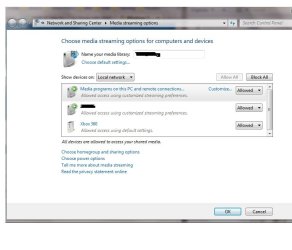
  • media.jpg
    media.jpg
    44.7 KB · Views: 91

My Computer My Computer

Computer Manufacturer/Model Number
Own Make
OS
Windows 7 Ultimate 64
CPU
E5200
Motherboard
Asrock N7AD-SLI
Memory
Samsung DDRII 4gig
Graphics Card(s)
Ati Radeon 2400HD
Sound Card
On board
Monitor(s) Displays
Digimate 19"
I'm pretty certain that you need XBMC to transfer files between a first gen XBOX and PC.

About | XBMC

If you're talking about an XBOX 360 then you need media center extender.

Also, you need to download the DivX program and AC3 audio codec to play most video files.
 

My Computer My Computer

Computer Manufacturer/Model Number
Apple Macbook Pro (April 2009)
OS
W7 Ult. x64 | OS X
CPU
Intel Mobile Core 2 Duo 2.93Ghz [T9800 Penryn]
Motherboard
NVIDIA nForce 730i Rev. B1 [Mac-F2268EC8 (U2E1)]
Memory
4096MB Samsung DDR3 Dual Channel [PC3-8500F 1066Mhz]
Graphics Card(s)
NVIDIA GeForce 9600M GT 512MB [G96M Rev. C1]
Sound Card
SB X-Fi Surround 5.1 USB | Onboard Realtek (Disabled)
Monitor(s) Displays
Acer x223wbd 22" | Apple Anti-Glare 17" (Disabled)
Screen Resolution
{Current} 1440x900 {Acer} 1680x1050 {Apple} 1920x1200
Hard Drives
{Internal}
Seagate Momentus 320GB 2.5" 7200RPM [ST9320421AS]

{Externals}
LaCie 320GB USB 2.0 HDD [301284UR]
LaCie 750GB USB 2.0 FW400 eSATA HDD [301314U]
LaCie 1TB USB 2.0 HDD [301304UR]
PSU
Magsafe
Case
Aluminum/Unibody (MBP52)
Cooling
2 x 6000 RPM Fans
Keyboard
Logitech G-15v2 [PN 920-000379]
Mouse
Logitech G-9 [PN 910-000338]
Internet Speed
12Mbps/2.5Mbps w/ 24Mbps Speed Boost [Comcast]
Other Info
Logitech X-540 Speakers [PN 970223-0122]
Sennheiser PC-151 Headset
If you're talking about an XBOX 360 then you need media center extender.

Also, you need to download the DivX program and AC3 audio codec to play most video files.

You don't need to use it as a media center extender. You can share it from just WMP. Most issues I have seen regarding Xbox connecting to Windows 7 have been networking related. Usually router settings. Wireless networks just cause even more heartache to the mix. If you have wireless involved, I would recommend hardwiring if possible. Or port forwarding or blocked ports on the router.
 

My Computer My Computer

OS
Windows 7
CPU
i5-750
Motherboard
Asus
Memory
4GB DDR3 1600
Graphics Card(s)
GT220
I'm pretty certain that you need XBMC to transfer files between a first gen XBOX and PC.

About | XBMC

If you're talking about an XBOX 360 then you need media center extender.

Also, you need to download the DivX program and AC3 audio codec to play most video files.

Sorry, should have made it clearer. It's the Xbox 360 i am having issues with. I have divx installed and can stream mkv, divx and so on with media center, it's just simple mp3 and photo streaming on the xbox dashboard that i am having issues with :(
 

My Computer My Computer

Computer Manufacturer/Model Number
Own Make
OS
Windows 7 Ultimate 64
CPU
E5200
Motherboard
Asrock N7AD-SLI
Memory
Samsung DDRII 4gig
Graphics Card(s)
Ati Radeon 2400HD
Sound Card
On board
Monitor(s) Displays
Digimate 19"
If you're talking about an XBOX 360 then you need media center extender.

Also, you need to download the DivX program and AC3 audio codec to play most video files.

You don't need to use it as a media center extender. You can share it from just WMP. Most issues I have seen regarding Xbox connecting to Windows 7 have been networking related. Usually router settings. Wireless networks just cause even more heartache to the mix. If you have wireless involved, I would recommend hardwiring if possible. Or port forwarding or blocked ports on the router.

I am using the Xbox 360 on a wireless network with the wireless n adapter, using MCE to stream is not a problem (except sometimes MCE and MC don't see each other). What is bugging me, is i can see the music files on the xbox, but they won't play, just gives me a circle with a line after a few seconds.
 

My Computer My Computer

Computer Manufacturer/Model Number
Own Make
OS
Windows 7 Ultimate 64
CPU
E5200
Motherboard
Asrock N7AD-SLI
Memory
Samsung DDRII 4gig
Graphics Card(s)
Ati Radeon 2400HD
Sound Card
On board
Monitor(s) Displays
Digimate 19"
Is the PC on wireless as well?
 

My Computer My Computer

OS
Windows 7
CPU
i5-750
Motherboard
Asus
Memory
4GB DDR3 1600
Graphics Card(s)
GT220

My Computer My Computer

Computer Manufacturer/Model Number
Own Make
OS
Windows 7 Ultimate 64
CPU
E5200
Motherboard
Asrock N7AD-SLI
Memory
Samsung DDRII 4gig
Graphics Card(s)
Ati Radeon 2400HD
Sound Card
On board
Monitor(s) Displays
Digimate 19"
Back
Top