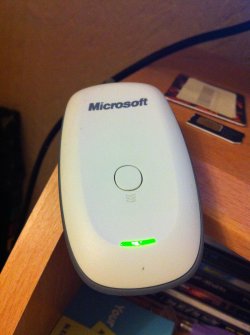
hi
I'm trying to install my Xbox 360 wireless control on my PC I didnt found the specific reciever in my city so I bought dedicated charging and connecting cable
my operation system Windows 7 ultimate 32bit.
the window detect the device as Xbox 360 Wireless Controller via Play & Charge Kit
put in device and printer category it's unspecified
and all of my game can't detect the device
you opinion please
My Computer
OS
Windows 7 Ultimate x64, Windows 7 Home Premium 32bit.
unfortunately, you will need a wireless receiver to use your wireless xbox controller, even if you have a play and charge kit, it will still be using wireless signals to connect to the PC.
My Computer
Computer type
PC/Desktop
Computer Manufacturer/Model Number
Custom Build
OS
Windows 7 Ultimate x64 SP1
CPU
Intel Q6600 @ 2.6Ghz
Motherboard
Evga NF78-CK-132-A 3-Way SLI
Memory
4Gb DDR2 Corsair Dominator @ 800Mhz 5-5-5-15
Graphics Card(s)
EVGA 560 GTX SC FTW 1GB
Sound Card
Realtek HD 7.1 Audio, Plantronics GameCom780 7.1 Headset
Monitor(s) Displays
Dell S2409W
Screen Resolution
1920 x 1080
Hard Drives
SanDisk SDSSDHII-120G-G25 120GB SSD
Samsung 7200RPM 750Gb SATA
Samsung 850 EVO 120GB SSD
Western Digital Green 1TB 7200RPM
PSU
Xigmatek 750W Quad sli quad core 80% eff
Case
Antec 900 Gaming Case
Cooling
Zalman CNPS9700-NT NVIDIA Tritium
Keyboard
Logitech generic keyboard, MS wireless keyboard
Mouse
Razor Lachesis Banshee V2 Blue, 4000DPI, MS wireless mouse
Internet Speed
152Mb Virgin Media Fibre Optic
Antivirus
Microsoft Security Essentials
Browser
Google Chrome
Other Info
Wireless Gaming Receiver for Windows, Wireless Xbox 360 Pad
I made a similar mistake when I was getting an Xbox controller that would work with my computer, but as imeem and MrNeeds said you need the wireless receiver, because the play and charge kit isn't meant for sending signals for games through the cable. The cable is meant only for charging the controller, this is the same when its connected to the Xbox. Even though its plugged in the wireless controller still only transmits data wirelessly, the cable only charges the controller. I believe that's why it doesn't work like that.
My Computer
OS
Microsoft Windows 7 Home Premium 64-bit 7601 Multiprocessor Free Service Pack 1
CPU
Intel(R) Core(TM)2 Quad CPU Q6600 @ 2.40GHz
Motherboard
Dell Inc. 0FM586
Memory
6.00 GB
Graphics Card(s)
NVIDIA GeForce GTS 450
Sound Card
(1) NVIDIA High Definition Audio (2) NVIDIA High Definitio
Monitor(s) Displays
LG Flatron W2361V
Screen Resolution
1920 x 1080 x 32 bits (4294967296 colors) @ 60 Hz
Hard Drives
(1) WDC WD6400AAKS-75A7B0 ATA Device (2) SanDisk Cruzer USB Device (3) TEAC USB HS-CF Card USB Device (4) TEAC USB HS-MS Card USB Device (5) TEAC USB HS-SD Card USB Device (6) TEAC USB HS-xD/SM USB Device
Case
Dell Inspirion 560
Keyboard
Microsoft Wireless Keyboard 3000 v2.0
Mouse
Microsoft Wireless Mouse 5000
Internet Speed
1.61 Mbps download and .32 Mbps upload (Speedtest.net)
play and charge does the same on the 360, only difference is the 360 has the built in wireless receiver.
Play and Charge does not make a wireless controller into a wired one.