
Solved XFX MB-750I + q9550 Quad Core = absolute instability ,Lockups. HELP!

XFX 750i Motherboard is a good buy?

  • Yes, it is a good Buy

    Votes: 0 0.0%
  • Stay away from this BRAND - XFX, and this XFX 750i Motherboard.

    Votes: 0 0.0%

  • Total voters
    1

Amapola

New member
Local time
4:33 PM
Messages
16
Hey guys! I came across with some instability over my system..its been going on for years, so I simply not used my PC for months because of that. Check my specs. I heard about something about compitability issues between Quad cores and XFX 750i, but now I have no video signal randomly from my video card, sticked into XFX Mobo.
I have checked the other thread http://www.sevenforums.com/hardware...ng-my-xfx-nforce-sli-750i-mobo-advices-3.html

Now I even cant access BIOS, no video signal..so easily changing voltage for the core would not be that easy.

First. My video card is not burned and works normally on different systems - have checked it elsewhere.
Second. The system and OS had been randomly working for hours and days..with both Stress test on video (FurMask) and on CPU applied (prime95) for 10-15 minutes = no mistakes,errors or freezes. (Even though the other day, it did freeze)
Third. All parts of current build mounted on different systems worked just fine, as usual, no BSOD or anything.
Fourth. Dishonored and Battlefield 3 games were running on it Maxed out with out lags, just randomly freezing and randomly running for hours.

Any advises what to do?, Currently no video signal is present + randomly appearing to give access to XFX screen logo or bios, sometimes to Windows in Safe Mode, but no stable user possibility of using PC.

Honestly, unpredictable mysterious behavior of my PC.
 
Last edited:

My Computer My Computer

At a glance

Windows 7 Ultimate x64Intel Core2Quad q9550 2.83Ghz 12mb cacheOCZ DDR2 PC2-8500 Fatal1ty Edition Dual Chann...HIS HD 4870 IceQ 4+ Turbo 1GB (256bit) GDDR5 ...
OS
Windows 7 Ultimate x64
CPU
Intel Core2Quad q9550 2.83Ghz 12mb cache
Motherboard
XFX NForce MB-750I- SLI - 72P9
Memory
OCZ DDR2 PC2-8500 Fatal1ty Edition Dual Channel (4Gb:2X2GB)
Graphics Card(s)
HIS HD 4870 IceQ 4+ Turbo 1GB (256bit) GDDR5 PCIe
Sound Card
Real HD on board MOBO
Hard Drives
SAMSUNG HD161HJ 160GB 7200 RPM 8MB Cache SATA 3.0Gb/s 3.5" Hard Drive -Bare Drive
PSU
Ultra LSP750 750-Watt Power Supply - ATX, SATA-Ready, SLI-Re
Cooling
Case Fans - 4 Fans in total (excluding video card, CPU Fans)
Hello Amapola!

I had a friend build a PC around an XFX 750i and Q9550 system. It ran very well, and I would not be surprised if it is still running to this day!
Personally I have run several 680i, 780i and 790i SLI NVIDIA chipset systems of all types and brands.
Please perform troubleshooting precautions on your hardware and bring it down to the minimum possible specification to take stress off your motherboard chips.

Get your motherboard manual handy as you might need to refer to it, and be ready to watch the little OSD panel on your motherboard for any error codes.

  • Take as much RAM as you can out of the system, leaving only a single module.
  • Reset your BIOS using the onboard BIOS jumper configuration. Refer to manual if unsure.
  • Ensure your GPU is in the primary PCIe slot, and it isn't being obstructed, is plugged in properly to power, etc.
    If possible, replace it with a standard VGA adapter or something else lighter that doesn't require as much power.
  • Ensure all cable connections are nice and tight.
  • Unplug all drives from the system, including the optical medium drive.
  • Unplug everything except for your keyboard and the video cable from USB/etc.
When you have performed the above, proceed to turn the machine on.
If you can get in to your BIOS, check all of your performance monitoring settings. Is the CPU running at a decent temperature? Are there any foreign devices or errors noted in any of the menus?


If you are unable to boot and there isn't an error code on the OSD at all, then I will recommend rebuilding your system, starting with reseating the CPU heatsink, as these boards will not perform a POST at all if the heatsink is on too tight or too heavy for the board. Sometimes, but rarely, I have managed to turn the computer on its side and avoid this, but that would only be temporary. It is a known issue for heavy heatsinks to affect the motherboard's ability to POST.


Failing all of this...

  • Unplug the 24-pin ATX power cable from the motherboard.
    Observe it closely. Are any of the pins scorched? Look at the plastic on the motherboard. Are they damaged?
    I have found that these older NVIDIA motherboards will burn their power ports to death, as I have experienced this on more than one occasion (on a 680i SLI and 790i).
    This might have something to do with newer GPUs being too demanding of the system and/or its ancient power management in conjunction with it.
  • If scorched, your system is irreparably damaged and any attempt to repair it will be in vain.
  • If everything looks fine and you are certain your motherboard is not overburdened by a heavy/tightened heat sink, then the only thing I can of is that the motherboard is not remaining grounded. Is it elevated from the case? Is there any metal making contact with the case from the motherboard?
  • Do you have another power supply to test? It's unlikely, but at this point it would be worth trying.
Unfortunately the NVIDIA chipset(s) are very temperamental, more so when utilizing today's parts and hardware with them, forcing you to be careful and selective about what you do with the system. I have even gone to extremes to make sure it stays cool and runs at the most stable settings possible, even when pushing the boundaries.


The reason why I have asked you to follow these instructions is so you can manage to get in to the system and check the BIOS version. You may need the latest one to fix all stability issues that your motherboard may have had prior to any BIOS updates. If your motherboard is an early release model, it might not be prepared for the Core 2 Quad series, which was usually addressed via a BIOS update.


If you are having any form of success then I would advise you to perform this BIOS update after booting once in to Windows.


Please report back with any of your findings in as much detail as possible. Minor details are important too.
 

My Computer My Computer

At a glance

Windows 8 Pro x64i7 3820 @ 4.68GHzF3-12800CL9D-8GBXL (32GB)GTX 480 SLI
Computer type
PC/Desktop
OS
Windows 8 Pro x64
CPU
i7 3820 @ 4.68GHz
Motherboard
ASUS Rampage IV Extreme RoG BF3
Memory
F3-12800CL9D-8GBXL (32GB)
Graphics Card(s)
GTX 480 SLI
Sound Card
Auzentech X-Fi HomeTheater HD
Monitor(s) Displays
Sony 32V5500
Screen Resolution
1920 x 1080
Hard Drives
LSI MR9260-4i (RAID10):
Toshiba DT01ACA300 x 4
iaStorA:
OCZ Vertex Enterprise 120GB
ST3500320AS 500GB
Intel 520 Series 120GB
PSU
OCZ ZX 1250W
Case
HAF X
Cooling
H80
Keyboard
Cyborg V.7
Mouse
Razer Lachesis 3.5G 5600dpi
Internet Speed
23296kbps ds / 812kbps us ADSL2+
Browser
Mozilla/5.0 (Windows NT 6.3; Win64; x64; rv:32.0) Gecko/2010
Other Info
AverMedia C127 Game Broadcaster HD
Thank you, for quick response. I will take my time to cautiously follow your instructions, probably with a help of some tech guy i know. I will soon post my findings.
 

My Computer My Computer

At a glance

Windows 7 Ultimate x64Intel Core2Quad q9550 2.83Ghz 12mb cacheOCZ DDR2 PC2-8500 Fatal1ty Edition Dual Chann...HIS HD 4870 IceQ 4+ Turbo 1GB (256bit) GDDR5 ...
OS
Windows 7 Ultimate x64
CPU
Intel Core2Quad q9550 2.83Ghz 12mb cache
Motherboard
XFX NForce MB-750I- SLI - 72P9
Memory
OCZ DDR2 PC2-8500 Fatal1ty Edition Dual Channel (4Gb:2X2GB)
Graphics Card(s)
HIS HD 4870 IceQ 4+ Turbo 1GB (256bit) GDDR5 PCIe
Sound Card
Real HD on board MOBO
Hard Drives
SAMSUNG HD161HJ 160GB 7200 RPM 8MB Cache SATA 3.0Gb/s 3.5" Hard Drive -Bare Drive
PSU
Ultra LSP750 750-Watt Power Supply - ATX, SATA-Ready, SLI-Re
Cooling
Case Fans - 4 Fans in total (excluding video card, CPU Fans)
The findings after following the above instruction! Result!

  • removed one stick of 2gb Ram, one was left seated inside (2gb)
  • Removed the only one HDD,powered off, SATA unplugged, where windows is installed
  • !!!FORGOT to remove DVD-ROM
  • !!!FORGOT to remove mouse
  • Did not use a lighter VGA adapter at the moment, don't have one (maybe I will). I used my HIS HD 4870 IceQ 4+ Turbo 1GB (256bit) GDDR5 PCIe, which did not give the video signal before.


I powered on the machine, the first screen I see is this =>
6r2hac.jpg


  • Then I press DEL...and it loads the components, please follow the link on sendspace to watch the video of my screen, and how I navigate through menus. I checked each tab separately including H/W monitor to show my voltage and temps. I will tell you ahead of time the temp and voltage seem just normal (hence the system at least boots into BIOS), but for the details of SB and NB watch the video. Download Video.wmv from Sendspace.com - send big files the easy way - BOOTING VIDEO

  • The debug led, showed gradually changing codes. I started shooting right away as I pressed the power on button,the camera was facing the debug led in the first place. I shot this video when I powered on the machine second or third time, after the successful first time. Without HDD hooked up, obviously, it ends up asking for OS. Download Debug Light.wmv from Sendspace.com - send big files the easy way - DEBUG LED
My bios version is the last version released for XFX 750I Mobo. Please follow the link to see it Index of /Support/BIOS/Motherboard/750i
Also to download the Manual for XFX Mobo go there Index of /Support/Manuals/Nforce7

Even following partially your instructions, it gave result.


OK, so we passed that stage, What's next!?


PS: Also here is an earlier picture taken during my struggle with PC yesterday, notice incorrect Mhz shown for my CPU =>
2conc43.jpg
 

My Computer My Computer

At a glance

Windows 7 Ultimate x64Intel Core2Quad q9550 2.83Ghz 12mb cacheOCZ DDR2 PC2-8500 Fatal1ty Edition Dual Chann...HIS HD 4870 IceQ 4+ Turbo 1GB (256bit) GDDR5 ...
OS
Windows 7 Ultimate x64
CPU
Intel Core2Quad q9550 2.83Ghz 12mb cache
Motherboard
XFX NForce MB-750I- SLI - 72P9
Memory
OCZ DDR2 PC2-8500 Fatal1ty Edition Dual Channel (4Gb:2X2GB)
Graphics Card(s)
HIS HD 4870 IceQ 4+ Turbo 1GB (256bit) GDDR5 PCIe
Sound Card
Real HD on board MOBO
Hard Drives
SAMSUNG HD161HJ 160GB 7200 RPM 8MB Cache SATA 3.0Gb/s 3.5" Hard Drive -Bare Drive
PSU
Ultra LSP750 750-Watt Power Supply - ATX, SATA-Ready, SLI-Re
Cooling
Case Fans - 4 Fans in total (excluding video card, CPU Fans)
This is very good news.


  • The next step would be to plug your OS drive in and boot in to it.

  • When you've booted in to Windows, navigate through it normally and perform a CPU stress test if you would like.
Please note the clock rate that it is running, which should be the standard 333x8.5 for 2.83GHz.
It looks like your motherboard has configured this.

Your temperatures look excellent and everything else in the BIOS configuration was fine.

The only thing I can see out of the ordinary is your RAM, which is 1066MHz DDR2 memory that you are running at 800MHz.
This is okay, but it might be stressful for the chipset to manage, especially if you were trying to run it at 1066MHz prior to this issue.


  • Now that your CPU is passing tests, turn it off and put the other RAM module back in.
How are things looking now?


  • Double check that nothing changes in your CPU and memory clocking in the BIOS.

  • Double check that the temperature of everything isn't too much different with the second module in the board.

Everything looking fine? Time to run Memtest.
http://www.sevenforums.com/tutorials/105647-ram-test-memtest86.html
 

My Computer My Computer

At a glance

Windows 8 Pro x64i7 3820 @ 4.68GHzF3-12800CL9D-8GBXL (32GB)GTX 480 SLI
Computer type
PC/Desktop
OS
Windows 8 Pro x64
CPU
i7 3820 @ 4.68GHz
Motherboard
ASUS Rampage IV Extreme RoG BF3
Memory
F3-12800CL9D-8GBXL (32GB)
Graphics Card(s)
GTX 480 SLI
Sound Card
Auzentech X-Fi HomeTheater HD
Monitor(s) Displays
Sony 32V5500
Screen Resolution
1920 x 1080
Hard Drives
LSI MR9260-4i (RAID10):
Toshiba DT01ACA300 x 4
iaStorA:
OCZ Vertex Enterprise 120GB
ST3500320AS 500GB
Intel 520 Series 120GB
PSU
OCZ ZX 1250W
Case
HAF X
Cooling
H80
Keyboard
Cyborg V.7
Mouse
Razer Lachesis 3.5G 5600dpi
Internet Speed
23296kbps ds / 812kbps us ADSL2+
Browser
Mozilla/5.0 (Windows NT 6.3; Win64; x64; rv:32.0) Gecko/2010
Other Info
AverMedia C127 Game Broadcaster HD
Alright, so I have some update on my case.

  1. I did get into Windows OS, and performed prime95 test, and metset86 , but just for 11 percent - NO ERRORS, and stopped it myself, shutdown the PC normally. I rebooted the PC just to test..and it would lockup during process 3-4 times in early stages of booting of OS.
  2. Once booted properly. However, the PC Locked up, after some time randomly.
  3. Again had a random no video signal issue coming up, and disappearing by following your previous instruction I was fixing it.
  4. Also, when I changed by 800 ddr2 RAm speed to 1066 speed, i got some "checksum" message ... did not take picture of that, it went away too quickly.
  5. After that, I tried to change my voltage for CPU but a few notches like from 1.09 to 1.120. No success, no booting into OS.
  6. With RAM set to 1066, the PC would not boot OS but instead reset itself, I tested it umber of time, and reset to defaults.
  7. I will have another not OCZ RAm just to start my PC, to see whether it is faulty, as I don't have a chance to check in OS, it might simply freeze during process or something. Can I do it from DOS or something?


So, a few hours of checking - obviously no normal access to OS or other usual PC features.

I have seen in Many places that, RAM timings and voltage has to be set manually for the XFX MOBO as well as CPU voltage, tell me something on that. I think this seems to be the problem, if anything ask me to take pictures or video for more details to see.
 

My Computer My Computer

At a glance

Windows 7 Ultimate x64Intel Core2Quad q9550 2.83Ghz 12mb cacheOCZ DDR2 PC2-8500 Fatal1ty Edition Dual Chann...HIS HD 4870 IceQ 4+ Turbo 1GB (256bit) GDDR5 ...
OS
Windows 7 Ultimate x64
CPU
Intel Core2Quad q9550 2.83Ghz 12mb cache
Motherboard
XFX NForce MB-750I- SLI - 72P9
Memory
OCZ DDR2 PC2-8500 Fatal1ty Edition Dual Channel (4Gb:2X2GB)
Graphics Card(s)
HIS HD 4870 IceQ 4+ Turbo 1GB (256bit) GDDR5 PCIe
Sound Card
Real HD on board MOBO
Hard Drives
SAMSUNG HD161HJ 160GB 7200 RPM 8MB Cache SATA 3.0Gb/s 3.5" Hard Drive -Bare Drive
PSU
Ultra LSP750 750-Watt Power Supply - ATX, SATA-Ready, SLI-Re
Cooling
Case Fans - 4 Fans in total (excluding video card, CPU Fans)
I have seen in Many places that, RAM timings and voltage has to be set manually for the XFX MOBO as well as CPU voltage, tell me something on that. I think this seems to be the problem, if anything ask me to take pictures or video for more details to see.

Yes, because often we are using components that were released after the board's final BIOS update, and the hardware is not that good at running newer things, like your RAM for example. Do not adjust your voltages or clock rates. This is counter-productive. You were supposed to keep the system stable so you could do a memtest on your RAM. Keep it powered off for a while and try again starting from the top. You'll have to unplug everything again. This motherboard is extremely temperamental and overvolting or overclocking components will only fan the flames.


  • You really need to check those temperatures before the second module is inserted and then after.
  • Rather than playing with your clock rates and voltages, please run Memtest the second you can and let it finish.
    I have left a link for you in my previous post that explains any processes you need to take to do it.
  • You also did not mention whether you put the second module in after getting the system to boot stable.
    This is crucial detail, now you've confused me.
  1. Also, when I changed by 800 ddr2 RAm speed to 1066 speed, i got some "checksum" message ... did not take picture of that, it went away too quickly.
  2. After that, I tried to change my voltage for CPU but a few notches like from 1.09 to 1.120. No success, no booting into OS.
  3. With RAM set to 1066, the PC would not boot OS but instead reset itself, I tested it umber of time, and reset to defaults.
Of course this will happen. Your system can't even boot on stock settings and you're asking it to go beyond that!
Your RAM might be rated at 1066MHz but as far as your motherboard is concerned that is still overclocking.
Overvolting is also not recommended. Please don't do any of these things again until you have rectified your stability issues.


You'll have to reset your BIOS configuration and try again.
 

My Computer My Computer

At a glance

Windows 8 Pro x64i7 3820 @ 4.68GHzF3-12800CL9D-8GBXL (32GB)GTX 480 SLI
Computer type
PC/Desktop
OS
Windows 8 Pro x64
CPU
i7 3820 @ 4.68GHz
Motherboard
ASUS Rampage IV Extreme RoG BF3
Memory
F3-12800CL9D-8GBXL (32GB)
Graphics Card(s)
GTX 480 SLI
Sound Card
Auzentech X-Fi HomeTheater HD
Monitor(s) Displays
Sony 32V5500
Screen Resolution
1920 x 1080
Hard Drives
LSI MR9260-4i (RAID10):
Toshiba DT01ACA300 x 4
iaStorA:
OCZ Vertex Enterprise 120GB
ST3500320AS 500GB
Intel 520 Series 120GB
PSU
OCZ ZX 1250W
Case
HAF X
Cooling
H80
Keyboard
Cyborg V.7
Mouse
Razer Lachesis 3.5G 5600dpi
Internet Speed
23296kbps ds / 812kbps us ADSL2+
Browser
Mozilla/5.0 (Windows NT 6.3; Win64; x64; rv:32.0) Gecko/2010
Other Info
AverMedia C127 Game Broadcaster HD
  • You also did not mention whether you put the second module in after getting the system to boot stable.
    This is crucial detail, now you've confused me.
I meant that all that i have seen happening with my PC was with two sticks inside. Also, remembered one detail, when I have no POST , once, I removed the 2nd stick and It did POST with the 1st stick inside. However, the other time it would not even with the 2nd inside. Ill do Memtest.

  1. (10 minutes passed) I am updating on my situation. I numbered my RAM sticks, I have only two, the 2nd RAM would not even POST. I am testing only with my 1st RAM stick, I will see if I will be able to test the other, let this one finish.
 
Last edited:

My Computer My Computer

At a glance

Windows 7 Ultimate x64Intel Core2Quad q9550 2.83Ghz 12mb cacheOCZ DDR2 PC2-8500 Fatal1ty Edition Dual Chann...HIS HD 4870 IceQ 4+ Turbo 1GB (256bit) GDDR5 ...
OS
Windows 7 Ultimate x64
CPU
Intel Core2Quad q9550 2.83Ghz 12mb cache
Motherboard
XFX NForce MB-750I- SLI - 72P9
Memory
OCZ DDR2 PC2-8500 Fatal1ty Edition Dual Channel (4Gb:2X2GB)
Graphics Card(s)
HIS HD 4870 IceQ 4+ Turbo 1GB (256bit) GDDR5 PCIe
Sound Card
Real HD on board MOBO
Hard Drives
SAMSUNG HD161HJ 160GB 7200 RPM 8MB Cache SATA 3.0Gb/s 3.5" Hard Drive -Bare Drive
PSU
Ultra LSP750 750-Watt Power Supply - ATX, SATA-Ready, SLI-Re
Cooling
Case Fans - 4 Fans in total (excluding video card, CPU Fans)
RAM testing completed! NO ERRORS!

As I mentioned in my previous post I started testing my memory stick#1. It took several hours and It passed 5 times, stopping on the fifth time and NOT freezing but just seating there with no further progress, even Timer stopped by not counting the seconds. Even though it was evident the program did not lock up or crash and NO ERRORS found so far. Have a look at the video: Download Memtest.wmv from Sendspace.com - send big files the easy way

  • Here is the screen, so you would see "0" errors message.
  • I will try 2nd RAM in other slots, even though it did not even POSt before. I will try my luck and I will stop this LOOP memtesting of the 1st RAM stick, as it seems stuck already.
Any thoughts on what is going on?

1st RAM,1st slot
2ak9w1z.jpg


  • Tested the 1st RAm in another slot,due to the timer freezing (refer to the video above), NO ERRORS.
1st RAM, 2nd slot

2s0b6mo.jpg


  • When I put 2nd RAM in the second MOBO slot (1st RAM stick is taken out) I hear

    clipping beep (like broken wiring or something) which turns into 3 long beeps and no

    POSTing, try 3rd slot - no POSTing, and I try the fourth slot it does POST and gives

    Warning screen ,as before , in red about default settings, I reset and Memtest

    starts testing my 2nd RAM stick in fourth MOBO slot. 8 passes - NO ERRORS!
2nd RAM, 4th slot

5xpmy1.jpg


(UPDATE after 2 hours) Both RAM sticks tested simultaneously for 2 passes - NO ERRORS. (It did POST.)

Temperature of the system with both RAM sticks inside. It actually has raised up since I took picture by 3-4 degrees, up to 24 -CPU, 34-SYS.

v76om0.jpg

So, as testing proves, RAM seems not to be the problem. What is the problem of Lockups and random no POST?
 
Last edited:

My Computer My Computer

At a glance

Windows 7 Ultimate x64Intel Core2Quad q9550 2.83Ghz 12mb cacheOCZ DDR2 PC2-8500 Fatal1ty Edition Dual Chann...HIS HD 4870 IceQ 4+ Turbo 1GB (256bit) GDDR5 ...
OS
Windows 7 Ultimate x64
CPU
Intel Core2Quad q9550 2.83Ghz 12mb cache
Motherboard
XFX NForce MB-750I- SLI - 72P9
Memory
OCZ DDR2 PC2-8500 Fatal1ty Edition Dual Channel (4Gb:2X2GB)
Graphics Card(s)
HIS HD 4870 IceQ 4+ Turbo 1GB (256bit) GDDR5 PCIe
Sound Card
Real HD on board MOBO
Hard Drives
SAMSUNG HD161HJ 160GB 7200 RPM 8MB Cache SATA 3.0Gb/s 3.5" Hard Drive -Bare Drive
PSU
Ultra LSP750 750-Watt Power Supply - ATX, SATA-Ready, SLI-Re
Cooling
Case Fans - 4 Fans in total (excluding video card, CPU Fans)
I am honestly pretty stumped. You could try testing the slots individually to see if they're faulty.
 

My Computer My Computer

At a glance

Windows 8 Pro x64i7 3820 @ 4.68GHzF3-12800CL9D-8GBXL (32GB)GTX 480 SLI
Computer type
PC/Desktop
OS
Windows 8 Pro x64
CPU
i7 3820 @ 4.68GHz
Motherboard
ASUS Rampage IV Extreme RoG BF3
Memory
F3-12800CL9D-8GBXL (32GB)
Graphics Card(s)
GTX 480 SLI
Sound Card
Auzentech X-Fi HomeTheater HD
Monitor(s) Displays
Sony 32V5500
Screen Resolution
1920 x 1080
Hard Drives
LSI MR9260-4i (RAID10):
Toshiba DT01ACA300 x 4
iaStorA:
OCZ Vertex Enterprise 120GB
ST3500320AS 500GB
Intel 520 Series 120GB
PSU
OCZ ZX 1250W
Case
HAF X
Cooling
H80
Keyboard
Cyborg V.7
Mouse
Razer Lachesis 3.5G 5600dpi
Internet Speed
23296kbps ds / 812kbps us ADSL2+
Browser
Mozilla/5.0 (Windows NT 6.3; Win64; x64; rv:32.0) Gecko/2010
Other Info
AverMedia C127 Game Broadcaster HD
After 3 years of constant problems with XFX 750i mobo, i am moving to another mobo. MSI Canada ? Mainboard - P43T-C51 - my be I will try this.

What do you guys think?
 
Last edited:

My Computer My Computer

At a glance

Windows 7 Ultimate x64Intel Core2Quad q9550 2.83Ghz 12mb cacheOCZ DDR2 PC2-8500 Fatal1ty Edition Dual Chann...HIS HD 4870 IceQ 4+ Turbo 1GB (256bit) GDDR5 ...
OS
Windows 7 Ultimate x64
CPU
Intel Core2Quad q9550 2.83Ghz 12mb cache
Motherboard
XFX NForce MB-750I- SLI - 72P9
Memory
OCZ DDR2 PC2-8500 Fatal1ty Edition Dual Channel (4Gb:2X2GB)
Graphics Card(s)
HIS HD 4870 IceQ 4+ Turbo 1GB (256bit) GDDR5 PCIe
Sound Card
Real HD on board MOBO
Hard Drives
SAMSUNG HD161HJ 160GB 7200 RPM 8MB Cache SATA 3.0Gb/s 3.5" Hard Drive -Bare Drive
PSU
Ultra LSP750 750-Watt Power Supply - ATX, SATA-Ready, SLI-Re
Cooling
Case Fans - 4 Fans in total (excluding video card, CPU Fans)
Considering you can't POST with the 2nd RAM module in the 2nd or 3rd MOBO slot, it is one of the two things, the Memory or that MOBO. But considering the 1st stick can POST is all slots and the 2nd stick only is 2 of 4, I'm thinking there is something weird with that RAM module. If you bought good memory, it probably has a lifetime warranty. Exchange that one stick, it should be relatively easy, but first do one more test. Use the 1st RAM stick, unplug ALL peripherals you can; i.e. only run MOBO, CPU, RAM, and a small GPU since yours doesn't have onboard video, and test all slots with Memtest86+ booted off a CD/USB (run for a few passes each slot). Then, if those all pass, do the same with 2nd module. If you have problems again with 2nd and 3rd MOBO slot only with that module, then it probably is that module and explains freezes. Like I said earlier, get it replaced as it should be under warranty. If not under warranty or you don't want to wait, does a friend have a similar spec RAM stick you can use for testing? Once the new RAM module comes in, test it, if it has problems with the 2nd and 3rd slot, it's the MOBO.

I would do this testing first as you could be buying a new MOBO but still have the same problem if it's the RAM.
 

My Computer My Computer

At a glance

7 Home Premium 64bitIntel Core i7-26008GB GSkill Ripjaws X DDR3 1866 (PC3 14900)2 - XFX Radeon HD 6950
OS
7 Home Premium 64bit
CPU
Intel Core i7-2600
Motherboard
Asrock Z68 Extreme4 Gen3
Memory
8GB GSkill Ripjaws X DDR3 1866 (PC3 14900)
Graphics Card(s)
2 - XFX Radeon HD 6950
Sound Card
Internal
Monitor(s) Displays
23" LG
Screen Resolution
1920x1080
Hard Drives
System: 300GB WD Velociraptor
Storage: 500GB WD Caviar Black
PSU
Corsair 750HX
Case
Lian Li PC-9F
Cooling
3 - 120mm case fans. COOLER MASTER Hyper 212 EVO - CPU Coole
Keyboard
MS Sidewinder X4
Mouse
Logitech G500
Internet Speed
4Mbps ADSL
Tested RAm and SLOTS!

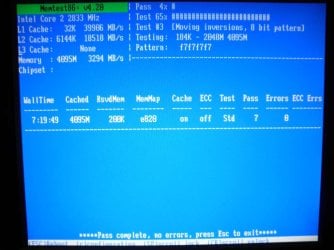
I have tested 2nd, and 3rd MOBO slots simultaneously! 4 gb! NO Errors! All slots work fine. It did POST!
Watch the screenshot. So it is not a problem than, I did test all slots so far in different configurations and possibilities watch previous posts. What might be the reason for Lock ups and Freezes?
 

Attachments

  • 2nd,3rd slots tested.jpg
    2nd,3rd slots tested.jpg
    62.8 KB · Views: 5

My Computer My Computer

At a glance

Windows 7 Ultimate x64Intel Core2Quad q9550 2.83Ghz 12mb cacheOCZ DDR2 PC2-8500 Fatal1ty Edition Dual Chann...HIS HD 4870 IceQ 4+ Turbo 1GB (256bit) GDDR5 ...
OS
Windows 7 Ultimate x64
CPU
Intel Core2Quad q9550 2.83Ghz 12mb cache
Motherboard
XFX NForce MB-750I- SLI - 72P9
Memory
OCZ DDR2 PC2-8500 Fatal1ty Edition Dual Channel (4Gb:2X2GB)
Graphics Card(s)
HIS HD 4870 IceQ 4+ Turbo 1GB (256bit) GDDR5 PCIe
Sound Card
Real HD on board MOBO
Hard Drives
SAMSUNG HD161HJ 160GB 7200 RPM 8MB Cache SATA 3.0Gb/s 3.5" Hard Drive -Bare Drive
PSU
Ultra LSP750 750-Watt Power Supply - ATX, SATA-Ready, SLI-Re
Cooling
Case Fans - 4 Fans in total (excluding video card, CPU Fans)
From your post #9 you wrote this:

When I put 2nd RAM in the second MOBO slot (1st RAM stick is taken out) I hear
clipping beep (like broken wiring or something) which turns into 3 long beeps and no
POSTing, try 3rd slot - no POSTing, and I try the fourth slot it does POST and gives
Warning screen ,as before , in red about default settings, I reset and Memtest
starts testing my 2nd RAM stick in fourth MOBO slot. 8 passes - NO ERRORS!

This to me points to a bad RAM stick. However, if you tested all RAM slots and everything tests fine (each stick by itself in every slot), then we are onto something new. It can be power - voltage levels dropping can wreak havoc on a system. Do you have "brownouts" in your area? Is it on a UPS? If it is on UPS, is the power supply bad? Heat can be an issue too. Have you ever removed the CPU fan, cleaned the contact points, put some new thermal compound on and reseated it?

My problem ended up being a timing problem with Windows 8 and a power problem when I was running Windows 7. I live in Africa and we have brownouts, which would cause my computer to lock up. A UPS fixed the problem, now I haven't had a lock up in many months.
 

My Computer My Computer

At a glance

7 Home Premium 64bitIntel Core i7-26008GB GSkill Ripjaws X DDR3 1866 (PC3 14900)2 - XFX Radeon HD 6950
OS
7 Home Premium 64bit
CPU
Intel Core i7-2600
Motherboard
Asrock Z68 Extreme4 Gen3
Memory
8GB GSkill Ripjaws X DDR3 1866 (PC3 14900)
Graphics Card(s)
2 - XFX Radeon HD 6950
Sound Card
Internal
Monitor(s) Displays
23" LG
Screen Resolution
1920x1080
Hard Drives
System: 300GB WD Velociraptor
Storage: 500GB WD Caviar Black
PSU
Corsair 750HX
Case
Lian Li PC-9F
Cooling
3 - 120mm case fans. COOLER MASTER Hyper 212 EVO - CPU Coole
Keyboard
MS Sidewinder X4
Mouse
Logitech G500
Internet Speed
4Mbps ADSL
I don't think I can troubleshoot this without being on site. As I have mentioned these motherboards are extremely temperamental. You may want to try running with just one memory module for an extended period of time just for clarification purposes.

Otherwise you're stuck in an endless process of trial & error until you find a solution.

Also bare in mind that you need to run Memtest for 24+ hours for such dubious issues.
 

My Computer My Computer

At a glance

Windows 8 Pro x64i7 3820 @ 4.68GHzF3-12800CL9D-8GBXL (32GB)GTX 480 SLI
Computer type
PC/Desktop
OS
Windows 8 Pro x64
CPU
i7 3820 @ 4.68GHz
Motherboard
ASUS Rampage IV Extreme RoG BF3
Memory
F3-12800CL9D-8GBXL (32GB)
Graphics Card(s)
GTX 480 SLI
Sound Card
Auzentech X-Fi HomeTheater HD
Monitor(s) Displays
Sony 32V5500
Screen Resolution
1920 x 1080
Hard Drives
LSI MR9260-4i (RAID10):
Toshiba DT01ACA300 x 4
iaStorA:
OCZ Vertex Enterprise 120GB
ST3500320AS 500GB
Intel 520 Series 120GB
PSU
OCZ ZX 1250W
Case
HAF X
Cooling
H80
Keyboard
Cyborg V.7
Mouse
Razer Lachesis 3.5G 5600dpi
Internet Speed
23296kbps ds / 812kbps us ADSL2+
Browser
Mozilla/5.0 (Windows NT 6.3; Win64; x64; rv:32.0) Gecko/2010
Other Info
AverMedia C127 Game Broadcaster HD
The thread is closed! I Moved to another MOBO! People beware of XFX 750i mobo, you will suffer dealing with it.
 

My Computer My Computer

At a glance

Windows 7 Ultimate x64Intel Core2Quad q9550 2.83Ghz 12mb cacheOCZ DDR2 PC2-8500 Fatal1ty Edition Dual Chann...HIS HD 4870 IceQ 4+ Turbo 1GB (256bit) GDDR5 ...
OS
Windows 7 Ultimate x64
CPU
Intel Core2Quad q9550 2.83Ghz 12mb cache
Motherboard
XFX NForce MB-750I- SLI - 72P9
Memory
OCZ DDR2 PC2-8500 Fatal1ty Edition Dual Channel (4Gb:2X2GB)
Graphics Card(s)
HIS HD 4870 IceQ 4+ Turbo 1GB (256bit) GDDR5 PCIe
Sound Card
Real HD on board MOBO
Hard Drives
SAMSUNG HD161HJ 160GB 7200 RPM 8MB Cache SATA 3.0Gb/s 3.5" Hard Drive -Bare Drive
PSU
Ultra LSP750 750-Watt Power Supply - ATX, SATA-Ready, SLI-Re
Cooling
Case Fans - 4 Fans in total (excluding video card, CPU Fans)
Back
Top