
Solved XFX One +Plus 1GB ATI Radeon HD 5450 Aero Issues

Alexeon

3 Times Slower
Local time
9:37 PM
Messages
11
Hi, this is my first post here. I just got a new graphics card to replace an old one that died on me a few months back and while it works, Windows isn't letting me use Aero with it. Here is the story:

I had my old graphics card and it died on me while I was doing some cleaning on the PC. I guess I touched it with some static or something. So, I went to using the on-board graphics from my mobo and it worked fine. Aero worked, I had dual monitors, etc. It was just a bit slow with Youtube videos (it would take a few seconds before playing video even while audio was already playing.) Not a big deal, its both on-board graphics and outdated so it was to be expected. Eventually, my little brother got a new graphics card for his PC because he games a lot on his (I prefer gaming on the PS3 so graphics aren't a big deal on my PC, but I have noticed that programs compile slower since I switched to my mobo's graphics card so that was the incentive for me to switch.) Before the upgrade, his PC, also running Windows 7 Pro, had Aero and worked just fine. I upgraded his card yesterday and installed drivers and everything is fine with his. As thanks, he gave me his old card which I just installed on my PC today. Unfortunately, while Windows detects the card, and I was able to install the latest drivers and everything, I can't get Aero to work on with it. I know the card can handle it because it ran on my little brother's PC. My PC ran Aero before the upgrade, too, so it's not something else, either. I did a lot of reading today and was lead to the Performance Options where you can enable or disable fancy graphics features for Windows. There should be Aero options since I have Windows 7 Pro but I am actually missing a lot of options, based on screenshots from around the web.

Things I've tried:
I reran the Windows rating, to see if maybe it requires that. I got a 4.1 as my lowest score (Desktop Performance for Windows Aero.)
I ran the Troubleshoot Problems with Aero tool in Personalization with no improvements. No problems were detected.
I tried poking around the registry based on some people who had similar issues. No go there.
I installed the latest graphics drivers, uninstalled the old graphics card's nVidia drivers, reinstalled the new drivers again, updated to the beta drivers, and rebooted the machine several times in-between.
I changed between themes going from an Aero theme to a classic theme to a high-contrast theme, and back to an Aero theme. Didn't work.


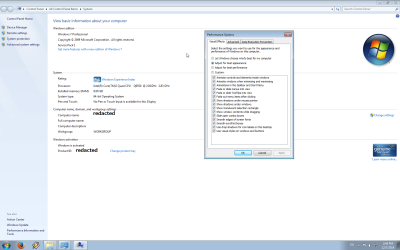
I can't think of anything else to try. Sorry for the wall of text, but I figured I'd give as much information as possible. I attached a picture with the Performance Options I'm getting.


EDIT: I forgot to mention that I had a second graphical issue. Windows recognizes that my left-most monitor's left-most border is the end of the road and won't let my cursor go past that. But, my second monitor on the right's right-most border is not being detected as the end. I can move my cursor way past it, and bringing it back takes just as long. I only have two monitors being detected on Display, and they are arranged properly on there (left monitor is on the left, etc.) Needless to say, this didn't occur before the upgrade.
 

Attachments
  • 2014-12-07 14_44_08-Greenshot.png
    2014-12-07 14_44_08-Greenshot.png
    69 KB · Views: 7
Last edited:

My Computer My Computer

At a glance

Windows 7 Pro x64Intel Core 2 Quad Q9550 2.83GHz4 x Corsair XMS2 2GB 240-pin DDR2 SDRAM 800XFX One +Plus 1GB ATI Radeon HD 5450
Computer type
PC/Desktop
Computer Manufacturer/Model Number
Custom Build
OS
Windows 7 Pro x64
CPU
Intel Core 2 Quad Q9550 2.83GHz
Motherboard
Asus P5N7A-VM
Memory
4 x Corsair XMS2 2GB 240-pin DDR2 SDRAM 800
Graphics Card(s)
XFX One +Plus 1GB ATI Radeon HD 5450
Sound Card
nVidia MCP79/7A
Monitor(s) Displays
22" Acer (main) and 20" Acer (right)
Screen Resolution
1680x1050 and 1600x900
Hard Drives
3 x 1TB HDDs + many externals
PSU
Corsair TX-Series CMPSU-750TX 750Watt ATX12V
Case
Antec Nine Hundred Black Steel ATX Mid Tower
Cooling
Various fans
Keyboard
Saitek Cyborg Keyboard
Mouse
Logitech Performance MX Darkfield Mouse
Internet Speed
29.25MBPS down/4.63MBPS up
Antivirus
Avast! Free Edition + Common Sense 2015
Browser
Mozilla Firefox
Hello Alexeon, welcome to Sevenforums.

Have you tried forcing Aero to work?

Try this:
Force Enable Aero in Windows 7 1. Click on Start and type regedit at run

2. Now Navigate to the following registry key:
HKEY_CURRENT_USER\Software\Microsoft\Windows\DWM

3. In the right details pane, create following Three DWORD (32-bit value) entry
UseMachineCheck, and set its value to 0.
Blur, and set its value to 0.
Animations, and set its value to 0.

4. Close Regedit

5. Click on Start and type CMD with administrative Priviliges

6. Now type following command
Net Stop uxsms
Net Start uxsms
Above command will stop and start Desktop Window Manager Session Manager.

7. Now you can turn on Aero by right clicking on desktop-> Personalize -> Select Windows Colors


Windows 7 Aero Disabled - How can I enable it again? - Microsoft Community
 

My Computer My Computer

At a glance

Dual Boot: Windows 8.1 & Server 2012r2 VMs: K...A10 7700 Kavari SteamRoller8GB DDR3 SDRAM PC3-85001024MB ATI AMD Radeon R7 Graphics
Computer type
PC/Desktop
Computer Manufacturer/Model Number
Custom
OS
Dual Boot: Windows 8.1 & Server 2012r2 VMs: Kali Linux, Backbox, Matriux, Windows 8.1
CPU
A10 7700 Kavari SteamRoller
Motherboard
ASUS A88XM-PLUS (FM2+ )
Memory
8GB DDR3 SDRAM PC3-8500
Graphics Card(s)
1024MB ATI AMD Radeon R7 Graphics
Sound Card
Realtek High Definition Audio
Monitor(s) Displays
Samsung
Hard Drives
SSD Crucial 120gb
WD VelociRaptor 1tb
PSU
Rosewill Gaming 650w
Case
Rosewill Galaxy 2
Internet Speed
55/12
Antivirus
Malwarebytes, MSE, SAS
Browser
FireFox, Chrome
I saw someone else had a similar issue and was told to try that, so I did. It didn't work, though. I forgot to mention a symptom I am having. Right-clicking on the desktop has some serious delays, but right-clicking anywhere else (My Computer, taskbar, etc) doesn't. This also began with the graphics card upgrade.

If I can't figure this out, I'll probably end up uninstalling it but it really bothers me that such a simple upgrade would be so problematic.
 

My Computer My Computer

At a glance

Windows 7 Pro x64Intel Core 2 Quad Q9550 2.83GHz4 x Corsair XMS2 2GB 240-pin DDR2 SDRAM 800XFX One +Plus 1GB ATI Radeon HD 5450
Computer type
PC/Desktop
Computer Manufacturer/Model Number
Custom Build
OS
Windows 7 Pro x64
CPU
Intel Core 2 Quad Q9550 2.83GHz
Motherboard
Asus P5N7A-VM
Memory
4 x Corsair XMS2 2GB 240-pin DDR2 SDRAM 800
Graphics Card(s)
XFX One +Plus 1GB ATI Radeon HD 5450
Sound Card
nVidia MCP79/7A
Monitor(s) Displays
22" Acer (main) and 20" Acer (right)
Screen Resolution
1680x1050 and 1600x900
Hard Drives
3 x 1TB HDDs + many externals
PSU
Corsair TX-Series CMPSU-750TX 750Watt ATX12V
Case
Antec Nine Hundred Black Steel ATX Mid Tower
Cooling
Various fans
Keyboard
Saitek Cyborg Keyboard
Mouse
Logitech Performance MX Darkfield Mouse
Internet Speed
29.25MBPS down/4.63MBPS up
Antivirus
Avast! Free Edition + Common Sense 2015
Browser
Mozilla Firefox

My Computer My Computer

At a glance

Dual Boot: Windows 8.1 & Server 2012r2 VMs: K...A10 7700 Kavari SteamRoller8GB DDR3 SDRAM PC3-85001024MB ATI AMD Radeon R7 Graphics
Computer type
PC/Desktop
Computer Manufacturer/Model Number
Custom
OS
Dual Boot: Windows 8.1 & Server 2012r2 VMs: Kali Linux, Backbox, Matriux, Windows 8.1
CPU
A10 7700 Kavari SteamRoller
Motherboard
ASUS A88XM-PLUS (FM2+ )
Memory
8GB DDR3 SDRAM PC3-8500
Graphics Card(s)
1024MB ATI AMD Radeon R7 Graphics
Sound Card
Realtek High Definition Audio
Monitor(s) Displays
Samsung
Hard Drives
SSD Crucial 120gb
WD VelociRaptor 1tb
PSU
Rosewill Gaming 650w
Case
Rosewill Galaxy 2
Internet Speed
55/12
Antivirus
Malwarebytes, MSE, SAS
Browser
FireFox, Chrome
I have not, I will have to try that. It just seems to me that the other issues are all graphics-related someway or another, or started with the new graphics card anyway. But maybe there was an underlying issue that I never came across all along. I'll try that and see.
 

My Computer My Computer

At a glance

Windows 7 Pro x64Intel Core 2 Quad Q9550 2.83GHz4 x Corsair XMS2 2GB 240-pin DDR2 SDRAM 800XFX One +Plus 1GB ATI Radeon HD 5450
Computer type
PC/Desktop
Computer Manufacturer/Model Number
Custom Build
OS
Windows 7 Pro x64
CPU
Intel Core 2 Quad Q9550 2.83GHz
Motherboard
Asus P5N7A-VM
Memory
4 x Corsair XMS2 2GB 240-pin DDR2 SDRAM 800
Graphics Card(s)
XFX One +Plus 1GB ATI Radeon HD 5450
Sound Card
nVidia MCP79/7A
Monitor(s) Displays
22" Acer (main) and 20" Acer (right)
Screen Resolution
1680x1050 and 1600x900
Hard Drives
3 x 1TB HDDs + many externals
PSU
Corsair TX-Series CMPSU-750TX 750Watt ATX12V
Case
Antec Nine Hundred Black Steel ATX Mid Tower
Cooling
Various fans
Keyboard
Saitek Cyborg Keyboard
Mouse
Logitech Performance MX Darkfield Mouse
Internet Speed
29.25MBPS down/4.63MBPS up
Antivirus
Avast! Free Edition + Common Sense 2015
Browser
Mozilla Firefox
I have not, I will have to try that. It just seems to me that the other issues are all graphics-related someway or another, or started with the new graphics card anyway. But maybe there was an underlying issue that I never came across all along. I'll try that and see.

Yeah its probably a good chance that it won't work, but sometimes it can tell us if certain files are missing from your computer. It can never hurt.
 

My Computer My Computer

At a glance

Dual Boot: Windows 8.1 & Server 2012r2 VMs: K...A10 7700 Kavari SteamRoller8GB DDR3 SDRAM PC3-85001024MB ATI AMD Radeon R7 Graphics
Computer type
PC/Desktop
Computer Manufacturer/Model Number
Custom
OS
Dual Boot: Windows 8.1 & Server 2012r2 VMs: Kali Linux, Backbox, Matriux, Windows 8.1
CPU
A10 7700 Kavari SteamRoller
Motherboard
ASUS A88XM-PLUS (FM2+ )
Memory
8GB DDR3 SDRAM PC3-8500
Graphics Card(s)
1024MB ATI AMD Radeon R7 Graphics
Sound Card
Realtek High Definition Audio
Monitor(s) Displays
Samsung
Hard Drives
SSD Crucial 120gb
WD VelociRaptor 1tb
PSU
Rosewill Gaming 650w
Case
Rosewill Galaxy 2
Internet Speed
55/12
Antivirus
Malwarebytes, MSE, SAS
Browser
FireFox, Chrome
Welp, results are in. Windows Resource Protection did not find any integrity violations. So, that didn't work. :/
 

My Computer My Computer

At a glance

Windows 7 Pro x64Intel Core 2 Quad Q9550 2.83GHz4 x Corsair XMS2 2GB 240-pin DDR2 SDRAM 800XFX One +Plus 1GB ATI Radeon HD 5450
Computer type
PC/Desktop
Computer Manufacturer/Model Number
Custom Build
OS
Windows 7 Pro x64
CPU
Intel Core 2 Quad Q9550 2.83GHz
Motherboard
Asus P5N7A-VM
Memory
4 x Corsair XMS2 2GB 240-pin DDR2 SDRAM 800
Graphics Card(s)
XFX One +Plus 1GB ATI Radeon HD 5450
Sound Card
nVidia MCP79/7A
Monitor(s) Displays
22" Acer (main) and 20" Acer (right)
Screen Resolution
1680x1050 and 1600x900
Hard Drives
3 x 1TB HDDs + many externals
PSU
Corsair TX-Series CMPSU-750TX 750Watt ATX12V
Case
Antec Nine Hundred Black Steel ATX Mid Tower
Cooling
Various fans
Keyboard
Saitek Cyborg Keyboard
Mouse
Logitech Performance MX Darkfield Mouse
Internet Speed
29.25MBPS down/4.63MBPS up
Antivirus
Avast! Free Edition + Common Sense 2015
Browser
Mozilla Firefox
Its strange, your visual effects options seem as if you have Home Basic or Starter installed and not Professional. Lets try a few things.

First, we need to ensure your machine is ready for Aero. Please read everything in the red box in the link below and ensure everything on your machine matches up with the requirements. In addition, Windows needs to be activated to use Aero.
http://www.sevenforums.com/tutorials/838-aero-peek-turn-off.html

Next, follow the link below to try and re enable your Aero settings:
http://www.sevenforums.com/tutorials/1908-visual-effects-settings-change.html

In addition, here is a Fix-it that may help:
Windows Aero Glass visual effects are not working or displayed

Ensure the following settings are correct in the registry:
HKEY_CURRENT_USER\Software\Microsoft\Windows\CurrentVersion\Explorer\VisualEffects\DWMAeroPeekEnabled
On the right pane - "DefaultApplied"=dword:00000001
HKEY_CURRENT_USER\Software\Microsoft\Windows\DWM
On the right pane - "EnableAeroPeek"=dword:00000001


If all of this fails, you can try a repair install:
http://www.sevenforums.com/tutorials/3413-repair-install.html
 

My Computer My Computer

At a glance

Dual Boot: Windows 8.1 & Server 2012r2 VMs: K...A10 7700 Kavari SteamRoller8GB DDR3 SDRAM PC3-85001024MB ATI AMD Radeon R7 Graphics
Computer type
PC/Desktop
Computer Manufacturer/Model Number
Custom
OS
Dual Boot: Windows 8.1 & Server 2012r2 VMs: Kali Linux, Backbox, Matriux, Windows 8.1
CPU
A10 7700 Kavari SteamRoller
Motherboard
ASUS A88XM-PLUS (FM2+ )
Memory
8GB DDR3 SDRAM PC3-8500
Graphics Card(s)
1024MB ATI AMD Radeon R7 Graphics
Sound Card
Realtek High Definition Audio
Monitor(s) Displays
Samsung
Hard Drives
SSD Crucial 120gb
WD VelociRaptor 1tb
PSU
Rosewill Gaming 650w
Case
Rosewill Galaxy 2
Internet Speed
55/12
Antivirus
Malwarebytes, MSE, SAS
Browser
FireFox, Chrome
Well, like I said, I had Aero running in this very same PC this morning before the upgrade. I have a legitimate copy of Windows 7 Professional 64-bit I bought through my school for about $20 and its activated. Has been for years since I've had this PC for a while (as you can tell, its not exactly cutting-edge.)

Everything in the first link matches up. 32-bit color, services are set to automatic, graphics score is 4.1, way higher than the minimum. My options are indeed missing out of the Performance Options. I mean, before now, I never had to look at them so I can't say they were there yesterday or something, but I have been very clearly running Aero since I installed Windows 7 (and Vista before that) like four years ago. Sometimes, driver updates for my old graphics card would break it and I'd need to roll back, and sometimes the updates would work fine. Aero also works on my virtual machines running on top of this, so the hardware is capable of it. I have screenshots I can post of my PC just a few months ago, but I took them while browsing 4chan, so I don't know if posting content from other sites here is bad or not. I mean, it's not bad stuff, just talking about giant robots, but some sites don't like even mentioning other sites.

I ran the Microsoft fixit earlier today before opening this thread. That didn't work either. The registry keys already existed and were set to the right values, too. I just checked that.

A repair install is the last suggestion I haven't tried yet. I'll give that a shot later in the week but I have some projects I need to get done and I can't devote another day to reinstalling and fixing things right now. Any other suggestions that aren't as time intensive, though, I'm willing to try them.
 
Last edited:

My Computer My Computer

At a glance

Windows 7 Pro x64Intel Core 2 Quad Q9550 2.83GHz4 x Corsair XMS2 2GB 240-pin DDR2 SDRAM 800XFX One +Plus 1GB ATI Radeon HD 5450
Computer type
PC/Desktop
Computer Manufacturer/Model Number
Custom Build
OS
Windows 7 Pro x64
CPU
Intel Core 2 Quad Q9550 2.83GHz
Motherboard
Asus P5N7A-VM
Memory
4 x Corsair XMS2 2GB 240-pin DDR2 SDRAM 800
Graphics Card(s)
XFX One +Plus 1GB ATI Radeon HD 5450
Sound Card
nVidia MCP79/7A
Monitor(s) Displays
22" Acer (main) and 20" Acer (right)
Screen Resolution
1680x1050 and 1600x900
Hard Drives
3 x 1TB HDDs + many externals
PSU
Corsair TX-Series CMPSU-750TX 750Watt ATX12V
Case
Antec Nine Hundred Black Steel ATX Mid Tower
Cooling
Various fans
Keyboard
Saitek Cyborg Keyboard
Mouse
Logitech Performance MX Darkfield Mouse
Internet Speed
29.25MBPS down/4.63MBPS up
Antivirus
Avast! Free Edition + Common Sense 2015
Browser
Mozilla Firefox
Well, like I said, I had Aero running in this very same PC this morning before the upgrade. I have a legitimate copy of Windows 7 Professional 64-bit I bought through my school for about $20 and its activated. Has been for years since I've had this PC for a while (as you can tell, its not exactly cutting-edge.)

Everything in the first link matches up. 32-bit color, services are set to automatic, graphics score is 4.1, way higher than the minimum. My options are indeed missing out of the Performance Options. I mean, before now, I never had to look at them so I can't say they were there yesterday or something, but I have been very clearly running Aero since I installed Windows 7 (and Vista before that) like four years ago. Sometimes, driver updates for my old graphics card would break it and I'd need to roll back, and sometimes the updates would work fine. Aero also works on my virtual machines running on top of this, so the hardware is capable of it. I have screenshots I can post of my PC just a few months ago, but I took them while browsing 4chan, so I don't know if posting content from other sites here is bad or not. I mean, it's not bad stuff, just talking about giant robots, but some sites don't like even mentioning other sites.

I ran the Microsoft fixit earlier today before opening this thread. That didn't work either. The registry keys already existed and were set to the right values, too. I just checked that.

A repair install is the last suggestion I haven't tried yet. I'll give that a shot later in the week but I have some projects I need to get done and I can't devote another day to reinstalling and fixing things right now. Any other suggestions that aren't as time intensive, though, I'm willing to try them.

A repair install wouldn't take too long and all of your settings will be in place. You may have to grab updates but thats about it.

Did you try this from my post above? Just wondering since you didn't mention it:
http://www.sevenforums.com/tutorials/1908-visual-effects-settings-change.html
 

My Computer My Computer

At a glance

Dual Boot: Windows 8.1 & Server 2012r2 VMs: K...A10 7700 Kavari SteamRoller8GB DDR3 SDRAM PC3-85001024MB ATI AMD Radeon R7 Graphics
Computer type
PC/Desktop
Computer Manufacturer/Model Number
Custom
OS
Dual Boot: Windows 8.1 & Server 2012r2 VMs: Kali Linux, Backbox, Matriux, Windows 8.1
CPU
A10 7700 Kavari SteamRoller
Motherboard
ASUS A88XM-PLUS (FM2+ )
Memory
8GB DDR3 SDRAM PC3-8500
Graphics Card(s)
1024MB ATI AMD Radeon R7 Graphics
Sound Card
Realtek High Definition Audio
Monitor(s) Displays
Samsung
Hard Drives
SSD Crucial 120gb
WD VelociRaptor 1tb
PSU
Rosewill Gaming 650w
Case
Rosewill Galaxy 2
Internet Speed
55/12
Antivirus
Malwarebytes, MSE, SAS
Browser
FireFox, Chrome
Try to re-install windows if you have the opportunity :)
 

My Computer My Computer

At a glance

Windows 7 Home Premium 64-BITAMD A8 7200P8GB 1600mhzRadeon R5 (APU) + Radeon R5 M230 2GB Dual Gra...
Computer type
PC/Desktop
Computer Manufacturer/Model Number
ASUS X550ZE
OS
Windows 7 Home Premium 64-BIT
CPU
AMD A8 7200P
Motherboard
N/A
Memory
8GB 1600mhz
Graphics Card(s)
Radeon R5 (APU) + Radeon R5 M230 2GB Dual Graphics
Sound Card
Realtek ALC269 with SonicMaster
Monitor(s) Displays
Laptop Display
Screen Resolution
1920 x 1080 @60hz
Hard Drives
WDC WD50 00LPVX-80V0TT0 (500GB)
PSU
Laptop Charger
Mouse
ARMAGGEDON TEXTRON SCORPION 7
Internet Speed
100 mbps DOWN / 50 mbps UP
Antivirus
Windows Defender
Browser
Mozzila FireFox, Valve Steam in-game internet browser
I'll give the repair a shot soon, but I have class tomorrow so I can't stay up unfortunately. As for the link you posted, well, it just says that you can enable or disable different visual effects through the Performance Options. I posted a screenshot of what my Performance Options look like, and they are missing a lot of the options I should have. It also says you can move the radio button and check the check boxes through the registry but that's not a difficulty I'm having.

@RoasterMan, I really want to avoid having to reinstall all my programs and set up my settings. I would honestly rather unplug the damn graphics card than do that. I'm due for a real upgrade one of these days, anyway, if I had the money.
 
Last edited:

My Computer My Computer

At a glance

Windows 7 Pro x64Intel Core 2 Quad Q9550 2.83GHz4 x Corsair XMS2 2GB 240-pin DDR2 SDRAM 800XFX One +Plus 1GB ATI Radeon HD 5450
Computer type
PC/Desktop
Computer Manufacturer/Model Number
Custom Build
OS
Windows 7 Pro x64
CPU
Intel Core 2 Quad Q9550 2.83GHz
Motherboard
Asus P5N7A-VM
Memory
4 x Corsair XMS2 2GB 240-pin DDR2 SDRAM 800
Graphics Card(s)
XFX One +Plus 1GB ATI Radeon HD 5450
Sound Card
nVidia MCP79/7A
Monitor(s) Displays
22" Acer (main) and 20" Acer (right)
Screen Resolution
1680x1050 and 1600x900
Hard Drives
3 x 1TB HDDs + many externals
PSU
Corsair TX-Series CMPSU-750TX 750Watt ATX12V
Case
Antec Nine Hundred Black Steel ATX Mid Tower
Cooling
Various fans
Keyboard
Saitek Cyborg Keyboard
Mouse
Logitech Performance MX Darkfield Mouse
Internet Speed
29.25MBPS down/4.63MBPS up
Antivirus
Avast! Free Edition + Common Sense 2015
Browser
Mozilla Firefox
I'll give the repair a shot soon, but I have class tomorrow so I can't stay up unfortunately. As for the link you posted, well, it just says that you can enable or disable different visual effects through the Performance Options. I posted a screenshot of what my Performance Options look like, and they are missing a lot of the options I should have. It also says you can move the radio button and check the check boxes through the registry but that's not a difficulty I'm having.

@RoasterMan, I really want to avoid having to reinstall all my programs and set up my settings. I would honestly rather unplug the damn graphics card than do that. I'm due for a real upgrade one of these days, anyway, if I had the money.

Yeah totally reinstalling at this point is not needed. Try the repair install and report back to us when you can.
 

My Computer My Computer

At a glance

Dual Boot: Windows 8.1 & Server 2012r2 VMs: K...A10 7700 Kavari SteamRoller8GB DDR3 SDRAM PC3-85001024MB ATI AMD Radeon R7 Graphics
Computer type
PC/Desktop
Computer Manufacturer/Model Number
Custom
OS
Dual Boot: Windows 8.1 & Server 2012r2 VMs: Kali Linux, Backbox, Matriux, Windows 8.1
CPU
A10 7700 Kavari SteamRoller
Motherboard
ASUS A88XM-PLUS (FM2+ )
Memory
8GB DDR3 SDRAM PC3-8500
Graphics Card(s)
1024MB ATI AMD Radeon R7 Graphics
Sound Card
Realtek High Definition Audio
Monitor(s) Displays
Samsung
Hard Drives
SSD Crucial 120gb
WD VelociRaptor 1tb
PSU
Rosewill Gaming 650w
Case
Rosewill Galaxy 2
Internet Speed
55/12
Antivirus
Malwarebytes, MSE, SAS
Browser
FireFox, Chrome
So I just tried to do the recovery install and it failed. It said that this version of Windows isn't compatible and it restored my previous installation. So, I'm back where I started, but with a lot of temp files from the upgrade to delete. I used the same DVD Microsoft sent me when I bought this copy of Windows, so I have no clue what the problem was. I'll probably uninstall the graphics card this weekend unless anyone else has a good idea.


UPDATE: I uninstalled the graphics card, uninstalled its drivers, and reinstalled my nVidia drivers and I kept getting the same issue with Aero not being enabled and my options missing. Just when I was about to give up, though, I thought to check DisplayFusion. I have that installed so I can have a taskbar on my second monitor and different wallpapers per monitor - is that feature so complicated that it wasn't available natively? But I digress. DisplayFusion has a Monitor Settings section in its preferences, and in there, I found that DisplayFusion detected a third monitor being hooked up which neither Windows Display Settings nor nVidia's GeForce Experience detected. I disabled that monitor and WAM!, Aero immediately came back and my Performance Options show up like they should. I have no clue why this worked out like it did, but well, there you go. I may try to reinstall the graphics card and seeing if that simple fix applies there, too, but to be honest, I'm not sure if I want to. I know its not much to go on, but when I ran the Windows Experience Index as part of the troubleshooting I did with the graphics card and without, I got a score of 4.1 with the card and 4.5 without it (using the onboard graphics card.) Is that a misleading score? Would a graphics card separate from the motherboard really cause my PC's capabilities to go down like that? I don't know if this update will bump my thread back up, but since I have that pending question, if it doesn't I will bump it with an extra post. Once that's all done, I'll close the thread properly.
 
Last edited:

My Computer My Computer

At a glance

Windows 7 Pro x64Intel Core 2 Quad Q9550 2.83GHz4 x Corsair XMS2 2GB 240-pin DDR2 SDRAM 800XFX One +Plus 1GB ATI Radeon HD 5450
Computer type
PC/Desktop
Computer Manufacturer/Model Number
Custom Build
OS
Windows 7 Pro x64
CPU
Intel Core 2 Quad Q9550 2.83GHz
Motherboard
Asus P5N7A-VM
Memory
4 x Corsair XMS2 2GB 240-pin DDR2 SDRAM 800
Graphics Card(s)
XFX One +Plus 1GB ATI Radeon HD 5450
Sound Card
nVidia MCP79/7A
Monitor(s) Displays
22" Acer (main) and 20" Acer (right)
Screen Resolution
1680x1050 and 1600x900
Hard Drives
3 x 1TB HDDs + many externals
PSU
Corsair TX-Series CMPSU-750TX 750Watt ATX12V
Case
Antec Nine Hundred Black Steel ATX Mid Tower
Cooling
Various fans
Keyboard
Saitek Cyborg Keyboard
Mouse
Logitech Performance MX Darkfield Mouse
Internet Speed
29.25MBPS down/4.63MBPS up
Antivirus
Avast! Free Edition + Common Sense 2015
Browser
Mozilla Firefox
Polite bump. I could not find a set of forum rules, so forgive me if I am breaking them.
 

My Computer My Computer

At a glance

Windows 7 Pro x64Intel Core 2 Quad Q9550 2.83GHz4 x Corsair XMS2 2GB 240-pin DDR2 SDRAM 800XFX One +Plus 1GB ATI Radeon HD 5450
Computer type
PC/Desktop
Computer Manufacturer/Model Number
Custom Build
OS
Windows 7 Pro x64
CPU
Intel Core 2 Quad Q9550 2.83GHz
Motherboard
Asus P5N7A-VM
Memory
4 x Corsair XMS2 2GB 240-pin DDR2 SDRAM 800
Graphics Card(s)
XFX One +Plus 1GB ATI Radeon HD 5450
Sound Card
nVidia MCP79/7A
Monitor(s) Displays
22" Acer (main) and 20" Acer (right)
Screen Resolution
1680x1050 and 1600x900
Hard Drives
3 x 1TB HDDs + many externals
PSU
Corsair TX-Series CMPSU-750TX 750Watt ATX12V
Case
Antec Nine Hundred Black Steel ATX Mid Tower
Cooling
Various fans
Keyboard
Saitek Cyborg Keyboard
Mouse
Logitech Performance MX Darkfield Mouse
Internet Speed
29.25MBPS down/4.63MBPS up
Antivirus
Avast! Free Edition + Common Sense 2015
Browser
Mozilla Firefox
Polite bump. I could not find a set of forum rules, so forgive me if I am breaking them.

Sorry, dealing with so many threads sometimes these get skipped. Its perfectly ok to bump and remind me. Let me look over your update and I'll get back to you in a bit.
 

My Computer My Computer

At a glance

Dual Boot: Windows 8.1 & Server 2012r2 VMs: K...A10 7700 Kavari SteamRoller8GB DDR3 SDRAM PC3-85001024MB ATI AMD Radeon R7 Graphics
Computer type
PC/Desktop
Computer Manufacturer/Model Number
Custom
OS
Dual Boot: Windows 8.1 & Server 2012r2 VMs: Kali Linux, Backbox, Matriux, Windows 8.1
CPU
A10 7700 Kavari SteamRoller
Motherboard
ASUS A88XM-PLUS (FM2+ )
Memory
8GB DDR3 SDRAM PC3-8500
Graphics Card(s)
1024MB ATI AMD Radeon R7 Graphics
Sound Card
Realtek High Definition Audio
Monitor(s) Displays
Samsung
Hard Drives
SSD Crucial 120gb
WD VelociRaptor 1tb
PSU
Rosewill Gaming 650w
Case
Rosewill Galaxy 2
Internet Speed
55/12
Antivirus
Malwarebytes, MSE, SAS
Browser
FireFox, Chrome
Cool, thanks. Take your time, I don't plan on reinstalling the card today anyway.
 

My Computer My Computer

At a glance

Windows 7 Pro x64Intel Core 2 Quad Q9550 2.83GHz4 x Corsair XMS2 2GB 240-pin DDR2 SDRAM 800XFX One +Plus 1GB ATI Radeon HD 5450
Computer type
PC/Desktop
Computer Manufacturer/Model Number
Custom Build
OS
Windows 7 Pro x64
CPU
Intel Core 2 Quad Q9550 2.83GHz
Motherboard
Asus P5N7A-VM
Memory
4 x Corsair XMS2 2GB 240-pin DDR2 SDRAM 800
Graphics Card(s)
XFX One +Plus 1GB ATI Radeon HD 5450
Sound Card
nVidia MCP79/7A
Monitor(s) Displays
22" Acer (main) and 20" Acer (right)
Screen Resolution
1680x1050 and 1600x900
Hard Drives
3 x 1TB HDDs + many externals
PSU
Corsair TX-Series CMPSU-750TX 750Watt ATX12V
Case
Antec Nine Hundred Black Steel ATX Mid Tower
Cooling
Various fans
Keyboard
Saitek Cyborg Keyboard
Mouse
Logitech Performance MX Darkfield Mouse
Internet Speed
29.25MBPS down/4.63MBPS up
Antivirus
Avast! Free Edition + Common Sense 2015
Browser
Mozilla Firefox
So if Im reading it right, you had a 3rd monitor in the settings and once you removed that, everything is fine?

As far as your WEI rating, Im not sure why you would get a better rating with your onboard graphics. The video card you have should perform better.

I would say reinstall the card with that extra monitor "gone" and see what happens, assuming Im reading it right. Worst case scenario you can uninstall it again. Maybe try a different pci slot if you have it.
 

My Computer My Computer

At a glance

Dual Boot: Windows 8.1 & Server 2012r2 VMs: K...A10 7700 Kavari SteamRoller8GB DDR3 SDRAM PC3-85001024MB ATI AMD Radeon R7 Graphics
Computer type
PC/Desktop
Computer Manufacturer/Model Number
Custom
OS
Dual Boot: Windows 8.1 & Server 2012r2 VMs: Kali Linux, Backbox, Matriux, Windows 8.1
CPU
A10 7700 Kavari SteamRoller
Motherboard
ASUS A88XM-PLUS (FM2+ )
Memory
8GB DDR3 SDRAM PC3-8500
Graphics Card(s)
1024MB ATI AMD Radeon R7 Graphics
Sound Card
Realtek High Definition Audio
Monitor(s) Displays
Samsung
Hard Drives
SSD Crucial 120gb
WD VelociRaptor 1tb
PSU
Rosewill Gaming 650w
Case
Rosewill Galaxy 2
Internet Speed
55/12
Antivirus
Malwarebytes, MSE, SAS
Browser
FireFox, Chrome
I only have the one slot, but yeah, I'll try again. The monitor only showed up in the settings for DisplayFusion, not Windows or nVidia, but somehow Windows bought it wholesale. I was able to move my mouse cursor far far far to the left, beyond the last physically present monitor. Maybe I'll get a better score with Aero actually working and without that other monitor, although I ran both WEI tests under the same conditions (no Aero, extra monitor, etc.) Well see tomorrow morning.
 

My Computer My Computer

At a glance

Windows 7 Pro x64Intel Core 2 Quad Q9550 2.83GHz4 x Corsair XMS2 2GB 240-pin DDR2 SDRAM 800XFX One +Plus 1GB ATI Radeon HD 5450
Computer type
PC/Desktop
Computer Manufacturer/Model Number
Custom Build
OS
Windows 7 Pro x64
CPU
Intel Core 2 Quad Q9550 2.83GHz
Motherboard
Asus P5N7A-VM
Memory
4 x Corsair XMS2 2GB 240-pin DDR2 SDRAM 800
Graphics Card(s)
XFX One +Plus 1GB ATI Radeon HD 5450
Sound Card
nVidia MCP79/7A
Monitor(s) Displays
22" Acer (main) and 20" Acer (right)
Screen Resolution
1680x1050 and 1600x900
Hard Drives
3 x 1TB HDDs + many externals
PSU
Corsair TX-Series CMPSU-750TX 750Watt ATX12V
Case
Antec Nine Hundred Black Steel ATX Mid Tower
Cooling
Various fans
Keyboard
Saitek Cyborg Keyboard
Mouse
Logitech Performance MX Darkfield Mouse
Internet Speed
29.25MBPS down/4.63MBPS up
Antivirus
Avast! Free Edition + Common Sense 2015
Browser
Mozilla Firefox
Alright, so I ended up being very busy this last month and I never got a chance to reinstall the graphics card. In fact, I just gave up with it. I didn't want to close the thread until I had some sort of answer but that's where I'm at now, so I will now close the thread and distribute my thanks. Thank you all for your help.


EDIT: Several months later, I figured out the issue and have installed my graphics card. The problem was that sometimes, when I make changes to the display drivers (updates, etc), DisplayFusion starts detecting an extra monitor under its Monitor Configuration settings. All I had to do was disable the extra monitor on there and everything started working just fine. Figures its a simple fix once I finally found the issue. Just posting here in case someone in the future has a similar problem and finds my thread through Google or something.
 
Last edited:

My Computer My Computer

At a glance

Windows 7 Pro x64Intel Core 2 Quad Q9550 2.83GHz4 x Corsair XMS2 2GB 240-pin DDR2 SDRAM 800XFX One +Plus 1GB ATI Radeon HD 5450
Computer type
PC/Desktop
Computer Manufacturer/Model Number
Custom Build
OS
Windows 7 Pro x64
CPU
Intel Core 2 Quad Q9550 2.83GHz
Motherboard
Asus P5N7A-VM
Memory
4 x Corsair XMS2 2GB 240-pin DDR2 SDRAM 800
Graphics Card(s)
XFX One +Plus 1GB ATI Radeon HD 5450
Sound Card
nVidia MCP79/7A
Monitor(s) Displays
22" Acer (main) and 20" Acer (right)
Screen Resolution
1680x1050 and 1600x900
Hard Drives
3 x 1TB HDDs + many externals
PSU
Corsair TX-Series CMPSU-750TX 750Watt ATX12V
Case
Antec Nine Hundred Black Steel ATX Mid Tower
Cooling
Various fans
Keyboard
Saitek Cyborg Keyboard
Mouse
Logitech Performance MX Darkfield Mouse
Internet Speed
29.25MBPS down/4.63MBPS up
Antivirus
Avast! Free Edition + Common Sense 2015
Browser
Mozilla Firefox
Back
Top