XM Radio

kingmatt

New member
Local time
8:00 AM
Messages
3
Does anyone know how to add XM Radio to Windows 7 Media Center?

Waaaay back (y'know 3 or 4 years) I remember installing it as an add-on to Media Center.

When Vista Media Center came around, XM was a link available under the Explore menu.

But ever since upgrading to Win7 I can't find it anywhere... and I can't even find the add-on mentioned above.

Anyone have an answer?
 

My Computer

OS
Windows 7
Go to "Extras", then "Extras gallery". You should see the XM extra in htere.
 

My Computer

OS
Windows 7
CPU
i5-750
Motherboard
Asus
Memory
4GB DDR3 1600
Graphics Card(s)
GT220
Thanks Desslok... unfortunately, the Extras screen no longer has the link to XM. I have a feeling its Canada related. I've been on other forums and US people seem to have the option but we don't. Frustrating!
 

My Computer

OS
Windows 7
Extra?

Go to "Extras", then "Extras gallery". You should see the XM extra in htere.

Sorry this may seem like a dumb question, but where is "Extra"?
Is that a menu item in Windows Media Player, or is that a folder within Windows 7?

I live in the US and I have Windows 7 Ultimate, if that makes a difference.
 

My Computer

Computer Manufacturer/Model Number
Dell Studio XPS 16
OS
Windows 7 x64 Ultimate
CPU
3.06
Memory
4 GB
Graphics Card(s)
1 GB
Go to "Extras", then "Extras gallery". You should see the XM extra in htere.

Sorry this may seem like a dumb question, but where is "Extra"?
Is that a menu item in Windows Media Player, or is that a folder within Windows 7?

.


It's in Windows Media Center, not Media Player. Kingmatt, did you do "Express" setup or custom? Can you tell me what options you do have in "Extras Gallery?
 

My Computer

OS
Windows 7
CPU
i5-750
Motherboard
Asus
Memory
4GB DDR3 1600
Graphics Card(s)
GT220
Thank you. I found it.

I must say I'm not impress with the XM Radio GUI.
At first I did not want to login as the GUI appears to me as something from phishing email.

Again thank you.
 

My Computer

Computer Manufacturer/Model Number
Dell Studio XPS 16
OS
Windows 7 x64 Ultimate
CPU
3.06
Memory
4 GB
Graphics Card(s)
1 GB
It's in Windows Media Center, not Media Player. Kingmatt, did you do "Express" setup or custom? Can you tell me what options you do have in "Extras Gallery?

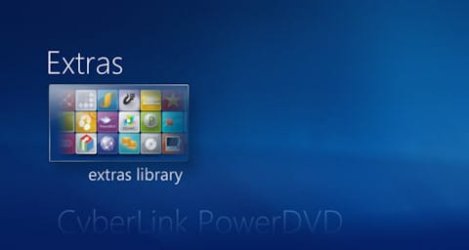
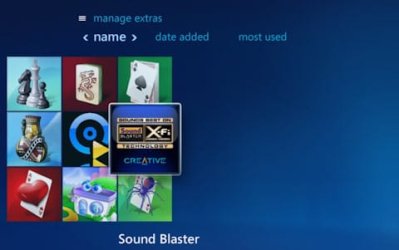
I'm running Windows 7 Pro (64-bit) on my new Dell desktop, and don't see anything like XM radio in the Extras, only apps that I have installed already. This computer came with Win7 Home Premium already installed, then I used Anytime Upgrade to upgrade to Pro. I will upload a couple of screenshots (resized) to show what I'm seeing.
 

Attachments

  • wmc01.jpg
    wmc01.jpg
    8.7 KB · Views: 3
  • wmc02.jpg
    wmc02.jpg
    16.7 KB · Views: 16

My Computer

OS
Windows 7 Professional 64-bit
CPU
Intel Core i7 920 - 2.67 GHz
Memory
8 GB
Graphics Card(s)
nVidia GeForce GTX 260
Sound Card
Sound Blaster X-Fi Xtreme
Monitor(s) Displays
Dual: Samsung SyncMaster 2494HM and 213T
Screen Resolution
1920x1080 and 1600x1200
It's in Windows Media Center, not Media Player. Kingmatt, did you do "Express" setup or custom? Can you tell me what options you do have in "Extras Gallery?

I'm running Windows 7 Pro (64-bit) on my new Dell desktop, and don't see anything like XM radio in the Extras, only apps that I have installed already. This computer came with Win7 Home Premium already installed, then I used Anytime Upgrade to upgrade to Pro. I will upload a couple of screenshots (resized) to show what I'm seeing.

You are missing the Extras Gallery. Sounds like you need to configure WMC to do updates, which in the setup is kind of "hidden" by saying something like "would you like to allow MC to connect to the internet for images,etc. or something like that. Go down to Tasks, then "Settings", click "general", then "Automatic Download Options". Check the boxes to allow updates, then click "Update Now". It may take several minutes to complete and isn't good about giving you status.
 

My Computer

OS
Windows 7
CPU
i5-750
Motherboard
Asus
Memory
4GB DDR3 1600
Graphics Card(s)
GT220
You are missing the Extras Gallery. Sounds like you need to configure WMC to do updates, which in the setup is kind of "hidden" by saying something like "would you like to allow MC to connect to the internet for images,etc. or something like that. Go down to Tasks, then "Settings", click "general", then "Automatic Download Options". Check the boxes to allow updates, then click "Update Now". It may take several minutes to complete and isn't good about giving you status.

Sorry it took me so long to get back to this. In my "Extras library" all I have is Orb TV and Tversity, both of which I installed manually. In the "Explore" menu all I have is Live 365, nothing else.

I didn't know about the "Automatic Download Options" so I was really hoping that was it! Unfortunately both checkboxes were already selected... I did click Download Now and waited for it to finish. No change to the Extras menu. :(

Any other ideas?
 

My Computer

OS
Windows 7
You are missing the Extras Gallery. Sounds like you need to configure WMC to do updates, which in the setup is kind of "hidden" by saying something like "would you like to allow MC to connect to the internet for images,etc. or something like that. Go down to Tasks, then "Settings", click "general", then "Automatic Download Options". Check the boxes to allow updates, then click "Update Now". It may take several minutes to complete and isn't good about giving you status.

Wow! Thanks so much for the reply...that worked great! It took some digging around to find the setting (you weren't kidding), clicked on Update Now, then it let me know when it was done downloading. I had to close WMC then relaunch it to see the Extras Gallery icon. I now have six services listed, including XM Radio Online! :D Thanks again!
 

My Computer

OS
Windows 7 Professional 64-bit
CPU
Intel Core i7 920 - 2.67 GHz
Memory
8 GB
Graphics Card(s)
nVidia GeForce GTX 260
Sound Card
Sound Blaster X-Fi Xtreme
Monitor(s) Displays
Dual: Samsung SyncMaster 2494HM and 213T
Screen Resolution
1920x1080 and 1600x1200
Back
Top