
Hello,
My PC has Windows 7 Ultimate x64
Here is my problem:
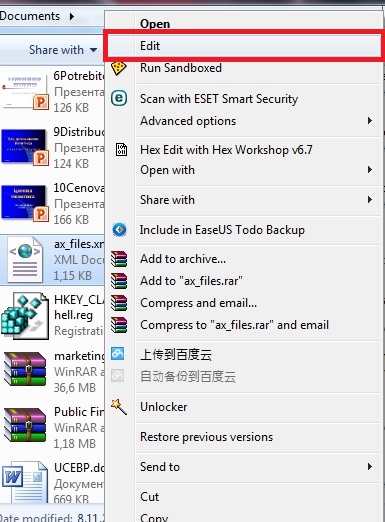
I want to edit an xml file by right clicking on it and choosing "Edit" from the context menu.
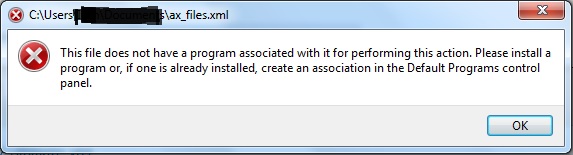
What I expect is Notepad to open the xml file. But in fact there is an error:
This file does not have a program associated with it for performing this action. Please install a program or, if one is already installed, create an association in the Default Programs control panel.
The Default Program chosen to open and edit xml files is MS XML Editor. As I want it to be.
Here is my registry:
HKCR\.xml
HKCR\xmlfile
Open and Edit menues are as I want them:
I want MSOXMLED.exe to check the xml file for specific headers and if any to open them with the specified program. And likewise if there are no headers to use the default programs.
It looks like if there are no headers (<?mso-application progid="something"?>) MSOXMLED.exe chooses the default program from XEV.GenericApp:
This works when I choose Open from the context menu.
MSOXMLED.exe /verb open leads to XEV.GenericApp's Open command and the xml file is being opened with IE as specified.
But when I choose Edit from the context menu, there is an error for file association.
I have another PC with Win7 Ultimate x64. When click Edit from the context menu the xml file is opened with Notepad as I wish. No errors. I checked these registry keys there and the were the same as mine.
I found a workaround. If I create a key named Edit with command ["C:\Windows\Notepad.exe" "%1"] under XEV.GenericApp, then everything works as I want it. Because the command under xmlfile\shell\edit is:
...MSOXMLED.exe /verb edit
But the problem is I don't want such a workaround.
I want to know why it's not working on my PC but on another it is finctioning just fine.
Perhaps there are other registry keys for default opening of xml files? Can somebody help me?
My PC has Windows 7 Ultimate x64
Here is my problem:
I want to edit an xml file by right clicking on it and choosing "Edit" from the context menu.
What I expect is Notepad to open the xml file. But in fact there is an error:
This file does not have a program associated with it for performing this action. Please install a program or, if one is already installed, create an association in the Default Programs control panel.
The Default Program chosen to open and edit xml files is MS XML Editor. As I want it to be.
Here is my registry:
HKCR\.xml
Code:
Windows Registry Editor Version 5.00

[HKEY_CLASSES_ROOT\.xml]
@="xmlfile"
"Content Type"="text/xml"
"PerceivedType"="text"

[HKEY_CLASSES_ROOT\.xml\OpenWithList]

[HKEY_CLASSES_ROOT\.xml\OpenWithList\vsta.exe]
@=""

[HKEY_CLASSES_ROOT\.xml\OpenWithList\winword.exe]
@=""

[HKEY_CLASSES_ROOT\.xml\OpenWithProgids]
"InfoPath.Document.3"=""
"VSTA.xml.8.0"=""
"XamarinStudio.5.1.4.0"=""

[HKEY_CLASSES_ROOT\.xml\PersistentHandler]
@="{7E9D8D44-6926-426F-AA2B-217A819A5CCE}"
Code:
Windows Registry Editor Version 5.00

[HKEY_CLASSES_ROOT\xmlfile]
@="XML Document"
"EditFlags"=hex:00,00,01,00
"FriendlyTypeName"=hex(2):40,00,25,00,53,00,79,00,73,00,74,00,65,00,6d,00,52,\
  00,6f,00,6f,00,74,00,25,00,5c,00,53,00,79,00,73,00,74,00,65,00,6d,00,33,00,\
  32,00,5c,00,6d,00,73,00,78,00,6d,00,6c,00,33,00,72,00,2e,00,64,00,6c,00,6c,\
  00,2c,00,2d,00,31,00,00,00

[HKEY_CLASSES_ROOT\xmlfile\BrowseInPlace]
@=""

[HKEY_CLASSES_ROOT\xmlfile\CLSID]
@="{48123BC4-99D9-11D1-A6B3-00C04FD91555}"

[HKEY_CLASSES_ROOT\xmlfile\DefaultIcon]
@=hex(2):25,00,53,00,79,00,73,00,74,00,65,00,6d,00,52,00,6f,00,6f,00,74,00,25,\
  00,5c,00,53,00,79,00,73,00,74,00,65,00,6d,00,33,00,32,00,5c,00,6d,00,73,00,\
  78,00,6d,00,6c,00,33,00,2e,00,64,00,6c,00,6c,00,2c,00,30,00,00,00

[HKEY_CLASSES_ROOT\xmlfile\shell]
@="open"

[HKEY_CLASSES_ROOT\xmlfile\shell\edit]

[HKEY_CLASSES_ROOT\xmlfile\shell\edit\command]
@="\"C:\\Program Files\\Common Files\\Microsoft Shared\\OFFICE14\\MSOXMLED.EXE\" /verb edit \"%1\""

[HKEY_CLASSES_ROOT\xmlfile\shell\Open]

[HKEY_CLASSES_ROOT\xmlfile\shell\Open\command]
@="\"C:\\Program Files\\Common Files\\Microsoft Shared\\OFFICE14\\MSOXMLED.EXE\" /verb open \"%1\""

[HKEY_CLASSES_ROOT\xmlfile\shell\Open\ddeexec]
@="\"file:%1\",,-1,,,,,"

[HKEY_CLASSES_ROOT\xmlfile\shell\Open\ddeexec\application]
@="IExplore"

[HKEY_CLASSES_ROOT\xmlfile\shell\Open\ddeexec\topic]
@="WWW_OpenURL"

[HKEY_CLASSES_ROOT\xmlfile\ShellEx]

[HKEY_CLASSES_ROOT\xmlfile\ShellEx\IconHandler]
@="{AB968F1E-E20B-403A-9EB8-72EB0EB6797E}"
Code:
[HKEY_CLASSES_ROOT\xmlfile\shell\edit\command]
@="\"C:\\Program Files\\Common Files\\Microsoft Shared\\OFFICE14\\MSOXMLED.EXE\" /verb edit \"%1\""

[HKEY_CLASSES_ROOT\xmlfile\shell\Open\command]
@="\"C:\\Program Files\\Common Files\\Microsoft Shared\\OFFICE14\\MSOXMLED.EXE\" /verb open \"%1\""It looks like if there are no headers (<?mso-application progid="something"?>) MSOXMLED.exe chooses the default program from XEV.GenericApp:
Code:
Windows Registry Editor Version 5.00

[HKEY_CLASSES_ROOT\XEV.GenericApp]
"EditFlags"=hex:01,00,00,00

[HKEY_CLASSES_ROOT\XEV.GenericApp\DefaultIcon]
@="C:\\Windows\\SysWow64\\msxml3.dll,0"

[HKEY_CLASSES_ROOT\XEV.GenericApp\shell]

[HKEY_CLASSES_ROOT\XEV.GenericApp\shell\open]

[HKEY_CLASSES_ROOT\XEV.GenericApp\shell\open\command]
@="\"C:\\Program Files (x86)\\Internet Explorer\\IEXPLORE.EXE\" -nohome"

[HKEY_CLASSES_ROOT\XEV.GenericApp\shell\open\ddeexec]
@="\"file:%1\",,-1,,,,,"

[HKEY_CLASSES_ROOT\XEV.GenericApp\shell\open\ddeexec\application]
@="IExplore"

[HKEY_CLASSES_ROOT\XEV.GenericApp\shell\open\ddeexec\topic]
@="WWW_OpenURL"MSOXMLED.exe /verb open leads to XEV.GenericApp's Open command and the xml file is being opened with IE as specified.
But when I choose Edit from the context menu, there is an error for file association.
I have another PC with Win7 Ultimate x64. When click Edit from the context menu the xml file is opened with Notepad as I wish. No errors. I checked these registry keys there and the were the same as mine.
I found a workaround. If I create a key named Edit with command ["C:\Windows\Notepad.exe" "%1"] under XEV.GenericApp, then everything works as I want it. Because the command under xmlfile\shell\edit is:
...MSOXMLED.exe /verb edit
Code:
[HKEY_CLASSES_ROOT\XEV.GenericApp\shell\edit]

[HKEY_CLASSES_ROOT\XEV.GenericApp\shell\edit\command]
@="\"C:\\Windows\\NOTEPAD.EXE\" \"%1\""
But the problem is I don't want such a workaround.
I want to know why it's not working on my PC but on another it is finctioning just fine.
Perhaps there are other registry keys for default opening of xml files? Can somebody help me?
Last edited:
My Computer
At a glance
Windows 7 Ultimate 64bitIntel Dual Core E52002x2GB DDR2 667Mhz KingstonPalit GT 240
- Computer type
- PC/Desktop
- OS
- Windows 7 Ultimate 64bit
- CPU
- Intel Dual Core E5200
- Motherboard
- MSI MS-7507
- Memory
- 2x2GB DDR2 667Mhz Kingston
- Graphics Card(s)
- Palit GT 240
- Hard Drives
- 500GB Seagate
- Antivirus
- ESET Smart Security
- Browser
- Google Chrome

 Glad you got it working


