XMP profile?

skipper84

New member
Local time
1:18 AM
Messages
61
Hi my ram is 1600 but in bios it set to 1300. I no to enable XMP to enable 1600 but is there another way to set it with out having to set XMP profile?. Thanks.
 

My Computer

Computer type
PC/Desktop
Computer Manufacturer/Model Number
Asus
OS
64bit
CPU
intel i7 3770k 3.5
Motherboard
Asus H61M-K
Memory
8GB
Graphics Card(s)
asus strix 970gtx
Monitor(s) Displays
Asus vg278he
Screen Resolution
1910x1080p
Hard Drives
ssd sandisk 120GB
Antivirus
Never tell haha
Browser
internet exploer
Hello skipper84,

XMP profile is factory predefined overclocking settings, which can be easily enabled.
If your motherboard supports manual RAM settings, you can overclock it yourself, but I would not recommend doing so without decent knowledge and enable XMP profile instead.
If you buy memory with XMP profile support that has frequency 1600, it means, you will have 1600 when XMP profile is enabled.

Hopefully, I could answer your question.

Regards,
Xenoid
 

My Computer

Computer type
PC/Desktop
Computer Manufacturer/Model Number
Custom
OS
Windows 7 Professional 64-bit
CPU
Intel Core i5-4670 LGA1150
Memory
8GB
Graphics Card(s)
GeForce GTX 1060 GIGABYTE GV-N1060G1 GAMING-6GD
PSU
Enermax Platimax EPM600 AWT 600W 80 Plus Platinum
Other Info
For history:
GPU: Asus GeForce GTS450 ENGTS450/DI/1GD5
Looking at the manual for your board it doesn't look as if it supports XMP profiles unfortunately, it's definitely the easiest and safest way of setting your RAM's target frequency.

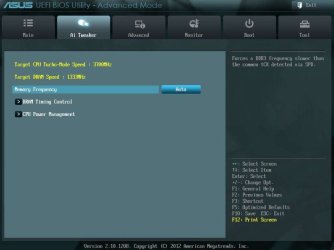
Select the AI Tweaker section from the main page in Advanced Mode in the BIOS
Capture.JPG
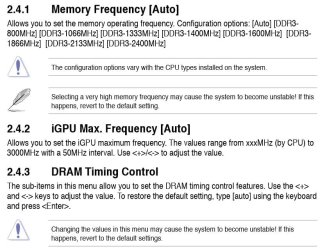
Choose DRAM Timing Control and follow the instructions below (2.4.3).
Capture 2.JPG
 

My Computer

Computer type
PC/Desktop
Computer Manufacturer/Model Number
Custom Build
OS
W7 Pro x64 SP1 | W10 Pro IP x64 | W8.1 Pro x64 VM | Linux Mint VM
CPU
i7-4790k @ 4GHz (4.4GHz Boost)
Motherboard
ASUS Sabertooth Z87 (BIOS Rev 2004)
Memory
16GB DDR3 Kingston HyperX Fury @ 1600MHz CL 9-9-9-27
Graphics Card(s)
EVGA GTX 980 Classified
Sound Card
Realtek Onboard
Monitor(s) Displays
Samsung S27D390
Screen Resolution
1920 x 1080
Hard Drives
240GB Intel 520 Series SSD |
Samsung 850 EVO 120GB SSD |
2TB WD Caviar Black |
2TB WD Caviar Green
PSU
Corsair HX850-80 Gold Modular
Case
Cooler Master Silencio 650
Cooling
Corsair H80i w/2 x Corsair SP120 | 2 x 120mm Noctua NF-S12B
Keyboard
Microsoft Sidewinder X4
Mouse
Gigabyte M6900 optical
Internet Speed
152mb
Antivirus
F-Secure
Browser
Firefox 38.0
Other Info
Backup Rig: Win 7 Pro 64-bit | AMD A10-5800k | ASUS F2A85-V Pro | 8GB Samsung DDR3 @1600MHz | 120GB Toshiba SDD | 2TB Seagate HDD | Cooler Master Silencio 550
Back
Top