xonar d2x sound card loud buzzing noise problem

ChaosEternal

New member
Local time
1:51 AM
Messages
10
I am using xonar d2x sound card and it has been good until recently when I played videos on youtube and games it gives a loud buzzing noise. Even sounds made by windows sound produces the loud buzzing noise. It also happens on sometimes when playing videos. Other than that it works fine. I tried to use realtek sound but can't find the driver on device manager, even after downloading & installing the drivers. I tried reinstalling my xonar sound driver but it didn't fix the problem. I reformatted my pc and installed the xonar sound card but the problem is still there. I then tried installing the update for it but my pc crash (blue screen with driver_IRQL_not_less_or_equal error). After restart, there's no audio output device detected. Device manager shows Marvell 91xx Config ATA device not installed.

I'm really frustrated now. Is there anyone that can help me? Thanks alot.
 

My Computer My Computer

At a glance

Windows 7 Home Premium 64bit
OS
Windows 7 Home Premium 64bit
First, don't have two sound devices enabled, as that can cause conflicts.

Is the buzzing caused by something attached to the sound card? e.g. a "ground loop hum". Remove anything attached to the card and then just connect a headphone and see if you still get the buzzing. If its gone then what is attached to the card is causing the problem. If its still there the first step is to "reseat" the card (with the PC powered off, remove the sound card then reinstall making sure its fully and correctly seated).
 

My Computer My Computer

At a glance

Windows 10 64 bitIntel i7 6700K16GB Corsair DominatorIntel CPU Graphics
Computer type
PC/Desktop
Computer Manufacturer/Model Number
My Own Build
OS
Windows 10 64 bit
CPU
Intel i7 6700K
Motherboard
ASUS ROG Maximus VIII Hero
Memory
16GB Corsair Dominator
Graphics Card(s)
Intel CPU Graphics
Sound Card
RealTek
Monitor(s) Displays
27" Dell S2719dgf
Screen Resolution
2560X1440
Hard Drives
1 TB Samsung 850 EVO SSD for Win 10 Pro
500GB Samsung 850 EVO SSD for Win 10 Insider
2 TB drive for backup
PSU
EVGA Supernova 750G2
Case
BeQuiet Silent Base 600
Cooling
Deepcool Captain 120EX
Keyboard
Microsoft Wireless 2000
Mouse
Microsoft wireless
Internet Speed
100 MB/sec (Cable)
Antivirus
Microsoft Defender and Malwarebytes
Browser
Edge/Firefox
Other Info
Cakewalk (Sonar) by BandLab and Studio One 4.1 Pro recording studio software. MOTU 896Mk3 Hybrid recording interface, Frontier Tranzport wireless control unit, Behringer X-Touch Control Surface.
Five USB connected optical drives for CD Audio production using Nero BurningROM
I don't have 2 sound devices enabled. Only the xonar. Realtek can't be found.

I don't have any attachments to my sound card. I don't think its a ground loop hum. The buzzing sounds like distortion or kinda like the buzzing sound u get on the radio.
I did reseat my sound card before but it didn't solve the problem. Also I tried using a headphone to make sure my speaker isn't the problem but I still get the buzzing sound when using the headphone.

I'm guessing its a hardware problem?
 

My Computer My Computer

At a glance

Windows 7 Home Premium 64bit
OS
Windows 7 Home Premium 64bit
Although it could be a problem with the sound card, that sounds like a bad connection. I do guitar amp repair so I come across similar noises at times.

Disconnect the front panel headphone/mic connection to the card and see if that makes any difference.
 

My Computer My Computer

At a glance

Windows 10 64 bitIntel i7 6700K16GB Corsair DominatorIntel CPU Graphics
Computer type
PC/Desktop
Computer Manufacturer/Model Number
My Own Build
OS
Windows 10 64 bit
CPU
Intel i7 6700K
Motherboard
ASUS ROG Maximus VIII Hero
Memory
16GB Corsair Dominator
Graphics Card(s)
Intel CPU Graphics
Sound Card
RealTek
Monitor(s) Displays
27" Dell S2719dgf
Screen Resolution
2560X1440
Hard Drives
1 TB Samsung 850 EVO SSD for Win 10 Pro
500GB Samsung 850 EVO SSD for Win 10 Insider
2 TB drive for backup
PSU
EVGA Supernova 750G2
Case
BeQuiet Silent Base 600
Cooling
Deepcool Captain 120EX
Keyboard
Microsoft Wireless 2000
Mouse
Microsoft wireless
Internet Speed
100 MB/sec (Cable)
Antivirus
Microsoft Defender and Malwarebytes
Browser
Edge/Firefox
Other Info
Cakewalk (Sonar) by BandLab and Studio One 4.1 Pro recording studio software. MOTU 896Mk3 Hybrid recording interface, Frontier Tranzport wireless control unit, Behringer X-Touch Control Surface.
Five USB connected optical drives for CD Audio production using Nero BurningROM
Disable all outputs/inputs you are not using or at least turn them all right down

Might do the trick
 

My Computer My Computer

At a glance

WIN7 Ultimate 64bitAMD FX8150/Trinity A10-5700G-Skill 2400 x2 @ 1866 (both pc's)Sapphire (factory OC version) AMD 7770
Computer type
PC/Desktop
Computer Manufacturer/Model Number
D.I.Y.
OS
WIN7 Ultimate 64bit
CPU
AMD FX8150/Trinity A10-5700
Motherboard
Asus Sabertooth v.1 /Asus F2A85-M Pro
Memory
G-Skill 2400 x2 @ 1866 (both pc's)
Graphics Card(s)
Sapphire (factory OC version) AMD 7770
Sound Card
onboard
Monitor(s) Displays
T260 Samsung
Screen Resolution
1920x1080
Hard Drives
Western Digital Sata 2TB/1TB Caviar Blacks
Buffalo 1TB usb (excellent drive)
PSU
Be-Quiet 700W E-9/Be-Quiet 550W E-9(E-9 = built by FSP)
Case
Antec P183/Antec P180mini
Cooling
x2 Xigmatek SXHH7-U01 + C-Master R4-EXBB-20PK-R0 120mm Fans
Keyboard
Cherry
Mouse
MS Explorer 3.0
Other Info
LG Blu ray combo
Pioneer 207D/208 Blu ray burners
I don't think the panel can be disconnected. I'm really confused. Sometimes it works fine when playing music but sometimes it gives distortion noise. I decided to switch back to realtek back I can't find the driver of it.

Anyway thanks for the help fireberd. Appreciate it.
 

My Computer My Computer

At a glance

Windows 7 Home Premium 64bit
OS
Windows 7 Home Premium 64bit
What do u mean inputs/outputs?
 

My Computer My Computer

At a glance

Windows 7 Home Premium 64bit
OS
Windows 7 Home Premium 64bit
right click on speaker icon on taskbar
Go to "Audio devices" or "playback devices"(win 7 icon)
sub menu
"Playback" + "recording" + "communications"

mute or disable all the items you don't use or say "unplugged"

I'm trying to remember as I own a xonar (not being used at present) there should be access to another setting for adjusting 'latency' which might help

Whats wrong with latest asus drivers cos they keep them reasonably up to date - download them

Before you do that, clean your pc of realtek driver debris
install "driver cleaner"
 

My Computer My Computer

At a glance

WIN7 Ultimate 64bitAMD FX8150/Trinity A10-5700G-Skill 2400 x2 @ 1866 (both pc's)Sapphire (factory OC version) AMD 7770
Computer type
PC/Desktop
Computer Manufacturer/Model Number
D.I.Y.
OS
WIN7 Ultimate 64bit
CPU
AMD FX8150/Trinity A10-5700
Motherboard
Asus Sabertooth v.1 /Asus F2A85-M Pro
Memory
G-Skill 2400 x2 @ 1866 (both pc's)
Graphics Card(s)
Sapphire (factory OC version) AMD 7770
Sound Card
onboard
Monitor(s) Displays
T260 Samsung
Screen Resolution
1920x1080
Hard Drives
Western Digital Sata 2TB/1TB Caviar Blacks
Buffalo 1TB usb (excellent drive)
PSU
Be-Quiet 700W E-9/Be-Quiet 550W E-9(E-9 = built by FSP)
Case
Antec P183/Antec P180mini
Cooling
x2 Xigmatek SXHH7-U01 + C-Master R4-EXBB-20PK-R0 120mm Fans
Keyboard
Cherry
Mouse
MS Explorer 3.0
Other Info
LG Blu ray combo
Pioneer 207D/208 Blu ray burners
Tried disabling all the other stuff that I don't use. Doesn't work. I just reformatted my pc so there shouldn't be any realtek driver stuff on it? To be safe I'll do a check on it. I did try to update the latest asus driver but I got a blue screen with driver_IRQL_not_less_or_equal error. And also, I have Marvell 91xx Config ATA device not installed showing up on device manager.
 

My Computer My Computer

At a glance

Windows 7 Home Premium 64bit
OS
Windows 7 Home Premium 64bit
unload all asus soundcard stuff

Pull the soundcard out of slot

download and install all motherboard stuff in device manager with yellow query mark
Reinstall your graphic driver! restart
make sure all is ok in device manager

now reinstall soundcard in a different slot if available

make sure onboard sound is disabled in bios (pref. not on 'auto' choice)

install asus latest drivers

See now if it installs properly without blue-screening

After restarting your pc to embed drivers

Have you installed latest 9.0c directx file updates?
https://www.microsoft.com/en-us/download/details.aspx?id=35

click search button on your pc after install (& restart)
type 'dxdiag' in "search progs & files" box at bottom
open dxdiagnostics
and go through the menus esp check sound
 

My Computer My Computer

At a glance

WIN7 Ultimate 64bitAMD FX8150/Trinity A10-5700G-Skill 2400 x2 @ 1866 (both pc's)Sapphire (factory OC version) AMD 7770
Computer type
PC/Desktop
Computer Manufacturer/Model Number
D.I.Y.
OS
WIN7 Ultimate 64bit
CPU
AMD FX8150/Trinity A10-5700
Motherboard
Asus Sabertooth v.1 /Asus F2A85-M Pro
Memory
G-Skill 2400 x2 @ 1866 (both pc's)
Graphics Card(s)
Sapphire (factory OC version) AMD 7770
Sound Card
onboard
Monitor(s) Displays
T260 Samsung
Screen Resolution
1920x1080
Hard Drives
Western Digital Sata 2TB/1TB Caviar Blacks
Buffalo 1TB usb (excellent drive)
PSU
Be-Quiet 700W E-9/Be-Quiet 550W E-9(E-9 = built by FSP)
Case
Antec P183/Antec P180mini
Cooling
x2 Xigmatek SXHH7-U01 + C-Master R4-EXBB-20PK-R0 120mm Fans
Keyboard
Cherry
Mouse
MS Explorer 3.0
Other Info
LG Blu ray combo
Pioneer 207D/208 Blu ray burners
Ok. Just curious, why does the graphic driver needs to be reinstall? Also could u emphasize on disabling sound in bios. And should I download directx 9.0c now? Thanks for the help!
 

My Computer My Computer

At a glance

Windows 7 Home Premium 64bit
OS
Windows 7 Home Premium 64bit
Oops double post.
 

My Computer My Computer

At a glance

Windows 7 Home Premium 64bit
OS
Windows 7 Home Premium 64bit
I have the same sound card and I get this problem after a clean install but "usually" not always it's only a problem when trying to use Silverlight.

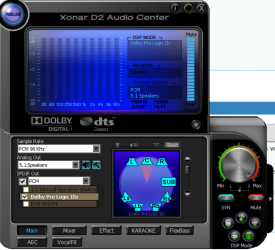
To fix the problem, open up the Xonar UI and go to the DSP mode switches, try messing with the different DSP modes until the problem is fixed.

You can see the DSP mode buttons lower right on the Xonar UI, the picture might help.

I can't recall exactly which DSP button made a difference but just pushing different ones fixed the problem straight away.

This is the only thing that worked for me. ;)
 

Attachments

  • Xonar UI.PNG
    Xonar UI.PNG
    69.4 KB · Views: 19

My Computer My Computer

At a glance

Windows 7 Ult, Windows 8.1 Pro,Q9650-4.275GHz, E8600 4.5GHz, E6750-3.8GHzG.Skill PC2 9600 1200Mhz 5 5 5 15 2TGTX480
Computer type
PC/Desktop
Computer Manufacturer/Model Number
Home built
OS
Windows 7 Ult, Windows 8.1 Pro,
CPU
Q9650-4.275GHz, E8600 4.5GHz, E6750-3.8GHz
Motherboard
Evga 780i FTW
Memory
G.Skill PC2 9600 1200Mhz 5 5 5 15 2T
Graphics Card(s)
GTX480
Sound Card
Asus Xonar D2
Monitor(s) Displays
HannsG
Screen Resolution
1680X1050
Hard Drives
GSkill Phoenix Pro 120GB SSD
PSU
ThermalTake Toughpower 1000Watt modular
Case
ThermalTake XaserV
Cooling
Xigmatek S1283
Keyboard
Logitech G15
Mouse
Logitech G9
Internet Speed
T1
How did u know its an issue with silverlight? I tried messing around with the different modes and it worked randomly (sometimes it works with only PCM 48kHz and 7.1 virtual setting). Seems like I have to on the audio center every time. But then again I need to solve the blue screen on updating the driver. I did a scan and there're some errors with my system. I'll post them tomorrow cos I really need to sleep now. Many thanks chev65!
 

My Computer My Computer

At a glance

Windows 7 Home Premium 64bit
OS
Windows 7 Home Premium 64bit
How did u know its an issue with silverlight? I tried messing around with the different modes and it worked randomly (sometimes it works with only PCM 48kHz and 7.1 virtual setting). Seems like I have to on the audio center every time. But then again I need to solve the blue screen on updating the driver. I did a scan and there're some errors with my system. I'll post them tomorrow cos I really need to sleep now. Many thanks chev65!

I knew it was an issue Silverlight because I have the same Xonar D2 and the problem seemed confined to Silverlight. This occurs every time I reinstall the OP system so I had a very good idea of what the problem might be.

You may also need to go into the sound setting in the control panel, click on speakers, then to configure, if it's not already on Stereo you should put it there and let the Asus drivers handle the 5.1. You might also want to check out "Levels" in speaker properties to ensure that it's set in the middle for balance.

I set the Asus panel to use 5.1, put a check mark on PCM, and another on
Dolby digital like in the picture I posted, for best sound quality.

The DSP mode buttons should definitely take care of the sound problem with Silverlight.

Good luck with those system errors what ever they might be. :)
 

My Computer My Computer

At a glance

Windows 7 Ult, Windows 8.1 Pro,Q9650-4.275GHz, E8600 4.5GHz, E6750-3.8GHzG.Skill PC2 9600 1200Mhz 5 5 5 15 2TGTX480
Computer type
PC/Desktop
Computer Manufacturer/Model Number
Home built
OS
Windows 7 Ult, Windows 8.1 Pro,
CPU
Q9650-4.275GHz, E8600 4.5GHz, E6750-3.8GHz
Motherboard
Evga 780i FTW
Memory
G.Skill PC2 9600 1200Mhz 5 5 5 15 2T
Graphics Card(s)
GTX480
Sound Card
Asus Xonar D2
Monitor(s) Displays
HannsG
Screen Resolution
1680X1050
Hard Drives
GSkill Phoenix Pro 120GB SSD
PSU
ThermalTake Toughpower 1000Watt modular
Case
ThermalTake XaserV
Cooling
Xigmatek S1283
Keyboard
Logitech G15
Mouse
Logitech G9
Internet Speed
T1
Come to think of it, the this problem started after I updated the latest version of Adobe shockwave player. Could there be conflict?

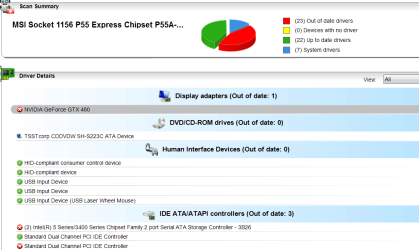
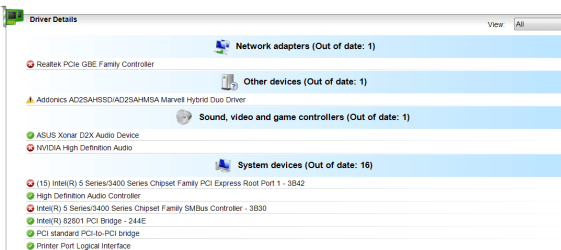
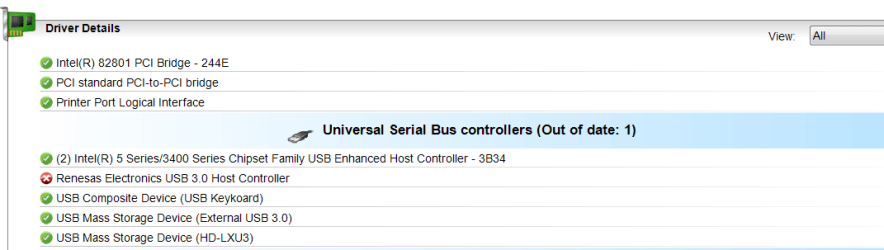
Checking the dolby digital live & DTS Interactive doesn't give any sound. Spdf loopback also gives the buzzing sound. PCM most of the time gives the buzz too. My best bet is too switch between checking and unchecking dolby digital & sometimes between 5.1 and 2 speakers to cancel out the buzz. This method is kinda troublesome.

pc scan.png

pc scan 1.png

pc scan 2.png

Need help on these.
 

My Computer My Computer

At a glance

Windows 7 Home Premium 64bit
OS
Windows 7 Home Premium 64bit
How did u know its an issue with silverlight? I tried messing around with the different modes and it worked randomly (sometimes it works with only PCM 48kHz and 7.1 virtual setting). Seems like I have to on the audio center every time. But then again I need to solve the blue screen on updating the driver. I did a scan and there're some errors with my system. I'll post them tomorrow cos I really need to sleep now. Many thanks chev65!

I knew it was an issue Silverlight because I have the same Xonar D2 and the problem seemed confined to Silverlight. This occurs every time I reinstall the OP system so I had a very good idea of what the problem might be.

You may also need to go into the sound setting in the control panel, click on speakers, then to configure, if it's not already on Stereo you should put it there and let the Asus drivers handle the 5.1. You might also want to check out "Levels" in speaker properties to ensure that it's set in the middle for balance.

I set the Asus panel to use 5.1, put a check mark on PCM, and another on
Dolby digital like in the picture I posted, for best sound quality.

The DSP mode buttons should definitely take care of the sound problem with Silverlight.

Good luck with those system errors what ever they might be. :)
Aha

I have a D2 - but refused to ever load silverlight on my pc's and never had this problem

Get rid of it unless you are forced to use it on MS sites - I never needed it to run anything at any time!

Glad you knew what it was!

errrr
reloading your graphic driver package also reloads a ton of other drivers including sound related stuff - ok :D

If another recently loaded prog has loaded on a slightly different driver and overwrote original - you could get a problem

errors with system?
- yet you said "brand new install of OS win7" - now you tell us :p

repair system how to
http://www.sevenforums.com/tutorials/1538-sfc-scannow-command-system-file-checker.html
 

My Computer My Computer

At a glance

WIN7 Ultimate 64bitAMD FX8150/Trinity A10-5700G-Skill 2400 x2 @ 1866 (both pc's)Sapphire (factory OC version) AMD 7770
Computer type
PC/Desktop
Computer Manufacturer/Model Number
D.I.Y.
OS
WIN7 Ultimate 64bit
CPU
AMD FX8150/Trinity A10-5700
Motherboard
Asus Sabertooth v.1 /Asus F2A85-M Pro
Memory
G-Skill 2400 x2 @ 1866 (both pc's)
Graphics Card(s)
Sapphire (factory OC version) AMD 7770
Sound Card
onboard
Monitor(s) Displays
T260 Samsung
Screen Resolution
1920x1080
Hard Drives
Western Digital Sata 2TB/1TB Caviar Blacks
Buffalo 1TB usb (excellent drive)
PSU
Be-Quiet 700W E-9/Be-Quiet 550W E-9(E-9 = built by FSP)
Case
Antec P183/Antec P180mini
Cooling
x2 Xigmatek SXHH7-U01 + C-Master R4-EXBB-20PK-R0 120mm Fans
Keyboard
Cherry
Mouse
MS Explorer 3.0
Other Info
LG Blu ray combo
Pioneer 207D/208 Blu ray burners
Ok. Just curious, why does the graphic driver needs to be reinstall? Also could u emphasize on disabling sound in bios. And should I download directx 9.0c now? Thanks for the help!

In some bios menus
You only get a choice of 'Auto' to switch off onboard soundchip
Majority will give another setting to 'disable' completely (or re-jumper pins on older motherboards)
- so there is no chance of auto sound setting making wrong choice, possibly giving your bluescreens

9.0c If you use older software/games which rely on it - it should help
 

My Computer My Computer

At a glance

WIN7 Ultimate 64bitAMD FX8150/Trinity A10-5700G-Skill 2400 x2 @ 1866 (both pc's)Sapphire (factory OC version) AMD 7770
Computer type
PC/Desktop
Computer Manufacturer/Model Number
D.I.Y.
OS
WIN7 Ultimate 64bit
CPU
AMD FX8150/Trinity A10-5700
Motherboard
Asus Sabertooth v.1 /Asus F2A85-M Pro
Memory
G-Skill 2400 x2 @ 1866 (both pc's)
Graphics Card(s)
Sapphire (factory OC version) AMD 7770
Sound Card
onboard
Monitor(s) Displays
T260 Samsung
Screen Resolution
1920x1080
Hard Drives
Western Digital Sata 2TB/1TB Caviar Blacks
Buffalo 1TB usb (excellent drive)
PSU
Be-Quiet 700W E-9/Be-Quiet 550W E-9(E-9 = built by FSP)
Case
Antec P183/Antec P180mini
Cooling
x2 Xigmatek SXHH7-U01 + C-Master R4-EXBB-20PK-R0 120mm Fans
Keyboard
Cherry
Mouse
MS Explorer 3.0
Other Info
LG Blu ray combo
Pioneer 207D/208 Blu ray burners
Aha

I have a D2 - but refused to ever load silverlight on my pc's and never had this problem

Get rid of it unless you are forced to use it on MS sites - I never needed it to run anything at any time!

Glad you knew what it was!

errrr
reloading your graphic driver package also reloads a ton of other drivers including sound related stuff - ok :D

If another recently loaded prog has loaded on a slightly different driver and overwrote original - you could get a problem

errors with system?
- yet you said "brand new install of OS win7" - now you tell us :p

repair system how to
http://www.sevenforums.com/tutorials/1538-sfc-scannow-command-system-file-checker.html

I got all these errors after trying to update my xonar sound card to the latest version I got from asus site. During installation it crash with the blue screen. After restart, I got the Marvell 91xx config ata device yellow triangle saying the driver isn't installed. Of all those out-of -dates, I know I didn't update the nvidia graphic and audio driver. I'm afraid the audio will conflict with my xonar.
 

My Computer My Computer

At a glance

Windows 7 Home Premium 64bit
OS
Windows 7 Home Premium 64bit
How did u know its an issue with silverlight? I tried messing around with the different modes and it worked randomly (sometimes it works with only PCM 48kHz and 7.1 virtual setting). Seems like I have to on the audio center every time. But then again I need to solve the blue screen on updating the driver. I did a scan and there're some errors with my system. I'll post them tomorrow cos I really need to sleep now. Many thanks chev65!

I knew it was an issue Silverlight because I have the same Xonar D2 and the problem seemed confined to Silverlight. This occurs every time I reinstall the OP system so I had a very good idea of what the problem might be.

You may also need to go into the sound setting in the control panel, click on speakers, then to configure, if it's not already on Stereo you should put it there and let the Asus drivers handle the 5.1. You might also want to check out "Levels" in speaker properties to ensure that it's set in the middle for balance.

I set the Asus panel to use 5.1, put a check mark on PCM, and another on
Dolby digital like in the picture I posted, for best sound quality.

The DSP mode buttons should definitely take care of the sound problem with Silverlight.

Good luck with those system errors what ever they might be. :)
Aha

I have a D2 - but refused to ever load silverlight on my pc's and never had this problem

Get rid of it unless you are forced to use it on MS sites - I never needed it to run anything at any time!

Glad you knew what it was!

errrr
reloading your graphic driver package also reloads a ton of other drivers including sound related stuff - ok :D

If another recently loaded prog has loaded on a slightly different driver and overwrote original - you could get a problem

errors with system?
- yet you said "brand new install of OS win7" - now you tell us :p

repair system how to
http://www.sevenforums.com/tutorials/1538-sfc-scannow-command-system-file-checker.html

Silverlight doesn't cause the problem, it's only a symptom of the problem which was using the incorrect sound effect. Your comment to recommend not using Silverlight is wrong on so many levels.

Silverlight works fine on my system and it causes absolutely zero problems. The Nvidia graphics drivers have absolutely nothing to do with this problem.

The fact that sfc/scannow is showing errors is the problem here. Until that problem is fixed nothing will be working right.
 

My Computer My Computer

At a glance

Windows 7 Ult, Windows 8.1 Pro,Q9650-4.275GHz, E8600 4.5GHz, E6750-3.8GHzG.Skill PC2 9600 1200Mhz 5 5 5 15 2TGTX480
Computer type
PC/Desktop
Computer Manufacturer/Model Number
Home built
OS
Windows 7 Ult, Windows 8.1 Pro,
CPU
Q9650-4.275GHz, E8600 4.5GHz, E6750-3.8GHz
Motherboard
Evga 780i FTW
Memory
G.Skill PC2 9600 1200Mhz 5 5 5 15 2T
Graphics Card(s)
GTX480
Sound Card
Asus Xonar D2
Monitor(s) Displays
HannsG
Screen Resolution
1680X1050
Hard Drives
GSkill Phoenix Pro 120GB SSD
PSU
ThermalTake Toughpower 1000Watt modular
Case
ThermalTake XaserV
Cooling
Xigmatek S1283
Keyboard
Logitech G15
Mouse
Logitech G9
Internet Speed
T1
Back
Top