
Solved XP/7 Dual Boot Disaster - Unplugged?

Sager

New member
Local time
7:22 PM
Messages
17
Location
Florida
Hi everybody,

Here's what happened...

My system was running Win XP Pro 32bit in C:. I desired to upgrade to Win 7 Pro 64bit. Everything checked out fine using Windows Advisor and I backed up my files using the Windows Easy Transfer tool. I booted the system from the Win 7 Pro 64bit disk and proceeded with the install. For some reason, Win7 got hung up wanting Drivers!? I loaded every driver I could get my hands on - still no success. So, I attempted to boot normally back into Win XP Pro 32bit and alas, the Boot Manager was missing! I figured, I'm one step away from owning a brick! :eek:

Here's what I did... (sorry)

I booted from my XP Pro 32bit disk and installed it onto my D: drive. I figured I would be able to load the DVD drivers to keep them active for a clean install of Win 7 Pro 64bit after a newly formatted C: drive. So far, so good... Then, I reformatted my C: drive and performed a clean install of Win 7 Pro 64bit. Sweet...almost. Upon reboot, I now have a dual boot system! But, I don't want that!

Here's what I got...

Gigabyte GA-880GA-UD3H Rev. 2.1
AMD Phenom II x 4 945 95Watt
PSU Seasonic X650 Gold
C: WD VelociRaptor 300Gig
D: WD Caviar Blue 640Gig
F: WD Caviar Blue 640Gig
8 Gigs DDR3 RAM
Lite-On IHAS-324-98 R x 2

Drive Status:
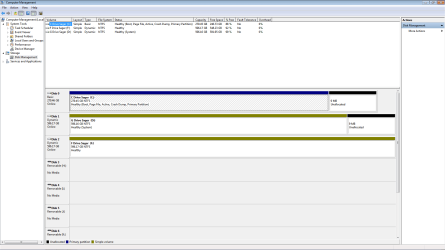
Disk 0 - C: Simple Basic NTFS - Healthy (Boot, Page File, Active, Crash Dump, Primary Partition)
Disk 1 - D: Simple Dynamic NTFS - Healthy (System)
Disk 2 - F: Simple Dynamic NTFS - Healthy

Here's what I'm trying to do...

I want to have Win 7 Pro 64bit stay on C:
I want to eliminate Win XP Pro 32bit on D: so I can format and use that drive for data and backups only.
I want to leave my F: alone.


Obviously, I'm not real sure about what I'm doing, so I desperately need some help to walk me through this. I just don't know.

If necessary, I can reformat and reinstall Win 7. There's not much on it right now, but I'd really rather not. I'd have done that already, but the system won't let me. I'll still have to be able to access and reformat my D: Drive.

Now I'm thinking, (which is dangerous) that I could disconnect the D: Drive, and boot from the Win 7 disk to maybe reformat C: and reinstall Win 7. But then, I wouldn't be able to reconnect the D: Drive (with a System on it) and boot up from C: in order to reformat the D: Drive! Something tells me this is not a good thing. "No guts, no glory" is not a confident move for me... :confused: Besides, if I can keep my Win 7 intact, that will save me lots of time reloading and reconfigurating to get back to where I currently reside. Other than that, everything is running just the way it's supposed to... GREAT!

I've been reading previous posts and solutions here to the point where I'm totally confused! Can you tell?

I need some serious help with this guys, if you don't mind. Thank you in advance for any help or suggestions you might venture to offer. If you think I need to just shoot myself, don't be shy... Have the courage to tell me so! I'll probably take your advice at this point! :)

Sager
 

My Computer My Computer

Computer Manufacturer/Model Number
Home Built
OS
Windows 7 Professional 64 bit
CPU
AMD Phenom II X 4 945 95 Watt 3GHz
Motherboard
Gigabyte GA-880GA-UD3H Rev. 2.1
Memory
Corsair DDR3 - 2 Gig TW3X4G1333C9A G R x 4 (8 Gig)
Graphics Card(s)
Onboard, Internal Radeon 4250
Sound Card
Onboard Realtec 7-1 HD Audio
Monitor(s) Displays
Asus LCD Flat Panel VH236H
Hard Drives
C: WD VelociRaptor 300 Gig - WD3000HLFS
D: WD Caviar Blue WD6400AAKS 640GB
F: WD Caviar Blue WD6400AAKS 640GB
PSU
Seasonic X650 Gold 650W
Case
Antec Sonata Elite
Cooling
Arctic Cooler - CPU, Gelid - Case Fan X 1
If you want to save your current Win7 install, please post back a screenshot of your full maximized Disk Management drive map with listings, using Snipping Tool in Start Menu.

Because you left all the HD's connected there could be multiple complications besides the unwanted Dual Boot. We can help you remove the Dual Boot and make any other necessary changes.

Frankly to get the cleanest install you should unplug all other HD's and wipe the target HD first, as formatting erases nothing and can leave infected or corrupt code on the HD. http://www.sevenforums.com/tutorials/91339-ssd-hdd-optimize-windows-reinstallation.html

But if you want to test performance on the current install after extricating the Dual Boot and any other issues, post back the screenshot and we will give you the steps.
 
I found the 'Snipping Tool' and copied a full screen of Disk Management. Now, exactly HOW do I send this to you?
 

My Computer My Computer

Computer Manufacturer/Model Number
Home Built
OS
Windows 7 Professional 64 bit
CPU
AMD Phenom II X 4 945 95 Watt 3GHz
Motherboard
Gigabyte GA-880GA-UD3H Rev. 2.1
Memory
Corsair DDR3 - 2 Gig TW3X4G1333C9A G R x 4 (8 Gig)
Graphics Card(s)
Onboard, Internal Radeon 4250
Sound Card
Onboard Realtec 7-1 HD Audio
Monitor(s) Displays
Asus LCD Flat Panel VH236H
Hard Drives
C: WD VelociRaptor 300 Gig - WD3000HLFS
D: WD Caviar Blue WD6400AAKS 640GB
F: WD Caviar Blue WD6400AAKS 640GB
PSU
Seasonic X650 Gold 650W
Case
Antec Sonata Elite
Cooling
Arctic Cooler - CPU, Gelid - Case Fan X 1
Post it up using the paper clip in reply box.

Tell us what you prefer to do.
 
Capture.PNG

I think this is it. I prefer to keep my Windows 7 on my C: drive. Thanks.
 

My Computer My Computer

Computer Manufacturer/Model Number
Home Built
OS
Windows 7 Professional 64 bit
CPU
AMD Phenom II X 4 945 95 Watt 3GHz
Motherboard
Gigabyte GA-880GA-UD3H Rev. 2.1
Memory
Corsair DDR3 - 2 Gig TW3X4G1333C9A G R x 4 (8 Gig)
Graphics Card(s)
Onboard, Internal Radeon 4250
Sound Card
Onboard Realtec 7-1 HD Audio
Monitor(s) Displays
Asus LCD Flat Panel VH236H
Hard Drives
C: WD VelociRaptor 300 Gig - WD3000HLFS
D: WD Caviar Blue WD6400AAKS 640GB
F: WD Caviar Blue WD6400AAKS 640GB
PSU
Seasonic X650 Gold 650W
Case
Antec Sonata Elite
Cooling
Arctic Cooler - CPU, Gelid - Case Fan X 1
Power down to Unplug XP HD so it doesn't interfere with repairs.

Next set Win7 HD as first HD to boot in BIOS setup (after DVD drive), boot the Win7 DVD Repair Console, accept any offered Repair. If it fails to start, boot back in to DVD Repair console's http://www.sevenforums.com/tutorials/668-system-recovery-options.html to http://www.sevenforums.com/tutorials/105541-startup-repair-run-3-separate-times.html.

Repair will run tests and fixes, eventually writing the System boot files to Win7 partition so it boots on its own in 1-3 separate repairs with restarts in between to test if Win7 starts.

Make sure Win7 remains first HD to boot in BIOS setup when you plug XP HD back in to wipe it using Diskpart Clean All command, which will delete XP as well as convert to Basic disk: http://www.sevenforums.com/tutorials/52129-disk-clean-clean-all-diskpart-command.html. If it interferes with the boot, then instead boot the 7 DVD to run Diskpart Clean All on XP HD from the Repair console Command Line.
 
Last edited:
Dear Sager,
Just a quick word. When you were using win.XP 32, were you using the same partition system--> C as Basic and D and F as Dynamic? OR did you notice this after you tried to upgrade to Win.7 Prof. 64 Bit, as the difference between Basic and dynamic is like Chalk and Cheese!

Regards,
Sreedhav
 

My Computer My Computer

Computer Manufacturer/Model Number
Sony Vaio C series VPCCB35FN laptop
OS
MS Windows 7 Home Premium 64-bit SP1
CPU
IntelCore [email protected]; Sandy Bridge 32nm Tech.
Motherboard
Sony Vaio Version:C609NJYJ
Memory
4096Mb RAM; Single ChannelDDR3@665MHz; DRAM Freq:662MHz
Graphics Card(s)
AMD Radeon HD 6630M; GPU:Whistler;BIOS Core&mem Clock:123.36
Sound Card
REALTEK High Definition Audio Device; INTEL Display Card
Monitor(s) Displays
Generic PnP Intel HD;Resolution:1920*1040 Pixels; BPP:32bits
Screen Resolution
Current Resolution:1920*1080 Pixels; Monitor Frequency:60Hz
Hard Drives
Internal HD:TOSHIBA MK5061GSY; Real Size:488 GB;NTFS; 3 Partitions; SATA; HEADS:16

External HDD: WD Elements 1023 PORTABLE; Estimated Size: 1TB; NTFS; 3 Partitions
Cooling
Lateral Exhaust with a Cooling Pad Placed Beneath.
Keyboard
Logitech Bluetooth+ Generic Integrated K-B
Mouse
Logitech Bluetooth
Internet Speed
2MBPS
Other Info
1)Trend Micro Titanium Maximum Security Suite Version:3
2)SAS-PRO

3)MBAM--PRO


4)WATERFOX+IE9 +WOT+LINKEXTEND+ DRWEBCUREIT LINK CHECKER

5)SPYWAREBLASTER

6) WINPATROL PLUS

7) SANDBOXIE and
8) A BIT OF COMMON SENSE.
Thank you for the rapid replies guys!

sreedhav,

Great technical point and one which I inadvertantly omitted during my initial post. Originally, WinXP was on the C: drive. Then I moved (reinstalled) it to D: and reformatted C: for the installation of Win7. I did notice that D: with XP was an 'Active drive' at the time and C: was not. Being a dummy I guess, and for some reason I don't even know, I made C: 'Active' also. It appears that D: now is no longer 'Active' but C: is. Evidently, this means something other than I a dummy?

Gregrocker,

Thanks for the formula --- waiting for reply to see if the 'Active Drive' business above plays a part in the equasion, before executing your instructions. Thanks!

Sager
 

My Computer My Computer

Computer Manufacturer/Model Number
Home Built
OS
Windows 7 Professional 64 bit
CPU
AMD Phenom II X 4 945 95 Watt 3GHz
Motherboard
Gigabyte GA-880GA-UD3H Rev. 2.1
Memory
Corsair DDR3 - 2 Gig TW3X4G1333C9A G R x 4 (8 Gig)
Graphics Card(s)
Onboard, Internal Radeon 4250
Sound Card
Onboard Realtec 7-1 HD Audio
Monitor(s) Displays
Asus LCD Flat Panel VH236H
Hard Drives
C: WD VelociRaptor 300 Gig - WD3000HLFS
D: WD Caviar Blue WD6400AAKS 640GB
F: WD Caviar Blue WD6400AAKS 640GB
PSU
Seasonic X650 Gold 650W
Case
Antec Sonata Elite
Cooling
Arctic Cooler - CPU, Gelid - Case Fan X 1
C needs to be marked Active to do the repairs which wll recover the System boot files into Win7 partition. Just follow the steps given unless you have changed your mind.
 
Okay gregrocker... I haven't changed my mind...gulp. :) Thanks.
 

My Computer My Computer

Computer Manufacturer/Model Number
Home Built
OS
Windows 7 Professional 64 bit
CPU
AMD Phenom II X 4 945 95 Watt 3GHz
Motherboard
Gigabyte GA-880GA-UD3H Rev. 2.1
Memory
Corsair DDR3 - 2 Gig TW3X4G1333C9A G R x 4 (8 Gig)
Graphics Card(s)
Onboard, Internal Radeon 4250
Sound Card
Onboard Realtec 7-1 HD Audio
Monitor(s) Displays
Asus LCD Flat Panel VH236H
Hard Drives
C: WD VelociRaptor 300 Gig - WD3000HLFS
D: WD Caviar Blue WD6400AAKS 640GB
F: WD Caviar Blue WD6400AAKS 640GB
PSU
Seasonic X650 Gold 650W
Case
Antec Sonata Elite
Cooling
Arctic Cooler - CPU, Gelid - Case Fan X 1
If it boots now with XP partition plugged in, you can unplug XP for the repairs so that you have a method you know boots to fall back on until Win7 will boot itself..
 
gregrocker,

Sir, you say: Make sure Windows 7 remains first HD to boot in BIOS setup when you plug XP HD back in to wipe it using Diskpart:

When or where do I unplug D: ? Oops, never mind... you're way ahead of me :)
 
Last edited:

My Computer My Computer

Computer Manufacturer/Model Number
Home Built
OS
Windows 7 Professional 64 bit
CPU
AMD Phenom II X 4 945 95 Watt 3GHz
Motherboard
Gigabyte GA-880GA-UD3H Rev. 2.1
Memory
Corsair DDR3 - 2 Gig TW3X4G1333C9A G R x 4 (8 Gig)
Graphics Card(s)
Onboard, Internal Radeon 4250
Sound Card
Onboard Realtec 7-1 HD Audio
Monitor(s) Displays
Asus LCD Flat Panel VH236H
Hard Drives
C: WD VelociRaptor 300 Gig - WD3000HLFS
D: WD Caviar Blue WD6400AAKS 640GB
F: WD Caviar Blue WD6400AAKS 640GB
PSU
Seasonic X650 Gold 650W
Case
Antec Sonata Elite
Cooling
Arctic Cooler - CPU, Gelid - Case Fan X 1
Good morning gregrocker,

I am proceeding with the repair this morning with a clear head and on my day off so I can devote my time and concentration on the matter at hand. I have printed out all of your instructions and sub-topics to aid in a successful repair attempt.

Right out of the box, there seems to be a reporting conflict. My Computer Management screen indicates that C: is Disk 0 --- and my D: is Disk 1.

However, at Command Prompt DISKPART> list disk
Windows indicates Disk 0 Online 596 GB - 9MB Free - Dyn (My D:)
and Disk 1 Online 279 GB - 9MB Free (Not Dyn, my addition) (My C:)

This is oppposing information. Logic would assume the selection of Disc 0 for "Clean All" but I want to check with you first. Thank you.
 

My Computer My Computer

Computer Manufacturer/Model Number
Home Built
OS
Windows 7 Professional 64 bit
CPU
AMD Phenom II X 4 945 95 Watt 3GHz
Motherboard
Gigabyte GA-880GA-UD3H Rev. 2.1
Memory
Corsair DDR3 - 2 Gig TW3X4G1333C9A G R x 4 (8 Gig)
Graphics Card(s)
Onboard, Internal Radeon 4250
Sound Card
Onboard Realtec 7-1 HD Audio
Monitor(s) Displays
Asus LCD Flat Panel VH236H
Hard Drives
C: WD VelociRaptor 300 Gig - WD3000HLFS
D: WD Caviar Blue WD6400AAKS 640GB
F: WD Caviar Blue WD6400AAKS 640GB
PSU
Seasonic X650 Gold 650W
Case
Antec Sonata Elite
Cooling
Arctic Cooler - CPU, Gelid - Case Fan X 1
Another reason to wait to wipe D until after you know for sure Win7 will recover it's boot files back into C.

So for now confirm in Disk Mgmt Win7 is still marked Active, power down to unplug the HD you know is D so it doesn't interfere.

Then boot the DVD Repair console, accept any offered Repair, if Win7 doesn't start boot back into DVD http://www.sevenforums.com/tutorials/668-system-recovery-options.html to run Startup Repair repeatedly with reboots until it starts.

Unless Win7 is otherwise damaged it should write the System boot files to C within three Startup Repairs with system reboots.
 
The C: drive remains Active. I have disconnected D: I have repeatedly run Startup Repair as instructed. The Repair Detail indicates only 1 repair attempt each time.

System Disk = \Device\Harddisk 1
Windows Directory =
AutoChk - 0
Number of root causes = 1

Test Results are Successful

Root cause found:
The partition table does not have a valid System Partition.
Repair action: Partition table repair
Result: Completed successfully. Error code = 0x0
Time taken = 2043ms

The system repeatedly boots from the DVD ROM.

It's almost like there's nothing on C:?
 

My Computer My Computer

Computer Manufacturer/Model Number
Home Built
OS
Windows 7 Professional 64 bit
CPU
AMD Phenom II X 4 945 95 Watt 3GHz
Motherboard
Gigabyte GA-880GA-UD3H Rev. 2.1
Memory
Corsair DDR3 - 2 Gig TW3X4G1333C9A G R x 4 (8 Gig)
Graphics Card(s)
Onboard, Internal Radeon 4250
Sound Card
Onboard Realtec 7-1 HD Audio
Monitor(s) Displays
Asus LCD Flat Panel VH236H
Hard Drives
C: WD VelociRaptor 300 Gig - WD3000HLFS
D: WD Caviar Blue WD6400AAKS 640GB
F: WD Caviar Blue WD6400AAKS 640GB
PSU
Seasonic X650 Gold 650W
Case
Antec Sonata Elite
Cooling
Arctic Cooler - CPU, Gelid - Case Fan X 1
Make sure C HD is set first to boot in BIOS setup, then try starting it.
 
NTLDR is missing
Control alt delete to restart
 

My Computer My Computer

Computer Manufacturer/Model Number
Home Built
OS
Windows 7 Professional 64 bit
CPU
AMD Phenom II X 4 945 95 Watt 3GHz
Motherboard
Gigabyte GA-880GA-UD3H Rev. 2.1
Memory
Corsair DDR3 - 2 Gig TW3X4G1333C9A G R x 4 (8 Gig)
Graphics Card(s)
Onboard, Internal Radeon 4250
Sound Card
Onboard Realtec 7-1 HD Audio
Monitor(s) Displays
Asus LCD Flat Panel VH236H
Hard Drives
C: WD VelociRaptor 300 Gig - WD3000HLFS
D: WD Caviar Blue WD6400AAKS 640GB
F: WD Caviar Blue WD6400AAKS 640GB
PSU
Seasonic X650 Gold 650W
Case
Antec Sonata Elite
Cooling
Arctic Cooler - CPU, Gelid - Case Fan X 1
Unplug all other HD's and peripherals, confirm Win7 is still marked Active then run Startup Repair again x3.

Do you have free Partition Wizard bootable CD? You can check Active using it and from the DIsk tab "Rebuild MBR."
 
I can do that but the only way to confirm Win7 Active would be to boot from D: currently unplugged - Got to get to Disk Management through Windows. I don't have the Partition Wizard tool.

Could D: have created a C: partition on its drive during the installation of Windows 7? Might that explain why there appears to be nothing on C:? If so, could the C partition and all of its contents be moved to the C: DRIVE and commence repairs that way?

OR, would you recommend a fresh install at this point? Thanks!
 

My Computer My Computer

Computer Manufacturer/Model Number
Home Built
OS
Windows 7 Professional 64 bit
CPU
AMD Phenom II X 4 945 95 Watt 3GHz
Motherboard
Gigabyte GA-880GA-UD3H Rev. 2.1
Memory
Corsair DDR3 - 2 Gig TW3X4G1333C9A G R x 4 (8 Gig)
Graphics Card(s)
Onboard, Internal Radeon 4250
Sound Card
Onboard Realtec 7-1 HD Audio
Monitor(s) Displays
Asus LCD Flat Panel VH236H
Hard Drives
C: WD VelociRaptor 300 Gig - WD3000HLFS
D: WD Caviar Blue WD6400AAKS 640GB
F: WD Caviar Blue WD6400AAKS 640GB
PSU
Seasonic X650 Gold 650W
Case
Antec Sonata Elite
Cooling
Arctic Cooler - CPU, Gelid - Case Fan X 1
In your screenshot it shows you are booted from C which is using 30gb of disk space. I don't know why you think there is nothing on C. It also shows your System boot files are on D.

You can confirm active by using this: http://www.sevenforums.com/tutorials/71432-partition-mark-active.html. Again, unplug all other HD's.

If you need to copy files out of C use this: http://www.sevenforums.com/tutorials/71432-partition-mark-active.html

Then when you're ready to clean reinstall, with only target HD plugged in follow these steps which apply to get a purrfect install: http://www.sevenforums.com/installation-setup/125874-re-install-windows-7-a.html#post1086729
 
Back
Top