XP and 7 Install Issues (Won't boot into Win 7 Install)

Mackinstyle

New member
Local time
5:44 AM
Messages
4
Hello Everyone,

I have XP SP2 installed. I used EASEUS Partition Master to split my drive in half, one half being XP, the other half being a future install of Windows 7.

Put DVD in, selected the blank partition, began the install. Once it gets to the first reboot, it will reboot and go straight into XP. There is no option to choose Windows 7. The XP boot.ini has only one entry for XP.

Does anyone have any suggestions? I'm thinking I need to add an entry for Windows 7, but have no clue what to put and I'm also guessing I'd have to add a few special tags because it's booting into the setup process of Win 7.

Thanks
 

My Computer My Computer

OS
Windows XP, Windows 7, OSX
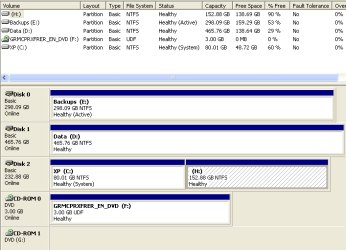
Boot into XP. Go into disk manager and take a screenshot of it. Post it here. This will help us understand the setup better.
 

My Computer My Computer

Computer Manufacturer/Model Number
self built
OS
7600.20510 x86
CPU
P4 550 3.4 GHz HT running at 3.5 GHz
Motherboard
MSI PM8M3-V (MS-7211 v1.x) Micro-ATX mainboard
Memory
OCZ 2 GB(2x1GB) DDR400mHz running @ 414 mHz
Graphics Card(s)
HIS Radeon HD 3850 IceQ 3 Turbo HDMI Dual DL-DVI AGP
Sound Card
MOTU Traveler firewire studio interface 192 kHz 24 bit
Monitor(s) Displays
22" widescreen Acer X223W LCD, 17" Compaq P75 CRT
Screen Resolution
1680x1050 and 1280x1024
Hard Drives
SATA I x2 WD, 400 GB and 120 GB, SATA 2 WD Caviar Black 1 TB
PSU
350W generic
Case
Cybertronpc, it glows blue
Cooling
stock cpu fan, Ice-Q 3 gpu and system, many case fans
Keyboard
Logitch Classical Keyboard 200
Mouse
Logitech Mediaplay cordless
Internet Speed
1792/448 kbits/sec
Other Info
SATA II PCI fake RAID adapter, 1 GB Readyboost, original ATI Remote Wonder (even works with WMC perfectly), Logitech Rumblepad 2 game controller x2
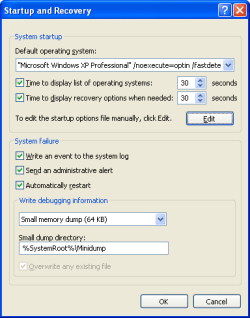
have you tried looking at advanced system settings by right-clicking my computer and selecting properties? There should be a tab that lets you choose the default boot partition, if XP detects it.

Then again judging by the lack of windows 7 on the boot.ini it might not work in the first place.
 

My Computer My Computer

OS
Windows 7 x64 Professional
CPU
Intel Core i5 750
Motherboard
Gigabyte GA-P55-UD3R
Memory
Kingston DDR3 1600 2GBx2
Graphics Card(s)
Sapphire HD5770
Monitor(s) Displays
Samsung 24"
Screen Resolution
1920x1080
Hard Drives
WD SATAII 250GB
PSU
Antec 450W
Case
Antec somethingoranother
Keyboard
Cheapass logitech
Mouse
Cheapass microsoft
Internet Speed
Not that great
Here are the pics and code = my boot.ini

My suspicion is this: After Win 7 installs via DVD, it wants to boot into Win 7 and complete the install locally. I think I'm supposed to get an option menu, which gives me the options of: Win 7, Older Version of Windows. What I get right now is nothing, but if I force it, I see Win XP Pro and nothing else.

Ie. It's letting XPs boot govern the boot and not Win 7.

Other than that, I really don't know enough about how the process with the boot loader and MBR works.

Code:
[boot loader]
timeout=30
default=multi(0)disk(0)rdisk(0)partition(1)\WINDOWS
[operating systems]
multi(0)disk(0)rdisk(0)partition(1)\WINDOWS="Microsoft Windows XP Professional" /noexecute=optin /fastdetect /usepmtimer

H: is where Win 7 Pro 64bit was installed (partially) to.
C: Is obviously Win XP
The rest are labeled as are.

Thanks again, everyone!
 

Attachments

  • startup.PNG
    startup.PNG
    6.9 KB · Views: 17
  • diskutil.PNG
    diskutil.PNG
    7.9 KB · Views: 23

My Computer My Computer

OS
Windows XP, Windows 7, OSX
What is the drive/parition that w7 was suppose to be on?

When u created the new primary parition did u format it or just let w7 installer did it for u?

Ps. If you intend to install anything onto a new partition, pls label it the partition.
 

My Computer My Computer

Computer Manufacturer/Model Number
Lenovo ThinkPad T60
OS
Windows 7 Ultimate 64Bit
CPU
GenuineIntel Intel(R) Core(TM) DuoCore T2400 @ 1.83GHz
Motherboard
Intel(R) 82801G (ICH7 Family)
Memory
2.00 GB
Graphics Card(s)
Mobile Intel(R) 945 Express Chipset
Sound Card
SoundMAX Integrated Digital HD Audio
Monitor(s) Displays
ThinkPad Display
Screen Resolution
1400x1050
Hard Drives
100Gb SATA
Keyboard
Standard Keyboard
Mouse
HID-compliant Mouse
Internet Speed
Cable Broadband - 54Mbps
Other Info
Intel(R) PRO/1000 PL Network Connection
11a/b/g Wireless LAN Mini PCI Express Adapter
XP was installed first. I then split the partition using EASEUS Partition Manager and used the steps explained here: http://www.sevenforums.com/tutorials/8057-dual-boot-installation-windows-7-xp.html

Edit: I really didn't think that using a Partition Manager would make any difference than using Diskpart, but that is something that differs from the typical methodology.

The selected (cross hatched shaded) partition is the one that Win 7 partial install is currently on.

Thanks.
 

My Computer My Computer

OS
Windows XP, Windows 7, OSX
You can use any tool to create the partition so long as it's works 100%. Once done, need to format it good (do not assume the tool will do a perfect format during the creation). Eg if you partitionised C: into D: during the partitionisation, it will get formatted (or select for it to do so). I would then log onto the C: Os and do another format in Disk Management.

Anyway, so your H: hs W7 on it?

Apart from just saying Healthy, it should say more.

My W7 has 'taken over' the C: but you can see the details in brackets from my D which is the Xp parition.
 

Attachments

  • Noname.jpg
    Noname.jpg
    10.4 KB · Views: 10

My Computer My Computer

Computer Manufacturer/Model Number
Lenovo ThinkPad T60
OS
Windows 7 Ultimate 64Bit
CPU
GenuineIntel Intel(R) Core(TM) DuoCore T2400 @ 1.83GHz
Motherboard
Intel(R) 82801G (ICH7 Family)
Memory
2.00 GB
Graphics Card(s)
Mobile Intel(R) 945 Express Chipset
Sound Card
SoundMAX Integrated Digital HD Audio
Monitor(s) Displays
ThinkPad Display
Screen Resolution
1400x1050
Hard Drives
100Gb SATA
Keyboard
Standard Keyboard
Mouse
HID-compliant Mouse
Internet Speed
Cable Broadband - 54Mbps
Other Info
Intel(R) PRO/1000 PL Network Connection
11a/b/g Wireless LAN Mini PCI Express Adapter
Aem: Thanks. I did notice that but wasn't sure what to make of it.

I did some more 'splorin and here's what I found:

BCDEDIT shows 2 configured boots, one for XP and one for Win 7. That's fine. The problem is that it doesn't use the BCD boot loader, it uses the old boot.ini method (which I believe is nolonger how it's done in 7, right?)

So I need some way of telling my computer to boot via. the BCD method and not the Boot.ini method, if that makes sense? I don't know the specific terms.

Because right now, even though BCDEDIT shows Win 7 boot item as the default, it doesn't boot to it or even list it. It's listing 1 item: Windows XP Professional based on Boot.ini found on the C: drive (E: in console) rather than the H: drive (F: in console). It's getting late and this post feels very poorly written. I'll try better tomorrow.

Thanks once again.

P.S. Some of the online steps telling me where to find some files on the Win 7 DVD were incorrect. I can accept that things won't be 100% the same around the board, but it suggested that I should mention that I'm using the free downloadable version (because I'm a student that participates in some Microsoft program), so I have Win 7 Pro 64bit via. a download/burn. I error checked the DVD and such, I'm confident that it's fine, but it may not be the same? Maybe it doesn't have the functionality that say, Ultimate has when trying a "fancy" install.
 

My Computer My Computer

OS
Windows XP, Windows 7, OSX
Back
Top