
XP cannot access W7's shared drives

churin

New member
Power User
Local time
1:09 AM
Messages
341
Location
California
A XP machine can see shared drives of a W7 machine but cannot open them. The XP machine does not have this problem with any other W7 machine, and the XP machine is accessible from any W7 machine on the network. There is no problem sharing drives among W7 machines including the above.

There must be something wrong with this particular W7 machine but I ran out of things to try.
I have reviewed past threads for the same problems but no solution was found.
Any suggestion would be appreciated.
 

My Computer

Computer type
PC/Desktop
OS
W7 Ult x64, W8 Pro x64 and W10 Pro x64
CPU
Phenom FX6300
Motherboard
Gigabyte GA-970A-UD3 rev. 1.2
Memory
16GB DDR3 1866 G.Skill F3-1866C9D-16GWM x2
Graphics Card(s)
Radeon R7 360
Sound Card
Asus Xonar DS
Monitor(s) Displays
27" x2, Dell P2715Q
Screen Resolution
3840 x 2160
Hard Drives
Samsung 850Pro 1TB SSD - system
Samsung 4TB SSD - Data
PSU
Corsair CX450M
Case
Corsair 200R
Cooling
Zalman CNPS5X Performa
Internet Speed
400Mbps/12Mbps
Other Info
2nd machine: Same as above
3rd machine: Apple MacAir with W7 Ult installed
Even if you RUN > IP\C$

192.168.1.113\C$

or

Set to home network.!!!
 

My Computer

Computer Manufacturer/Model Number
Asus
OS
Seven ultimate 32bit
CPU
Core2Duo E5700
Motherboard
Asus p5qlem
Memory
3GB DDR2
Graphics Card(s)
HD5670
Sound Card
Onboard
Monitor(s) Displays
Philips 18.5 widescreen
Screen Resolution
Depends
Hard Drives
500GB Samsung 7200RPM
PSU
500w Sparta
Case
Aerocool
Cooling
Standard + 2x 40's inserted
Keyboard
Multimedia
Mouse
Genius
Internet Speed
10meg.
Hi churin, read this Windows Secrets News Letter. let me know if it helps.
Thanks for your response.
I tried that but no luck. All other W7 machines are with the same default settings in that particular areas or File sharing connections and HomeGroup connections and have no such problem. Another W7 installed on the same machine has no problem as the rest of the W7 machines.


For experimental purpose, I added another XP machine to the network and found the same problem with that particular W7 and has no problem with any other W7 and not to mention the XP originally on the network.
 

My Computer

Computer type
PC/Desktop
OS
W7 Ult x64, W8 Pro x64 and W10 Pro x64
CPU
Phenom FX6300
Motherboard
Gigabyte GA-970A-UD3 rev. 1.2
Memory
16GB DDR3 1866 G.Skill F3-1866C9D-16GWM x2
Graphics Card(s)
Radeon R7 360
Sound Card
Asus Xonar DS
Monitor(s) Displays
27" x2, Dell P2715Q
Screen Resolution
3840 x 2160
Hard Drives
Samsung 850Pro 1TB SSD - system
Samsung 4TB SSD - Data
PSU
Corsair CX450M
Case
Corsair 200R
Cooling
Zalman CNPS5X Performa
Internet Speed
400Mbps/12Mbps
Other Info
2nd machine: Same as above
3rd machine: Apple MacAir with W7 Ult installed
Even if you RUN > IP\C$

192.168.1.113\C$
I am not sure what is the above supposed to do. Anyway I tried it but to no avail.
The following is the command instead which I am aware of:

\\Computer name or IP\Drive name

But this did not work either.

or

Set to home network.!!!
Are you suggesting that I use home network instead?
 

My Computer

Computer type
PC/Desktop
OS
W7 Ult x64, W8 Pro x64 and W10 Pro x64
CPU
Phenom FX6300
Motherboard
Gigabyte GA-970A-UD3 rev. 1.2
Memory
16GB DDR3 1866 G.Skill F3-1866C9D-16GWM x2
Graphics Card(s)
Radeon R7 360
Sound Card
Asus Xonar DS
Monitor(s) Displays
27" x2, Dell P2715Q
Screen Resolution
3840 x 2160
Hard Drives
Samsung 850Pro 1TB SSD - system
Samsung 4TB SSD - Data
PSU
Corsair CX450M
Case
Corsair 200R
Cooling
Zalman CNPS5X Performa
Internet Speed
400Mbps/12Mbps
Other Info
2nd machine: Same as above
3rd machine: Apple MacAir with W7 Ult installed
XP machines will not work with win7 HOMEGROUP, you need to use a business-like workgroup. All computers need to have a unique computer name (NO two the same). Hope this helps.
 

My Computer

Computer type
PC/Desktop
Computer Manufacturer/Model Number
Built them myself, Science Experiments !
OS
Win7 Enterprise, Win7 x86 (Ult 7600), Win7 x64 Ult 7600, TechNet RTM on AMD x64 (2.8Ghz)
CPU
AMD fx8350 4ghz, AMD-32 2400mhz, AMD-64 3200mhz, AMDx64 2.8G
Motherboard
SIS 755, ECS-K8M890M-M (Ult 7600), GigaByte & others
Memory
2gb, 4gb on the Ult 7600, 4gb on Technet RTM, 32gb on FX8350
Graphics Card(s)
Draw my own Graphics, several nVidia cards
Sound Card
on motherboard
Monitor(s) Displays
19" flat scr, 28" I-Inc widescr,22" Emprex Widescr, 23" Acer
Screen Resolution
1280 x 1024, 1440 x 900, 1920 x 1080
Hard Drives
6 pata Ide HD's & 2 Sata HD's
added 80gb external on Ult 7600 computer,
numerous extra 1tb, 2TB, 3Tb SATA HD's
A collection of ext HD Docks w/ HDs
PSU
430w, 550w, 600w, 700, 800, etc
Case
All Generic Full Towers
Cooling
Open Air & a few fans, some w/ colored LEDs
Keyboard
Compaq & Dell recycled from GoodWill
Mouse
Made in China Optical Wired Mouse
Internet Speed
Fast Cable InterNet
Antivirus
AVG Free on 24 different Desktops, NO Problems!
Browser
IE 8 is preferred, but use FireFox sometimes
Other Info
Linksys Routers, switches, & Hubs
Too Many USB Flash Drives to count, Biggest is 64GB !
Eight computers in my home network.
Sixteen computers at my business network.
Linked via TeamViewer !
Lots of old used spare computer parts everywhere!
Hi churin, read this Windows Secrets News Letter. let me know if it helps.
Thanks for your response.
I tried that but no luck. All other W7 machines are with the same default settings in that particular areas or File sharing connections and HomeGroup connections and have no such problem. Another W7 installed on the same machine has no problem as the rest of the W7 machines.


For experimental purpose, I added another XP machine to the network and found the same problem with that particular W7 and has no problem with any other W7 and not to mention the XP originally on the network.
Hi churin, I suggest you re read the W S News Letter again and do the 2 changes. When done, post back and I'll explain the next steps that are guaranteed to work.
 

My Computer

Computer Manufacturer/Model Number
Look in my Signature.
OS
Win7 H.Prem. 32bit+SP1
Hi churin, read this Windows Secrets News Letter. let me know if it helps.
Thanks for your response.
I tried that but no luck. All other W7 machines are with the same default settings in that particular areas or File sharing connections and HomeGroup connections and have no such problem. Another W7 installed on the same machine has no problem as the rest of the W7 machines.


For experimental purpose, I added another XP machine to the network and found the same problem with that particular W7 and has no problem with any other W7 and not to mention the XP originally on the network.
Hi churin, I suggest you re read the W S News Letter again and do the 2 changes. When done, post back and I'll explain the next steps that are guaranteed to work.
Yes, I did those two changes exactly.
 

My Computer

Computer type
PC/Desktop
OS
W7 Ult x64, W8 Pro x64 and W10 Pro x64
CPU
Phenom FX6300
Motherboard
Gigabyte GA-970A-UD3 rev. 1.2
Memory
16GB DDR3 1866 G.Skill F3-1866C9D-16GWM x2
Graphics Card(s)
Radeon R7 360
Sound Card
Asus Xonar DS
Monitor(s) Displays
27" x2, Dell P2715Q
Screen Resolution
3840 x 2160
Hard Drives
Samsung 850Pro 1TB SSD - system
Samsung 4TB SSD - Data
PSU
Corsair CX450M
Case
Corsair 200R
Cooling
Zalman CNPS5X Performa
Internet Speed
400Mbps/12Mbps
Other Info
2nd machine: Same as above
3rd machine: Apple MacAir with W7 Ult installed
XP machines will not work with win7 HOMEGROUP, you need to use a business-like workgroup. All computers need to have a unique computer name (NO two the same). Hope this helps.
I am not using and never used the HOMGROUP. The same workgroup name is used for all machines on the network.
 

My Computer

Computer type
PC/Desktop
OS
W7 Ult x64, W8 Pro x64 and W10 Pro x64
CPU
Phenom FX6300
Motherboard
Gigabyte GA-970A-UD3 rev. 1.2
Memory
16GB DDR3 1866 G.Skill F3-1866C9D-16GWM x2
Graphics Card(s)
Radeon R7 360
Sound Card
Asus Xonar DS
Monitor(s) Displays
27" x2, Dell P2715Q
Screen Resolution
3840 x 2160
Hard Drives
Samsung 850Pro 1TB SSD - system
Samsung 4TB SSD - Data
PSU
Corsair CX450M
Case
Corsair 200R
Cooling
Zalman CNPS5X Performa
Internet Speed
400Mbps/12Mbps
Other Info
2nd machine: Same as above
3rd machine: Apple MacAir with W7 Ult installed
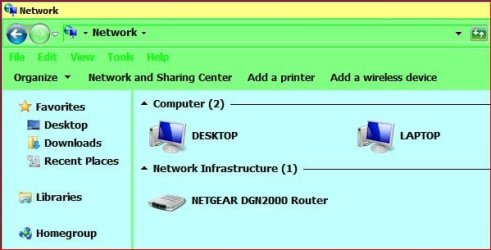
Hi churin, when you click on the network link on the XP pc, what does it show? For example:- this is my Win 7 Laptop to Win7 Desktop.

Capture.JPG
 

My Computer

Computer Manufacturer/Model Number
Look in my Signature.
OS
Win7 H.Prem. 32bit+SP1
Roderunner:

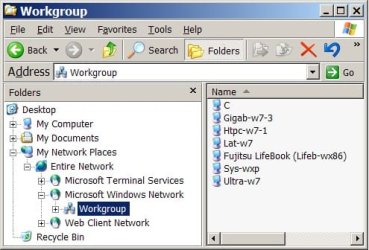
Here is the image requested:
untitledx.jpg
 

My Computer

Computer type
PC/Desktop
OS
W7 Ult x64, W8 Pro x64 and W10 Pro x64
CPU
Phenom FX6300
Motherboard
Gigabyte GA-970A-UD3 rev. 1.2
Memory
16GB DDR3 1866 G.Skill F3-1866C9D-16GWM x2
Graphics Card(s)
Radeon R7 360
Sound Card
Asus Xonar DS
Monitor(s) Displays
27" x2, Dell P2715Q
Screen Resolution
3840 x 2160
Hard Drives
Samsung 850Pro 1TB SSD - system
Samsung 4TB SSD - Data
PSU
Corsair CX450M
Case
Corsair 200R
Cooling
Zalman CNPS5X Performa
Internet Speed
400Mbps/12Mbps
Other Info
2nd machine: Same as above
3rd machine: Apple MacAir with W7 Ult installed
What happened, churin? Did roadrunner ever help you solve it?
I've had your problem for years and solved it irregularly by installing KB 922120 V6. Not reliable, though. :(
 

My Computer

Computer type
PC/Desktop
Computer Manufacturer/Model Number
Intel
OS
Windows 8 Pro x64
CPU
i7 920
Motherboard
Gigabyte X58-UDP4
Memory
6 GB
Graphics Card(s)
Gainward GTS 250
Hard Drives
1 + 1 + 2
Antivirus
MSE
Browser
IE, Ff, Ch
Thanks for your reply. But it was three years ago and I do not remember how it was resolved or if it was ever solved. I am no longer using XP. I reviewed the thread and Roadrunner was supposed to make follow-up post in response to my latest post but he never did.

What I remember about the incidence is that the particular W7 machine among multiple W7 machines was Apple Macbook Air. The W7 was installed on the Macbook Air using the BootCamp utility from Apple. This might be something to do with this problem since the XP machine did not have this problem with any other ordinary W7 machine in the network. Since then I have added W8 machine and the W7 machine using Macbook Air stayed unchanged in the network, and still no problem. The XP for some reason did not like W7 on Macbook Air.
 

My Computer

Computer type
PC/Desktop
OS
W7 Ult x64, W8 Pro x64 and W10 Pro x64
CPU
Phenom FX6300
Motherboard
Gigabyte GA-970A-UD3 rev. 1.2
Memory
16GB DDR3 1866 G.Skill F3-1866C9D-16GWM x2
Graphics Card(s)
Radeon R7 360
Sound Card
Asus Xonar DS
Monitor(s) Displays
27" x2, Dell P2715Q
Screen Resolution
3840 x 2160
Hard Drives
Samsung 850Pro 1TB SSD - system
Samsung 4TB SSD - Data
PSU
Corsair CX450M
Case
Corsair 200R
Cooling
Zalman CNPS5X Performa
Internet Speed
400Mbps/12Mbps
Other Info
2nd machine: Same as above
3rd machine: Apple MacAir with W7 Ult installed
Back
Top