
You are using an out of date browser. It may not display this or other websites correctly.
You should upgrade or use an alternative browser.
You should upgrade or use an alternative browser.
xp mode and another os
- Thread starter alvaro99
- Start date

- Local time
- 9:26 PM
- Messages
- 1,258
I downloaded xp mode and use the VM xp.
but there is a way to install an operating system such as was done with W2003 old VirtualPC?
thanks
Try this:
http://www.sevenforums.com/tutorials/8254-windows-virtual-pc-create-virtual-machine.html
- Click the Start Orb to open the Start Menu
- Click your User Name
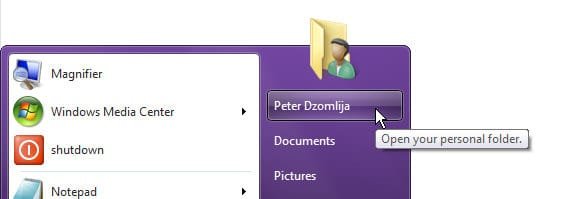
- Double-click the Virtual Machine icon

- Click Create virtual machine
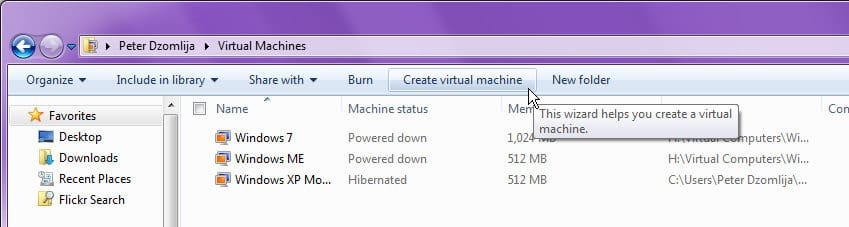
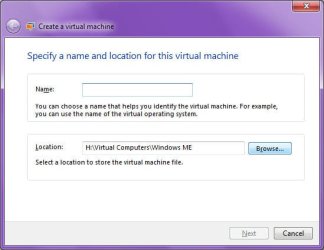
- Follow the instructions provided by the Wizard.
- When you have created your virtual machine, right-click the name of the virtual machine and click Settings
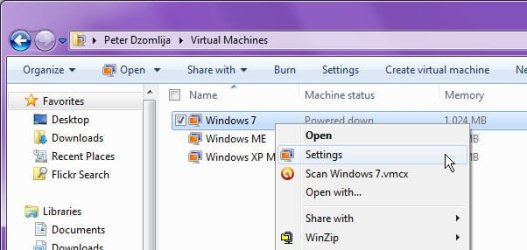
- Click the DVD Drive setting, and then adjust it to your needs, using either no DVD drive, and ISO image, or your host machine Physical drive.
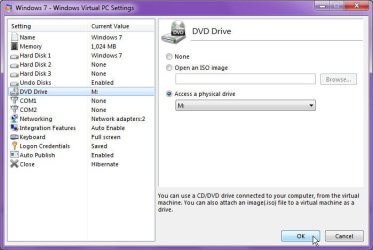
- From there on in, you should be able to install whatever OS you want.
- From the screenshots I've provided, you can see that I have virtual machines for XP Mode itself, Windows ME and Windows 7.
Last edited by a moderator:
My Computer
- Computer type
- PC/Desktop
- Computer Manufacturer/Model Number
- Virtual Machine
- OS
- Windows 7 Professional 32-bit SP1
- CPU
- AMD A4/A6
- Motherboard
- Intel Corporation 440BX Desktop Reference Platform
- Memory
- 3.00GB EDO
- Graphics Card(s)
- VMware SVGA 3D
- Sound Card
- High Definition Audio Device
- Monitor(s) Displays
- Generic Non-PnP Monitor on VMware SVGA 3D
- Screen Resolution
- 1440x900
- Hard Drives
- 1 x 60GB VMware Virtual SATA Hard Drive ATA Device
- Antivirus
- Kaspersky Total Security
- Local time
- 9:26 PM
- Messages
- 1,258
thenks
working but not support r2 for not support 64bit
Yeah, that is a limitation unfortunately of virtualization right now. You can only install 32 bit operating systems
My Computer
- Computer type
- PC/Desktop
- Computer Manufacturer/Model Number
- Virtual Machine
- OS
- Windows 7 Professional 32-bit SP1
- CPU
- AMD A4/A6
- Motherboard
- Intel Corporation 440BX Desktop Reference Platform
- Memory
- 3.00GB EDO
- Graphics Card(s)
- VMware SVGA 3D
- Sound Card
- High Definition Audio Device
- Monitor(s) Displays
- Generic Non-PnP Monitor on VMware SVGA 3D
- Screen Resolution
- 1440x900
- Hard Drives
- 1 x 60GB VMware Virtual SATA Hard Drive ATA Device
- Antivirus
- Kaspersky Total Security