XP mode and printer sharing issues.

cyberpine

New member
Local time
4:29 PM
Messages
25
I have a fresh windows 7 pro install on a new machine. For the sake of this email, lets say that machine is called HHH. I joined that machine to workgroup GGG. The machine is DHCP into my router.

I created a new XP mode Virtual. Called the new virutual VVV, joined it into the same workgroup GGG.

I've opened up all networking from the 7 pro host. tried required password and not required password for sharing.

From the host if I navigate to \\HHH (itself) I see all drives, shares and printers as expected.

From the the virtual VVV XP if go to \\tsclient I can see drives on the host but no printers. If I check the USB tab under VVV (xp virtual) I see the three printers on my host, but If I select printers from XP VVV I see no printers available. If I attempt to go to \\HHH or ping HHH from the virtual VVV i get not found. If I select one on the printers under USB, it installs drivers (every time for some reason), but still no printers show up as available from the VVV XP mode virtual.

I've worked with virtual PC and don't recall this problem. Am I missing something here? Why can't I see or ping the host from the virtual?
 

My Computer

OS
Windows 7
If printer on host is shared, it should be visible to XP Mode. Check the NIC XP Mode is using (XPM settings > Networking). You should use your host's NIC.

Kari

XPM-NIC.png
 

My Computer

Computer type
Laptop
Computer Manufacturer/Model Number
HP ENVY 17-1150eg
OS
Windows 10 Pro x64 EN-GB
CPU
1.6 GHz Intel Core i7-720QM Processor
Memory
6 GB
Graphics Card(s)
ATI Mobility Radeon HD 5850 Graphics
Sound Card
Beats sound system with integrated subwoofer
Monitor(s) Displays
17" laptop display, 22" LED and 32" Full HD TV through HDMI
Screen Resolution
1600*900 (1), 1920*1080 (2&3)
Hard Drives
Internal: 2 x 500 GB SATA Hard Disk Drive 7200 rpm
External: 2TB for backups, 3TB USB3 network drive for media
Cooling
As Envy runs a bit warm, I have it on a Cooler Master pad
Keyboard
Logitech diNovo Media Desktop Laser (bluetooth)
Mouse
Logitech Performance Mouse MX
Internet Speed
50/10 Mbps VDSL
Antivirus
Windows Defender 4.3.9431.0
Browser
Maxthon 3.5.2., IE11
Thanks.

How can I confirm it's shared? I belive it is. Do I have to do something to join the windows share? I'm away from the client will check tonight.

In your XP mode VM, are you able to open the host with unc like this? \\win7hostname and ping it by it's computer name? I can do neither from XP mode.
 

My Computer

OS
Windows 7
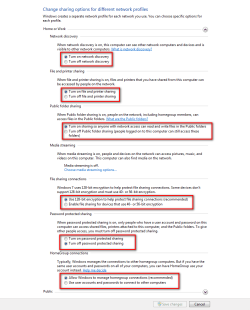
First, here are my sharing settings (host, Windows 7):

Sharing_settings.png

I have password protected sharing off in my home network, and access allowed to everybody. (My router takes care of intruders...)

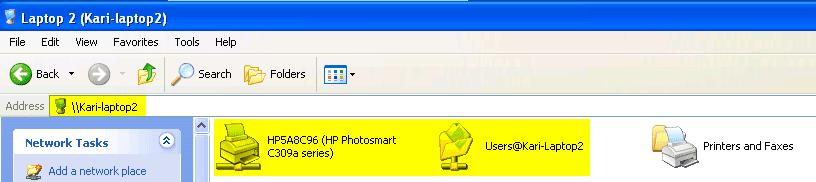
Using host's NIC as XP Mode NIC, I have absolutely no problems using host network computer name in XP Mode explorer:

XPM_Host_shares.png

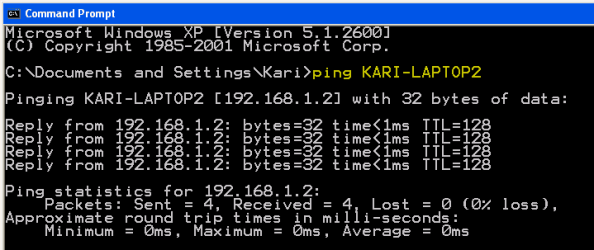
Pinging host from XP Mode:

XPM_Ping_host.png

Kari
 

My Computer

Computer type
Laptop
Computer Manufacturer/Model Number
HP ENVY 17-1150eg
OS
Windows 10 Pro x64 EN-GB
CPU
1.6 GHz Intel Core i7-720QM Processor
Memory
6 GB
Graphics Card(s)
ATI Mobility Radeon HD 5850 Graphics
Sound Card
Beats sound system with integrated subwoofer
Monitor(s) Displays
17" laptop display, 22" LED and 32" Full HD TV through HDMI
Screen Resolution
1600*900 (1), 1920*1080 (2&3)
Hard Drives
Internal: 2 x 500 GB SATA Hard Disk Drive 7200 rpm
External: 2TB for backups, 3TB USB3 network drive for media
Cooling
As Envy runs a bit warm, I have it on a Cooler Master pad
Keyboard
Logitech diNovo Media Desktop Laser (bluetooth)
Mouse
Logitech Performance Mouse MX
Internet Speed
50/10 Mbps VDSL
Antivirus
Windows Defender 4.3.9431.0
Browser
Maxthon 3.5.2., IE11
Thanks. from memory That looks like my share page. Likely NIC issue - since I can't ping. Will check.

Sorry, how is your router securiting Windows resources?
 

My Computer

OS
Windows 7
I use MAC address filtering and router's own firewall (Belkin N1 Vision).

Do you have a second NIC (wireless, for instance) on your host, too? If yes, choose that from XP Mode settings NIC drop down list to test. Also check that both belong to same workgroup.

Basically, if sharing is allowed on both host and guest, and guest is using host's NIC to mulate its own NIC, there should be no problems. If you want to, you could check this thread to see if you have everything as it should be.

Kari
 

My Computer

Computer type
Laptop
Computer Manufacturer/Model Number
HP ENVY 17-1150eg
OS
Windows 10 Pro x64 EN-GB
CPU
1.6 GHz Intel Core i7-720QM Processor
Memory
6 GB
Graphics Card(s)
ATI Mobility Radeon HD 5850 Graphics
Sound Card
Beats sound system with integrated subwoofer
Monitor(s) Displays
17" laptop display, 22" LED and 32" Full HD TV through HDMI
Screen Resolution
1600*900 (1), 1920*1080 (2&3)
Hard Drives
Internal: 2 x 500 GB SATA Hard Disk Drive 7200 rpm
External: 2TB for backups, 3TB USB3 network drive for media
Cooling
As Envy runs a bit warm, I have it on a Cooler Master pad
Keyboard
Logitech diNovo Media Desktop Laser (bluetooth)
Mouse
Logitech Performance Mouse MX
Internet Speed
50/10 Mbps VDSL
Antivirus
Windows Defender 4.3.9431.0
Browser
Maxthon 3.5.2., IE11
hello KARI,
I'm new on this forum and first of all I would thanks to all the user which contribute to solve problems.
I HAVE A SIMILAR PROBLEM:
on windows 7 (host) I have installed a pdf creator (a server installation which provide driver for xp) but I can't see it from xpmode.
Just to add usefull information:
1) on the host are installed 2 printer (a USB and a network printer) which work from xp mode.
2) the ping of the host from xpmode donesn't work.

A your suggestion would be appreciated.
best regards.
 

My Computer

OS
WINDOWS 7
Back
Top