XP Mode -- any OFFICES / Workplaces using it yet

jimbo45

New member
Guru
Gold Member
VIP
Local time
8:27 AM
Messages
5,941
Location
Hafnarfjörður IS
Hi all
I've posted another thread expressing my disappointment with XP mode -- great Idea but flawed implementation IMO.

I'm just curious to see if anybody is actually using this in a WORK PLACE / CORPORATE LAN environment.

I've seen plenty of users testing this on a HOME computer but is this actually being used by anybody in a WORKPLACE upgrade to W7.

I've trialled it with a few users in a Workplace - with another group also trialling running the legacy apps on a W2003 XP server accessed via a VPN / RDP.

NOBODY liked the XP mode compared with the Virtual W2003 server implementation even though the legacy app was now run on a server instead of on their desktop.

I think case proved.

The cost of the W2003 server license was well within the "upgrade" budget for the W7 upgrade and passes the test 100% -- not a single app was inacessible or failed to work - and not only that there was an added bonus for the test users -- they could also via the vpn access the xp legacy applications from home as well whatever machine they had.

Anybody else in W7 upgrade testing processing -- for a WORKPLACE -- not a HOME LAN please.

Cheers
jimbo
 

My Computer My Computer

Computer type
PC/Desktop
Computer Manufacturer/Model Number
Custom built, several laptops HP/ASUS
OS
Linux CENTOS 7 / various Windows OS'es and servers
CPU
Intel i7 Intel i5
Memory
8GB, 16GB
Graphics Card(s)
On Motherboard
Sound Card
Realtek HD audio
Monitor(s) Displays
Apple Cinema display, Samsung LCD
Screen Resolution
1920 X 1080
Hard Drives
4 X 1TB SATA
Mouse
Toshiba wireless laser
Internet Speed
> 20MB up
Rumours at my work place, has it that people prefer Med-V over XPM. Personally i don't think you can use XPM in a corporate environment, rather for home and indiviual use.
 

My Computer My Computer

Computer Manufacturer/Model Number
Lenovo ThinkPad T60
OS
Windows 7 Ultimate 64Bit
CPU
GenuineIntel Intel(R) Core(TM) DuoCore T2400 @ 1.83GHz
Motherboard
Intel(R) 82801G (ICH7 Family)
Memory
2.00 GB
Graphics Card(s)
Mobile Intel(R) 945 Express Chipset
Sound Card
SoundMAX Integrated Digital HD Audio
Monitor(s) Displays
ThinkPad Display
Screen Resolution
1400x1050
Hard Drives
100Gb SATA
Keyboard
Standard Keyboard
Mouse
HID-compliant Mouse
Internet Speed
Cable Broadband - 54Mbps
Other Info
Intel(R) PRO/1000 PL Network Connection
11a/b/g Wireless LAN Mini PCI Express Adapter
Rumours at my work place, has it that people prefer Med-V over XPM. Personally i don't think you can use XPM in a corporate environment, rather for home and indiviual use.

I thought the whole idea of XP mode was for Offices -- Home users could always have dual booted etc etc.

Running legacy apps in a Corporate environment is a much more critical requirement before an OS upgrade can even be considered.

In any case I think you've probably demolished your own argument (Nicely BTW I'm not trying to slag you off) since XP Mode with a free XP system only works for Professional / Business / Ultimate / Enterprise versions of W7 and not Home Basic / Home Premium which 99% of "Purchased" W7 computers will be equipped with.

Cheers
jimbo
 

My Computer My Computer

Computer type
PC/Desktop
Computer Manufacturer/Model Number
Custom built, several laptops HP/ASUS
OS
Linux CENTOS 7 / various Windows OS'es and servers
CPU
Intel i7 Intel i5
Memory
8GB, 16GB
Graphics Card(s)
On Motherboard
Sound Card
Realtek HD audio
Monitor(s) Displays
Apple Cinema display, Samsung LCD
Screen Resolution
1920 X 1080
Hard Drives
4 X 1TB SATA
Mouse
Toshiba wireless laser
Internet Speed
> 20MB up
Well i have it the other way around lol. XPM for home use. In a corporate environment you want need to worry about what free and what's not, company have corporate licenses for softwares.

I work in software/image distribution, and this is yet to be confirmed as we are still building the w7 image for the client's machines, but we probably will disable XPM usage/installation. It's still early days, and i would think this will ultimately depnd on the client's decision (not our's).
 

My Computer My Computer

Computer Manufacturer/Model Number
Lenovo ThinkPad T60
OS
Windows 7 Ultimate 64Bit
CPU
GenuineIntel Intel(R) Core(TM) DuoCore T2400 @ 1.83GHz
Motherboard
Intel(R) 82801G (ICH7 Family)
Memory
2.00 GB
Graphics Card(s)
Mobile Intel(R) 945 Express Chipset
Sound Card
SoundMAX Integrated Digital HD Audio
Monitor(s) Displays
ThinkPad Display
Screen Resolution
1400x1050
Hard Drives
100Gb SATA
Keyboard
Standard Keyboard
Mouse
HID-compliant Mouse
Internet Speed
Cable Broadband - 54Mbps
Other Info
Intel(R) PRO/1000 PL Network Connection
11a/b/g Wireless LAN Mini PCI Express Adapter
Well i have it the other way around lol. XPM for home use. In a corporate environment you want need to worry about what free and what's not, company have corporate licenses for softwares.

I work in software/image distribution, and this is yet to be confirmed as we are still building the w7 image for the client's machines, but we probably will disable XPM usage/installation. It's still early days, and i would think this will ultimately depnd on the client's decision (not our's).


Hi there
but WHICH version of W7 are you using at home.

I think if you re-read the post 99% of people who buy Computers with W7 already installed on it will have the Home Premium version of W7 -- so you won't be able to get a FREE download of XP mode -- you only get the "embedded Free XP license with the versions of W7 I've outlined in the previous post.

Most "Mom and Pop" outfits aren't going to pay for another XP license.

Cheers
jimbo
 

My Computer My Computer

Computer type
PC/Desktop
Computer Manufacturer/Model Number
Custom built, several laptops HP/ASUS
OS
Linux CENTOS 7 / various Windows OS'es and servers
CPU
Intel i7 Intel i5
Memory
8GB, 16GB
Graphics Card(s)
On Motherboard
Sound Card
Realtek HD audio
Monitor(s) Displays
Apple Cinema display, Samsung LCD
Screen Resolution
1920 X 1080
Hard Drives
4 X 1TB SATA
Mouse
Toshiba wireless laser
Internet Speed
> 20MB up
I'm using Utimate...RTM to be precise. You're confusing me now. If we are talking about the corporate envirnoment. Then we are talking about volume licensing right? That would then be 7 Enterprise wouldn't it be? Whilst our clients bulk buy the machines with w7 pre-installed (which ever version that might be). They will not be using that pre-installed version cos in a corpororate environment there would be a standard Base Build (aka BOE build) for all machines, distributed via automation tool eg MDT and WDS. If this is the case, then i'm thinking the 7 would be Enterprise. However, as it could boil down to the company's requirements. Not allowing XPM to be installed could be imposed via group policy.

Now if you are talking able the oldies at home who would be buying home editions then yes. They wouldnt know what XPM is.

All that said, i rememeber MS advertised XPM to be used for home, rather than corporate environment. Need to double check this. I dunno, my memory is poor so i could be wrong :eek:
 

My Computer My Computer

Computer Manufacturer/Model Number
Lenovo ThinkPad T60
OS
Windows 7 Ultimate 64Bit
CPU
GenuineIntel Intel(R) Core(TM) DuoCore T2400 @ 1.83GHz
Motherboard
Intel(R) 82801G (ICH7 Family)
Memory
2.00 GB
Graphics Card(s)
Mobile Intel(R) 945 Express Chipset
Sound Card
SoundMAX Integrated Digital HD Audio
Monitor(s) Displays
ThinkPad Display
Screen Resolution
1400x1050
Hard Drives
100Gb SATA
Keyboard
Standard Keyboard
Mouse
HID-compliant Mouse
Internet Speed
Cable Broadband - 54Mbps
Other Info
Intel(R) PRO/1000 PL Network Connection
11a/b/g Wireless LAN Mini PCI Express Adapter
Hi there

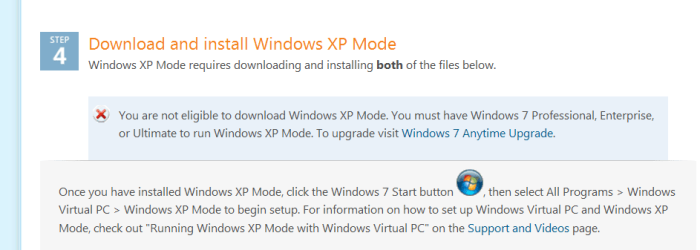
XP mode only "works" with the "Business" versions of W7 -- Enterprise / Ultimate / Professional

For Home Premium you need to supply your own copy of Windows XP and run Virtual PC or another VM product.

This to me implies XP mode WAS designed for Business use.

Here


Cheers
jimbo
 

Attachments

  • xpmode.png
    xpmode.png
    12.3 KB · Views: 8

My Computer My Computer

Computer type
PC/Desktop
Computer Manufacturer/Model Number
Custom built, several laptops HP/ASUS
OS
Linux CENTOS 7 / various Windows OS'es and servers
CPU
Intel i7 Intel i5
Memory
8GB, 16GB
Graphics Card(s)
On Motherboard
Sound Card
Realtek HD audio
Monitor(s) Displays
Apple Cinema display, Samsung LCD
Screen Resolution
1920 X 1080
Hard Drives
4 X 1TB SATA
Mouse
Toshiba wireless laser
Internet Speed
> 20MB up
I just checked with MS Walkthroughs, and my memory was poor indeed (and i got mixed up with HomeGroup). They advertied XPM for small to medium business use. That is their pitch, however i am reserved in my belief, as i believe it all boils down to the company's business requirements. :)

Anyone else have an oppinion on XPM for use in business environment?
 

My Computer My Computer

Computer Manufacturer/Model Number
Lenovo ThinkPad T60
OS
Windows 7 Ultimate 64Bit
CPU
GenuineIntel Intel(R) Core(TM) DuoCore T2400 @ 1.83GHz
Motherboard
Intel(R) 82801G (ICH7 Family)
Memory
2.00 GB
Graphics Card(s)
Mobile Intel(R) 945 Express Chipset
Sound Card
SoundMAX Integrated Digital HD Audio
Monitor(s) Displays
ThinkPad Display
Screen Resolution
1400x1050
Hard Drives
100Gb SATA
Keyboard
Standard Keyboard
Mouse
HID-compliant Mouse
Internet Speed
Cable Broadband - 54Mbps
Other Info
Intel(R) PRO/1000 PL Network Connection
11a/b/g Wireless LAN Mini PCI Express Adapter
Back
Top