xp mode download keeps being interrupted

strawbale

New member
Local time
7:49 PM
Messages
4
I've been trying to download XP mode (for a Windows 7 professional 64 bit) all evening, but every time it stops after a certain period (though each time at a different stage of the download - not passed 25% though). My line is (always) slow, about 500 kb/sec, could that be the problem? Does this download process require a certain minimum downloading speed?

Thanks for any info in advance!
 

My Computer My Computer

OS
Windows 7 Professional
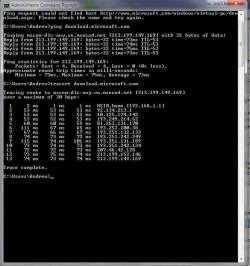
It shouldn't matter what your downlod speed is. The problem is likely due to one of the two connections having packet loss or losing the connection. Try pinging the target and see if there are any lost steps. Also try a tracert.

Open a Command Prompt
Type: ping "website_url_here"
Post Results
Type: tracert "website_url_here"
Post Results

As mentioned, just post the results here. If you think it may be something to do with Windows or the browser's download manager you could try a different one.

FlashGet works really well and actually speeds up your downloads.

If you use Firefox you can use the same that I do:

The FlashGot extension in conjunction with FlashGet 1.9 (Not 3.3)
 

My Computer My Computer

Computer Manufacturer/Model Number
Apple Macbook Pro (April 2009)
OS
W7 Ult. x64 | OS X
CPU
Intel Mobile Core 2 Duo 2.93Ghz [T9800 Penryn]
Motherboard
NVIDIA nForce 730i Rev. B1 [Mac-F2268EC8 (U2E1)]
Memory
4096MB Samsung DDR3 Dual Channel [PC3-8500F 1066Mhz]
Graphics Card(s)
NVIDIA GeForce 9600M GT 512MB [G96M Rev. C1]
Sound Card
SB X-Fi Surround 5.1 USB | Onboard Realtek (Disabled)
Monitor(s) Displays
Acer x223wbd 22" | Apple Anti-Glare 17" (Disabled)
Screen Resolution
{Current} 1440x900 {Acer} 1680x1050 {Apple} 1920x1200
Hard Drives
{Internal}
Seagate Momentus 320GB 2.5" 7200RPM [ST9320421AS]

{Externals}
LaCie 320GB USB 2.0 HDD [301284UR]
LaCie 750GB USB 2.0 FW400 eSATA HDD [301314U]
LaCie 1TB USB 2.0 HDD [301304UR]
PSU
Magsafe
Case
Aluminum/Unibody (MBP52)
Cooling
2 x 6000 RPM Fans
Keyboard
Logitech G-15v2 [PN 920-000379]
Mouse
Logitech G-9 [PN 910-000338]
Internet Speed
12Mbps/2.5Mbps w/ 24Mbps Speed Boost [Comcast]
Other Info
Logitech X-540 Speakers [PN 970223-0122]
Sennheiser PC-151 Headset
Thanks a lot!

I'll pass on the information to my father in law (whose machine it concernes) and post back the results when he's done.
 

My Computer My Computer

OS
Windows 7 Professional
these are the results (he got):
 

Attachments

  • xp download check.jpg
    xp download check.jpg
    55.6 KB · Views: 51

My Computer My Computer

OS
Windows 7 Professional
If you think it may be something to do with Windows or the browser's download manager you could try a different one.

FlashGet works really well and actually speeds up your downloads.

If you use Firefox you can use the same that I do:

The FlashGot extension in conjunction with FlashGet 1.9 (Not 3.3)

After downloading Firefox and FlashGet and the FlashGot extension you mentioned, he managed to download it first time round - THANKS A LOT!!!
 

My Computer My Computer

OS
Windows 7 Professional
Back
Top