Solved XP Mode having issue with DvD

Shane Williams

New member
Member
Local time
3:43 PM
Messages
13
I have as yet been able to install anything. It either times out before it's installed, wont completely install, says there is a 3d issue, or if it requires a disk to opperate the program, it wont find the disk even tho it can find the optical drive.


7 pro on an MSI P67A-43C mobo, Core i5-2400, 2x4 DDR3, 2 Hitachi 500g on RAID1 (possible issue?), LG DVD RW, Radeon HD 5450, 2 case and 1 CPU fan, 480w power, generic case.
 

My Computer

Computer Manufacturer/Model Number
Self
OS
Windows 7 Professional
CPU
Intel Core i5-2400
Motherboard
MSI P67A-43C
Memory
2x4 DDR3
Graphics Card(s)
RADEON HD 5450
Sound Card
Integrated Realtek
Monitor(s) Displays
Generic
Hard Drives
2x Hitachi 500GB SATA @RAID1
PSU
Generic
Case
Generic
Cooling
2 internal and 1 CPU fan
Welcome to the forum!
Can you be more specific about what you're trying to do. There shouldn't be any discs. VM-XP is downloaded directly from Microsoft and it's free.

Download Windows XP Mode
 

My Computer

Computer type
PC/Desktop
Computer Manufacturer/Model Number
Built 2/11/2011
OS
Windows 7 Pro-x64
CPU
i7-2600 3.4GHz - 3.8GHz Turbo
Motherboard
Intel DH67BL-B3
Memory
8Gb - 2x4GB, Muskin 991770 PC3-1333
Graphics Card(s)
Integrated Intel HD 2000
Sound Card
Integrated Intel 10.1 HD, RealTek ALC892
Monitor(s) Displays
Asus LCD VH222H, Haier HL24XSL2a
Screen Resolution
1920x1080, 1920x1080
Hard Drives
Crucial SSD C300-128Gb,
Western Digital WD5002AALX - 500Gb,
Western Digital WD7501AALS - 750Gb
PSU
Seasonic 650W 80+ Gold Modular
Case
Rosewill Defender
Cooling
Stock CPU, Four 120mm case fans, PCH fan added
Keyboard
Logitech EX100 Y-RBH94 Wireless
Mouse
Logitech EX100 M-RCE95 Wireless
Internet Speed
3.0/1.5 Mbs
Antivirus
Microsoft Security Essentials
Browser
Microsoft Internet Explorer 11
Other Info
Antec Veris Premier-Multimedia IR Station,
Cyber Accoustics-3602 Speakers,
AFT XM-5U Card Reader,
Hauppauge TV-HVR-2250,
Sony LX300 USB Turntable
Installing apps that wont run on 7 but did in XP
 

My Computer

Computer Manufacturer/Model Number
Self
OS
Windows 7 Professional
CPU
Intel Core i5-2400
Motherboard
MSI P67A-43C
Memory
2x4 DDR3
Graphics Card(s)
RADEON HD 5450
Sound Card
Integrated Realtek
Monitor(s) Displays
Generic
Hard Drives
2x Hitachi 500GB SATA @RAID1
PSU
Generic
Case
Generic
Cooling
2 internal and 1 CPU fan

My Computer

Computer Manufacturer/Model Number
HP Pavilion Elite 495UK
OS
Windows 7 Ultimate SP1 64-Bit
CPU
Intel Core i7 870 @ 2.93GHz
Motherboard
MSI 2A9C (CPU1)
Memory
8Gb Dual-Channel DDR3 @ 664MHz
Graphics Card(s)
nVidia GeForce GTX 460 1024MB dedicated RAM
Sound Card
Realtek HD Audio
Monitor(s) Displays
HP2310i
Screen Resolution
1920 x 1080
Hard Drives
1x1954GB Hitachi HDS22020ALA 330 (RAID), 1x1954GB Hitachi External for backup and storage
PSU
460W
Case
HP Elite
Cooling
Air cooled
Keyboard
Logitech K750 solar-powered keyboard
Mouse
Logitech Wireless M180 mouse
Internet Speed
2Mb
Other Info
Pure Avanti Flow Internet Radio with iPod Dock, 64Gb iPod, HP USB Speakers, Sony MDR-V500 Headphones, Sony Vaio F-Series Laptop
Already did. Note my signature is *IT Student*. I guess I should have started with "XP Mode is installed. No programs I install on it will run." My apologies for assuming that was a gimme.
 

My Computer

Computer Manufacturer/Model Number
Self
OS
Windows 7 Professional
CPU
Intel Core i5-2400
Motherboard
MSI P67A-43C
Memory
2x4 DDR3
Graphics Card(s)
RADEON HD 5450
Sound Card
Integrated Realtek
Monitor(s) Displays
Generic
Hard Drives
2x Hitachi 500GB SATA @RAID1
PSU
Generic
Case
Generic
Cooling
2 internal and 1 CPU fan
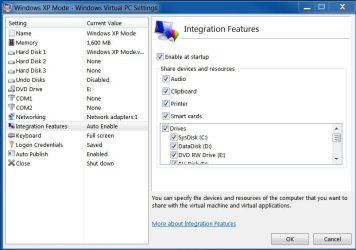
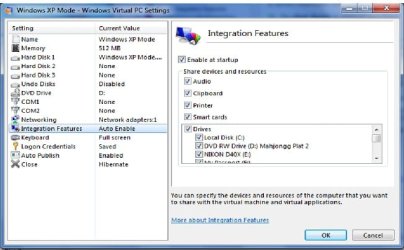
Click on the Tools tab at the top then select Settings. Post a picture of the settings with Integration Features expanded.
 

Attachments

  • XP Settings.JPG
    XP Settings.JPG
    80.2 KB · Views: 15

My Computer

Computer type
PC/Desktop
Computer Manufacturer/Model Number
Built 2/11/2011
OS
Windows 7 Pro-x64
CPU
i7-2600 3.4GHz - 3.8GHz Turbo
Motherboard
Intel DH67BL-B3
Memory
8Gb - 2x4GB, Muskin 991770 PC3-1333
Graphics Card(s)
Integrated Intel HD 2000
Sound Card
Integrated Intel 10.1 HD, RealTek ALC892
Monitor(s) Displays
Asus LCD VH222H, Haier HL24XSL2a
Screen Resolution
1920x1080, 1920x1080
Hard Drives
Crucial SSD C300-128Gb,
Western Digital WD5002AALX - 500Gb,
Western Digital WD7501AALS - 750Gb
PSU
Seasonic 650W 80+ Gold Modular
Case
Rosewill Defender
Cooling
Stock CPU, Four 120mm case fans, PCH fan added
Keyboard
Logitech EX100 Y-RBH94 Wireless
Mouse
Logitech EX100 M-RCE95 Wireless
Internet Speed
3.0/1.5 Mbs
Antivirus
Microsoft Security Essentials
Browser
Microsoft Internet Explorer 11
Other Info
Antec Veris Premier-Multimedia IR Station,
Cyber Accoustics-3602 Speakers,
AFT XM-5U Card Reader,
Hauppauge TV-HVR-2250,
Sony LX300 USB Turntable
VPC Settings.jpg
 

My Computer

Computer Manufacturer/Model Number
Self
OS
Windows 7 Professional
CPU
Intel Core i5-2400
Motherboard
MSI P67A-43C
Memory
2x4 DDR3
Graphics Card(s)
RADEON HD 5450
Sound Card
Integrated Realtek
Monitor(s) Displays
Generic
Hard Drives
2x Hitachi 500GB SATA @RAID1
PSU
Generic
Case
Generic
Cooling
2 internal and 1 CPU fan
I don't think it's the problem but it would be better to assign more memory to VM. Especially if you're running an antivirus on the VM too. You do have some to spare. ;)

Be sure XP is up to date. Five just came through today and a bunch last week. Also be sure your Windows 7 is up to date.

Will any of Windows XP programs run? (Internet Explorer, Notepad, Wordpad, Windows Explorer, etc.)

Do you have a known good music CD that you can play using the XP Media Player?

Added: Also, please list the "specific" error message(s) you are seeing.
 
Last edited:

My Computer

Computer type
PC/Desktop
Computer Manufacturer/Model Number
Built 2/11/2011
OS
Windows 7 Pro-x64
CPU
i7-2600 3.4GHz - 3.8GHz Turbo
Motherboard
Intel DH67BL-B3
Memory
8Gb - 2x4GB, Muskin 991770 PC3-1333
Graphics Card(s)
Integrated Intel HD 2000
Sound Card
Integrated Intel 10.1 HD, RealTek ALC892
Monitor(s) Displays
Asus LCD VH222H, Haier HL24XSL2a
Screen Resolution
1920x1080, 1920x1080
Hard Drives
Crucial SSD C300-128Gb,
Western Digital WD5002AALX - 500Gb,
Western Digital WD7501AALS - 750Gb
PSU
Seasonic 650W 80+ Gold Modular
Case
Rosewill Defender
Cooling
Stock CPU, Four 120mm case fans, PCH fan added
Keyboard
Logitech EX100 Y-RBH94 Wireless
Mouse
Logitech EX100 M-RCE95 Wireless
Internet Speed
3.0/1.5 Mbs
Antivirus
Microsoft Security Essentials
Browser
Microsoft Internet Explorer 11
Other Info
Antec Veris Premier-Multimedia IR Station,
Cyber Accoustics-3602 Speakers,
AFT XM-5U Card Reader,
Hauppauge TV-HVR-2250,
Sony LX300 USB Turntable
XP Mode itself runs great. I just cant get any programs I load to run. 7 is set to dl updates and then I check them out first(habit) before installing them. I haven't updated XP in a week so will do that.

didnt load an AV into XP mode.

I will reinstall the programs and get the errors-

hmmm- never thought to play music in XP mode but will try it.

Edit: Upped the memory to 2000MB (8GB for system so good on that) And yes- music CDs play in XP Mode
 
Last edited:

My Computer

Computer Manufacturer/Model Number
Self
OS
Windows 7 Professional
CPU
Intel Core i5-2400
Motherboard
MSI P67A-43C
Memory
2x4 DDR3
Graphics Card(s)
RADEON HD 5450
Sound Card
Integrated Realtek
Monitor(s) Displays
Generic
Hard Drives
2x Hitachi 500GB SATA @RAID1
PSU
Generic
Case
Generic
Cooling
2 internal and 1 CPU fan
VIM-XP is a separate "machine" and as such not updated through Windows 7 except for the VM OS part on your host machine. XP itself is updated through Windows XP updates. It is automatically set to update but you need to run the XP machine at least once a month to keep it updated. If you use any programs that need/use access to the internet, I would suggest you run an antivirus or malware detection software on the XP machine.

Playing a CD was just to make sure your optical drive was working in XP. After re-reading your initial post it seems you got past that. Sorry for making you chase a goose on that one. :o

I also see that you mention 3D but don't say what programs or what the error says. You may be out of luck on some high-demand and 64-bit programs. That's not one of VM-XP's strengths. Here an excerpt from one of Microsoft's Q&A pages on the VM.

Windows XP Mode is best suited for older business and productivity applications such as accounting, inventory, and similar applications. Windows XP Mode is not aimed at consumers because many consumer applications require extensive use of hardware interfaces, such as 3-D graphics, audio, and TV tuners, that do not work well under virtualization today.
 

My Computer

Computer type
PC/Desktop
Computer Manufacturer/Model Number
Built 2/11/2011
OS
Windows 7 Pro-x64
CPU
i7-2600 3.4GHz - 3.8GHz Turbo
Motherboard
Intel DH67BL-B3
Memory
8Gb - 2x4GB, Muskin 991770 PC3-1333
Graphics Card(s)
Integrated Intel HD 2000
Sound Card
Integrated Intel 10.1 HD, RealTek ALC892
Monitor(s) Displays
Asus LCD VH222H, Haier HL24XSL2a
Screen Resolution
1920x1080, 1920x1080
Hard Drives
Crucial SSD C300-128Gb,
Western Digital WD5002AALX - 500Gb,
Western Digital WD7501AALS - 750Gb
PSU
Seasonic 650W 80+ Gold Modular
Case
Rosewill Defender
Cooling
Stock CPU, Four 120mm case fans, PCH fan added
Keyboard
Logitech EX100 Y-RBH94 Wireless
Mouse
Logitech EX100 M-RCE95 Wireless
Internet Speed
3.0/1.5 Mbs
Antivirus
Microsoft Security Essentials
Browser
Microsoft Internet Explorer 11
Other Info
Antec Veris Premier-Multimedia IR Station,
Cyber Accoustics-3602 Speakers,
AFT XM-5U Card Reader,
Hauppauge TV-HVR-2250,
Sony LX300 USB Turntable
After being agrevated by this- I set back and re-evaluated the situation and realized I hadn't turned on Intel Virtualization in the BIOS- going to try to reload the programs this weekend and will give you a heads up on how it turns out.

Edit: Yep- that took care of everything except the part you posted about "Windows XP Mode is best suited for older business and productivity applications such as accounting, inventory, and similar applications. Windows XP Mode is not aimed at consumers because many consumer applications require extensive use of hardware interfaces, such as 3-D graphics, audio, and TV tuners, that do not work well under virtualization today."

Thank you. You made me think better and help solve it.
 
Last edited:

My Computer

Computer Manufacturer/Model Number
Self
OS
Windows 7 Professional
CPU
Intel Core i5-2400
Motherboard
MSI P67A-43C
Memory
2x4 DDR3
Graphics Card(s)
RADEON HD 5450
Sound Card
Integrated Realtek
Monitor(s) Displays
Generic
Hard Drives
2x Hitachi 500GB SATA @RAID1
PSU
Generic
Case
Generic
Cooling
2 internal and 1 CPU fan
I always thought the installer checked for VM capabilities. Perhaps it only checks that the processor "supports" it. Good find and thanks for reporting back. +1
 

My Computer

Computer type
PC/Desktop
Computer Manufacturer/Model Number
Built 2/11/2011
OS
Windows 7 Pro-x64
CPU
i7-2600 3.4GHz - 3.8GHz Turbo
Motherboard
Intel DH67BL-B3
Memory
8Gb - 2x4GB, Muskin 991770 PC3-1333
Graphics Card(s)
Integrated Intel HD 2000
Sound Card
Integrated Intel 10.1 HD, RealTek ALC892
Monitor(s) Displays
Asus LCD VH222H, Haier HL24XSL2a
Screen Resolution
1920x1080, 1920x1080
Hard Drives
Crucial SSD C300-128Gb,
Western Digital WD5002AALX - 500Gb,
Western Digital WD7501AALS - 750Gb
PSU
Seasonic 650W 80+ Gold Modular
Case
Rosewill Defender
Cooling
Stock CPU, Four 120mm case fans, PCH fan added
Keyboard
Logitech EX100 Y-RBH94 Wireless
Mouse
Logitech EX100 M-RCE95 Wireless
Internet Speed
3.0/1.5 Mbs
Antivirus
Microsoft Security Essentials
Browser
Microsoft Internet Explorer 11
Other Info
Antec Veris Premier-Multimedia IR Station,
Cyber Accoustics-3602 Speakers,
AFT XM-5U Card Reader,
Hauppauge TV-HVR-2250,
Sony LX300 USB Turntable
Back
Top