XP Mode Logon Details

1994F7PT

New member
Power User
Local time
10:54 PM
Messages
99
I have virtual pc setup running xp mode with default logon of XPMUser but i have no idea what my password is? i don't even remember putting one in during the install?

its okay as i have logon credentials saved so it autologs on but if i ever want to change that.......well i can't!

any advice much appreciated

cheers

Ben
 

My Computer

Computer Manufacturer/Model Number
Toshiba Z830-S8301
OS
Windows 7 Ultimate SP1 x64
CPU
Intel Core i5 2557M
Motherboard
Intel QM67
Memory
6 Gb PC3-10600 DDR3
Graphics Card(s)
Intel 3000 HD
Monitor(s) Displays
13.3" Matt LCD Panel
Screen Resolution
1366 x 768
Hard Drives
128Gb Toshiba mSATA SSD
Cooling
Toshiba Airflow Technology
Keyboard
Chiclet
Mouse
Synaptics Touchpad
Other Info
1.08 Kg (2.38lb)
I am sure you can - if XPMUser is an Administrator

start, type regedit, and in the registry editor drill down the tree to
HKEY_LOCAL_MACHINE\SOFTWARE\Microsoft\Windows NT\CurrentVersion\Winlogon

There should be a "DefaultUserName"="XPMUser"
And a "DefaultPassword"="password1", or whatever value has been set.
 

My Computer

Computer Manufacturer/Model Number
Acer 7520, Packard Bell dot se, Acer travelmate 2423
OS
Win 7 Ult + Starter, XP Pro +Home, 2kAS, Linux Mint 8, SuperOS
CPU
AMD 64 Athlon X2 , Intel Atom N450, Intel Celeron M 1.50 Ghz
Motherboard
Acer Fuquene
Memory
2.5GB ; 1GB; 2GB
Graphics Card(s)
Nvidia GeForce7000m; Intel; Intel
Sound Card
Realtek AC57
Monitor(s) Displays
17" ;10.1"; 19"
Screen Resolution
1440x900;1024x600;1440x900;
Hard Drives
WD 80, WD 320;
PSU
19v
Case
Laptop
Cooling
Air
Internet Speed
9.7Mb/s down 0.99Mb/s up
Other Info
ISP VIRGINMEDIA 10M cable broadband - D-Link DIR615 wireless router, 3Com OfficeConnect ASDL router used as wireless extender switch
good thinking, i forgot about the auto logon reg key

cheers

Ben
 

My Computer

Computer Manufacturer/Model Number
Toshiba Z830-S8301
OS
Windows 7 Ultimate SP1 x64
CPU
Intel Core i5 2557M
Motherboard
Intel QM67
Memory
6 Gb PC3-10600 DDR3
Graphics Card(s)
Intel 3000 HD
Monitor(s) Displays
13.3" Matt LCD Panel
Screen Resolution
1366 x 768
Hard Drives
128Gb Toshiba mSATA SSD
Cooling
Toshiba Airflow Technology
Keyboard
Chiclet
Mouse
Synaptics Touchpad
Other Info
1.08 Kg (2.38lb)
nope thats not worked either, there is no DefaultPassword string value in there, so i added one and stuck a password on it, no change, it wont let me use that password as the logon

it seems its not windows xp thats remembering the logon, its virtual pc itself forcing the logon with the credentials it has stored, but it only shows the username not the password in the stored credentials under the setting tab for the xpmode within VP??

most frustrating!
 

My Computer

Computer Manufacturer/Model Number
Toshiba Z830-S8301
OS
Windows 7 Ultimate SP1 x64
CPU
Intel Core i5 2557M
Motherboard
Intel QM67
Memory
6 Gb PC3-10600 DDR3
Graphics Card(s)
Intel 3000 HD
Monitor(s) Displays
13.3" Matt LCD Panel
Screen Resolution
1366 x 768
Hard Drives
128Gb Toshiba mSATA SSD
Cooling
Toshiba Airflow Technology
Keyboard
Chiclet
Mouse
Synaptics Touchpad
Other Info
1.08 Kg (2.38lb)
When you set XP Mode up, first boot, it asked you to create a password:

XPM_setup_set_password.png

Because of the restrictions of Remote Desktop Protocol, XP Mode and other Virtual PC vm's can not be used without a password if integration features are enabled. When installing XP Mode and setting it up, integration is by default enabled. This is why XP Mode does not allow you to set it up without password, so IMO you should try once more to remember it.

However, if you have later disabled integration features, then it is possible to login to XP Mode with a username without password. First thing to do is to really check if you have a password or not. This can most easily be done by checking XP Mode > Control Panel > User accounts. Click XPMUser and see what it says. The two images below show the difference, first image shows XPMUser has a password, the second that XPMUser has no password. You can clearly see the difference:
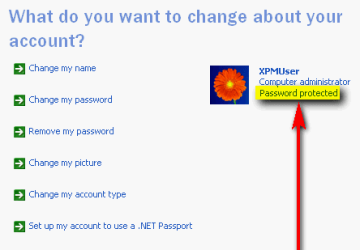
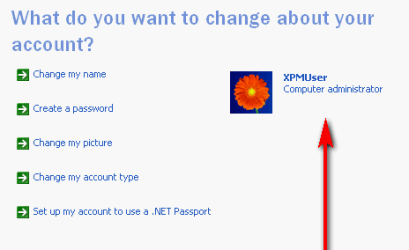
XPM_Password_1.png

XPM_Password_2.png

If XPMUser has no password but you have been able to login and use that user account, it means you have also disabled integration features. To enable integration, simply create a password and logout, login using the new password and enable integration from virtual machine's Tools menu.

If your XPMUser account has a password and you can not remember it, the best you can do is this:
  • Create a new administrator account with password (XP Mode > Control Panel > User Accounts)
  • Still being logged in as XPMUser, copy all your personal files and folders from C:\Documents and Settings\XPMUser to C:\Documents and Settings\All Users
  • Log off XPMUser, login to your new account
  • When new user has logged in successfully, shut down XP Mode and delete saved credentials from XP Mode settings
  • When credentials are deleted, boot XP Mode again, select the new account you created, give password and select Remember my credentials:
    .
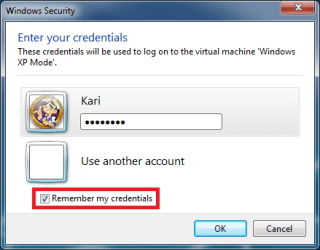
    XPM_Remember_credentials.png

Now in the future XP Mode logs you automatically in with this new account.

When in XP Mode with the new account, open All Users and copy all files and folders you earlier copied from XPMUser to your new account. Now you you can simply delete the XPMUser account, having a new working administrator account with all your files from old XPMUser account transferred to your new account.

Kari

 

My Computer

Computer type
Laptop
Computer Manufacturer/Model Number
HP ENVY 17-1150eg
OS
Windows 10 Pro x64 EN-GB
CPU
1.6 GHz Intel Core i7-720QM Processor
Memory
6 GB
Graphics Card(s)
ATI Mobility Radeon HD 5850 Graphics
Sound Card
Beats sound system with integrated subwoofer
Monitor(s) Displays
17" laptop display, 22" LED and 32" Full HD TV through HDMI
Screen Resolution
1600*900 (1), 1920*1080 (2&3)
Hard Drives
Internal: 2 x 500 GB SATA Hard Disk Drive 7200 rpm
External: 2TB for backups, 3TB USB3 network drive for media
Cooling
As Envy runs a bit warm, I have it on a Cooler Master pad
Keyboard
Logitech diNovo Media Desktop Laser (bluetooth)
Mouse
Logitech Performance Mouse MX
Internet Speed
50/10 Mbps VDSL
Antivirus
Windows Defender 4.3.9431.0
Browser
Maxthon 3.5.2., IE11
Thanks for that Kari, yet another layer of Virtual fog has dissipated.
 

My Computer

Computer Manufacturer/Model Number
Acer 7520, Packard Bell dot se, Acer travelmate 2423
OS
Win 7 Ult + Starter, XP Pro +Home, 2kAS, Linux Mint 8, SuperOS
CPU
AMD 64 Athlon X2 , Intel Atom N450, Intel Celeron M 1.50 Ghz
Motherboard
Acer Fuquene
Memory
2.5GB ; 1GB; 2GB
Graphics Card(s)
Nvidia GeForce7000m; Intel; Intel
Sound Card
Realtek AC57
Monitor(s) Displays
17" ;10.1"; 19"
Screen Resolution
1440x900;1024x600;1440x900;
Hard Drives
WD 80, WD 320;
PSU
19v
Case
Laptop
Cooling
Air
Internet Speed
9.7Mb/s down 0.99Mb/s up
Other Info
ISP VIRGINMEDIA 10M cable broadband - D-Link DIR615 wireless router, 3Com OfficeConnect ASDL router used as wireless extender switch
Log on without password

It's interesting to read this post. After logging off VirtualXP OS, I wanted to be able to be able to log back on without having to put a password in every time. So I went to XP Mode > Control Panel > User accounts and deleted my password. When I logged off, I couldn't log back in, the reason for which I now understand as explained in this post. I also couldn't reopen XP Mode once I had shut it down and tried to reboot.

By trial and error I discovered that if I disabled the integration option by going to Start Menu > All Programs > Windows Virtual PC > Windows Virtual PC > Right click: Windows XP Mode > Settings > Untick: Integration Features .... I could then boot into XP Mode and create a password in User Accounts. Once done, I could then shut down, reactivate the integration option,and be back to normal.

I was going to do a post to see if there was some way possible to totally remove the need for passwords for booting up and logging on/off?
 

My Computer

Computer Manufacturer/Model Number
Self-assembled
OS
Win7 Ultimate 64bit Retail
CPU
Intel i7 960 quad core
Motherboard
Intel DX58SO2 Extreme
Memory
12 GB Kingston DDR 3 1300
Graphics Card(s)
PCI Express Gigabyte GTX 550 Ti
Sound Card
Gigabyte GTX 550 Ti Graphics/5 Sound card
Monitor(s) Displays
Samsung WS Syncmaster S23A350H
Screen Resolution
1920 x 1080
Hard Drives
OS on 128 GB Corsair SSD SATA 3 + Storage on 1 TB Western Digital Black SATA 2
Case
Cooler Master CM690 II Advanced Mid Tower
Cooling
CPU, top, front and rear extractor fans
Keyboard
Microsoft Intellitype Wireless Multimedia
Mouse
Microsoft Intellipoint2 Wireless
Internet Speed
100 MB/sec Theoretical max. Actual average 0.5MB/sec
Other Info
Back-up PC with Vista Ultimate OEM 32bit. Intel i5 2400 Quad Core CPU, DH67CL mobo, 8 GB Kingston DDR3 1300 RAM,
Back
Top