
XP Mode or Virtual PC doesn't start

Luxa

New member
Local time
7:04 PM
Messages
12
Location
Budapest, Hungary
Hello!

I've been struggling with this problem for a while and thought that I might get some help here.

I have a Thinkpad T500 with Windows 7 Pro 64-bit installed, and I need VPN connection to my library. The library handles only Cisco clients properly, so I have to use the provided Cisco 32-bit client. So I thought about installing XP Mode to solve my problems.

I downloaded and installed the files and turned CPU support on in BIOS, but if I try to start Virtual PC or XP Mode, usually visually nothing happens. Vpc.exe does show up as a process and system log contains a line Virtual PC has successfully started (or the Hungarian equivalent...). But nothing else.

Sometimes I can make it to the next screen and actually try to start XP Mode. It always start as a new installation, asks for some configuration options like login, and then says it configures itself. Then nothing happens. Right now I can't describe the exact sequence, as I can't even reach that point. :(

I'd be very grateful for any ideas on this problem...

Regards,
Luxa
 

My Computer

Computer Manufacturer/Model Number
Thinkpad T500
OS
Windows 7 Professional 64-bit
CPU
Intel Core 2 Duo P8600, 2400 MHz
Memory
4 GB DDR3
Graphics Card(s)
ATI Mobility Radeon HD 3650 (256 MB) and Mobile Intel(R) 4
Hard Drives
ST9160827AS ATA Device (160 GB, 5400 RPM, SATA-II)
can you check if XP Mode is indeed installed? it's in c:\program files\Windows XP Mode.
 

My Computer

OS
windows 7
Yes, I've checked, it is there.
 

My Computer

Computer Manufacturer/Model Number
Thinkpad T500
OS
Windows 7 Professional 64-bit
CPU
Intel Core 2 Duo P8600, 2400 MHz
Memory
4 GB DDR3
Graphics Card(s)
ATI Mobility Radeon HD 3650 (256 MB) and Mobile Intel(R) 4
Hard Drives
ST9160827AS ATA Device (160 GB, 5400 RPM, SATA-II)
what happens if you run this in command prompt:

vpcwizard.exe /defaultvm

does it launch a window?
 

My Computer

OS
windows 7
No, it loads a bit then nothing happens. System log contains Virtual PC has successfully started as usual.
 

My Computer

Computer Manufacturer/Model Number
Thinkpad T500
OS
Windows 7 Professional 64-bit
CPU
Intel Core 2 Duo P8600, 2400 MHz
Memory
4 GB DDR3
Graphics Card(s)
ATI Mobility Radeon HD 3650 (256 MB) and Mobile Intel(R) 4
Hard Drives
ST9160827AS ATA Device (160 GB, 5400 RPM, SATA-II)
This is so weird. Do you actually see any virtual machine created?

search inside your user name folder, c:\users\your-usr-id\..., a file called "Windows XP Mode.vmcx".

usually, "c:\users\your-id\Virtual Machines\Windows XP Mode.vmcx"
maybe you can post it here.
 

My Computer

OS
windows 7
Yes there is a virtual machine called Windows XP Mode.wmcx, contents are the following:

<?xml version="1.0" encoding="UTF-16"?>
<!-- Microsoft Virtual Machine Description and Registration Settings -->
<vm_description>
<ram_size type="string">512 MB</ram_size>
<vmstate type="string">Kikapcsolva</vmstate> (Kikapcsolva means turned off)
<vmc_path type="string">C:\Users\Luxa\AppData\Local\Microsoft\Windows Virtual PC\Virtuális gépek\Windows XP Mode.vmc</vmc_path>
<primary_disk1 type="string">C:\Users\Luxa\AppData\Local\Microsoft\Windows Virtual PC\Virtuális gépek\Windows XP Mode.vhd</primary_disk1>
<secondary_disk1 type="string" />
</vm_description>

Also since then I've managed to reach both the VM setting window (the one listing the Virtual Machine subdirectory) and get XP Mode right until the question about if I want to activate security updates but thereafter it did nothing as usual (the same scenario I mentioned in my first post). I really don't know what is different between these times and the others...

So the logs from this morning are the following (translated from Hungarian, so there might be some errors):
The recovery disks of Windows XP Mode have been cancelled (ID 86)
The hibernated state of Windows XP Mode has been cancelled (ID 85)
System has deleted C:\Users\Luxa\AppData\Local\Microsoft\Windows Virtual PC\Virtuális gépek\Windows XP Mode.vmc configuration file (ID 7)
The program has created C:\Users\Luxa\AppData\Local\Microsoft\Windows Virtual PC\Virtuális gépek\Windows XP Mode.vhd virtual harddisk (ID 175)
The system has created C:\Users\Luxa\AppData\Local\Microsoft\Windows Virtual PC\Virtuális gépek\Windows XP Mode.vmc configuration file (ID 6)

It looks like the VM has been created and subsequent starts delete it.
 
Last edited:

My Computer

Computer Manufacturer/Model Number
Thinkpad T500
OS
Windows 7 Professional 64-bit
CPU
Intel Core 2 Duo P8600, 2400 MHz
Memory
4 GB DDR3
Graphics Card(s)
ATI Mobility Radeon HD 3650 (256 MB) and Mobile Intel(R) 4
Hard Drives
ST9160827AS ATA Device (160 GB, 5400 RPM, SATA-II)
can you delete this vm using virtual PC? then create a new one.
 

My Computer

OS
windows 7
I deleted the old one and created two new Virtual PCs. One with using the default settings:

<?xml version="1.0" encoding="UTF-16"?>
<!-- Microsoft Virtual Machine Description and Registration Settings -->
<vm_description>
<ram_size type="string">512 MB</ram_size>
<vmstate type="string">Fut</vmstate> (means running)
<primary_disk1 type="string">C:\Users\Luxa\AppData\Local\Microsoft\Windows Virtual PC\Virtuális gépek\VMTeszt.vhd</primary_disk1>
<secondary_disk1 type="string">E</secondary_disk1>
<notes type="string" />
<vmc_path type="string">C:\Users\Luxa\AppData\Local\Microsoft\Windows Virtual PC\Virtuális gépek\VMTeszt.vmc</vmc_path>
</vm_description>

and one using the vhd in the XP Mode directory as hard disk:

<?xml version="1.0" encoding="UTF-16"?>
<!-- Microsoft Virtual Machine Description and Registration Settings -->
<vm_description>
<ram_size type="string">512 MB</ram_size>
<vmstate type="string">Kikapcsolva</vmstate> (means turned off)
<vmc_path type="string">C:\Users\Luxa\AppData\Local\Microsoft\Windows Virtual PC\Virtuális gépek\XP Mode Teszt.vmc</vmc_path>
<primary_disk1 type="string">C:\Program Files\Windows XP Mode\Windows XP Mode base.vhd</primary_disk1>
<secondary_disk1 type="string">E</secondary_disk1>
</vm_description>

I was able to start the first one, its status changed to running, it wrote a line stating this (ID 80) to the system log and right now it consumes 9980 K of RAM and the full CPU core it occupies. But I have no graphic output or anything else.
The second one did not start.
 

My Computer

Computer Manufacturer/Model Number
Thinkpad T500
OS
Windows 7 Professional 64-bit
CPU
Intel Core 2 Duo P8600, 2400 MHz
Memory
4 GB DDR3
Graphics Card(s)
ATI Mobility Radeon HD 3650 (256 MB) and Mobile Intel(R) 4
Hard Drives
ST9160827AS ATA Device (160 GB, 5400 RPM, SATA-II)
those settings file are looking good. Really strange there are so many problems.

I recommend you try our VMLite, it's better than VPC anyway.
 

My Computer

OS
windows 7
I've downloaded WMLiteWorkstationSetup.exe, ran it and gave it permission to modify my computer. And nothing happened. This is a bit surprising as I have absolutely no problems with my system otherwise and I can run and install other programs. Do you think I should do a repair install to try to fix the problem?
 

My Computer

Computer Manufacturer/Model Number
Thinkpad T500
OS
Windows 7 Professional 64-bit
CPU
Intel Core 2 Duo P8600, 2400 MHz
Memory
4 GB DDR3
Graphics Card(s)
ATI Mobility Radeon HD 3650 (256 MB) and Mobile Intel(R) 4
Hard Drives
ST9160827AS ATA Device (160 GB, 5400 RPM, SATA-II)
interesting, do you mean the installer didn't run at all? do you see any dialogbox coming out? you may need to redownload the file, and re-install it.
 

My Computer

OS
windows 7
No, the installer doesn't run at all, sadly not even after redownload.
 

My Computer

Computer Manufacturer/Model Number
Thinkpad T500
OS
Windows 7 Professional 64-bit
CPU
Intel Core 2 Duo P8600, 2400 MHz
Memory
4 GB DDR3
Graphics Card(s)
ATI Mobility Radeon HD 3650 (256 MB) and Mobile Intel(R) 4
Hard Drives
ST9160827AS ATA Device (160 GB, 5400 RPM, SATA-II)
no dialog boxes poping up? no user reported that so far. so weird !
 

My Computer

OS
windows 7
There is always a first time. :) It shows up a bit in the processes list in Task Manager then exits...
 

My Computer

Computer Manufacturer/Model Number
Thinkpad T500
OS
Windows 7 Professional 64-bit
CPU
Intel Core 2 Duo P8600, 2400 MHz
Memory
4 GB DDR3
Graphics Card(s)
ATI Mobility Radeon HD 3650 (256 MB) and Mobile Intel(R) 4
Hard Drives
ST9160827AS ATA Device (160 GB, 5400 RPM, SATA-II)
wait for 20 mins, i will upload a msi file for you to test. Your host is 64-bit, right?
 

My Computer

OS
windows 7
Okay, there are still some 5 hours left of today here, I can wait. Yes, it is 64-bit, I'm running a 64-bit Hungarian Windows 7 Professional.
 

My Computer

Computer Manufacturer/Model Number
Thinkpad T500
OS
Windows 7 Professional 64-bit
CPU
Intel Core 2 Duo P8600, 2400 MHz
Memory
4 GB DDR3
Graphics Card(s)
ATI Mobility Radeon HD 3650 (256 MB) and Mobile Intel(R) 4
Hard Drives
ST9160827AS ATA Device (160 GB, 5400 RPM, SATA-II)

My Computer

Computer Manufacturer/Model Number
Black_Box (homebuilt)
OS
windows 7 RTM x64
CPU
Phenom II 965 Quad Core 3.4Ghz
Motherboard
Asus M4A79T Deluxe
Memory
Mushkin Blackline 8GB (4x2gb)
Graphics Card(s)
XFX Radeon 5970 Black Edition
Sound Card
onboard
Monitor(s) Displays
Dell 2408WPF-main Dell E248WFP-secondary
Screen Resolution
1920x1200-main 1920x1200-secondary
Hard Drives
OCZ Vertex Limited Edition 100GB (OS)
x1 WD Black Edition 500GB drive (Storage)
PSU
XFX 850w Black Edition (Modular)
Case
Mountian Mods H2go
Cooling
CoolITSystems ECO A.L.C.
Keyboard
Logitech MX 5500 wireless keyboard
Mouse
Razor Copperhead
Internet Speed
16Mb down/2Mb up Wowway Cable Internet
Download

you need to login first, then get the 3rd file: VMLiteWorkstationSetup64.msi

I removed the bootstrap code that may not run on your pc.

Let me know if this msi can install.
 

My Computer

OS
windows 7
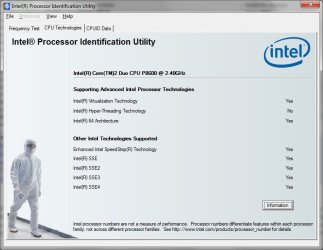
I have uploaded the screenshot as the attachment of this post. Also I've been filling out system specifications before, I'm not sure if anything is relevant beyond CPU, but there you go.

@huisinro: I'm downloading the file, it will take some twenty minutes. After that, I will try it out. Thanks!
 

Attachments

  • Luxa_Intel_CPUID_Result.jpg
    Luxa_Intel_CPUID_Result.jpg
    104.8 KB · Views: 64

My Computer

Computer Manufacturer/Model Number
Thinkpad T500
OS
Windows 7 Professional 64-bit
CPU
Intel Core 2 Duo P8600, 2400 MHz
Memory
4 GB DDR3
Graphics Card(s)
ATI Mobility Radeon HD 3650 (256 MB) and Mobile Intel(R) 4
Hard Drives
ST9160827AS ATA Device (160 GB, 5400 RPM, SATA-II)
Back
Top