

- Local time
- 7:03 PM
- Messages
- 36
OK, this is probably stupid, but maybe someone can steer me to a solution: My main IDE HDD that has the Win 7 \BOOT folder with its BCD started failing. I was getting the "HAL.DLL missing or corrupt" error. So, in a short window where it DID work, I copied its partitions off to backup on another drive, and found an identical Maxtor to replace it with. I did the hardware swap-out and usual DVD SETUP nightmare with diskpart and reassigning letters after making the drive an MBR drive, and its primary partition startable-active. After hours of fiddling, Win 7 boots fine after a startup repair, and I restored the original drive lettering. Problem is, the XP installation won't boot. It appears in the selection screen, but when I choose it to boot, all I get is a black screen with a flashing underscore.
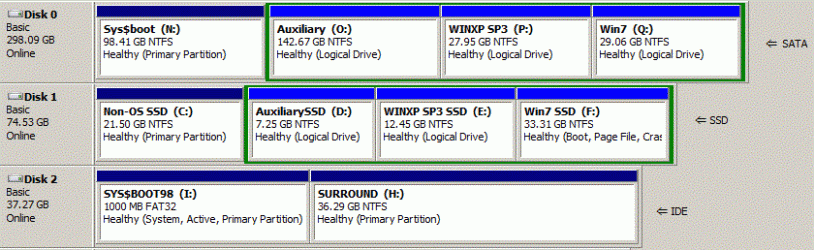
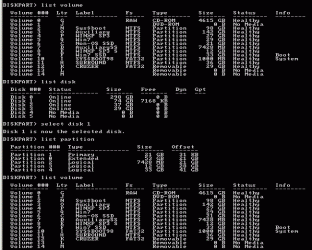
Here's the configuration: The system boot disk (0), the 40Gb Maxtor IDE that failed and was replaced, has the MBR. Its first primary partition, active, is I:, which has \BOOT (the second, H:SURROUND, is a scratchpad). The main disk (1) is an SSD that has partitions C:NON-OS SSD, an auxiliary; D:AUXILIARY SSD; E:XP SP3 SSD; and F:WIN7 SSD. That's unchanged from before the HD problem, when booting XP from E: worked fine.
I have a SATA drive (2) with partitions N: O: P: Q: that replicates the partition structure of the SSD exactly. Win 7 starts fine off that too, but I don't use its P:XP SP3 anymore.
XP's BOOT.INI on I:\ is as follows:
;
;Warning: Boot.ini is used on Windows XP and earlier operating systems.
;Warning: Use BCDEDIT.exe to modify Windows Vista boot options.
;
[boot loader]
timeout=8
default=multi(0)disk(0)rdisk(1)partition(3)\WINDOWS
[operating systems]
multi(0)disk(0)rdisk(1)partition(3)\WINDOWS="XP on the SSD"
;yes, Win 98 SE is still on C:
c:\BOOTSECT.W98=" Windows 98SE (on 40Gb IDE only)"
That worked before. What would make XP do a black-screen startup failure now?
Here's the configuration: The system boot disk (0), the 40Gb Maxtor IDE that failed and was replaced, has the MBR. Its first primary partition, active, is I:, which has \BOOT (the second, H:SURROUND, is a scratchpad). The main disk (1) is an SSD that has partitions C:NON-OS SSD, an auxiliary; D:AUXILIARY SSD; E:XP SP3 SSD; and F:WIN7 SSD. That's unchanged from before the HD problem, when booting XP from E: worked fine.
I have a SATA drive (2) with partitions N: O: P: Q: that replicates the partition structure of the SSD exactly. Win 7 starts fine off that too, but I don't use its P:XP SP3 anymore.
XP's BOOT.INI on I:\ is as follows:
;
;Warning: Boot.ini is used on Windows XP and earlier operating systems.
;Warning: Use BCDEDIT.exe to modify Windows Vista boot options.
;
[boot loader]
timeout=8
default=multi(0)disk(0)rdisk(1)partition(3)\WINDOWS
[operating systems]
multi(0)disk(0)rdisk(1)partition(3)\WINDOWS="XP on the SSD"
;yes, Win 98 SE is still on C:
c:\BOOTSECT.W98=" Windows 98SE (on 40Gb IDE only)"
That worked before. What would make XP do a black-screen startup failure now?
My Computer
- Computer type
- PC/Desktop
- Computer Manufacturer/Model Number
- tower: self-made; laptop: ASUS U50f
- OS
- Tower: 7 Pro; Laptop: Win 7x64/Win10x64 multiboot
- CPU
- Intel: tower i7, laptop i3
- Motherboard
- tower: ASUS B85M-E, Via chipset; ASUS U50f notebook
- Memory
- both 4Gb DDR3
- Graphics Card(s)
- Intel Graphics 4600 series; ASUS U50f Intel graphics
- Sound Card
- Microsoft hi-d audio; laptop OEM
- Monitor(s) Displays
- Dell 2709W; laptop: OEM
- Screen Resolution
- 1900x1200 TruColor, landscape
- Hard Drives
- Tower: Samsung SSD
Laptop: Hitachi IDE
- PSU
- 300W
- Case
- Generic
- Cooling
- CPU fan, chassis in- and exhaust fans
- Keyboard
- Logitech Illuminated USB
- Mouse
- Microsoft USB mouse
- Internet Speed
- 100Mb+ fiber-optic
- Antivirus
- Microsoft Security Essentials/Win 7 firewall
- Browser
- Firefox 46, MSIE 11, Opera


 I learned a lot more about