XP on one drive, 7 on another[Resolved]
I have a problem and see that it has been raised and solved several times here.
My system is in system specs.
I bought myself all these new goodies a few weeks back and set about putting it all together etc.
Once connected, I fired up and partitioned my Raptor, installed XP on one partition and 7 on the other. This was done in IDE mode in BIOS.
Once finished everything worked as it should.
I have just now decided to go with an SSD, so I connected up, went into BIOS and set up AHCI and selected Sata type.
The SSD is in Sata port 0 and my Raptor is in Sata 1.
I installed XP onto the Raptor (which is still partitioned), installed the AHCI drivers during install and all went well. I did not install any motherboard drivers upon boot, I just made sure XP was working.
I then popped 7 CD in and rebooted and installed 7 onto the SSD.
Again, the install went as it should have done with no hiccups.
The problem though is that upon start-up, I do not get the option of dual booting. It just goes straight into 7.
I have followed a couple of guides for using easyBCD, but I cannot get it to work as it does in the guide and I am a bit of a newbie with messing with the MBR. I already wrecked it once and re-installed .
.
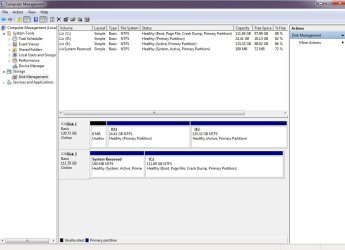
I have looked in computer management and it is showing the partition that XP is installed on as a logical drive. Not sure exactly what that means, but none of the others are showing that.

SSD is shown as disk 2 there, but I am not sure why. It is definitely in Sata port 0.
'F' and 'H' is another drive that I only just connected 5 minutes before I took the screenie. Only drives that were connected to the mobo during install was the Raptor and the SSD.
Is there a way I can fix this without it involving a re-install/repair, or anything that I cannot understand?
I have no concern actually with reformatting the Raptor and installing XP again if I have too.
I have a problem and see that it has been raised and solved several times here.
My system is in system specs.
I bought myself all these new goodies a few weeks back and set about putting it all together etc.
Once connected, I fired up and partitioned my Raptor, installed XP on one partition and 7 on the other. This was done in IDE mode in BIOS.
Once finished everything worked as it should.
I have just now decided to go with an SSD, so I connected up, went into BIOS and set up AHCI and selected Sata type.
The SSD is in Sata port 0 and my Raptor is in Sata 1.
I installed XP onto the Raptor (which is still partitioned), installed the AHCI drivers during install and all went well. I did not install any motherboard drivers upon boot, I just made sure XP was working.
I then popped 7 CD in and rebooted and installed 7 onto the SSD.
Again, the install went as it should have done with no hiccups.
The problem though is that upon start-up, I do not get the option of dual booting. It just goes straight into 7.
I have followed a couple of guides for using easyBCD, but I cannot get it to work as it does in the guide and I am a bit of a newbie with messing with the MBR. I already wrecked it once and re-installed
.I have looked in computer management and it is showing the partition that XP is installed on as a logical drive. Not sure exactly what that means, but none of the others are showing that.
SSD is shown as disk 2 there, but I am not sure why. It is definitely in Sata port 0.
'F' and 'H' is another drive that I only just connected 5 minutes before I took the screenie. Only drives that were connected to the mobo during install was the Raptor and the SSD.
Is there a way I can fix this without it involving a re-install/repair, or anything that I cannot understand
?I have no concern actually with reformatting the Raptor and installing XP again if I have too.
Last edited:
My Computer
- Computer type
- PC/Desktop
- Computer Manufacturer/Model Number
- Home made
- OS
- Windows 7 Pro 64bit
- CPU
- Intel 4790K
- Motherboard
- MSI Z97 Gaming 3
- Memory
- Corsair Vengeance Pro CL9 1866 16Gb
- Graphics Card(s)
- ASUS Strix GTX970
- Sound Card
- On board
- Monitor(s) Displays
- BenQ XL2730Z
- Screen Resolution
- 2560 x 1440
- Hard Drives
- Samsung 850 Pro
GSkill Phoenix Pro 120Gb SSD
- PSU
- Corsair HX750i
- Case
- Corsair Obsidian 450D
- Cooling
- Corsair H110
- Keyboard
- Corsair K95
- Mouse
- RAT 7
- Internet Speed
- 100/40

 .
.