XP Pro to Windows 7

KWR44

New member
Local time
4:56 PM
Messages
6
I purchased a new 1 TB sata HDD to install Windows 7 onto. Do I need to install XP onto this drive to upgrade to Windows 7? Does Windows 7 need files form XP to do the upgrade or can I just insert my XP disc for verificaiton to upgrade?

Thanks
 

My Computer

OS
XP Pro
CPU
Pentium 4 3.00 GHZ
Motherboard
Asus P5GD2
Memory
4 GBs
Graphics Card(s)
Nvidia GeForce 8500 GT
Sound Card
5.1
Monitor(s) Displays
Samsung SyncMaster 204B
Hard Drives
WD 1 TB Sata
Maxtor 300 GB Sata
Cooling
Case and CPU large coling fan and heat sink
Rumor is that if you only own the Windows 7 upgrade media, you'll need to install and activate XP first then upgrade it.
 

My Computer

Computer Manufacturer/Model Number
Too many to list.
OS
XP, Seven, 2008R2
CPU
AMD, Intel, VIA
Motherboard
Various
Memory
Corsair, Kingston, etc.
Graphics Card(s)
ATI, NVIDIA
Monitor(s) Displays
Samsung
Hard Drives
Maxtor, Western Digital
Keyboard
qwerty
Internet Speed
22 Mb/s @ home, 1 Gb/s @ server
Other Info
All of my systems still run fastest on XP 32-bit for the most part. Win7 is fun to play with, but I still prefer XP for raw speed, security, and functionality.
Do I need to do all the XP upgrades to bring it up to SP 3 level or just the old XP install?
 

My Computer

OS
XP Pro
CPU
Pentium 4 3.00 GHZ
Motherboard
Asus P5GD2
Memory
4 GBs
Graphics Card(s)
Nvidia GeForce 8500 GT
Sound Card
5.1
Monitor(s) Displays
Samsung SyncMaster 204B
Hard Drives
WD 1 TB Sata
Maxtor 300 GB Sata
Cooling
Case and CPU large coling fan and heat sink
it's a good question, but I don't know the answer. I don't think that Microsoft has made any of that clear yet (if they've even said anything at all).
 

My Computer

Computer Manufacturer/Model Number
Too many to list.
OS
XP, Seven, 2008R2
CPU
AMD, Intel, VIA
Motherboard
Various
Memory
Corsair, Kingston, etc.
Graphics Card(s)
ATI, NVIDIA
Monitor(s) Displays
Samsung
Hard Drives
Maxtor, Western Digital
Keyboard
qwerty
Internet Speed
22 Mb/s @ home, 1 Gb/s @ server
Other Info
All of my systems still run fastest on XP 32-bit for the most part. Win7 is fun to play with, but I still prefer XP for raw speed, security, and functionality.
Rumor is that if you only own the Windows 7 upgrade media, you'll need to install and activate XP first then upgrade it.

it's a good question, but I don't know the answer. I don't think that Microsoft has made any of that clear yet (if they've even said anything at all).

Sir, Upgarde is not possible directly from XP to Win7.
Directly install win7..

For more info please Bing/Google: Upgrade Path fro win7 on microsoft.com

Thanks
Cheers
LP
 

My Computer

OS
Windows 7
Sir, Upgarde is not possible directly from XP to Win7.
Directly install win7..

Hello L.P.

Yes, you can upgrade from XP to 7. You just have to do a custom install.
 

My Computer

Computer Manufacturer/Model Number
Too many to list.
OS
XP, Seven, 2008R2
CPU
AMD, Intel, VIA
Motherboard
Various
Memory
Corsair, Kingston, etc.
Graphics Card(s)
ATI, NVIDIA
Monitor(s) Displays
Samsung
Hard Drives
Maxtor, Western Digital
Keyboard
qwerty
Internet Speed
22 Mb/s @ home, 1 Gb/s @ server
Other Info
All of my systems still run fastest on XP 32-bit for the most part. Win7 is fun to play with, but I still prefer XP for raw speed, security, and functionality.
Laplink had previously announced that they were going to enhance their PC Mover SW to allow "upgrades" from XP to Seven. They said they would release it at the same time as Seven.

So, if you hold off a few days, you may be able to acquire some SW that will allow you to do the "upgrade".

Realize, though, that the general advice is to do a clean-install anyway.
 

My Computer

Computer type
PC/Desktop
Computer Manufacturer/Model Number
Custom
OS
Win7 Pro 32-bit, Win8 Pro 32-bit
CPU
AMD Phenom II X6 1090T
Motherboard
Gigabyte
Memory
4GB ddr3 1300
Graphics Card(s)
AMD HD 4290 onboard
Sound Card
Builtin Realtek HD Audio
Monitor(s) Displays
Samsung 24" widescreen, LG 23" widescreen
Screen Resolution
1920x1200/1920x1080
Hard Drives
Kingston 256GB SSD
Keyboard
Logitech Illuminated Keyboard
Mouse
Logitech M705 wireless mouse
Antivirus
Norton Av 2013
Browser
IE v10
Sir, Upgarde is not possible directly from XP to Win7.
Directly install win7..
Hello L.P.

Yes, you can upgrade from XP to 7. You just have to do a custom install.
That is not called Upgarde Sir..

It is called Clean Install or Custom install.
If you do not trust me for it,you can use the Microsoft Upgrade Advisor!

Realize, though, that the general advice is to do a clean-install anyway.
That is correct,Upgrade is not possible,only a clean install can be done!
 

My Computer

OS
Windows 7
Thanks for all the input on my question.

I did know that you cannot upgrade from XP.

In my original thread entry I wanted to install Windows 7 on a new 1 TB drive. I wanted to get the upgrade version (save $100.00) and needed to know if I had to install my XP on the new drive in order to use the upgrade (to do a clean install). I had read that the upgrade version used some components of XP durring its install??? If this was the case do I need to install XP and do the updates to SP3 to do this with the upgade version. If not would it only ask for my XP disk durring the installation to my formatted HDD.
 

My Computer

OS
XP Pro
CPU
Pentium 4 3.00 GHZ
Motherboard
Asus P5GD2
Memory
4 GBs
Graphics Card(s)
Nvidia GeForce 8500 GT
Sound Card
5.1
Monitor(s) Displays
Samsung SyncMaster 204B
Hard Drives
WD 1 TB Sata
Maxtor 300 GB Sata
Cooling
Case and CPU large coling fan and heat sink
Thanks for all the input on my question.

I did know that you cannot upgrade from XP.

In my original thread entry I wanted to install Windows 7 on a new 1 TB drive. I wanted to get the upgrade version (save $100.00) and needed to know if I had to install my XP on the new drive in order to use the upgrade (to do a clean install). I had read that the upgrade version used some components of XP durring its install??? If this was the case do I need to install XP and do the updates to SP3 to do this with the upgarde version. If not would it only ask for my XP disk durring the installation to my formatted HDD.

Brother you can not perform a complete install from an Upgarde DVD,Buy a Full Install DVD.
Clean install will last for only 30Days, and then you would need to buy a key in 30days and activate it,otherwise you will be in a No-Boot situation and again a clean install.
 

My Computer

OS
Windows 7
You can upgrade activated XP/Vista/RC to your new HDD with a clean formatted Custom install by unplugging all but XP/VIsta/RC drive and the new target drive which is formatted Primary. Custom install to the target, then change cables or BIOS boot order on target drive to boot first, mark active, run startup repair and you have a clean formatted Win7 upgrade install on your new HDD>
 
Last edited:
Upgrade is not possible

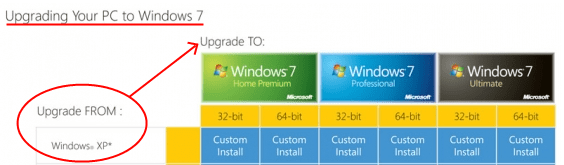
Incorrect. If upgrade wasn't possible, you'd have to buy the full version of Windows 7. But since you can use the upgrade media to move from XP to 7, THAT IS AN UPGRADE no matter if you have to do a custom install or not (If you do not trust me, see the attached chart created by Microsoft).

If what you are actually arguing is that you cannot do an IN-PLACE upgrade, I would agree with it. What I don't agree with is when you state one cannot upgrade from XP to 7.
 

Attachments

  • upgrade2.png
    upgrade2.png
    29.2 KB · Views: 19

My Computer

Computer Manufacturer/Model Number
Too many to list.
OS
XP, Seven, 2008R2
CPU
AMD, Intel, VIA
Motherboard
Various
Memory
Corsair, Kingston, etc.
Graphics Card(s)
ATI, NVIDIA
Monitor(s) Displays
Samsung
Hard Drives
Maxtor, Western Digital
Keyboard
qwerty
Internet Speed
22 Mb/s @ home, 1 Gb/s @ server
Other Info
All of my systems still run fastest on XP 32-bit for the most part. Win7 is fun to play with, but I still prefer XP for raw speed, security, and functionality.
Another option is to buy an OEM version off Newegg. They're full versions that run for around the same price as the upgrade versions, without the need for a previous OS to be installed. The downside is, once activated, it's locked to that hardware, although it's nothing a quick phone call to Microsoft can't fix if you upgrade. :)
 

My Computer

OS
Windows 7 Professional x64 SP1
CPU
Intel Core i5-2500K
Motherboard
Gigabyte P67X-UD3-B3
Memory
8 GB Corsair Vengeance Blue DDR3-1600
Graphics Card(s)
Sapphire Radeon HD 6870 1 GB GDDR5
Monitor(s) Displays
Samsung SyncMaster T220HD
Screen Resolution
1680x1050
Hard Drives
120 GB Corsair Force SSD + 320 GB Seagate Barracuda SATA2 + 2 TB My Book Elite
PSU
Corsair 650W
Internet Speed
50 Mbps
Upgrade is not possible

Incorrect. If upgrade wasn't possible, you'd have to buy the full version of Windows 7. But since you can use the upgrade media to move from XP to 7, THAT IS AN UPGRADE no matter if you have to do a custom install or not.

If what you are actually arguing is that you cannot do an IN-PLACE upgrade, I would agree with it. What I don't agree with is when you state one cannot upgrade from XP to 7.

+1 You can read a ton more about install issues from MS experts in the Technet Install forum. You can def install Win7 upgrade to an activated XP over itself (files go in windows.old for redistribution but require program reinstalls), to a second formatted partition, or even a second plugged primary formatted HDD which you afterward mark active, set in BIOS as boot drive and run start up repair. .
 
Upgrade is not possible

Incorrect. If upgrade wasn't possible, you'd have to buy the full version of Windows 7. But since you can use the upgrade media to move from XP to 7, THAT IS AN UPGRADE no matter if you have to do a custom install or not.

If what you are actually arguing is that you cannot do an IN-PLACE upgrade, I would agree with it. What I don't agree with is when you state one cannot upgrade from XP to 7.

+1 You can read a ton more about install issues from MS experts in the Technet Install forum. You can def install Win7 upgrade to an activated XP over itself (files go in windows.old for redistribution but require program reinstalls), to a second formatted partition, or even a second plugged primary formatted HDD.

L.P., gregrocker and sup3rsprt are correct.

It can be a bit confusing using the terminology 'Upgrade'. It is used to describe the OS version, you can use the Upgrade version to upgrade your OS from XP/Vista to Win7.
Then there is the installation procedure, Upgrade, Custom or Clean install.

These are two different subjects, they just happen to use the same term, Upgrade.

The OP's question is about using the 'Upgrade version of Win7' to install via the Custom installation method, which can be done.
 

My Computer

Computer type
PC/Desktop
Computer Manufacturer/Model Number
76~2.0
OS
Windows 7 Ult x64 - SP1/ Windows 8 Pro x64
CPU
Intel Core i5-3570K 4.6GHz
Motherboard
Gigabyte GA-Z77X UD3H, f18
Memory
8GB (2X4GB) DDR3 1600 Corsair Vengeance CL8 1.5v
Graphics Card(s)
Sapphire HD 7770 Vapor-X OC 1GB DDR5
Sound Card
Onboard VIA VT2021
Monitor(s) Displays
22" LCD Dell
Screen Resolution
1680x1050
Hard Drives
Samsung 840Pro 128GB SSD,
Seagate Barracuda 500GB SATA2 7200rpm 32MB cache, Seagate Barracuda 1TB SATA2 7200rpm 32MB cache,
PSU
Corsair HX650W
Case
Cooler Master Storm Scout
Cooling
Corsair H80 2x12cm Noctua NF P12 , 2x14cm case fans
Keyboard
Logitech Wave
Mouse
CM Sentinel
Internet Speed
Dismal
Antivirus
Avast
Browser
Opera Next
Other Info
Haswell laptop: HP Envy 17t-j, i7-4700MQ, GeForce 740M 2GB DDR3, 17.3" Full HD 1920x1080, 16GB RAM, Samsung 840 Pro 128GB, 1TB Hitachi 7200 HDD,
Desktop: eSATA ports,
External eSATA Seagate 500GB SATA2 7200rpm,
External WD USB 500GB
Thanks guys for helping to clear that up.
 

My Computer

Computer Manufacturer/Model Number
Too many to list.
OS
XP, Seven, 2008R2
CPU
AMD, Intel, VIA
Motherboard
Various
Memory
Corsair, Kingston, etc.
Graphics Card(s)
ATI, NVIDIA
Monitor(s) Displays
Samsung
Hard Drives
Maxtor, Western Digital
Keyboard
qwerty
Internet Speed
22 Mb/s @ home, 1 Gb/s @ server
Other Info
All of my systems still run fastest on XP 32-bit for the most part. Win7 is fun to play with, but I still prefer XP for raw speed, security, and functionality.
So what you are saying is that if I have XP installed on a drive and do a custom insatll (Clean) windows 7 will create a separate partition for itself and leave the XP in an old partition?? If I want to only have Windows 7 I should do a full version and start from the new formatted disk??

Thanks
 

My Computer

OS
XP Pro
CPU
Pentium 4 3.00 GHZ
Motherboard
Asus P5GD2
Memory
4 GBs
Graphics Card(s)
Nvidia GeForce 8500 GT
Sound Card
5.1
Monitor(s) Displays
Samsung SyncMaster 204B
Hard Drives
WD 1 TB Sata
Maxtor 300 GB Sata
Cooling
Case and CPU large coling fan and heat sink
So what you are saying is that if I have XP installed on a drive and do a custom insatll (Clean) windows 7 will create a separate partition for itself and leave the XP in an old partition?? If I want to only have Windows 7 I should do a full version and start from the new formatted disk??

Thanks

If you want only Windows 7 from an Upgrade disk then your options are:

1) start the installer from the XP desktop, choose the same partition for install. It will overwrite your XP and place all of your files in windows.old folder for resdistribution (delete it later).

2) plug in a second formatted primary HDD, install from XP desktop to this target HDD, afterwards unplug XP drive and plug cable into Win7 drive (or change boot order in BIOS), mark active, run Startup repair. THis is the only way to get an Upgrade disk install to formatted metal.

In either case, as soon as you get your Windows 7 configured like you want it, use the Win7 backup imaging utility to make an image of your install and store it externally. This way you will never have to reinstall both OS again, just reimage the HDD in 20 minutes or so.

 
So what you are saying is that if I have XP installed on a drive and do a custom insatll (Clean) windows 7 will create a separate partition for itself and leave the XP in an old partition?? If I want to only have Windows 7 I should do a full version and start from the new formatted disk??

Thanks

If you want only Windows 7 from an Upgrade disk then your options are:

1) start the installer from the XP desktop, choose the same partition for install. It will overwrite your XP and place all of your files in windows.old folder for resdistribution (delete it later).

2) plug in a second formatted primary HDD, install from XP desktop to this target HDD, afterwards unplug XP drive and plug cable into Win7 drive (or change boot order in BIOS), mark active, run Startup repair. THis is the only way to get an Upgrade disk install to formatted metal.

In either case, as soon as you get your Windows 7 configured like you want it, use the Win7 backup imaging utility to make an image of your install and store it externally. This way you will never have to reinstall both OS again, just reimage the HDD in 20 minutes or so.


If I take a new HDD install my XP which is probably SP1 do I need to update it to SP3 before I do option 1 you mentioned?
 

My Computer

OS
XP Pro
CPU
Pentium 4 3.00 GHZ
Motherboard
Asus P5GD2
Memory
4 GBs
Graphics Card(s)
Nvidia GeForce 8500 GT
Sound Card
5.1
Monitor(s) Displays
Samsung SyncMaster 204B
Hard Drives
WD 1 TB Sata
Maxtor 300 GB Sata
Cooling
Case and CPU large coling fan and heat sink
So what you are saying is that if I have XP installed on a drive and do a custom insatll (Clean) windows 7 will create a separate partition for itself and leave the XP in an old partition?? If I want to only have Windows 7 I should do a full version and start from the new formatted disk??

Thanks

If you want only Windows 7 from an Upgrade disk then your options are:

1) start the installer from the XP desktop, choose the same partition for install. It will overwrite your XP and place all of your files in windows.old folder for resdistribution (delete it later).

2) plug in a second formatted primary HDD, install from XP desktop to this target HDD, afterwards unplug XP drive and plug cable into Win7 drive (or change boot order in BIOS), mark active, run Startup repair. THis is the only way to get an Upgrade disk install to formatted metal.

In either case, as soon as you get your Windows 7 configured like you want it, use the Win7 backup imaging utility to make an image of your install and store it externally. This way you will never have to reinstall both OS again, just reimage the HDD in 20 minutes or so.


If I take a new HDD install my XP which is probably SP1 do I need to update it to SP3 before I do option 1 you mentioned?

Not according to everything I've read on Technet. The Win7 Upgrade installer only looks for an activated qualifying OS before starting the Upgrade disk install.

That said, I haven't tried it yet with only SP1, but will be doing that one next week. Others may know for sure who try it.
 
Back
Top