xp sees em, 7 doesnt

BIG RED

New member
Member
Local time
1:22 AM
Messages
31
i have been trying to get network sharing up and running at my home network. i have 2 computers that i was hoping to accomplish this with: a desktop running xp 64-bit and a laptop with windows 7 64-bit. i (believe) have all the networking settings all figured out for the desktop computer. it sees my laptop and i am able to open up my Users folders. however, my laptop does NOT see my desktop. i ran ping through the command line off my laptop and both computers are able to communicate with each other. from what i have heard, windows 7 networking is supposed to be very easy and is supposed to be able to notice any networked comps with ease. obviously, both computers are using the same network and have the same workgroup name.

my suspicion: i believe the reason that the desktop computer sees the laptop might be because of some windows 7 magic. windows 7 might have gotten the desktop to see the laptop and its actually windows xp thats preventing the laptop from seeing the desktop. this is only a theory and i dont know how to actually prove it and/or investigate it.

any help would be greatly appreciated!
 

My Computer My Computer

OS
Windows 7 Home Premium
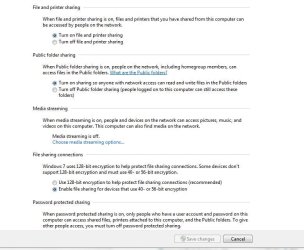
Did you set up the win7 laptop as a business type workgroup? Not a win7 HomeGroup ?
 

Attachments

  • network_options.JPG
    network_options.JPG
    73.4 KB · Views: 14
  • Network_Options2.JPG
    Network_Options2.JPG
    60.1 KB · Views: 12

My Computer My Computer

Computer type
PC/Desktop
Computer Manufacturer/Model Number
Built them myself, Science Experiments !
OS
Win7 Enterprise, Win7 x86 (Ult 7600), Win7 x64 Ult 7600, TechNet RTM on AMD x64 (2.8Ghz)
CPU
AMD fx8350 4ghz, AMD-32 2400mhz, AMD-64 3200mhz, AMDx64 2.8G
Motherboard
SIS 755, ECS-K8M890M-M (Ult 7600), GigaByte & others
Memory
2gb, 4gb on the Ult 7600, 4gb on Technet RTM, 32gb on FX8350
Graphics Card(s)
Draw my own Graphics, several nVidia cards
Sound Card
on motherboard
Monitor(s) Displays
19" flat scr, 28" I-Inc widescr,22" Emprex Widescr, 23" Acer
Screen Resolution
1280 x 1024, 1440 x 900, 1920 x 1080
Hard Drives
6 pata Ide HD's & 2 Sata HD's
added 80gb external on Ult 7600 computer,
numerous extra 1tb, 2TB, 3Tb SATA HD's
A collection of ext HD Docks w/ HDs
PSU
430w, 550w, 600w, 700, 800, etc
Case
All Generic Full Towers
Cooling
Open Air & a few fans, some w/ colored LEDs
Keyboard
Compaq & Dell recycled from GoodWill
Mouse
Made in China Optical Wired Mouse
Internet Speed
Fast Cable InterNet
Antivirus
AVG Free on 24 different Desktops, NO Problems!
Browser
IE 8 is preferred, but use FireFox sometimes
Other Info
Linksys Routers, switches, & Hubs
Too Many USB Flash Drives to count, Biggest is 64GB !
Eight computers in my home network.
Sixteen computers at my business network.
Linked via TeamViewer !
Lots of old used spare computer parts everywhere!
i have been trying to get network sharing up and running at my home network. i have 2 computers that i was hoping to accomplish this with: a desktop running xp 64-bit and a laptop with windows 7 64-bit. i (believe) have all the networking settings all figured out for the desktop computer. it sees my laptop and i am able to open up my Users folders. however, my laptop does NOT see my desktop. i ran ping through the command line off my laptop and both computers are able to communicate with each other. from what i have heard, windows 7 networking is supposed to be very easy and is supposed to be able to notice any networked comps with ease. obviously, both computers are using the same network and have the same workgroup name.

my suspicion: i believe the reason that the desktop computer sees the laptop might be because of some windows 7 magic. windows 7 might have gotten the desktop to see the laptop and its actually windows xp thats preventing the laptop from seeing the desktop. this is only a theory and i dont know how to actually prove it and/or investigate it.

any help would be greatly appreciated!


Solution is really easy just modify one key in registry: Back up the registry before making this adjustment...
HKEY_LOCAL_MACHINE\SOFTWARE\Microsoft\Windows\CurrentVersion\Policies\System
create or modify 32-bit DWORD: LocalAccountTokenFilterPolicy
set the value to: 1

After this adjustment reboot both machines.

It might also help to make sure that simple file sharing is disabled on the XP machine.
 

My Computer My Computer

Computer type
PC/Desktop
Computer Manufacturer/Model Number
Home built
OS
Windows 7 Ult, Windows 8.1 Pro,
CPU
Q9650-4.275GHz, E8600 4.5GHz, E6750-3.8GHz
Motherboard
Evga 780i FTW
Memory
G.Skill PC2 9600 1200Mhz 5 5 5 15 2T
Graphics Card(s)
GTX480
Sound Card
Asus Xonar D2
Monitor(s) Displays
HannsG
Screen Resolution
1680X1050
Hard Drives
GSkill Phoenix Pro 120GB SSD
PSU
ThermalTake Toughpower 1000Watt modular
Case
ThermalTake XaserV
Cooling
Xigmatek S1283
Keyboard
Logitech G15
Mouse
Logitech G9
Internet Speed
T1
i have been trying to get network sharing up and running at my home network. i have 2 computers that i was hoping to accomplish this with: a desktop running xp 64-bit and a laptop with windows 7 64-bit. i (believe) have all the networking settings all figured out for the desktop computer. it sees my laptop and i am able to open up my Users folders. however, my laptop does NOT see my desktop. i ran ping through the command line off my laptop and both computers are able to communicate with each other. from what i have heard, windows 7 networking is supposed to be very easy and is supposed to be able to notice any networked comps with ease. obviously, both computers are using the same network and have the same workgroup name.

my suspicion: i believe the reason that the desktop computer sees the laptop might be because of some windows 7 magic. windows 7 might have gotten the desktop to see the laptop and its actually windows xp thats preventing the laptop from seeing the desktop. this is only a theory and i dont know how to actually prove it and/or investigate it.

any help would be greatly appreciated!


Solution is really easy just modify one key in registry: Back up the registry before making this adjustment...
HKEY_LOCAL_MACHINE\SOFTWARE\Microsoft\Windows\CurrentVersion\Policies\System
create or modify 32-bit DWORD: LocalAccountTokenFilterPolicy
set the value to: 1

After this adjustment reboot both machines.

It might also help to make sure that simple file sharing is disabled on the XP machine.

i just tried editing the registry. . . but it didnt change anything. and how would turning off simple file sharing on the xp machine change anything? i want to be able to share files between the two machines. in addition, how would i go about changing this setting?
 

My Computer My Computer

OS
Windows 7 Home Premium
To disable Simple File Sharing:

  1. Click Start, and then click My Computer.
  2. On the Tools menu, click Folder Options.
  3. Click the View tab.
  4. In the Advanced Settings section, click to clear the Use simple file sharing (Recommended) check box.
  5. Click OK.
 

My Computer My Computer

Computer type
PC/Desktop
Computer Manufacturer/Model Number
Lenovo IdeaCenter 450
OS
Windows 10 Pro X64
CPU
Intel Quad Core i7-4770 @ 3.4Ghz
Memory
16.0GB PC3-12800 DDR3 SDRAM 1600 MHz
Graphics Card(s)
Intel Integrated HD Graphics
Sound Card
Realtek HD Audio
Monitor(s) Displays
HP 22" LCD
Screen Resolution
1680 x 1050
Hard Drives
250GB Samsung EVO SATA-3 SSD
2TB Seagate ST2000DM001 SATA-2
1.5TB Seagate ST3150041AS SATA
Keyboard
Dell USB
Mouse
Lenovo USB
Internet Speed
Cable via Road Runner 3MB Upload, 30MB Download
Antivirus
Windows Defender, MBAM Pro, MBAE
Browser
Seamonkey
Other Info
UEFI/GPT
PLDS DVD-RW DH16AERSH
To disable Simple File Sharing:

  1. Click Start, and then click My Computer.
  2. On the Tools menu, click Folder Options.
  3. Click the View tab.
  4. In the Advanced Settings section, click to clear the Use simple file sharing (Recommended) check box.
  5. Click OK.


For a different reason, I want to change my simple file sharing check box, but I can't find that option! The only thing that looks similar is "Use Sharing Wizard (Recommended)", is that the same thing? If it matters, I'm on Windows 7 Home Premium, 64bit
 

My Computer My Computer

OS
Windows 7 Home Premium 64bit
No, the above applies to XP Pro or MCE (not XP Home), not Vista or Win 7, neither of which supports the concept of Simple FIle Sharing as far as I know.
 

My Computer My Computer

Computer type
PC/Desktop
Computer Manufacturer/Model Number
Lenovo IdeaCenter 450
OS
Windows 10 Pro X64
CPU
Intel Quad Core i7-4770 @ 3.4Ghz
Memory
16.0GB PC3-12800 DDR3 SDRAM 1600 MHz
Graphics Card(s)
Intel Integrated HD Graphics
Sound Card
Realtek HD Audio
Monitor(s) Displays
HP 22" LCD
Screen Resolution
1680 x 1050
Hard Drives
250GB Samsung EVO SATA-3 SSD
2TB Seagate ST2000DM001 SATA-2
1.5TB Seagate ST3150041AS SATA
Keyboard
Dell USB
Mouse
Lenovo USB
Internet Speed
Cable via Road Runner 3MB Upload, 30MB Download
Antivirus
Windows Defender, MBAM Pro, MBAE
Browser
Seamonkey
Other Info
UEFI/GPT
PLDS DVD-RW DH16AERSH
i have been trying to get network sharing up and running at my home network. i have 2 computers that i was hoping to accomplish this with: a desktop running xp 64-bit and a laptop with windows 7 64-bit. i (believe) have all the networking settings all figured out for the desktop computer. it sees my laptop and i am able to open up my Users folders. however, my laptop does NOT see my desktop. i ran ping through the command line off my laptop and both computers are able to communicate with each other. from what i have heard, windows 7 networking is supposed to be very easy and is supposed to be able to notice any networked comps with ease. obviously, both computers are using the same network and have the same workgroup name.

my suspicion: i believe the reason that the desktop computer sees the laptop might be because of some windows 7 magic. windows 7 might have gotten the desktop to see the laptop and its actually windows xp thats preventing the laptop from seeing the desktop. this is only a theory and i dont know how to actually prove it and/or investigate it.

any help would be greatly appreciated!


You using "workgroup" or "homegroup"?
 

My Computer My Computer

Computer Manufacturer/Model Number
HP Pavillion dv-7 1005 Tx
OS
Win 8 Release candidate 8400
CPU
[email protected]
Memory
4 gigs
Graphics Card(s)
Nvidia 9600M
Sound Card
HD built-in
Monitor(s) Displays
17" Wxga
Screen Resolution
1440x900
Cooling
none
Internet Speed
45Mb down 5Mb up
Back
Top