XP + Seven: Boot Manager missing on XP

Alberto77

New member
Local time
11:47 PM
Messages
5
Hello all,

I use XP on my machine with two 300 GB HDs configured as RAID1 (Nvidia NForce 570 SLI). There are two partitions C (100 GB) for system and D (remaining 200 GB) for data. All is working fine.

Now I try to install Windows 7. First I resized D by 100 GB and installed W7 on this new partition. I updated the Nvidia NForce RAID driver and can see correctly my RAID under W7.
My problem now is that if I start my computer always the old XP boots up.
The Boot Manager is not present. The only way I can boot W7 is to insert the
W7 installation DVD (and not pressing any key) then W7 is booting.
The boot manager is present but only on this new W7 partition. I already tried (using EasyBCD under W7) to add the old XP as a second entry in the Boot Manager but I was not able to boot XP using the boot manager.
I see the XP-Partition under W7 and vice versa but it seems to be impossible to use the boot manager.
How can I install the W7 Boot Manager on my XP-partition, thus I will be able to
choose whether to boot XP or W7.

Thanks in advance for any hints.
Alberto77
 

My Computer

OS
Windows 7 and Windows XP

My Computer

Computer type
PC/Desktop
Computer Manufacturer/Model Number
Pauly Special
OS
Win7 Ultimate X64
CPU
Intel i5 3570K
Motherboard
Gigabyte Z77X-DS3H
Memory
8GB DDR3 1600
Graphics Card(s)
Onboard
Sound Card
Onboard
Screen Resolution
1280x1024
Hard Drives
Samsung 840 Evo SSD (OS)
1TB Spinner (Data)
PSU
800W Arctic
Case
Cooler Master
Cooling
3x120mm Fans
Keyboard
MS Wireless
Mouse
MS Wireless
Internet Speed
20M
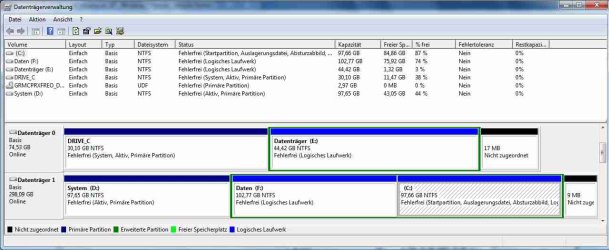
Here is my disk management:
View attachment 43454
Sorry but my language is german.
What you can see as Drive 0 is my old HD (75 GB) used only for temp stuff
Drive 1 is my RAID (298 GB) consisting of Partition "System D" where my XP is installed, you see the partition is active, and this is a primary partition. When I boot XP it apears as partition C. The second one is the partition "Daten F" this is the partition where my data is stored. The third one is this I used for my Windows 7.

WBR
Alberto
 

My Computer

OS
Windows 7 and Windows XP
The boot menu that you see at startup is defined by the bcd (boot configuration data) in Windows 7. Therefore there should be an entry for both Win 7 partition and XP partition in the bcd as well as an entry for the boot manager. To display the information in the bcd, open an elevated command prompt and type BCDEDIT. If any of the three entries are missing you will not be able to boot to that OS from the boot menu displayed at startup.

The easiest way to add/remove entries in the bcd is throuugh EasyBCD. If you have correctly installed XP and and then Win 7 afterwards they should both show as bootable OS's in EasyBCD.

Also your screenshot is not working. I think Pauly wants to see that you have two bootable OS system partitions on your hard drive. It can not be ascertained from your description.
 

My Computer

OS
Windows 7
O sorry, here is the JPG again:
Zwischenablage02.jpg

WBR
Alberto77
 

My Computer

OS
Windows 7 and Windows XP
Win7 is somewhat allergic to RAID. It challenges it's ability to otherwise correctly configure multi-Boots.

We also have a problem troubleshooting RAID installs here because the fixes that otherwise work so well rarely work. Yet we have at least one RAID problem a day.

You can install EasyBCD 2.0 beta which is highly automated, attempt to Add any OS not listed using the Add/Remove tab. If any tool is already acclimated to RAID, then that would be it.

View attachment 43514
 
Thank you all for trying to help to solve my problem :D.
I tried the EasyBCD 2.0 Beta but my XP was not automaticaly recognized even by this version of EasyBCD.
From what I learned here in this forum, a clean Windows 7 Setup, maybe, will be my best option to avoid unwanted surprises in the future. I tried to keep XP for having
a smooth transition from XP to Seven, but in connection with my Nvidia RAID it seems
to be challenging.

WBR
Alberto77
 

My Computer

OS
Windows 7 and Windows XP
See if you can remove the RAID, connect only one HD, then boot from the Win7 installer, select Custom install and use Drive tools to delete all, create new partition(s) as you wish, then format before installing Win7 to the first partition.
 
LOL.

Very strange drive labelling.

The "system" partition is actually the one you have labelled Drive_C.

The logical drive you are booted into is C.

Try setting Disk 1 as first in the Bios boot order , then run startup repair from the 7 dvd 3 times.
 

My Computers

System One System Two

  • Computer type
    PC/Desktop
    OS
    7 X64
    CPU
    i5 8400
    Motherboard
    gigabyte b365m ds3h
    Memory
    2x8gb 3200mhz
    Hard Drives
    various
    PSU
    pure power 11 400w cm
    Case
    Coolermaster
    Cooling
    cryorig m9i
  • Computer type
    PC/Desktop
    OS
    7x64
    CPU
    g5400
    Motherboard
    ga b365m ds3h
    Memory
    8gb ddr4 2400
    PSU
    xfx pro 450w
LOL.

Very strange drive labelling.

The "system" partition is actually the one you have labelled Drive_C.

The logical drive you are booted into is C.

Congrats for being able to interpret it. :shock:


What is that Active System D: drive on DISK1? XP?

Will WIn7 Startup Repair put the MBR there to include XP in Dual Boot?

Or does he then need to get Win7 started up, unplug or swap DISK0, run a http://www.sevenforums.com/tutorials/3413-repair-install.html?ltr=R to correctly reconfigure the dual boot with Win7 and XP on only DISK1?
 
Doesn't everyone speak several languages?;)
 

My Computers

System One System Two

  • Computer type
    PC/Desktop
    OS
    7 X64
    CPU
    i5 8400
    Motherboard
    gigabyte b365m ds3h
    Memory
    2x8gb 3200mhz
    Hard Drives
    various
    PSU
    pure power 11 400w cm
    Case
    Coolermaster
    Cooling
    cryorig m9i
  • Computer type
    PC/Desktop
    OS
    7x64
    CPU
    g5400
    Motherboard
    ga b365m ds3h
    Memory
    8gb ddr4 2400
    PSU
    xfx pro 450w
Doesn't everyone speak several languages?;)

Wasn't referring to the language, was referring to the mishmash:confused:.

What is that Active System D: drive on DISK1? XP?

Will Windows 7 Startup Repair put the MBR there to include XP in Dual Boot?

Or does he then need to get Windows 7 started up, unplug or swap DISK0, run a Repair Install to correctly reconfigure the dual boot with Windows 7 and XP on only DISK1?

Then replug data drive to format logical?
 
Hello again,

my problem with the missing Boot Manager is solved now.
The reason for all my trouble was not the RAID it was the additional drive in my computer (please refer to "Datenträger 0" in my partition table).

Your questions on my strange labelling focused me to this auxiliary drive. It is suited in a mobile cartridge (connected to an ATA Port, whereas my RAID1 consist of to SATA Drives). I use it only for temporary stuff, thus it was not
matter of my attention, but this HD was in my former computer the "Drive_C" with XP as system. To reuse it I removed only
all files, but as you can see from the drive map the first partition is primary and still active.This caused in my opinion all the problems.

After I removed the drive (quick task with a mobile cartridge) I started the Windows 7 installation again, removed the partition with the former Windows 7 installation, build a new one and installed Windows 7 once again. This time the Boot Manager was installed properly and now I can select my old XP or Seven during boot.
After this successful task I put the old drive once again in the cartridge and all is still working fine. Thus I think this drive only seems to disturb Windows 7 installation procedures.
Thank you all for spending your precious time trying to help me.

With best regards Alberto77
 

My Computer

OS
Windows 7 and Windows XP
Suggest you format your data drives Logical to avoid being accidentally marked active, which caused Win7 to place the MBR there since it was the first active drive.

Had you returned earlier, we could also have advised you that you needn't reinstall Win7. You can recover it's ability to boot after unplugging the data drive by booting the DVD to run Startup Repair 3 times. Then run a http://www.sevenforums.com/tutorials/3413-repair-install.html?ltr=R from the desktop to reconfigure the dual boot correctly.

Glad you got it sorted out.
 
Back
Top