XP Style File/Music Browsing In Windows 7 - Any Suggestions?

s1mon

New member
Local time
8:42 AM
Messages
3
First of all i would just like to say a quick hello to everyone on the forum as this i my first post, although i have been reading stuff on here for ages! :)

I am looking for some advice or suggestions on something that has bugged me on windows 7 since i started using it back when it was released.

I have quite a large (almost 200 gig) music collection, and browsing for music to listen to has always been a bit of a chore...

Wondering if any of you know of a way to go back to XP style album art folders like this:
b4afteru.png


The one on the left looks so much nicer! It always made me think Microsoft had take a backwards step by doing away with the old folders!

Oh and 1 other thing... When you try to group a folders contents by 'Name' does anyone know if there is a way of modding windows so that you can sort by: A,B,C,D etc etc, rather than the standard A-H > I-P > Q-Z ??

Thanks in advance

s1mon
 

My Computer My Computer

At a glance

Windows 7 ultimate x64Intel i7-26008GB Corsair XMS3 1333MHzXFX HD6870
Computer Manufacturer/Model Number
Home Made
OS
Windows 7 ultimate x64
CPU
Intel i7-2600
Motherboard
ASROC H67DE3
Memory
8GB Corsair XMS3 1333MHz
Graphics Card(s)
XFX HD6870
Sound Card
M-Audio Audiophile 2496
Monitor(s) Displays
DELL 23"
Screen Resolution
1920x1080
Hard Drives
WD WD3200AAKS 320G Boot drive
2TB Samsung
1TB Hitachi
500GB Samsung
PSU
ThermalTake Toughpower 750w modular
Case
LianLi / Lancool Dragonlord K62
Cooling
Freezer 7 Pro CPU/ 1 Noctua 120mm & 3 LianLi 120mm case fans
Keyboard
Samsung/Pleomax k300b
Mouse
Logitech G5 2007 / S&S Steel mouse pad
Internet Speed
50mb/10mb
Other Info
PC AUDIO: NAD C320bee Amp / B&W DM602 s2 speakers / QED original speaker cables / Cambridge Audio interconnect from pc to amp
Just in passing, if you have such a large music collection, you might do better than basic Microsoft/Windows-provided tools for organizing, browsing, playing, etc. At the very least you might consider augmenting what is provided through the basic capabilities of Windows Explorer and Windows Media Player.

I am specifically recommending a wonderful program I use named Jaangle. This is a fantastic music collection organizer, browser, player, playlist creator, and all-around enjoyment provider for serious music collectors.

An in-depth discussion of this and related programs (including its configuration and usage with screenshots, as well as all kinds of other terrific back-and-forth) went on extensively earlier this year on this other thread. That thread was initially related to the loss of album art cache in Windows Explorer but devolved into a REPLACEMENT with a far-better solution, especially for serious music collections... namely Jaangle.

jaangle.jpg


Just give it a try. I'll be glad to share my usage insights for that program's "power usage" as I did on that other thread.

Note that the program can also invoke "external players" (e.g. Winamp or WMP) if you want) although it has its own terrific-sounding built-in player (with 3-band EQ) that can play all sorts of music native (including FLAC).
 

My Computer My Computer

At a glance

Windows 7 Pro x64 (1), Win7 Pro X64 (2)i5-3350p 3.1Ghz/6MB-cache (1); E8400 3.0Ghz/6...8GB PC3-12800 DDR3 (1); 4GB PC3-10600 DDR3 (2)ATI HD7750 (1), (see TV cards); ATI R7 250 (2)
Computer type
PC/Desktop
Computer Manufacturer/Model Number
Home-built, two systems (1) and (2)
OS
Windows 7 Pro x64 (1), Win7 Pro X64 (2)
CPU
i5-3350p 3.1Ghz/6MB-cache (1); E8400 3.0Ghz/6MB-cache (2)
Motherboard
ASUS P8Z77-V Pro (1); ASUS P5Q3 (2)
Memory
8GB PC3-12800 DDR3 (1); 4GB PC3-10600 DDR3 (2)
Graphics Card(s)
ATI HD7750 (1), (see TV cards); ATI R7 250 (2)
Sound Card
Realtek ALC892 HD Audio (1); Realtek ALC1200 HD Audio (2)
Monitor(s) Displays
Eizo HD2441W LCD, Eizo S2433W (1); Eizo 24" S2433W (2)
Screen Resolution
1920x1200, 1920x1200 (1); 1920x1200 (2)
Hard Drives
(1) 1TB SATA-II (7200RPM), 2x2TB SATA-III (7200RPM), 250GB SATA-III (10000RPM) for OS; 2x2TB external USB 3.0

(2) 320GB SATA-II (7200RPM), 750GB SATA-II (7200RPM), 150GB SATA-II (10000RPM) for OS; 2TB external USB 3.0
PSU
Nesteq ECS-6001 600W (1); Nesteq ECS-5001 500W (2)
Case
Acousti-Case 360 (1) and (2)
Cooling
Noctua NH-U12P SE2 for CPU, 2x120mm case fans (1) and (2)
Keyboard
IBM PS/2 (1) and (2)
Mouse
Logitech MX Revolution wireless (1); Microsoft wired (2)
Internet Speed
100mbps down / 10mbps up
Antivirus
Microsoft Security Essentials; Malwarebyte Anti-Malware Pro
Browser
Firefox
Other Info
Ceton InfiniTV 4-tuner cablecard-enabled TV card as well as Hauppauge HVR-2250 OTA/ATSC 2-tuner TV card in (1), running under Win7 WMC
dsperber, thanks for your speedy reply ;)

Not sure i am into the idea of using such a program for browsing music, i am kinda stuck in my ways in that respect and i browse my music in exactly the same way i would have done back in the day when i had a CD collection. I have Shortcut in my quick launch to my album folder, i find an album want open folder and one click play in my beloved win amp with MMD3 skin :)

I will not totaly dismiss your suggestion though... i will at least give Jaangle a try. But to be honest i can't see me lasting long with it.

:D
 

My Computer My Computer

At a glance

Windows 7 ultimate x64Intel i7-26008GB Corsair XMS3 1333MHzXFX HD6870
Computer Manufacturer/Model Number
Home Made
OS
Windows 7 ultimate x64
CPU
Intel i7-2600
Motherboard
ASROC H67DE3
Memory
8GB Corsair XMS3 1333MHz
Graphics Card(s)
XFX HD6870
Sound Card
M-Audio Audiophile 2496
Monitor(s) Displays
DELL 23"
Screen Resolution
1920x1080
Hard Drives
WD WD3200AAKS 320G Boot drive
2TB Samsung
1TB Hitachi
500GB Samsung
PSU
ThermalTake Toughpower 750w modular
Case
LianLi / Lancool Dragonlord K62
Cooling
Freezer 7 Pro CPU/ 1 Noctua 120mm & 3 LianLi 120mm case fans
Keyboard
Samsung/Pleomax k300b
Mouse
Logitech G5 2007 / S&S Steel mouse pad
Internet Speed
50mb/10mb
Other Info
PC AUDIO: NAD C320bee Amp / B&W DM602 s2 speakers / QED original speaker cables / Cambridge Audio interconnect from pc to amp
Not sure i am into the idea of using such a program for browsing music, i am kinda stuck in my ways in that respect and i browse my music in exactly the same way i would have done back in the day when i had a CD collection. I have Shortcut in my quick launch to my album folder, i find an album want open folder and one click play in my beloved win amp with MMD3 skin :)
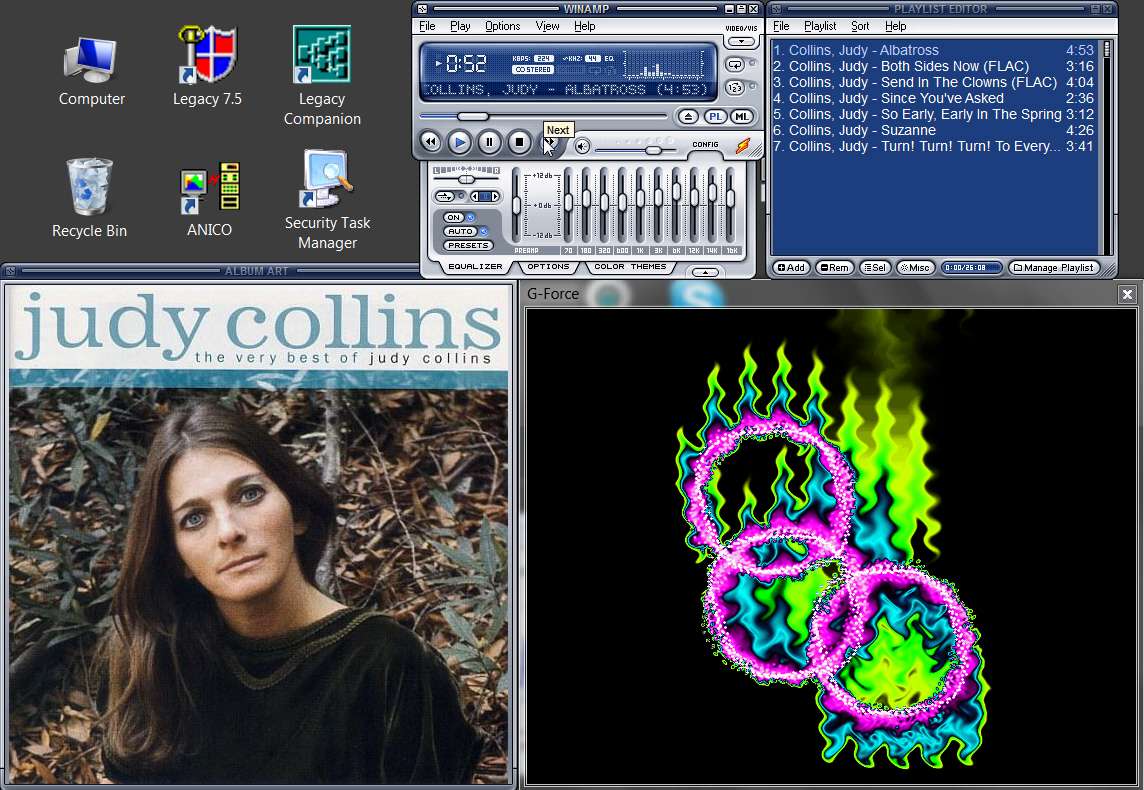
I understand completely. I, too, have a shortcut for Winamp on my Win7 taskbar (as it was on my Quicklaunch bar under XP), because that is often how I will play music directly. I like the way it looks, just like you do (although I've been using the "modern" skin for a long time since finally converting from "1 and only" which I used for 10 years but which did not support an "Album Art" window which I now required). I can't stop watching the G-Force Platinum visualization anytime I play anything.

winamps.jpg


But for general browsing, and convenient simple/advanced searching to play music for someone from my collection as well as viewing album/artist reviews, etc., I also use Jaangle. I like the way it looks and works. I think the user-interface is terrific.

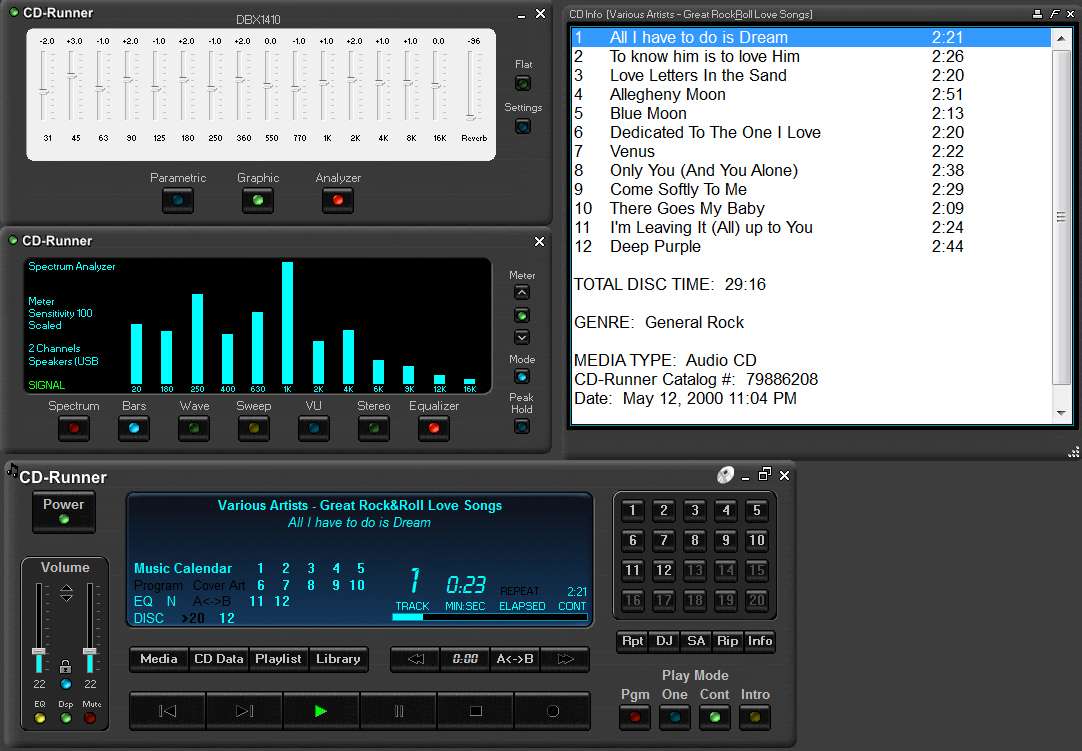
Same as why I also use another program named CD-Runner when playing true audio CDs... again, just because I like the way it looks and works (exactly like a mechanical CD player, and beautifully drawn with a 3D-like shape and texture) and that provides "joy" to me, the user.

cdrunner.jpg


I will not totaly dismiss your suggestion though... i will at least give Jaangle a try. But to be honest i can't see me lasting long with it.
Just one more "tool in your arsenal" of media-related products.

Note that Jaangle's delivered default presentation can also be changed with "skins". I myself prefer the black-look as shown in my earlier screenshot, which is "Massif".

Also, it has a large assortment of presentaion and organization sort-sequences you can choose from (or change to on-the-fly), depending on what your collection looks like and how you're trying to find or play something. Album, artist, \artist\album, year, etc. And of course you can always do a simple or advanced search and then select from the presented tracklist.

Honestly... it's very useful. And you can always then launch Winamp from Jaangle to actually "play" the music playlist you've found/selected through Jaangle.
 
Last edited:

My Computer My Computer

At a glance

Windows 7 Pro x64 (1), Win7 Pro X64 (2)i5-3350p 3.1Ghz/6MB-cache (1); E8400 3.0Ghz/6...8GB PC3-12800 DDR3 (1); 4GB PC3-10600 DDR3 (2)ATI HD7750 (1), (see TV cards); ATI R7 250 (2)
Computer type
PC/Desktop
Computer Manufacturer/Model Number
Home-built, two systems (1) and (2)
OS
Windows 7 Pro x64 (1), Win7 Pro X64 (2)
CPU
i5-3350p 3.1Ghz/6MB-cache (1); E8400 3.0Ghz/6MB-cache (2)
Motherboard
ASUS P8Z77-V Pro (1); ASUS P5Q3 (2)
Memory
8GB PC3-12800 DDR3 (1); 4GB PC3-10600 DDR3 (2)
Graphics Card(s)
ATI HD7750 (1), (see TV cards); ATI R7 250 (2)
Sound Card
Realtek ALC892 HD Audio (1); Realtek ALC1200 HD Audio (2)
Monitor(s) Displays
Eizo HD2441W LCD, Eizo S2433W (1); Eizo 24" S2433W (2)
Screen Resolution
1920x1200, 1920x1200 (1); 1920x1200 (2)
Hard Drives
(1) 1TB SATA-II (7200RPM), 2x2TB SATA-III (7200RPM), 250GB SATA-III (10000RPM) for OS; 2x2TB external USB 3.0

(2) 320GB SATA-II (7200RPM), 750GB SATA-II (7200RPM), 150GB SATA-II (10000RPM) for OS; 2TB external USB 3.0
PSU
Nesteq ECS-6001 600W (1); Nesteq ECS-5001 500W (2)
Case
Acousti-Case 360 (1) and (2)
Cooling
Noctua NH-U12P SE2 for CPU, 2x120mm case fans (1) and (2)
Keyboard
IBM PS/2 (1) and (2)
Mouse
Logitech MX Revolution wireless (1); Microsoft wired (2)
Internet Speed
100mbps down / 10mbps up
Antivirus
Microsoft Security Essentials; Malwarebyte Anti-Malware Pro
Browser
Firefox
Other Info
Ceton InfiniTV 4-tuner cablecard-enabled TV card as well as Hauppauge HVR-2250 OTA/ATSC 2-tuner TV card in (1), running under Win7 WMC
Thanx again for your reply, not got round to testing Jaangle but it is on my to do list :) will keep you posted

But back to the original question... anyone have any idea's?

cheers
 

My Computer My Computer

At a glance

Windows 7 ultimate x64Intel i7-26008GB Corsair XMS3 1333MHzXFX HD6870
Computer Manufacturer/Model Number
Home Made
OS
Windows 7 ultimate x64
CPU
Intel i7-2600
Motherboard
ASROC H67DE3
Memory
8GB Corsair XMS3 1333MHz
Graphics Card(s)
XFX HD6870
Sound Card
M-Audio Audiophile 2496
Monitor(s) Displays
DELL 23"
Screen Resolution
1920x1080
Hard Drives
WD WD3200AAKS 320G Boot drive
2TB Samsung
1TB Hitachi
500GB Samsung
PSU
ThermalTake Toughpower 750w modular
Case
LianLi / Lancool Dragonlord K62
Cooling
Freezer 7 Pro CPU/ 1 Noctua 120mm & 3 LianLi 120mm case fans
Keyboard
Samsung/Pleomax k300b
Mouse
Logitech G5 2007 / S&S Steel mouse pad
Internet Speed
50mb/10mb
Other Info
PC AUDIO: NAD C320bee Amp / B&W DM602 s2 speakers / QED original speaker cables / Cambridge Audio interconnect from pc to amp
Back
Top