XP-Style Folder Thumbails in Explorer

deadevil13

New member
Local time
9:14 AM
Messages
23
Location
South - East of England
Hello

I'm just curious to know if this is possible (either with settings built into W7 or a third-party program).

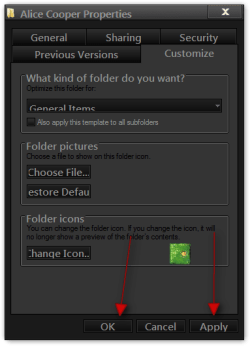
If we cast our memories back to Windows Explorer in XP, I remember that if you right clicked a folder (directory), properties and then 'customize' you could set the folder icon to be a thumbnail image; like so:


(Sorry about the size, i just found it through a google search)


Anyway, I want to do something similar for my music folder; where i have a picture of the band on the folder, not this 'slipped-in' image that you get currently.

Here's my current folder structure in W7.


Ive tried going to customize, choose file to show on folder etc. - but that doesnt change anything.

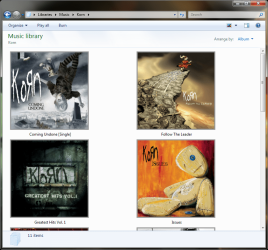
I also want it to show like this in the music library.

Many Thanks :D
 

My Computer My Computer

Computer Manufacturer/Model Number
None - Whitebox
OS
Windows 7 x64 Ultimate
CPU
Intel i5-2500 3.30GHz
Motherboard
MSI P67A-C45 (MS-7673)
Memory
Corsair CMX8GX3M2A1600C9 - 8GB (2x4) @ 1333mhz
Graphics Card(s)
ATi Radeon HD3650
Sound Card
Motherboard OnBoard
Monitor(s) Displays
1x Gateway FPD1960 TFT Display (D-Sub)
Screen Resolution
1280 x 1024
Hard Drives
750GB SATA Seagate Barracuda 7200rpm
75GB SATA WD WDC WD740GD-00FLA1 10000rpm
PSU
Artic Power 500W
Case
Coolermaster CM Stacker
Cooling
Case Fans as stock, Venom Cooler
Keyboard
Logitech Cordless Desktop EX110 - Keyboard
Mouse
Logitech Cordless Desktop EX110 - Mouse
Internet Speed
Virgin Media - 30mbps (2mbps up)
Other Info
Speakers - Hi-Fi
Printer - HP All-In-One Deskjet F2280
Wireless - TPLink N+ Card
ODD - LG DVD-RW
I do not know a easy way but here is one way of doing it.
Before
1.png

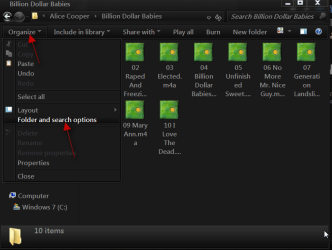
Open your music folder go to Organize then Folder and search options.
2.png

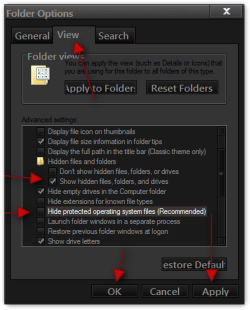
Go to the View tab and put a check mark by Show hidden files, folders, and drives.
And uncheck Hide Protected operating system files. Click Apply and OK. (you can change this back when done)
3b.png

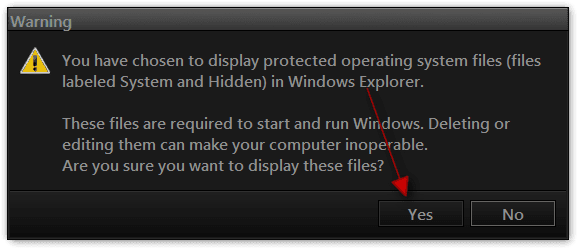
You will get a warning click yes.
4.png

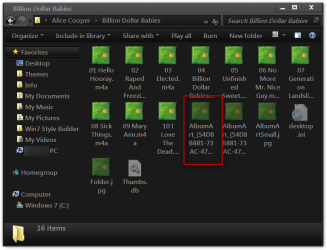
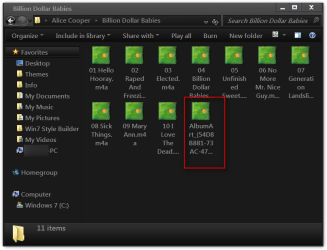
You will see Album Art jpgs you will need to convert one of them to .ico I used gimp.
5.png

After you have converted it put it back in your music folder.
6.png

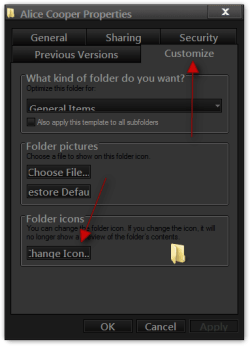
Close your music folder and right click on it and choose Properties go to the Customize tab and choose Change icon.
7.png

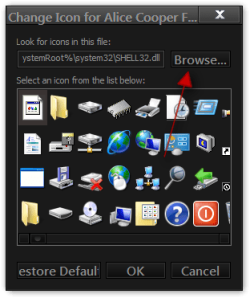
Click on the Browse button and browse to your music folder.
8.png

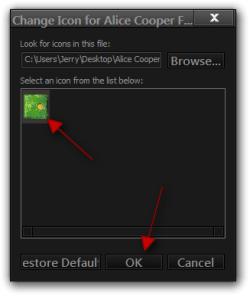
Choose The Album Art and click open.
9.png

Choose The Album Art and click OK.
10.png

Click Apply and OK
11.png

You may need to right click and click on Refresh.
After.
12.png

Jerry
 

My Computer My Computer

Computer type
Laptop
Computer Manufacturer/Model Number
Sager NP9170
OS
Win 7 Pro x64 / Win 10 Pro
CPU
Intel(R) Core(TM) i7-3630QM CPU @ 2.40GHz
Motherboard
CLEVO P170EM
Memory
12 GB
Graphics Card(s)
(1) Intel(R) HD Graphics 4000 (2) NVIDIA GeForce GTX 675M
Sound Card
(1) Realtek High Definition Audio (2) Intel(R) Display Aud
Monitor(s) Displays
17.3
Screen Resolution
1920x1080
Hard Drives
(1) Samsung 860 EVO 500GB(OS) (1) Samsung 860 EVO 500GB(Data)
Keyboard
Backlite
Antivirus
MSE, Malwarebytes Pro
Browser
Firefox
Other Info
DESKTOP: Custom-built.
OS: Win 10 Pro x64.
CASE: Rosewill R5.
CPU: Intel I5 4670K CPU @ 3.40GHz.
CPU COOLER: Cool Master Hyper 212 EVO.
MOTHERBOARD: Asus Z87-A.
MEMORY: Kingston HyperX 2x4 GB.
GPU: Nvidia Geforce 650 TI.
PSU: Corsair TX750.
DRIVES: (1) Samsung 840 120 GB SSD (2) Western Digital blue 500 GB 7200 RPM.
Aah yes that is a way to do it... I didn't realise you could do it in GIMP! (I'm used to working with Photoshop & Fireworks)

Many thanks for your suggestion! :D
 

My Computer My Computer

Computer Manufacturer/Model Number
None - Whitebox
OS
Windows 7 x64 Ultimate
CPU
Intel i5-2500 3.30GHz
Motherboard
MSI P67A-C45 (MS-7673)
Memory
Corsair CMX8GX3M2A1600C9 - 8GB (2x4) @ 1333mhz
Graphics Card(s)
ATi Radeon HD3650
Sound Card
Motherboard OnBoard
Monitor(s) Displays
1x Gateway FPD1960 TFT Display (D-Sub)
Screen Resolution
1280 x 1024
Hard Drives
750GB SATA Seagate Barracuda 7200rpm
75GB SATA WD WDC WD740GD-00FLA1 10000rpm
PSU
Artic Power 500W
Case
Coolermaster CM Stacker
Cooling
Case Fans as stock, Venom Cooler
Keyboard
Logitech Cordless Desktop EX110 - Keyboard
Mouse
Logitech Cordless Desktop EX110 - Mouse
Internet Speed
Virgin Media - 30mbps (2mbps up)
Other Info
Speakers - Hi-Fi
Printer - HP All-In-One Deskjet F2280
Wireless - TPLink N+ Card
ODD - LG DVD-RW
Aah yes that is a way to do it... I didn't realise you could do it in GIMP! (I'm used to working with Photoshop & Fireworks)

Many thanks for your suggestion! :D
You're Welcome if this solved it at the top of your first post should be a place to mark as solved.
Jerry
 

My Computer My Computer

Computer type
Laptop
Computer Manufacturer/Model Number
Sager NP9170
OS
Win 7 Pro x64 / Win 10 Pro
CPU
Intel(R) Core(TM) i7-3630QM CPU @ 2.40GHz
Motherboard
CLEVO P170EM
Memory
12 GB
Graphics Card(s)
(1) Intel(R) HD Graphics 4000 (2) NVIDIA GeForce GTX 675M
Sound Card
(1) Realtek High Definition Audio (2) Intel(R) Display Aud
Monitor(s) Displays
17.3
Screen Resolution
1920x1080
Hard Drives
(1) Samsung 860 EVO 500GB(OS) (1) Samsung 860 EVO 500GB(Data)
Keyboard
Backlite
Antivirus
MSE, Malwarebytes Pro
Browser
Firefox
Other Info
DESKTOP: Custom-built.
OS: Win 10 Pro x64.
CASE: Rosewill R5.
CPU: Intel I5 4670K CPU @ 3.40GHz.
CPU COOLER: Cool Master Hyper 212 EVO.
MOTHERBOARD: Asus Z87-A.
MEMORY: Kingston HyperX 2x4 GB.
GPU: Nvidia Geforce 650 TI.
PSU: Corsair TX750.
DRIVES: (1) Samsung 840 120 GB SSD (2) Western Digital blue 500 GB 7200 RPM.
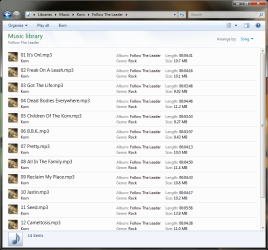
*cough* use the Music Library. Top right "Arrange by" pick either Artist or Album, adjust the view to thumbnails. When set to Artist, double click to open to Album view, change the settings to how you want, open an Album change the song list to what you want. From there on, all Albums and Songs will have to same settings.
 

Attachments

  • shot-20110720T043739.png
    shot-20110720T043739.png
    70.4 KB · Views: 34
  • shot-20110720T043808.png
    shot-20110720T043808.png
    164.7 KB · Views: 24
  • shot-20110720T043819.png
    shot-20110720T043819.png
    58 KB · Views: 14

My Computer My Computer

Computer type
PC/Desktop
Computer Manufacturer/Model Number
Alienware Aurora ALX R4
OS
Windows 10 Pro (x64)
CPU
Intel Core i7-3930K (3.2GHz - 4.5GHz)
Motherboard
Alienware Aurora-R4 x79
Memory
4x Samsung 4GB PC3-12800 DDR3 (16GB 1600MHz)
Graphics Card(s)
Nvidia Geforce GTX 690
Sound Card
SteelSeries Siberia Elite
Monitor(s) Displays
Dell UltraSharp U3011
Screen Resolution
2560x1600
Hard Drives
Samsung 850 Pro 256 GB, Seagate 1TB Desktop Hybrid HDD, 2x Western Digital 4TB Green HDD
PSU
875W Some Dell PSU <.<
Case
Alienware Aurora ALX
Cooling
Custom Liquid Cooling (EK CPU & GPU blocks) dual EK 480RAD
Keyboard
Logitech G710+ Mechanical
Mouse
Logitech G700s
Internet Speed
Verizon Fios (50 mbps average)
Other Info
Server: Intel NUC D54250WYK: i5-4250U, 16GB, 256 GB mSATA, Windows Server 2012 R2
*cough* use the Music Library. Top right "Arrange by" pick either Artist or Album, adjust the view to thumbnails. When set to Artist, double click to open to Album view, change the settings to how you want, open an Album change the song list to what you want. From there on, all Albums and Songs will have to same settings.
Good to know logicearth I don't use libraries I did not know that thanks.
Jerry
 

My Computer My Computer

Computer type
Laptop
Computer Manufacturer/Model Number
Sager NP9170
OS
Win 7 Pro x64 / Win 10 Pro
CPU
Intel(R) Core(TM) i7-3630QM CPU @ 2.40GHz
Motherboard
CLEVO P170EM
Memory
12 GB
Graphics Card(s)
(1) Intel(R) HD Graphics 4000 (2) NVIDIA GeForce GTX 675M
Sound Card
(1) Realtek High Definition Audio (2) Intel(R) Display Aud
Monitor(s) Displays
17.3
Screen Resolution
1920x1080
Hard Drives
(1) Samsung 860 EVO 500GB(OS) (1) Samsung 860 EVO 500GB(Data)
Keyboard
Backlite
Antivirus
MSE, Malwarebytes Pro
Browser
Firefox
Other Info
DESKTOP: Custom-built.
OS: Win 10 Pro x64.
CASE: Rosewill R5.
CPU: Intel I5 4670K CPU @ 3.40GHz.
CPU COOLER: Cool Master Hyper 212 EVO.
MOTHERBOARD: Asus Z87-A.
MEMORY: Kingston HyperX 2x4 GB.
GPU: Nvidia Geforce 650 TI.
PSU: Corsair TX750.
DRIVES: (1) Samsung 840 120 GB SSD (2) Western Digital blue 500 GB 7200 RPM.
Back
Top