xp to 7 - any recomended alternatives to WET

trinaz

New member
Member
VIP
Local time
12:06 PM
Messages
477
Location
Phoenix
Seems to me I saw a post that indicated there were better alternatives to Windows Easy Transfer ? I'm going from XP Pro to Win 7 pro.

Has WEP proven to be the safest/best way to more docs/settings/files etc after a 'clean' install of Win 7 Pro on a new hard drive ? ( Planning on keeping XP Pro on second drive...using bios controls rather than dual boot option )

Thanks, Tim
 

My Computer My Computer

At a glance

Windows 7 Pro 64bit SP1AMD FX-6100 Six-Core Processor2ea Corsair-1333MHz-PC3-10666-240-pin-CMX4GX3...NVIDIA GeForce GT 630 - 1023MB (EVGA)
Computer type
PC/Desktop
Computer Manufacturer/Model Number
Self built
OS
Windows 7 Pro 64bit SP1
CPU
AMD FX-6100 Six-Core Processor
Motherboard
M5A78L-M LX PLUS
Memory
2ea Corsair-1333MHz-PC3-10666-240-pin-CMX4GX3M1A1333C9
Graphics Card(s)
NVIDIA GeForce GT 630 - 1023MB (EVGA)
Sound Card
OnBoard Via High Def Audio
Monitor(s) Displays
Samsung 204B main - ASUS VS228 secondary
Screen Resolution
1920x1080 main - 1920x1080 secondary
Hard Drives
Samsung SSD 840 128GB Win7 Pro 64bit - Western Digital WDC 465GB - Seagate 640GB Sata B/U - Maxtor 500GB Sata B/U - Maxtor 200GB Sata
PSU
Antec 650 watt
Cooling
Multiple case fans
Keyboard
MS USB dual Wireless Keyboard - IntelliType Pro
Mouse
MS USB dual Wireless Mouse - IntelliPoint
Internet Speed
Cox Cable
Antivirus
Bitdefender IS 2014
Browser
FireFox Primary - IE 11
Other Info
Hauppaguge Win TV HVR-1250 (Model 22xxx, Hybrid ATSC/QAM)
Samsung HD103SI USB 1TB Desktop Drive - Backup & Disk Image storage
I have answered a lot of questions about WET. Id say about 5% of the time there is a problem. The data to be trasnferred totally or partially disappears. I have used it myself and it was perfect. Everything was transferred, desktop, cookie, favorites, settings, everything but programs. If I had to again, I would use it, but have a second back up on an external HD, etc.
 

My Computer My Computer

At a glance

Windows 10, Home Clean InstallIntel Core2 processsor Q8200(2.33Ghz 1333FSB)...6 gbATI Radeon 256MB HD3650
Computer type
PC/Desktop
Computer Manufacturer/Model Number
Dell XPS 420
OS
Windows 10, Home Clean Install
CPU
Intel Core2 processsor Q8200(2.33Ghz 1333FSB) Quad Core Tech
Motherboard
Dell
Memory
6 gb
Graphics Card(s)
ATI Radeon 256MB HD3650
Sound Card
Intergrated 7.1 Channel Audio
Monitor(s) Displays
Dell SP2009W 20"
Hard Drives
640 GB Serial ATA Hard drive
Cooling
Fan
Keyboard
Dell USB Keyboard
Mouse
Dell Premium Optical USB
Internet Speed
DSL 2.85
Seems to me I saw a post that indicated there were better alternatives to Windows Easy Transfer ? I'm going from XP Pro to Win 7 pro.

Has WEP proven to be the safest/best way to more docs/settings/files etc after a 'clean' install of Win 7 Pro on a new hard drive ? ( Planning on keeping XP Pro on second drive...using bios controls rather than dual boot option )

Thanks, Tim
You might want to check this for more info:
Description of Windows Easy Transfer for Windows Vista

Based on the Microsoft Support website you will be able to transfer files and settings but not program files:

"However, you cannot use Windows Easy Transfer to move program files. Windows Easy Transfer can only move data and program settings. To transfer the settings of a program to Windows Vista, you must install the program on the Windows based computer before you run Windows Easy Transfer."

So ideally all of your Files and Data would be safe except that to be able to view or open files that were created by third party software you would need to reinstall them on the new computer manualy.

Hope this works ;)
 

My Computer My Computer

At a glance

Windows 7 Ultimate 64bitIntel Core2 Quad4gb ddr2 10668800GTS
Computer Manufacturer/Model Number
Bo's "Kitchen" - Custom
OS
Windows 7 Ultimate 64bit
CPU
Intel Core2 Quad
Motherboard
i7 extreme
Memory
4gb ddr2 1066
Graphics Card(s)
8800GTS
Sound Card
Realtec
Monitor(s) Displays
Sony HD
Hard Drives
1 TB Western Digital
Cooling
Thermaltake Spin-Q Universal CPU Cooler
Hi,

There are a couple of alternatives which spring to mind. I haven't compared thenm - so can't advise which may suit you best.

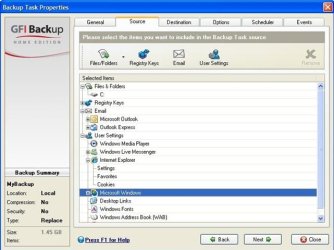
GFI is a highly regarded free file backup program - looks like it would do the job :

GFI-2010-01-14_004953 (Small).jpg

There is also the free: takemeto7
 

My Computers My Computers

  • At a glance

    7 X64i5 84002x8gb 3200mhz
    Computer type
    PC/Desktop
    OS
    7 X64
    CPU
    i5 8400
    Motherboard
    gigabyte b365m ds3h
    Memory
    2x8gb 3200mhz
    Hard Drives
    various
    PSU
    pure power 11 400w cm
    Case
    Coolermaster
    Cooling
    cryorig m9i
  • At a glance

    7x64g54008gb ddr4 2400
    Computer type
    PC/Desktop
    OS
    7x64
    CPU
    g5400
    Motherboard
    ga b365m ds3h
    Memory
    8gb ddr4 2400
    PSU
    xfx pro 450w
Drag your active User accounts onto an external. Check everything is there. You;re done.

After install, open each folder and Select All, drag files as a group to same folder in Explorer tree at left.

All you miss with this method is copying settings (although they are hidden in User appdata folders if you really want them). But Settings are a corruption path into the new OS so I don't recommend copying them anyway.
 
Last edited:
Thanks guys...am aware that program files by any methode can't be tansfered...thinks mostly about docs..pdf...graphics work etc...not the main programs themselves.

One other key question...Will most 32 bit programs used on XP work on a new 64 bit Widnows & XP Pro isntallation ? Want to 'migrate tyo 64 bit...but not purchase ALL new software to run on a 64 bit Win 7 Pro system ?

Does it go based on individual programs...or will most apps isntalled on my XP Pro 32 bit system run ok on a new 7 Pro 64 bit system ?

Thanks
 

My Computer My Computer

At a glance

Windows 7 Pro 64bit SP1AMD FX-6100 Six-Core Processor2ea Corsair-1333MHz-PC3-10666-240-pin-CMX4GX3...NVIDIA GeForce GT 630 - 1023MB (EVGA)
Computer type
PC/Desktop
Computer Manufacturer/Model Number
Self built
OS
Windows 7 Pro 64bit SP1
CPU
AMD FX-6100 Six-Core Processor
Motherboard
M5A78L-M LX PLUS
Memory
2ea Corsair-1333MHz-PC3-10666-240-pin-CMX4GX3M1A1333C9
Graphics Card(s)
NVIDIA GeForce GT 630 - 1023MB (EVGA)
Sound Card
OnBoard Via High Def Audio
Monitor(s) Displays
Samsung 204B main - ASUS VS228 secondary
Screen Resolution
1920x1080 main - 1920x1080 secondary
Hard Drives
Samsung SSD 840 128GB Win7 Pro 64bit - Western Digital WDC 465GB - Seagate 640GB Sata B/U - Maxtor 500GB Sata B/U - Maxtor 200GB Sata
PSU
Antec 650 watt
Cooling
Multiple case fans
Keyboard
MS USB dual Wireless Keyboard - IntelliType Pro
Mouse
MS USB dual Wireless Mouse - IntelliPoint
Internet Speed
Cox Cable
Antivirus
Bitdefender IS 2014
Browser
FireFox Primary - IE 11
Other Info
Hauppaguge Win TV HVR-1250 (Model 22xxx, Hybrid ATSC/QAM)
Samsung HD103SI USB 1TB Desktop Drive - Backup & Disk Image storage
ALMOST all 32 bit can be used on 64 bit. I have no problem, I do not know of anyone with a problem. Of course helping out at this forum, I have run accross some, but, very few problems. Don't let that concern stop your transition.
 

My Computer My Computer

At a glance

Windows 10, Home Clean InstallIntel Core2 processsor Q8200(2.33Ghz 1333FSB)...6 gbATI Radeon 256MB HD3650
Computer type
PC/Desktop
Computer Manufacturer/Model Number
Dell XPS 420
OS
Windows 10, Home Clean Install
CPU
Intel Core2 processsor Q8200(2.33Ghz 1333FSB) Quad Core Tech
Motherboard
Dell
Memory
6 gb
Graphics Card(s)
ATI Radeon 256MB HD3650
Sound Card
Intergrated 7.1 Channel Audio
Monitor(s) Displays
Dell SP2009W 20"
Hard Drives
640 GB Serial ATA Hard drive
Cooling
Fan
Keyboard
Dell USB Keyboard
Mouse
Dell Premium Optical USB
Internet Speed
DSL 2.85

My Computer My Computer

At a glance

Windows 10, Home Clean InstallIntel Core2 processsor Q8200(2.33Ghz 1333FSB)...6 gbATI Radeon 256MB HD3650
Computer type
PC/Desktop
Computer Manufacturer/Model Number
Dell XPS 420
OS
Windows 10, Home Clean Install
CPU
Intel Core2 processsor Q8200(2.33Ghz 1333FSB) Quad Core Tech
Motherboard
Dell
Memory
6 gb
Graphics Card(s)
ATI Radeon 256MB HD3650
Sound Card
Intergrated 7.1 Channel Audio
Monitor(s) Displays
Dell SP2009W 20"
Hard Drives
640 GB Serial ATA Hard drive
Cooling
Fan
Keyboard
Dell USB Keyboard
Mouse
Dell Premium Optical USB
Internet Speed
DSL 2.85
Back
Top