xp to 7 problems

skateva

New member
Local time
12:44 AM
Messages
12
Okay, so for Christmas I got a new laptop with Vista installed on it. Shortly after, Vista was already giving me problems so I booted the recovery disc, only to find out that the recovery disc that came with my VISTA laptop was for XP, so I ended up accidently installing XP. Today I got a Windows 7 upgrade disc that was free with my computer. After trying to install it, it told me I need to reinstall Vista first with the discs that came with my computer. Only problem is, my computer didn't come with any vista discs, just XP. Is there any way to install 7 to xp using the upgrade disc? I really don't have the money to go and buy Vista just to upgrade, there has to be an easier way.
thanks for any help.
 

My Computer

Computer Manufacturer/Model Number
Sony Vaio / VGN-NS305D
OS
xp

My Computer

Computer type
PC/Desktop
Computer Manufacturer/Model Number
Medion Erazer (note to self: insert model number) - with custom additions
OS
Windows 10 Pro x64
CPU
Intel Core i5 7400 @ 3.00GHz
Motherboard
OEM supllied with PC
Memory
8GB 2133Mhz DDR4 (OEM supplied)
Graphics Card(s)
Gygabyte Windforce GTX 1050Ti (Factory Overclocked)
Sound Card
Realtek
Monitor(s) Displays
Acer Al1980 + HKC
Screen Resolution
1360*768(HKC) / 1280*1024(Acer)
Hard Drives
1TB Toshiba
1TB WD Caviar Green
120GB Samsung Evo 840
PSU
OEM supplied (no power rating on case)
Case
OEM Supplied
Cooling
Stock
Keyboard
Logitech Wireless
Mouse
Logitect Wireless
Internet Speed
40Mb/s Down 10Mb/s Up
Antivirus
Defender
Browser
Firefox
if all else fails contact the system manufacturer, seems like you got the wrong disc with your laptop unless you selected a downgrade option
 

My Computer

Computer Manufacturer/Model Number
Custom
OS
Windows 7 Ultimate Signature Edition
CPU
Intel Core i7 Extreme 3.33GHz
Motherboard
EVGA X-58 SLI Classified
Memory
12GB DDR3
Graphics Card(s)
2x EVGA 285 2GB in SLI
Sound Card
Creative Labs X-Fi ExtremeGamer
Monitor(s) Displays
30" Viewsonic
Hard Drives
2x1TB Western Digital 7200RPM in RAID 0/1TB WD My Book External HDD
PSU
Thermaltake 1000w supporting quad SLI
Case
Thermaltake Armor Full Tower
Cooling
Thermaltake V1 CPU+DIY Liquid cooling
severedsolo, i have seen that page, i'm just confused as to whether i can use the upgrade disc or i need a setup disc. Also i couldn't find the boot from disc option at startup after pressing f8.
 

My Computer

Computer Manufacturer/Model Number
Sony Vaio / VGN-NS305D
OS
xp
Oh and I already called Sony, they're trying to charge me for a vista disc..
 

My Computer

Computer Manufacturer/Model Number
Sony Vaio / VGN-NS305D
OS
xp
just argue with them for awhile and complain, you'll get it for free if it was their mistake.
 

My Computer

Computer Manufacturer/Model Number
Custom
OS
Windows 7 Ultimate Signature Edition
CPU
Intel Core i7 Extreme 3.33GHz
Motherboard
EVGA X-58 SLI Classified
Memory
12GB DDR3
Graphics Card(s)
2x EVGA 285 2GB in SLI
Sound Card
Creative Labs X-Fi ExtremeGamer
Monitor(s) Displays
30" Viewsonic
Hard Drives
2x1TB Western Digital 7200RPM in RAID 0/1TB WD My Book External HDD
PSU
Thermaltake 1000w supporting quad SLI
Case
Thermaltake Armor Full Tower
Cooling
Thermaltake V1 CPU+DIY Liquid cooling
They basically said its not their fault, that I should have made the backup disc myself.
 

My Computer

Computer Manufacturer/Model Number
Sony Vaio / VGN-NS305D
OS
xp
ok well i agree with valtonray that they should give you a disk, but to get it to boot from disk, go into your BIOS (spam f2 as soon as you switch it on) and change boot order so cd/dvd is at the top of the list, save settings then when you restart it should say "press any key to boot from cd/dvd" do so and your sorted, failing that, if you feel confident enough to do so, make yourself a recovery partition http://www.sevenforums.com/tutorials/58455-recovery-partition-create.html (youll have to install the windows 7 MBR from easy bcd but windows XP will be an entry still)

just had a thought, doesnt it come with an OEM recovery partition?
 

My Computer

Computer type
PC/Desktop
Computer Manufacturer/Model Number
Medion Erazer (note to self: insert model number) - with custom additions
OS
Windows 10 Pro x64
CPU
Intel Core i5 7400 @ 3.00GHz
Motherboard
OEM supllied with PC
Memory
8GB 2133Mhz DDR4 (OEM supplied)
Graphics Card(s)
Gygabyte Windforce GTX 1050Ti (Factory Overclocked)
Sound Card
Realtek
Monitor(s) Displays
Acer Al1980 + HKC
Screen Resolution
1360*768(HKC) / 1280*1024(Acer)
Hard Drives
1TB Toshiba
1TB WD Caviar Green
120GB Samsung Evo 840
PSU
OEM supplied (no power rating on case)
Case
OEM Supplied
Cooling
Stock
Keyboard
Logitech Wireless
Mouse
Logitect Wireless
Internet Speed
40Mb/s Down 10Mb/s Up
Antivirus
Defender
Browser
Firefox
Is there a Product Key on a MS Certificate of Authenticity with the Windows 7 upgrade you received? This means that if the Sony disk is not bootable or is some special Sony hybrid DVD, then you can still use a clean-copy Win7 installer to Upgrade. .

Next, try booting the Sony DVD: Boot from CD - How to Boot your Computer from a Bootable CD or DVD - Boot to CD

If it will boot, then back up your files and do a Custom install using Drive Tools to format over XP. It should even accept the license key as the Win7 DVD will see XP at bootup to allow Upgrade key.

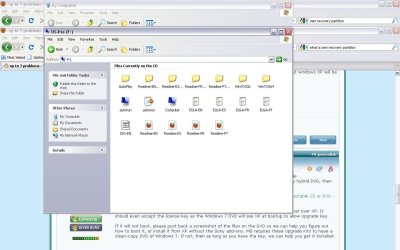
If it will not boot, please post back a screenshot of the files on the DVD so we can help you figure out how to boot it, or install it from XP without the Sony add-ons. MS requires these Upgrade Kits to have a clean-copy DVD of Win7. If not, then as long as you have the key, we can help you get it installed.
http://www.sevenforums.com/tutorials/9733-how-post-screenshot-seven-forums.html
 
thanks for all of the help so far, i've tried to boot from the cd, but it doesn't even give me the option to, even after changing the settings. is the oem recovery partition on a disc? because i only have the upgrade dvd, companion dvd, and the xp sp3 recovery dvd's that came with the pc.
 

My Computer

Computer Manufacturer/Model Number
Sony Vaio / VGN-NS305D
OS
xp
if you have an oem recovery partition there will be a hotkey to press during boot to activate it, (youll probably have to check that stupid flimsy little troubleshooting guide they give you with it) on my pc it's F10, but i have no idea if thats the norm, please can you post the screenshot gregrocker requested so we can help you further on this
 

My Computer

Computer type
PC/Desktop
Computer Manufacturer/Model Number
Medion Erazer (note to self: insert model number) - with custom additions
OS
Windows 10 Pro x64
CPU
Intel Core i5 7400 @ 3.00GHz
Motherboard
OEM supllied with PC
Memory
8GB 2133Mhz DDR4 (OEM supplied)
Graphics Card(s)
Gygabyte Windforce GTX 1050Ti (Factory Overclocked)
Sound Card
Realtek
Monitor(s) Displays
Acer Al1980 + HKC
Screen Resolution
1360*768(HKC) / 1280*1024(Acer)
Hard Drives
1TB Toshiba
1TB WD Caviar Green
120GB Samsung Evo 840
PSU
OEM supplied (no power rating on case)
Case
OEM Supplied
Cooling
Stock
Keyboard
Logitech Wireless
Mouse
Logitect Wireless
Internet Speed
40Mb/s Down 10Mb/s Up
Antivirus
Defender
Browser
Firefox
I do have a product key that came with the DVD.
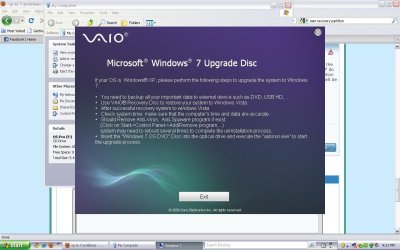
heres a screen shot of the files, and the message that comes up when i try to open the dvd.
 

Attachments

  • untitled2.JPG
    untitled2.JPG
    94.7 KB · Views: 13
  • untitled.JPG
    untitled.JPG
    101.4 KB · Views: 7

My Computer

Computer Manufacturer/Model Number
Sony Vaio / VGN-NS305D
OS
xp
I recognize the DVD contents from a guy who was here just a few days ago who I believe extracted the ISO in the file and ran from his Vista desktop.

What is ISO size? Should be around 2.44 gb if Win7 ISO.

If so, you can burn that ISO to DVD using ImgBurn at 4x speed with Verify. Copy it to desktop and then browse from ImgBurn file icon after selecting "Burn Image to Disk"

or, Use PowerISO trial version to extract the ISO then run Setup.

The key is what really matters.
 
god save us from OEM's... whats wrong with shipping a standard windows 7 upgrade disk?
 

My Computer

Computer type
PC/Desktop
Computer Manufacturer/Model Number
Medion Erazer (note to self: insert model number) - with custom additions
OS
Windows 10 Pro x64
CPU
Intel Core i5 7400 @ 3.00GHz
Motherboard
OEM supllied with PC
Memory
8GB 2133Mhz DDR4 (OEM supplied)
Graphics Card(s)
Gygabyte Windforce GTX 1050Ti (Factory Overclocked)
Sound Card
Realtek
Monitor(s) Displays
Acer Al1980 + HKC
Screen Resolution
1360*768(HKC) / 1280*1024(Acer)
Hard Drives
1TB Toshiba
1TB WD Caviar Green
120GB Samsung Evo 840
PSU
OEM supplied (no power rating on case)
Case
OEM Supplied
Cooling
Stock
Keyboard
Logitech Wireless
Mouse
Logitect Wireless
Internet Speed
40Mb/s Down 10Mb/s Up
Antivirus
Defender
Browser
Firefox
thanks gregrocker, it worked but should i do custom installation or upgrade?
 

My Computer

Computer Manufacturer/Model Number
Sony Vaio / VGN-NS305D
OS
xp
kind of stumped again. when i click on custom installation, it says no device drivers were found.
 

My Computer

Computer Manufacturer/Model Number
Sony Vaio / VGN-NS305D
OS
xp
Are you booting DVD or flash stick installer, or running Setup from XP?

What is the exact size of the ISO?

When you load it into ImgBurn to burn to DVD, check the text at left to see that it says bootable.
 
i was running it from xp. where is the iso file located? i can't find any .iso's using powerISO, i just clicked on setup in the windows32 bit folder
 

My Computer

Computer Manufacturer/Model Number
Sony Vaio / VGN-NS305D
OS
xp
I was referring to the ISO file in the screenshot you posted above.

Right click on it to see its exact size. If it is 2.44 gb then it is a clean copy of Win7. Copy it to XP desktop, browse to it from ImgBurn folder icon after selecting "Burn Image file to disk".

If it is not Win7 ISO, Can you post a screenshot of the contents of the 32 bit Win7 folder?
 
Back
Top