XP virt error msg: "update is not applicable to your machine"

klxdrt

New member
Member
VIP
Local time
4:02 PM
Messages
188
XP virt error msg: "update is not applicable to your machine"

Help again,

Hi,

:cry::mad:Tried to re-install XP virtual on MY W7Pro PC. And got this attached msg from MS.
Re-installed XP V using the same process before with no problem.

Thanks to this forum for all the help in getting my WLM2009 email back in order.
It's working fine now.

The attached Superman Award is for you guys for helping.

cheers,

klx
 

Attachments

  • w update is not applicable to your machine.jpg
    w update is not applicable to your machine.jpg
    16.7 KB · Views: 0
  • w superman award.png
    w superman award.png
    20.7 KB · Views: 19

My Computer

Computer type
PC/Desktop
Computer Manufacturer/Model Number
locally made
OS
w7 pro 32 bit w/XP virt enabled.
CPU
AMD A6-3650
Motherboard
ASUS F1A55-M CSM
Memory
4 GB DDR3 RAM
Graphics Card(s)
NVIDIA GeForce 210
Sound Card
NVIDIA High Definition Audio
Monitor(s) Displays
28" HD monitor
Screen Resolution
1680 x 1050 x 32 bits (4294967296 colors) @ 59 Hz
Hard Drives
2 x 500 GB Western Digital Blue Hard Drive
PSU
?
Case
?
Cooling
3-4 fans
Keyboard
big yellow keys
Mouse
logitec
Internet Speed
60 mb
Antivirus
panda
Browser
ff
Other Info
scanner, webcam, bw printer, fax modem, cd/dvd burner, PC usb ports: 2 usb3, 6 usb2 plus 7 port usb hub, 2 tb usb3, 1 Tb usb3, 500Mb usb2, 120Mb USB2 portable drives, asst of flash drives 250 Mb to 32 Gb. backup PC, office
You will get that error if the update has already been applied to the computer.

Go to Start and begin typing
view installed updates
See if the KB is already installed.
 

My Computer

Computer type
Laptop
Computer Manufacturer/Model Number
Employer provided Dell Latitude
OS
W7 Pro SP1 64bit
CPU
i7
Memory
8GB
Graphics Card(s)
Intel HD Graphics
Hard Drives
crappy SSD
Antivirus
Employer mandated Symantec Endpoint Protection
Browser
Pale Moon 64bit, IE11 64bit & Chrome 64bit
UsernameIssues,

Thanks for the reply.:)

I'm confused?? :confused:

I just want to re-install XP virtual in my W7 32 bit PC. It has been installed since 8-2012 and because of malfunctions I've had to re-install it several times with success. I found it to be simple: I removed, downloaded, installed in about 10-20 min I was back to work.

This week I had another malfunction and got the error msg in my previous email. All I want to do is re-install XP virt back on my machine. Why am I getting this error now & not previously?

Also what is the number of the KB I'm looking for?

My target is "Getting XP virt back & running on my PC".

Sorry for my confusion, I'm an experienced & creative Win user, not a techie. My experience is "above the code & hdwe"

I appreciate any help you and the forum guys can give me as I use XP virt in my Info Mgmt business.

cheers,

klx
 

My Computer

Computer type
PC/Desktop
Computer Manufacturer/Model Number
locally made
OS
w7 pro 32 bit w/XP virt enabled.
CPU
AMD A6-3650
Motherboard
ASUS F1A55-M CSM
Memory
4 GB DDR3 RAM
Graphics Card(s)
NVIDIA GeForce 210
Sound Card
NVIDIA High Definition Audio
Monitor(s) Displays
28" HD monitor
Screen Resolution
1680 x 1050 x 32 bits (4294967296 colors) @ 59 Hz
Hard Drives
2 x 500 GB Western Digital Blue Hard Drive
PSU
?
Case
?
Cooling
3-4 fans
Keyboard
big yellow keys
Mouse
logitec
Internet Speed
60 mb
Antivirus
panda
Browser
ff
Other Info
scanner, webcam, bw printer, fax modem, cd/dvd burner, PC usb ports: 2 usb3, 6 usb2 plus 7 port usb hub, 2 tb usb3, 1 Tb usb3, 500Mb usb2, 120Mb USB2 portable drives, asst of flash drives 250 Mb to 32 Gb. backup PC, office
The KB number is shown in your screenshot:

KB958559

What steps did you use to remove (uninstall?) it?

Let us know if it is listed in the installed updates list.
 

My Computer

Computer type
Laptop
Computer Manufacturer/Model Number
Employer provided Dell Latitude
OS
W7 Pro SP1 64bit
CPU
i7
Memory
8GB
Graphics Card(s)
Intel HD Graphics
Hard Drives
crappy SSD
Antivirus
Employer mandated Symantec Endpoint Protection
Browser
Pale Moon 64bit, IE11 64bit & Chrome 64bit
XP virt error msg: "update is not applicable to your machine

UsernameIssues,

I'm not sure as I was troubleshooting my email client, a $5,000 healthcare bill, re-arranging my IRA, rolling over my wife's IRS and cash balance acct., web server problem, colleague email problem, making plaster models for granddaughter. so I was in my one-handed paper hanger mode.

But pretty sure I use W7 uninstall program to uninstall. As to the KB958599 update in image, I just didn't read it as an update, just the XP vert install program. Upon further investigation, KB958599 was still on my machine. So I geass if I uninstall it, I can download and re-install XP virt.

Kick me in the butt.

klx:o
 

My Computer

Computer type
PC/Desktop
Computer Manufacturer/Model Number
locally made
OS
w7 pro 32 bit w/XP virt enabled.
CPU
AMD A6-3650
Motherboard
ASUS F1A55-M CSM
Memory
4 GB DDR3 RAM
Graphics Card(s)
NVIDIA GeForce 210
Sound Card
NVIDIA High Definition Audio
Monitor(s) Displays
28" HD monitor
Screen Resolution
1680 x 1050 x 32 bits (4294967296 colors) @ 59 Hz
Hard Drives
2 x 500 GB Western Digital Blue Hard Drive
PSU
?
Case
?
Cooling
3-4 fans
Keyboard
big yellow keys
Mouse
logitec
Internet Speed
60 mb
Antivirus
panda
Browser
ff
Other Info
scanner, webcam, bw printer, fax modem, cd/dvd burner, PC usb ports: 2 usb3, 6 usb2 plus 7 port usb hub, 2 tb usb3, 1 Tb usb3, 500Mb usb2, 120Mb USB2 portable drives, asst of flash drives 250 Mb to 32 Gb. backup PC, office
Yep - you can uninstall it and then re-install it to see if that cures the issues that you have been having.

It would have been nice if Microsoft would just tell you that the KB is already installed. "Not applicable" is not that good of a message.
 

My Computer

Computer type
Laptop
Computer Manufacturer/Model Number
Employer provided Dell Latitude
OS
W7 Pro SP1 64bit
CPU
i7
Memory
8GB
Graphics Card(s)
Intel HD Graphics
Hard Drives
crappy SSD
Antivirus
Employer mandated Symantec Endpoint Protection
Browser
Pale Moon 64bit, IE11 64bit & Chrome 64bit
UsernameIssues,

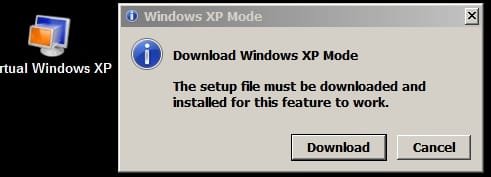
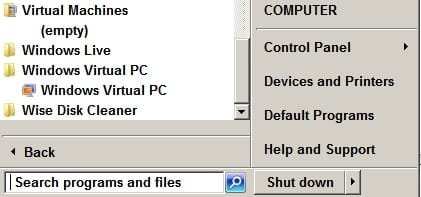
The update installed and XP virt shows on programs menu & desktop, (see attachments) but how do I get XP to setup so I can use it?

This process is totally different from what I encountered the 2-3 times I installed XP virt.
"Don't change what works." Plato

When I select DOWNLOAD, I get the same KB 958599x86 udate.

UsernameIssues, I'm very sorry for putting you thru all this kerfuffle.

cheers,

klx
 

Attachments

  • virt almost there.jpg
    virt almost there.jpg
    11.4 KB · Views: 8
  • virt on start menu.jpg
    virt on start menu.jpg
    14.9 KB · Views: 8

My Computer

Computer type
PC/Desktop
Computer Manufacturer/Model Number
locally made
OS
w7 pro 32 bit w/XP virt enabled.
CPU
AMD A6-3650
Motherboard
ASUS F1A55-M CSM
Memory
4 GB DDR3 RAM
Graphics Card(s)
NVIDIA GeForce 210
Sound Card
NVIDIA High Definition Audio
Monitor(s) Displays
28" HD monitor
Screen Resolution
1680 x 1050 x 32 bits (4294967296 colors) @ 59 Hz
Hard Drives
2 x 500 GB Western Digital Blue Hard Drive
PSU
?
Case
?
Cooling
3-4 fans
Keyboard
big yellow keys
Mouse
logitec
Internet Speed
60 mb
Antivirus
panda
Browser
ff
Other Info
scanner, webcam, bw printer, fax modem, cd/dvd burner, PC usb ports: 2 usb3, 6 usb2 plus 7 port usb hub, 2 tb usb3, 1 Tb usb3, 500Mb usb2, 120Mb USB2 portable drives, asst of flash drives 250 Mb to 32 Gb. backup PC, office

My Computer

Computer type
Laptop
Computer Manufacturer/Model Number
Employer provided Dell Latitude
OS
W7 Pro SP1 64bit
CPU
i7
Memory
8GB
Graphics Card(s)
Intel HD Graphics
Hard Drives
crappy SSD
Antivirus
Employer mandated Symantec Endpoint Protection
Browser
Pale Moon 64bit, IE11 64bit & Chrome 64bit
Thanks, will try tomorrow.

Starting a fire & staying in tonite, brrrrr

klx
 

Attachments

  • deck.JPG
    deck.JPG
    80.7 KB · Views: 0

My Computer

Computer type
PC/Desktop
Computer Manufacturer/Model Number
locally made
OS
w7 pro 32 bit w/XP virt enabled.
CPU
AMD A6-3650
Motherboard
ASUS F1A55-M CSM
Memory
4 GB DDR3 RAM
Graphics Card(s)
NVIDIA GeForce 210
Sound Card
NVIDIA High Definition Audio
Monitor(s) Displays
28" HD monitor
Screen Resolution
1680 x 1050 x 32 bits (4294967296 colors) @ 59 Hz
Hard Drives
2 x 500 GB Western Digital Blue Hard Drive
PSU
?
Case
?
Cooling
3-4 fans
Keyboard
big yellow keys
Mouse
logitec
Internet Speed
60 mb
Antivirus
panda
Browser
ff
Other Info
scanner, webcam, bw printer, fax modem, cd/dvd burner, PC usb ports: 2 usb3, 6 usb2 plus 7 port usb hub, 2 tb usb3, 1 Tb usb3, 500Mb usb2, 120Mb USB2 portable drives, asst of flash drives 250 Mb to 32 Gb. backup PC, office
Back
Top