XP VM does not connect wirelessly with home network or wirelessprinter

XP VM User

New member
Member
VIP
Local time
3:34 AM
Messages
279
I'll start with the problem, and anyone ask and I'll fill in what information (drivers, programs, etc) are needed to round out the problem and hopefully we'll find a solution together!

I have Windows 7 64-bit (Professional of course) and it was installed 2 years ago with the XP Virtual Machine Desktop. It is running in a SONY VAIO Laptop VPCS111FM model, with i5 core. 500 GB Seagate HDD. 2.5 GHz, 4.0 GB RAM.
The problem is that all other computers I have (running XP, Mac, iPad, etc) all are able to connect wirelessly to the printers and to internet using home router (Mac Airport Express) (Yes I know proper way was other way around but too late, too much money and time spent in wrong direction). Windows 7 of course works in the laptop to both HP Printers wirelessly, but not the XP Virtual Machine. NOTHING can be printed off the XP to either HP (6500A Plus (too advanced anyway) or the HP Officejet 8500A Wireless printer.

Of course you know why I"m here. SONY Help has expired, Best Buy who installed the purchased and we own it, Windows 7 Professional 64-bit and also installed the XP Desktop (It was their very very first download of that system, as I know they spent over an hour on phone with Microsoft (I had to prove who I was, the owner, before they would speak to Best Buy), installing it, and here it is 2 years of back and forth and they still say nothing is wrong and will charge us for looking as all warranties and free help have expired. Of course the latest wrinkle is that Microsoft is now charging me $100 just to answer the question of why its not working as its "XP" and even though its part of Windows 7! its still "XP" and gets charged !

HP Has been great and discovered that the IP Code begins with (hopefully saying the first three digits won't compromise the ISP WEP protection we have 192. for the XP VM, while everything (including MAC and iPad) all start with...... 10.!!! and have done so for all these years we have had the wireless system installed (i.e. since 2004).

Can anyone help me get my XP connected wirelessly? What is wrong? What is missing?

By the way, Ethernet card is that green icon and no question marks or anything in the XP VM except for 5 wierd ones listed as "other devices" . Under Device Manager is Network adapters: Intel 21140-Based PCI Fast Ethernet Adapter (Generic). Under "Other devices" are: 5 copies of "Virtual PC Integration Device" all with question marks yet under "Properies" and "Device status" they all say "This device is working properly" No clue as to why its showing quesiton mark! Following "Troubleshooting" only ends me up with "contact the manufacturer or installer etc which means major costs as there is no more free ride or guarantee with the installation after 2 years!

I hope this all helps!

If I install a program that needs the internet it CANNOT find the internet on its own! (i.e. HP set up program or any small other program I've tried to install from my other XP that needs the "internet" to register before using it!).
BUT THANK YOU everyone! While searching for information to fill in this request I hit the "USB" tab at top of XP VM page and unknown device (my DVD?? ) and HP Printer 8500 were able to be installed via "USB" so at least for FIRST TIME in 2 years they are prnting and working over the USB cable! ITs not a separate DVD, but the one inside the laptop. Sometimes it works to the XP Desktop, most times I have to browse into the DVD disk and force the autorun to run using "RUN" on the start menu. I still do not know what happens if I pull out (Or safely close out) the USB attached device (printer) or if it will reattach next time without going through set up (it created four more printer/fax settings (Series 2!) on my printer list. I have NO idea what is going on, but its nice to see a page come out from "notepad' or "wordpad" for first time in two years!

Now all I need is that to occur wirelessly!

Thanks to all who read this far! Super thanks to anyone willing to help!
 

My Computer

Computer type
Laptop
Computer Manufacturer/Model Number
SONY VAIO VPCS111FM
OS
Windows7 Professional 64bit
CPU
Intel(R) Core (TM) i5 CPU M 430 @2.27 Ghz
Memory
8.0 GB
Hard Drives
Seagate 500GB Momentus
Cooling
Internal fan
Mouse
Logitech bluetooth trackball
Browser
Pale Moon Browser for x64
Hello XP VM User, welcome to the Seven Forums.

First let's clear this with XP Mode wireless connection. Windows XP Mode, as any other Microsoft Virtual PC virtual machine does not use WiFi to connect to the network. Not even when the host computer is connected with WiFi.

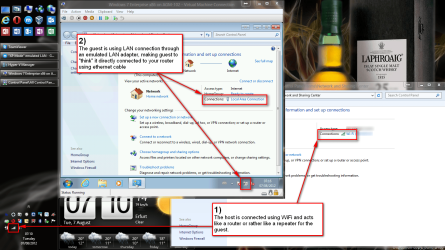
A virtual machine sees your host system (Win 7 Pro) as a router or rather as a repeater. A virtual machine does not care how this repeater is connected to the router and further to network. To connect to network a virtual machine (like your XP Mode) uses an emulated LAN (Ethernet) connection. It has its own emulated software LAN adapter and the connection between the guest and the host is therefore always a LAN (Ethernet) connection. (Exception: By installing an external WiFi adapter to a virtual machine it is possible to connect it wireless.)

See if this image can help you to understand this. Although it shows a Windows 7 virtual machine running on Windows 8, the principle is same whatever host / guest combination you have:

Host-Guest_networking_example_13.png
(Click to enlarge)

So, your XP Mode is using a LAN connection, not WiFi. Now you need to connect the XP Mode to rest of your network. Here are two links, first our own Brink's excellent tutorial on how to connect a Microsoft Virtual PC guest to network, and then my earlier post about the same theme. Read both, connect the XP Mode to your network and you should be able to use all network resources, including printers:
Most important thing is to set virtual machine (XP Mode) to use your host's network adapter, in your case its WiFi adapter. See the above mentioned tutorial (first link), point 7 C.

Then the Virtual PC Integration Device issue. Always when running a Virtual PC guest, you will find several Virtual PC Integration Devices in Device Manager. When working as they should you will always see the yellow exclamation point on them although the properties are telling the devices are working properly. This is as it should be, read more here: http://www.sevenforums.com/virtuali...pc-integration-device-missing.html#post756645

Kari
 
Last edited:

My Computer

Computer type
Laptop
Computer Manufacturer/Model Number
HP ENVY 17-1150eg
OS
Windows 10 Pro x64 EN-GB
CPU
1.6 GHz Intel Core i7-720QM Processor
Memory
6 GB
Graphics Card(s)
ATI Mobility Radeon HD 5850 Graphics
Sound Card
Beats sound system with integrated subwoofer
Monitor(s) Displays
17" laptop display, 22" LED and 32" Full HD TV through HDMI
Screen Resolution
1600*900 (1), 1920*1080 (2&3)
Hard Drives
Internal: 2 x 500 GB SATA Hard Disk Drive 7200 rpm
External: 2TB for backups, 3TB USB3 network drive for media
Cooling
As Envy runs a bit warm, I have it on a Cooler Master pad
Keyboard
Logitech diNovo Media Desktop Laser (bluetooth)
Mouse
Logitech Performance Mouse MX
Internet Speed
50/10 Mbps VDSL
Antivirus
Windows Defender 4.3.9431.0
Browser
Maxthon 3.5.2., IE11
Depending on how important this virtual machine is to you, it may be worth your time to explore other options beyond Microsoft's limited Virtual PC. I suggest checking out Oracle's VirtualBox which is completely free and has a host of more features. Even better if you're looking to spend some $$, VMware Workstation which includes a virtual network editor.

What you are trying to accomplish is "Bridging" your virtual machine to your local network. This way it will appear as any other computer on your network and have its own IP address in the same subnet as the host.

Another option is purchasing a USB wireless adapter exclusively for the virtual machine. This way you can connect the VM directly to your wireless without any sort of network emulation.
 

My Computer

Computer Manufacturer/Model Number
Custom Build
OS
Windows 7 Ultimate x64, BackTrack Linux 5 R2, Windows XP
CPU
Intel Core i7 920 OC to 3.6GHz
Motherboard
ASUS P6T Deluxe V2
Memory
Corsair 6GB DDR3
Graphics Card(s)
ATI Radeon 4890
Monitor(s) Displays
ASUS 23"
Screen Resolution
1920x1080
Hard Drives
150GB Velociraptor
640GB
PSU
Corsair 850w
Case
CoolerMaster HAF932
Cooling
CoolerMaster V8
Internet Speed
30Mbps
----first reply---
Thanks Kari for all your help! I'm impressed!

Marvellous screenshots and diagramming! (I'll ask you later about how do I find those graphics of arrows and red boxes when I have to ask questions as it would help!)

Meanwhile, I've been purusing your solution in your link to your prior posting.

Your Link has two titles so I'll use both here: "Windows Virtual PC --Connect Virtual Machine to Network" and 'How to Connect Windows Virtual PC to the Network"

I'm on "Step 6" If you use a router with "MAC Address Filtering" enabled.

While I do know that "MAC" there refers to "Media Access Control" and not my "MAC" (Macintosh" Apple Airport Express" which is actually doing the wireless routing......
....As I thought I might have problems when I came to that area (constant battle of Mac vs PC at work and home!---for over 20 years!)

Without revealing my WEP code etc that I do use for security (not just using the address filtering to keep others out of network) (there are 6 flooding over our system including a major school's wireless system in the area so students can connect outside of buildings on lawn/field), here are the relevant items/settings I get from my Macintosh Airport Administration Utility (Using old old Tiger 10.4.11 OS if that means anything to anyone out there--longer story):

Name: ______ Of my wireless network
Ethernet (WAN) : Address i.e. 00: etc_______________
AirPort ID: 00: etc _______________
Apple Base Station V6.3 (YES I KNOW ITS OLD)

Which one (if any) is the required item mentioned in "If You use a Router with "MAC Address Filtering" Enabled" ?
I do not see any button for that answer in my Apple screen choices.

My Airport Express does not say anything about MAC on the unit itself. The RCA Cable Router does have a "MAC" address listed as do most every other printer or wireless device attached.

Also, I went ahead anyway (knowing where the problems are helps) and tried to bring up a DOS Command window in my PC Windows 7.

Although this is not a problem I wrote about (I"ll ask it elsewhere and come back here if you don't know how to fix it--its ok there is a children's story about a ladder that this reminds me of), I can't ever get the DOS Comamnd window to "stay open"

When I entered ipconfig /all (OR ANY command, msc etc others have tried in the past 2 years) the window opens and stays open for 1/10 of a second!!!

Is there a "pause" button or command for this window?
Is there a setting that I'm doing wrong under "RUN"?
Does not appear to me to be any choices or options.

SO I have two quesitons above: 1 Does an old V6.3 Apple Airport Express Router use "MAC Addrss Filtering" as everything (all PC all Mac's iPad and all Printers and intra-net at home use this one wireless router for all their connections. It is connected by 2" Ethernet to the Cable Company's RCA Modem. That's all there is.

and 2 What is going on with my DOS Command Prompt screen?

If the Apple AIrport express does not use "MAC Address filtering" then I assume I can skip that step 6 and move to step 7?

Thanks again for reading all my complicated set up information, but again I only found out after the fact it was never set up in the best of all possible worlds method.

-----second reply to:

Dear Doubled822:

Thanks for your suggestions too! I followed the names and am researching those other options in case I cannot get the XP VM to function (the free other version, is a pain to set up and I'm really not 100% confident in following complicated problem setting set ups so avoiding that one leaving the two paid ones which have their pros and cons (especially for me transferring files from my older XP programs into Windows 7 for future use as completed documents etc results there).
I do appreciate directing me there....I never quite figure out the correct search terms so I would never have known that others figured out ways to do this when Microsoft offered up such a poor method for free.

Thanks!
 

My Computer

Computer type
Laptop
Computer Manufacturer/Model Number
SONY VAIO VPCS111FM
OS
Windows7 Professional 64bit
CPU
Intel(R) Core (TM) i5 CPU M 430 @2.27 Ghz
Memory
8.0 GB
Hard Drives
Seagate 500GB Momentus
Cooling
Internal fan
Mouse
Logitech bluetooth trackball
Browser
Pale Moon Browser for x64
Without revealing my WEP code etc that I do use for security...

I highly recommend you upgrade your equipment to support WPA encryption as WEP is highly unsecure and easily crackable. Especially if you're in a school environment--kids are very crafty these days. Also, even with MAC filtering, it is very easy to discover an allowed MAC address and spoof it to gain access. I've done this myself in penetration tests--it doesn't take very long either.

Also, I went ahead anyway (knowing where the problems are helps) and tried to bring up a DOS Command window in my PC Windows 7.

Although this is not a problem I wrote about (I"ll ask it elsewhere and come back here if you don't know how to fix it--its ok there is a children's story about a ladder that this reminds me of), I can't ever get the DOS Comamnd window to "stay open"

When I entered ipconfig /all (OR ANY command, msc etc others have tried in the past 2 years) the window opens and stays open for 1/10 of a second!!!

Is there a "pause" button or command for this window?
Is there a setting that I'm doing wrong under "RUN"?
Does not appear to me to be any choices or options.

What exactly are you typing in the Run command? If you simply type ipconfig in the Run dialog, it will appear for a split second. Instead, type cmd to bring up the command prompt, and then run your commands from there.

Dear Doubled822:

Thanks for your suggestions too! I followed the names and am researching those other options in case I cannot get the XP VM to function (the free other version, is a pain to set up and I'm really not 100% confident in following complicated problem setting set ups so avoiding that one leaving the two paid ones which have their pros and cons (especially for me transferring files from my older XP programs into Windows 7 for future use as completed documents etc results there).
I do appreciate directing me there....I never quite figure out the correct search terms so I would never have known that others figured out ways to do this when Microsoft offered up such a poor method for free.

Thanks!

I also forgot to mention that VMware has a freeware product called VMware Player, which is the one I prefer when choosing the freeware solutions. In my testing, it works great (including the network bridging feature which I find to be essential). The only issue with VMware Player is that it does not come with VMware tools by default, although this can be found and installed manually in your VMs (will save a lot of headaches)

I live and breathe VMs so if you ever need help setting that up, PM me and I'll do my best to accommodate. Good luck!
 

My Computer

Computer Manufacturer/Model Number
Custom Build
OS
Windows 7 Ultimate x64, BackTrack Linux 5 R2, Windows XP
CPU
Intel Core i7 920 OC to 3.6GHz
Motherboard
ASUS P6T Deluxe V2
Memory
Corsair 6GB DDR3
Graphics Card(s)
ATI Radeon 4890
Monitor(s) Displays
ASUS 23"
Screen Resolution
1920x1080
Hard Drives
150GB Velociraptor
640GB
PSU
Corsair 850w
Case
CoolerMaster HAF932
Cooling
CoolerMaster V8
Internet Speed
30Mbps
Thanks Doubled822!


I got the cmd which does open the DOS window for as long as I need it.


Now where is my old DOS manual? I know I can "Mark" and copy or highlight the dozens of entries to show them to you (with personal data masked) but I don't see any control menus or buttons! Hmm have to enter in the commands line by line /d /m ? which allows it to be marked to copy and paste it as I don't remember.


I'm pasting it when I get it as there is no line marked "MAC" ! I know one of them must be the answer that Kari's instructions in Step 6 are looking for.

There are many categores which all have a "Physical Address" and many are different from each other as well.

There is still a problem with connecting to the "router's IP Address" as I don't see it on these listings as it must be stuck in the Apple computer's own version of the DOS command screen! I don't get this information (other than the brief one I posted in my prior message) for this Airport Express router.

You probably know them better then I do, but the choices for a physical address to use in Kari's Step 6 are:

Wireless LAN Adapter Wireless Network Connection 3 (says "Not connected in control panel)

Wireless LAN Adapter Wireless Network Connection 2 (says "Not connected in control panel).

Wireless LAN Adapter Wireless Network Connection (appears to be the only one working!)

Ethernet adapter Local Area Connection

Tunnel Adapter Teredo Tunnelling Pesudo-Interface

Tunnel Adapter isatap (again 3 of these cateogories appear--only one appears currently active--maybe one of the others is supposed to be the one with wireless?)

And all 8 of these have entry "Physical Address"

Sorry to overload you with information, just ignore what you don't need. Better than asking me back and forth for details I guess.

ALSO In terms of entering in an "IP" address to contact the Apple router (if that is indeed possible from the PC using IE? (I have safari on PC as well, would that work better?) All of them have IPv4 addresses, some have IPv6 Addresses as well! Which one is the preferred use?? I should learn what v4 v6 differences are and why, I just made the assumption that computer designers ran out of numbers for the IP addresses so made a new series?

(just as an experiment I tried entering some of the IP addresses in the Safari and got "Safari cannot open page ________ because Safari cannot connect to the server ________")
When I try IE 8 I don't know where to enter it as no matter what I have i get google searches....must have too many tool bars and no real address bar someone else at the store set this up when I purchased the PC 2 yrs ago so no more advice/help from store or SONY or anyone.

Thanks again!
 

My Computer

Computer type
Laptop
Computer Manufacturer/Model Number
SONY VAIO VPCS111FM
OS
Windows7 Professional 64bit
CPU
Intel(R) Core (TM) i5 CPU M 430 @2.27 Ghz
Memory
8.0 GB
Hard Drives
Seagate 500GB Momentus
Cooling
Internal fan
Mouse
Logitech bluetooth trackball
Browser
Pale Moon Browser for x64
Now where is my old DOS manual? I know I can "Mark" and copy or highlight the dozens of entries to show them to you (with personal data masked) but I don't see any control menus or buttons! Hmm have to enter in the commands line by line /d /m ? which allows it to be marked to copy and paste it as I don't remember.

In Windows 7, you will have to right-click inside the command prompt window and then click Mark. Then highlight the text you wish to copy, and hit the enter key. No need for any other commands or switches. In XP (your virtual machine) you can simply highlight the text like you would anything else, and still hit Enter to copy.

I'm pasting it when I get it as there is no line marked "MAC" ! I know one of them must be the answer that Kari's instructions in Step 6 are looking for.

It appears you are referring to the tutorial that he pointed you to. The only way you'll need the MAC address is if your router/access point is set up for MAC filtering, which is typically not enabled by default. If you initially set up the router, chances are you didn't enable this and don't have to worry about it.

If you do have MAC filtering enabled, in your command prompt on your XP virtual machine you'll want to do ipconfig /all to find it. If not (I seriously doubt that you do have this enabled), you can safely skip this step :-) Once you know for sure, you can post the output of ipconfig /all without worry of compromising your network--it is only going to display your internal IP addresses and information that are protected behind your router's firewall. This way we can see your full output and be able to tell you which information you need.

Of course, all this information won't be helpful if you can't get your XP VM bridged to your network. That tutorial is very good but it does not go into the different methods of connecting the VM to your network. The specific function you will need is bridged. See this link here on Microsoft's TechNet and pay close attention to the "Networking a Windows XP Mode VM". This will explain the different networking methods and how to set them up. You will want option 2 on that article.

Hope this helps!
 

My Computer

Computer Manufacturer/Model Number
Custom Build
OS
Windows 7 Ultimate x64, BackTrack Linux 5 R2, Windows XP
CPU
Intel Core i7 920 OC to 3.6GHz
Motherboard
ASUS P6T Deluxe V2
Memory
Corsair 6GB DDR3
Graphics Card(s)
ATI Radeon 4890
Monitor(s) Displays
ASUS 23"
Screen Resolution
1920x1080
Hard Drives
150GB Velociraptor
640GB
PSU
Corsair 850w
Case
CoolerMaster HAF932
Cooling
CoolerMaster V8
Internet Speed
30Mbps
There are many categores which all have a "Physical Address" and many are different from each other as well.

There is still a problem with connecting to the "router's IP Address" as I don't see it on these listings as it must be stuck in the Apple computer's own version of the DOS command screen! I don't get this information (other than the brief one I posted in my prior message) for this Airport Express router.

Question--are you trying to access the router from your host Windows 7 machine, or the virtual XP machine running on it? Is the Win7 machine connected to the internet through this router?

ALSO In terms of entering in an "IP" address to contact the Apple router (if that is indeed possible from the PC using IE? (I have safari on PC as well, would that work better?) All of them have IPv4 addresses, some have IPv6 Addresses as well! Which one is the preferred use?? I should learn what v4 v6 differences are and why, I just made the assumption that computer designers ran out of numbers for the IP addresses so made a new series?

Yes, you should be able to access the router configuration via the "default gateway" you might see in your ipconfig output on your Windows 7 machine. In most home networks this address is 192.168.1.1.

As far as your assumption about IPv6, you're absolutely right. But that is a whole 'nother story. For your situation here, ignore the IPv6 stuff.
 

My Computer

Computer Manufacturer/Model Number
Custom Build
OS
Windows 7 Ultimate x64, BackTrack Linux 5 R2, Windows XP
CPU
Intel Core i7 920 OC to 3.6GHz
Motherboard
ASUS P6T Deluxe V2
Memory
Corsair 6GB DDR3
Graphics Card(s)
ATI Radeon 4890
Monitor(s) Displays
ASUS 23"
Screen Resolution
1920x1080
Hard Drives
150GB Velociraptor
640GB
PSU
Corsair 850w
Case
CoolerMaster HAF932
Cooling
CoolerMaster V8
Internet Speed
30Mbps
Wow! Perfect answers! Two replies!

Just stepped out for a minute, came back and there are the answers!

(Sorry haven't figured out how to box the quotes like you and Kari do---next project I'll learn but wanted to get this out today back to you):

Quoted by double822 in 8-9-12 message:
Question--are you trying to access the router from your host Windows 7 machine, or the virtual XP machine running on it? Is the Win7 machine connected to the internet through this router?

Answer--Trying using IE 8 (dk how) and Safari (can't open page) from the Host Windows 7 Profesional OS when I minimized the XP VM (Unless you tell me to hiberate/close the XP if its preventing or doing something else even minimized.
Answer---Yes, the Winows 7 SONY Laptop (as are all printers iPad, All other PC and the Apple are all connected through the Airport Express wireless router (no worry, both the cable account and router are designed for up to 10 wireless devices at the same time, but I do close down the ones not needed when trying to "fix" these problems to give the cable company the widest choices of addresses (under "10" to use).


Now you should know the whole reason I'm digging into this terrible wireless situation is again, I have several HP printers successful (since 2004-5-6) operating wirelessly including the new "air print" version for exclusive use of iPad and also shared with this SONY PC.

The HP technician on the phone noticed immediately that the IP address is set to 192 for the XP VM but it is set to "10" for both the Windows 7 OS and all HP Printers and other devices! The cable company does not have "static IP " addresses available on its system and uses dynamic addressing.

The default gateway on the XP VM has the same problem but the subnet mask is showing 255 which is for everything else.

In reply to your earlier comment about getting increased safety around the school (yes the kids try to get in). We do have sensitive materials on many devices so most of them (older ones) have old encryption programs operating whenever something is transmitted over the internet in addition to the WEP code....but I have over the years investigated how to convert to something like WPA or better? but devices like "Valet" etc all seem to have one defect, that they can't access the older kinds of XP or "Tiger" OS ! So that would elminate from the system those devices and right now there is no splitter on the cable so we only get 'one" incoming signal unless we do another cable box into internet but it would not be in the center of our location and lopsided signal would not help unless the new equipment has its own repeaters (we have several repeaters for the older Apple Express as it cannot get a signal into every area a desktop type computer is currently located!) Yes sounds complicated we do video editing so need the power but don't need latest Final Cut etc happy with older programs as they are...which I guess you might look up some units and the problem is that Tiger is on old G4 that is "NOT" Intel based one, oops didn't know to do that back in 2004 so now stuck that way can't interface with intel based routers that are all on market and just don't trust anything of ebay etc amaon used ones as already in enough difficulty without making it worse and all the XP 's (3) are only SP2...even longer story so no SP3 which is required for Valet etc etc.

Just complicated things when forced to upgrade to better laptop to access more job and web created items without codexes etc slowing them down in older systems.

Ok back to your excellent answers.

I skipped step 6 as you said I probably do not have that older Airport set up for MAC address filtering as who did it back in 2004 would probably not have done it...

In the drop down menu was the one item out of 6 there: INtel (R) Centrino(R) Advanced-N6200 AGN which matched the one Wireless LAN Connection which was labelled as "working" on the DOS/cmd prompt screen from the command (don't know how to expres this so very clumsily written) ipconfig /all listing.

I chose that (I tried others too just in case) Shut down the VM and opened it again and still do not see the "wireless" signal and signal bars (which I can click to get properites, etc), that my other computers running XP show in the bottom right taskbar.

IE 8 still makes contact with the web (don't know how it does) in the XP VM but no other program (i.e. ones that are designed to get their regisration numbers from a web site) are able to do so.

Breaking news!:

As i kept trying to check it out and turned on /off the XP VM
 
I eventually got :
Microsoft windows
The ssytem has recovered from a serious error
A log has been created
 
Error codes (copied and pasted here) (sorry lost the paste command for some reason!)
 
Then sent the error report and got;
 
Corrupted error report website for Microsoft : They can't read it.

 Corrupted error report
Unfortunately, the error report you submitted is corrupted and can't be analyzed. Corrupted error reports are rare. They can be caused by hardware or software problems, and usually indicate a serious problem with your computer.


First time happened (first time "fiddling" to fix XP!) so I checked that box and sent it back.

Ok, any advice at this point?

Thanks!

Oh checked to see if I missed anything: You gave me power to mark and copy the cmd window for ipconfig /all

I did copy it below taking out obvious identifying features i can put back in any line of code you really need to see

Good luck!

Microsoft Windows [Version 6.1.7601]
Copyright (c) 2009 Microsoft Corporation. All rights reserved.

C:>ipconfig /all

Windows IP Configuration
Host Name . . . . . . . . . . . . : xxxxxxxxxxxxx
Primary Dns Suffix . . . . . . . :
Node Type . . . . . . . . . . . . : Hybrid
IP Routing Enabled. . . . . . . . : No
WINS Proxy Enabled. . . . . . . . : No
DNS Suffix Search List. . . . . . : xxxxxxxxxxx.com

Wireless LAN adapter Wireless Network Connection 3:
Media State . . . . . . . . . . . : Media disconnected
Connection-specific DNS Suffix . :
Description . . . . . . . . . . . : Microsoft Virtual WiFi Miniport Adapter#2
Physical Address. . . . . . . . . : 00-23-14-92-D2-31
DHCP Enabled. . . . . . . . . . . : Yes
Autoconfiguration Enabled . . . . : Yes

Wireless LAN adapter Wireless Network Connection 2:
Media State . . . . . . . . . . . : Media disconnected
Connection-specific DNS Suffix . :
Description . . . . . . . . . . . : Microsoft Virtual WiFi Miniport Adapter
Physical Address. . . . . . . . . : 00-23-14-92-D2-31
DHCP Enabled. . . . . . . . . . . : No
Autoconfiguration Enabled . . . . : Yes

Wireless LAN adapter Wireless Network Connection:
Connection-specific DNS Suffix . :xxxxxxxxxxxxxxx.com
Description . . . . . . . . . . . : Intel(R) Centrino(R) Advanced-N 6200 A
Physical Address. . . . . . . . . : 00-23-14-92-D2-30
DHCP Enabled. . . . . . . . . . . : Yes
Autoconfiguration Enabled . . . . : Yes
Link-local IPv6 Address . . . . . : fe80::ccd1:943c:e2a5:f48f%13(Preferred
IPv4 Address. . . . . . . . . . . : 10.0.1.5(Preferred)
Subnet Mask . . . . . . . . . . . : 255.255.255.0
Lease Obtained. . . . . . . . . . : Thursday, August 09, 2012 8:05:51 AM
Lease Expires . . . . . . . . . . : Thursday, August 09, 2012 3:12:34 PM
Default Gateway . . . . . . . . . : 10.0.1.1
DHCP Server . . . . . . . . . . . : 10.0.1.1
DHCPv6 IAID . . . . . . . . . . . : 352330516
DHCPv6 Client DUID. . . . . . . . : 00-01-00-01-13-D3-B6-F4-00-24-BE-EA-4D
DNS Servers . . . . . . . . . . . : 10.0.1.1
NetBIOS over Tcpip. . . . . . . . : Enabled

Ethernet adapter Local Area Connection:
Media State . . . . . . . . . . . : Media disconnected
Connection-specific DNS Suffix . : xxxxxxxxxxxxxxx.com
Description . . . . . . . . . . . : Atheros AR8131 PCI-E Gigabit Ethernet
troller (NDIS 6.20)
Physical Address. . . . . . . . . : 00-24-BE-EA-4E-34
DHCP Enabled. . . . . . . . . . . : Yes
Autoconfiguration Enabled . . . . : Yes

Tunnel adapter Teredo Tunneling Pseudo-Interface:
Connection-specific DNS Suffix . :
Description . . . . . . . . . . . : Teredo Tunneling Pseudo-Interface
Physical Address. . . . . . . . . : 00-00-00-00-00-00-00-E0
DHCP Enabled. . . . . . . . . . . : No
Autoconfiguration Enabled . . . . : Yes
IPv6 Address. . . . . . . . . . . : 2001:xxxxxxxxxxxxxxxxxxxxxxxxxxxxxxx(Pr
rred)
Link-local IPv6 Address . . . . . : fe80xxxxxxxxxxxxxxxxxxxx(Preferred)
Default Gateway . . . . . . . . . : ::
NetBIOS over Tcpip. . . . . . . . : Disabled

Tunnel adapter isatap.{A929486D-88D9-451E-9D52-33E07950D623}:
Media State . . . . . . . . . . . : Media disconnected
Connection-specific DNS Suffix . :
Description . . . . . . . . . . . : Microsoft ISATAP Adapter
Physical Address. . . . . . . . . : 00-00-00-00-00-00-00-E0
DHCP Enabled. . . . . . . . . . . : No
Autoconfiguration Enabled . . . . : Yes

Tunnel adapter isatap.{E1229A61-CEE6-4406-9CCC-EB665D6AAD26}:
Media State . . . . . . . . . . . : Media disconnected
Connection-specific DNS Suffix . :
Description . . . . . . . . . . . : Microsoft ISATAP Adapter #2
Physical Address. . . . . . . . . : 00-00-00-00-00-00-00-E0
DHCP Enabled. . . . . . . . . . . : No
Autoconfiguration Enabled . . . . : Yes

Tunnel adapter isatap.nj.rr.com:
Media State . . . . . . . . . . . : Media disconnected
Connection-specific DNS Suffix . :xxxxxxxxxxxxxxxx.com
Description . . . . . . . . . . . : Microsoft ISATAP Adapter #4
Physical Address. . . . . . . . . : 00-00-00-00-00-00-00-E0
DHCP Enabled. . . . . . . . . . . : No
Autoconfiguration Enabled . . . . : Yes
C:>

if it is blank or says 00-00 it really is I only did "x" when removing information

Thanks!
 

My Computer

Computer type
Laptop
Computer Manufacturer/Model Number
SONY VAIO VPCS111FM
OS
Windows7 Professional 64bit
CPU
Intel(R) Core (TM) i5 CPU M 430 @2.27 Ghz
Memory
8.0 GB
Hard Drives
Seagate 500GB Momentus
Cooling
Internal fan
Mouse
Logitech bluetooth trackball
Browser
Pale Moon Browser for x64
(Sorry haven't figured out how to box the quotes like you and Kari do---next project I'll learn but wanted to get this out today back to you):

Two ways -- first, at the bottom of each post you'll see a "quote" button. Second way--put the text you wish to quote between this [ quote ] [ /quote ] (minus the spaces). Preview your post to make sure it looks right.

Answer--Trying using IE 8 (dk how) and Safari (can't open page) from the Host Windows 7 Profesional OS when I minimized the XP VM (Unless you tell me to hiberate/close the XP if its preventing or doing something else even minimized.

It is likely that your router is not allowing access to the administration page via wireless. If you can, plug your laptop directly into the router and temporarily disable WiFi, and then try to access the gateway address, which using your given information would be 10.0.1.1. If you didn't already try that address--try it over the wireless first.

The HP technician on the phone noticed immediately that the IP address is set to 192 for the XP VM but it is set to "10" for both the Windows 7 OS and all HP Printers and other devices! The cable company does not have "static IP " addresses available on its system and uses dynamic addressing.

This comes back to the networking issue with your VM. This tells me that it is connected using the default NAT setting, which simply creates its own little "network" within your Windows 7 machine, so to speak. You need to get the VM on the 10.0.1.x network--dont' forget to read the article I posted earlier. This should be your #1 priority at this point.

...but I have over the years investigated how to convert to something like WPA or better? but devices like "Valet" etc all seem to have one defect, that they can't access the older kinds of XP or "Tiger" OS ! So that would elminate from the system those devices and right now there is no splitter on the cable so we only get 'one" incoming signal unless we do another cable box into internet but it would not be in the center of our location and lopsided signal would not help unless the new equipment has its own repeaters (we have several repeaters for the older Apple Express as it cannot get a signal into every area a desktop type computer is currently located!)

May i ask your formal position at the school? You may wish to suggest to your employers to send you to some computer networking classes. (don't take this the wrong way) Business networking is far more advanced than home use typically, which is why I can't recommend any Valet routers to you. Getting the right wireless access point can be a fairly simple and very important upgrade to your network, depending on how many computers need to have access to it. Since you've mentioned you are using Cable internet, you do not want to split any of those connections, trust me.

it sounds like your school is in need of serious network consulting and upgrades that would be costly for the right, effective solution. I wouldn't recommend the use of repeaters although they get the job done. I think what you want are access points, spread throughout the school. It's important that each one is on a different channel as well, but with the same SSID and security--which is where your WPA comes in. No doubt if you were to do this upgrade, you'd have to configure each wireless computer with the new settings to connect--but you'd be greatly boosting security.

Now, I'm not sure how those older Apple devices would play into this, I know my old iBook running OS X 10.3 does not support WPA. Once again my friend, you need some serious upgrades. Modern Macs will connect to most any wireless access points and co-habituate with the Windows machines. XP will connect to anything if you have the right drivers.

I chose that (I tried others too just in case) Shut down the VM and opened it again and still do not see the "wireless" signal and signal bars (which I can click to get properites, etc), that my other computers running XP show in the bottom right taskbar.

Please take notes here: you will NOT see any wireless bars of any sort on the virtual machine--UNLESS you purchase a USB wireless adapter, install the drivers in the Virtual XP machine, and connect it through VirtualPC to the VM. If somebody wants to challenge me on this--feel free as I'm not 100% familiar with Virtual PC but I know the other more ideal solutions don't support this.

This brings me to a new question regarding your wireless printers--can non-wireless machines print to them as well?

In regards to your fatal error...I would ignore it and reboot as long as the XP machine is still working OK.
 

My Computer

Computer Manufacturer/Model Number
Custom Build
OS
Windows 7 Ultimate x64, BackTrack Linux 5 R2, Windows XP
CPU
Intel Core i7 920 OC to 3.6GHz
Motherboard
ASUS P6T Deluxe V2
Memory
Corsair 6GB DDR3
Graphics Card(s)
ATI Radeon 4890
Monitor(s) Displays
ASUS 23"
Screen Resolution
1920x1080
Hard Drives
150GB Velociraptor
640GB
PSU
Corsair 850w
Case
CoolerMaster HAF932
Cooling
CoolerMaster V8
Internet Speed
30Mbps
Dear Doubled822:

Thanks for your reply again!

A quick question before I actually do anything....

(thanks for the quote marks--they are not at bottom for some reason but in top row above the reply to thread box)

It is likely that your router is not allowing access to the administration page via wireless. If you can, plug your laptop directly into the router and temporarily disable WiFi, and then try to access the gateway address, which using your given information would be 10.0.1.1. If you didn't already try that address--try it over the wireless first.

I entered just 10.0.1.1 in the Safari address bar and got Safari cannot open the page.

My cable/broadband set up is diagrammed thus:

Cable ====> RCA Modem ====> Apple Airport Express.

The RCA Modem has one Ethernet going out and one USB going out nothing "going in" at same time.

The Airport express has even less. Just a power plug, Ethernet port and USB port. Do you mean for me to hook the USB of the laptop into the Airport Express Router WHILE the Ethernet cable is plugged in? There is no "off" switch for the wireless signal. Just a light on top that is either Orange (searching for connections) or green (found connections to cable/internet.

There is similarly no on/off setting on the Apple computer or its "system preferences" icon I.e. no "disable" for 15 minutes choice like my Norton Anti-Virus etc programs can have.

So is that the set up you're looking for in that suggestion?

Or is the laptop to be directly plugged into the RCA Modem? I've done that before (at HP Tech's suggesion) to get a signal from the web directly into the laptop so they could download some software before I got the IE 8 "working" and I still don't know how come I got IE 8 connecting to the internet with the Win 7 as the router while nothing else uses it wirelessly (guess I'm reading but not learning).

As for lessons.....first of all clear up confuion. The school with the powerful signal is in one state I live in and I work in another as a Professor. No lessons as the school I work for has their own IT division handling all of the set ups on their computers/ sun systems UNIX etc... I've even pitched in for a few years stringing wires and repeaters through ceiling panels and ducts so I leanred a lot more than others were ever taught there.

Thanks again for your lessons here and in the article: re reading it while doing this.

dont' forget to read the article I posted earlier. This should be your #1 priority at this point

Again I just dashed this off--- will answer anything I missed in next message.

Thanks!
 

My Computer

Computer type
Laptop
Computer Manufacturer/Model Number
SONY VAIO VPCS111FM
OS
Windows7 Professional 64bit
CPU
Intel(R) Core (TM) i5 CPU M 430 @2.27 Ghz
Memory
8.0 GB
Hard Drives
Seagate 500GB Momentus
Cooling
Internal fan
Mouse
Logitech bluetooth trackball
Browser
Pale Moon Browser for x64
Did I post it to the correct thread? I went to look at my posting and all I got is this latest one. Page 1 of 2. Not the 10 other postings which are referred to as total number of posts (#11) off to the right side.

I hope you can read it. If you do not see it or reply by tomorrow I'll repost it or start a new thread if there is some limit to posting that I went over...... sorry
 

My Computer

Computer type
Laptop
Computer Manufacturer/Model Number
SONY VAIO VPCS111FM
OS
Windows7 Professional 64bit
CPU
Intel(R) Core (TM) i5 CPU M 430 @2.27 Ghz
Memory
8.0 GB
Hard Drives
Seagate 500GB Momentus
Cooling
Internal fan
Mouse
Logitech bluetooth trackball
Browser
Pale Moon Browser for x64
Sorry for the late reply. This is the correct thread. Can you find the model number off of the AirPort?

When I said to turn off the wireless, I meant the wireless connection on your Windows laptop. Sorry for the confusion. It seems Apple's current AirPort has two ethernet ports--one for WAN (your cable modem) and another for a LAN connection (where you'd plug your laptop into in my suggestion)

It seems that you should be able to access the configuration page via wireless--not sure what's wrong here but if you can get the model number we can see.
 

My Computer

Computer Manufacturer/Model Number
Custom Build
OS
Windows 7 Ultimate x64, BackTrack Linux 5 R2, Windows XP
CPU
Intel Core i7 920 OC to 3.6GHz
Motherboard
ASUS P6T Deluxe V2
Memory
Corsair 6GB DDR3
Graphics Card(s)
ATI Radeon 4890
Monitor(s) Displays
ASUS 23"
Screen Resolution
1920x1080
Hard Drives
150GB Velociraptor
640GB
PSU
Corsair 850w
Case
CoolerMaster HAF932
Cooling
CoolerMaster V8
Internet Speed
30Mbps
Thanks for replying!

Yes I have the model number off the Airport Express Base Station (its full name):

Model A1084

perhaps since it was built/installed in 2004 may be the reason it has less functionality?

Need serious upgrades, but lacking the direction (order of operations as in math) to take everything without just buying $1,000's and starting over from scratch!

Yes I do have on Windows 7 the bars and word 'disconnect" if that is what you mean for me to do when I do find a way to connect directly to the Modem/Cable?

Or if you want me to just disable the Airport Express at the source its always been on a tiny power strip (for lighting protection) and that is on/off how we turn on off internet for entire home intra-net and internet services! It also was done at the suggestion of the Cable company so their dynamic addressing can re-do all the devices especially when adding or taking off too many in a row upsets the system---it does!--often!

Thanks again for your interest in this and help! Really appreciate it!
 

My Computer

Computer type
Laptop
Computer Manufacturer/Model Number
SONY VAIO VPCS111FM
OS
Windows7 Professional 64bit
CPU
Intel(R) Core (TM) i5 CPU M 430 @2.27 Ghz
Memory
8.0 GB
Hard Drives
Seagate 500GB Momentus
Cooling
Internal fan
Mouse
Logitech bluetooth trackball
Browser
Pale Moon Browser for x64
P.S. Just wondering why you use Windows 98 as your avatar logo? I might have something for an expert in Windows 98 SE but I probably should warn you its about 30-40 posts this past year and might take a while to go through all the help options from Microsoft /Dell etc (another computer not the one with windows 7 on it).
 

My Computer

Computer type
Laptop
Computer Manufacturer/Model Number
SONY VAIO VPCS111FM
OS
Windows7 Professional 64bit
CPU
Intel(R) Core (TM) i5 CPU M 430 @2.27 Ghz
Memory
8.0 GB
Hard Drives
Seagate 500GB Momentus
Cooling
Internal fan
Mouse
Logitech bluetooth trackball
Browser
Pale Moon Browser for x64
Well, I am unable to find any useful information on your access point. I'd highly suggest junking it and getting a new (read: non-Apple) access point.

Regardless of the administration page, you shouldn't have to worry about the access point as far as printing wirelessly goes. If you can get your VM bridged to the same network (10.0.1.x), you should have no problems adding the printer to XP.

P.S. Just wondering why you use Windows 98 as your avatar logo?

A few reasons, main one being I think that the old style logo kicked rear as opposed to the new ones. Also, I started out on Windows 98 14 years ago and am still a fan of the retro OS. :-)
 

My Computer

Computer Manufacturer/Model Number
Custom Build
OS
Windows 7 Ultimate x64, BackTrack Linux 5 R2, Windows XP
CPU
Intel Core i7 920 OC to 3.6GHz
Motherboard
ASUS P6T Deluxe V2
Memory
Corsair 6GB DDR3
Graphics Card(s)
ATI Radeon 4890
Monitor(s) Displays
ASUS 23"
Screen Resolution
1920x1080
Hard Drives
150GB Velociraptor
640GB
PSU
Corsair 850w
Case
CoolerMaster HAF932
Cooling
CoolerMaster V8
Internet Speed
30Mbps
(Yes, graphic artist here and the older windows logos--are still better than the hazy, out of focus (maybe Bill is out of focus?) new age, new style ones). Just because they are old doesn't mean bad, think of the Bauhaus designs that are still used today.

I first want to say thank you again for looking up on web where I do not know how to go and finding all this useful information.....

as a "reward" (tongue in cheek) let me continue the problems this particular user has with simply proceeding to solve one problem after another.....including that of choosing and correctly installing a "new" router i.e. 802.11n etc.

As I said I don't know where to begin..its both cost and difficult choices of options.

I have too many "older" systems on the 2 networks already. Just getting a newer wireless router leaves them unable to connect to the internet as they can't install new router information for the very reason that I'm here on these pages struggling. There are older XP and 'Tiger" 10.4.11 OS and wireless printers that do not support or handle Windows 7 or iPad or newer equipment.

Again, cart before the horse.....right now all the new equipment I recently was forced to buy, was just added onto the older Apple Airport Express Router. Interestingly I just entered some search terms and found a page consumersearch.com that rates the Apple Airport Extreme as the best one to buy for both MAC and PC users (like myself) stuck with combination systems!

But I look and look in the web for specification information on the units....in the store all I have to do is turn the box over and see that it does not work with "Panther" or "Tiger" (just upgraded to "Tiger" this year by the way!) and XP (Service Pack 2) is not supported on most wireless routers.. (long story as prior post said.....would need help with 98SE to fix that mess if you're interested someday...)

Then there are (as a recently heard joke goes) serious problems with the "unit" between the chair seat and the keyboard.....I'm not a fast learner of new OS systems. So that is why I've had the SONY laptop for 2 years now with Windows 7 and just getting to use latest IE 8 on it for Email and doing a few Word Pad etc documents. That is why I really wanted to get the XP Virtual Machine working so I can fall back on my confort level with the Word processors and spreadsheets and database et al scanners et al that I've been using up to now.

SO all in all while I would like to upgrade, its more than just saying get a new MacPro or MacAir with Mountain Lion (leap forward from "Tiger") just as I'm struggling with Windows 7 after never learning Windows NT and the college went from NT to Windows 7 just last year on all its computers so leaving me in the dust. (By the by a good Dell XPS with water cooled mid tower for all the computering I'd really need would be desired, but can't afford in these times).

My current Dell desktop is not funcitoning as well due to Microsoft (long story) and is right now fallen back down to MBR's oldest partition where Windows 98SE is running (but without the PS/2 ports in the newer computer there is no keyboard and no mouse control so that's part of the problem with hardware I'm working on.

Thus you see the need for getting the XP working so I can print from the unit wirelessly. The HP Tech tried 2 years ago to do it with USB and was unable to do so! But latest one managed to get USB to work but only if I switch continually off the "default" printer or last "chosen/selected" printer each and every print job (a pain).

So anyway now you know the need for having XP Mode and can understand with all the varied systems and my taking too long to learn new ones as they come out....yes Windows 8 is on its way! Meaning a lot more expense and time than just "replacing" the Apple router. Also Microsoft problem means that unless I have two routers working at same time... (I think you mentioned earlier for me not to split the cable line coming in!) Then someone has to actualy "re-program each of the older systems to accept the new router, but access to some of these systems is preveted by Microsoft's actions so again longer story but briefly that is why I can't leap or run to a new system.....still learning how to crawl first. And I thought I should owe you and others reading why I just don't upgrade (other than the obvious cost involved replacing so many old units devices comupters at the same time).

Apologies to all for rambling on.....would have organized it better if I knew I'd say this much before I began.

Thanks again! (any further suggestions?)
 

My Computer

Computer type
Laptop
Computer Manufacturer/Model Number
SONY VAIO VPCS111FM
OS
Windows7 Professional 64bit
CPU
Intel(R) Core (TM) i5 CPU M 430 @2.27 Ghz
Memory
8.0 GB
Hard Drives
Seagate 500GB Momentus
Cooling
Internal fan
Mouse
Logitech bluetooth trackball
Browser
Pale Moon Browser for x64
Now for something completely different as Monty Python says

Hi again Doubled822:

Its been a busy few weeks following your great suggestions ....

Need to fill you in about my use of Oracle Virtual Box set up and problems I encountered, along with continued efforts with HP Printer company still trying to help me solve the wireless situation with the Windows 7 XP Virtual Machine screen.

I have a totally different computer....
with a totally different problem....
and I recalled you used a Windows 98 logo:

You said back to me in an earlier post:

P.S. Just wondering why you use Windows 98 as your avatar logo?

A few reasons, main one being I think that the old style logo kicked rear as opposed to the new ones. Also, I started out on Windows 98 14 years ago and am still a fan of the retro OS. :-)[/QUOTE]

I was wondering, if not too much trouble, if I can give you a problem I have with Windows 98SE ?? (of course my brand new Raptor WD 600 GB HDD with all old computer items transferred to it is not supposed to be running Windows 98SE but my Home Edition XP "fell back" to its earlier version on a modern computer....and as you probably know.... Windows 98SE does not know and does not have the drivers to operate in a modern computer, so I lack keyboard and mouse controls without a PS/2 adapter hole (even used two companies PS/2 to USB adapters) but again all of these work arounds need to load drivers from the adapters, so I can't even press the "ok" button to get out of the Windows 98SE launching screen and re-upgrade to XP or do anything! If we can use this page to discuss this with more detail than I gave here? Or I'll make a new heading if there is anywhere a forum that is still in use for Windows 98SE somewhere in the universe???

Thanks so very much!

XP VM User
 

My Computer

Computer type
Laptop
Computer Manufacturer/Model Number
SONY VAIO VPCS111FM
OS
Windows7 Professional 64bit
CPU
Intel(R) Core (TM) i5 CPU M 430 @2.27 Ghz
Memory
8.0 GB
Hard Drives
Seagate 500GB Momentus
Cooling
Internal fan
Mouse
Logitech bluetooth trackball
Browser
Pale Moon Browser for x64
Back
Top