XP vs 7 Themes

ApologetixFan

New member
Local time
5:04 AM
Messages
2
Two questions:

One:
I have created a custom theme in Windows 7. In the "built-in" themes there is a section called [SlideShow] that lists all the images that the theme will rotate through. My custom theme file does not have that section, but still rotates through the images I selected in the GUI. How does Windows know about these slideshow images, and can I just add them to my custom theme file?
Edit: Doh! Answered my own question here. I did not scroll down far enough in the theme file (for some reason there are a bunch of blank lines in there). Also, there is a page at http://msdn.microsoft.com about Windows 7 theme file format.

Two:
In Windows XP the theme files contained a section that had all the metrics (fonts, font sizes, icon sizes, etc.) for the theme. This made it very easy to copy this info to a new custom theme file. This is no longer stored in the Win7 theme files when you save a custom file. Where is this stored now, and can I change it?

Thanks, ya'll!
 

My Computer

Computer Manufacturer/Model Number
Toshiba Satellite
OS
Windows 7 Home Premium 64bit
Memory
4Gb
Welcome to the Seven Forums
Go to see you got #1
#2 try
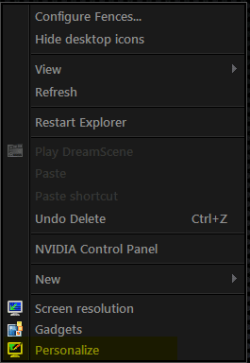
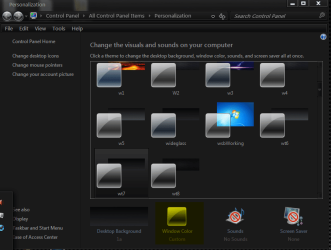
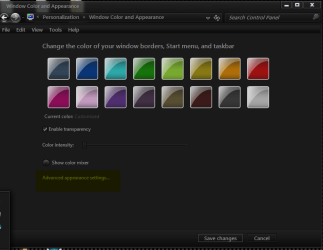
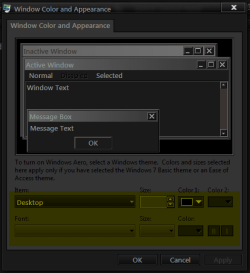
Right click on Desktop go to Personalize then Window Color then Advanced appearance settings then use the Dropdown menu to change the fonts, font sizes You can do the icons there to or
For the icon size hold Ctrl & scroll your mouse wheel
Jerry
 

Attachments

  • Personalize.png
    Personalize.png
    5 KB · Views: 3
  • Window Color.png
    Window Color.png
    37 KB · Views: 5
  • Advanced appearance settings.png
    Advanced appearance settings.png
    28.9 KB · Views: 4
  • Dropdown menu.png
    Dropdown menu.png
    12.4 KB · Views: 2

My Computer

Computer type
Laptop
Computer Manufacturer/Model Number
Sager NP9170
OS
Win 7 Pro x64 / Win 10 Pro
CPU
Intel(R) Core(TM) i7-3630QM CPU @ 2.40GHz
Motherboard
CLEVO P170EM
Memory
12 GB
Graphics Card(s)
(1) Intel(R) HD Graphics 4000 (2) NVIDIA GeForce GTX 675M
Sound Card
(1) Realtek High Definition Audio (2) Intel(R) Display Aud
Monitor(s) Displays
17.3
Screen Resolution
1920x1080
Hard Drives
(1) Samsung 860 EVO 500GB(OS) (1) Samsung 860 EVO 500GB(Data)
Keyboard
Backlite
Antivirus
MSE, Malwarebytes Pro
Browser
Firefox
Other Info
DESKTOP: Custom-built.
OS: Win 10 Pro x64.
CASE: Rosewill R5.
CPU: Intel I5 4670K CPU @ 3.40GHz.
CPU COOLER: Cool Master Hyper 212 EVO.
MOTHERBOARD: Asus Z87-A.
MEMORY: Kingston HyperX 2x4 GB.
GPU: Nvidia Geforce 650 TI.
PSU: Corsair TX750.
DRIVES: (1) Samsung 840 120 GB SSD (2) Western Digital blue 500 GB 7200 RPM.
Thanks for the response. I had seen that and made changes there. However, if I change themes the old font sizes return. Don't know how to save those changes for each or all themes so they persist between theme changes.
 
Last edited:

My Computer

Computer Manufacturer/Model Number
Toshiba Satellite
OS
Windows 7 Home Premium 64bit
Memory
4Gb
Thanks for the response. I had seen that and made changes there. However, if I change themes the old font sizes return. Don't know how to save those changes for each or all themes so they persist between theme changes.

OK after doing whats in post #2
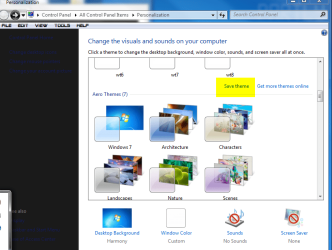
click Save Changes then look for Save Theme then Name it & it should save it give it a try
Jerry
 

Attachments

  • save changes.png
    save changes.png
    36.5 KB · Views: 2
  • save theme.png
    save theme.png
    56.3 KB · Views: 2
  • theme name.png
    theme name.png
    7.2 KB · Views: 1

My Computer

Computer type
Laptop
Computer Manufacturer/Model Number
Sager NP9170
OS
Win 7 Pro x64 / Win 10 Pro
CPU
Intel(R) Core(TM) i7-3630QM CPU @ 2.40GHz
Motherboard
CLEVO P170EM
Memory
12 GB
Graphics Card(s)
(1) Intel(R) HD Graphics 4000 (2) NVIDIA GeForce GTX 675M
Sound Card
(1) Realtek High Definition Audio (2) Intel(R) Display Aud
Monitor(s) Displays
17.3
Screen Resolution
1920x1080
Hard Drives
(1) Samsung 860 EVO 500GB(OS) (1) Samsung 860 EVO 500GB(Data)
Keyboard
Backlite
Antivirus
MSE, Malwarebytes Pro
Browser
Firefox
Other Info
DESKTOP: Custom-built.
OS: Win 10 Pro x64.
CASE: Rosewill R5.
CPU: Intel I5 4670K CPU @ 3.40GHz.
CPU COOLER: Cool Master Hyper 212 EVO.
MOTHERBOARD: Asus Z87-A.
MEMORY: Kingston HyperX 2x4 GB.
GPU: Nvidia Geforce 650 TI.
PSU: Corsair TX750.
DRIVES: (1) Samsung 840 120 GB SSD (2) Western Digital blue 500 GB 7200 RPM.
Back
Top