XP x86 and 7 x64 dual boot issue

Kirki

New member
Local time
4:30 AM
Messages
8
Location
Liverpool, UK
Hi,

Been reading many posts here to see if they could help me with a problem but couldn't find a definitive answer.

I have XP Sp3 32-bit on my main HDD, been using it fine for quite some time, and I wanted to try 7, so I bought a new HDD and installed W7 RC 64-bit on it. I then setup the dual boot and everything was working fine - I could chose which to load up, both were working fine, and I could see the W7 files while working on XP and vice-versa. I then got more confortable using W7 (as most people here, no doubt, cause it is bril ;)) and started using more and more often, to the point of copying loads of files from my XP disk (My Docs, Videos, Music, Favourites etc) onto the W7 disk so I could have them handy.

Then after a few days I noticed my XP installation started crashing every now and again. It's got progressively worse to the point my XP installation is not loading up at the moment - XP loads all the way up to displaying my desktop wallpaper picture and then freezes. Nothing happens for quite some time and I end up having to swich it off.

When I try to boot into XP again it goes into CHKDSK, it does it's thing for a good length of time and then when it loads XP it freezes on the desktop wallpaper again. Safe mode works fine and everything seems in order, but when I try the real thing it freezes again.

I'm very security conscious, but to eliminate this option I've ran a few AV and Malware programs and nothing found on both disks, so I'm confident this is not the problem. The XP disk itself also seems fine - cause if I load W7 I can see all the files currently on the XP disk, no problem opening/copying them and nothing has been lost.

Anyone know of any known issues of mixing XP (32) and 7 (64) OS? Something to do with how they handle file structures, indexes etc for example? Could my XP be getting system files mixed up with the W7 installation? Or W7 writting files that corrupt the XP file system? Should I have kept XP disk hidden from W7 in the first place?

Don't know what else to try but I need to run XP (due to 3D software) and didn't want to get rid of W7... :(

Thanks in advance.
 

My Computer My Computer

At a glance

Windows 7 Home PremiumAMD Athlon 64 X2 6000+ AM2 3.0GHz6GB Corsair XMS2-6400 CL5Sapphire HD 5750 1GB PCI-E
Computer Manufacturer/Model Number
DIY2007
OS
Windows 7 Home Premium
CPU
AMD Athlon 64 X2 6000+ AM2 3.0GHz
Motherboard
Gigabyte GA-M55S-S3 (rev 2)
Memory
6GB Corsair XMS2-6400 CL5
Graphics Card(s)
Sapphire HD 5750 1GB PCI-E
Monitor(s) Displays
LG 22" and Samsung LE40M86 LCD TV
Screen Resolution
1680x1050
Hard Drives
Samsung SpinPoint F3 1TB SATA (HD103SJ)
Seagate Barracuda 7200.10 500GB SATA
PSU
OCZ 600W StealthXStream
Cooling
Arctic Cooling Freezer 64 Pro PWM
Keyboard
Logitech Cordless Wave
I do not like the fact that defrag is scheduled by default. I think it might cause problems and perhaps it's possible that it was the thing that bit you.

For what it's worth, I've disabled the scheduled defrag before it had a chance to run and my XP x86 and Win7 x64 have been living together fine.
 

My Computer My Computer

At a glance

XP, Seven, 2008R2AMD, Intel, VIACorsair, Kingston, etc.ATI, NVIDIA
Computer Manufacturer/Model Number
Too many to list.
OS
XP, Seven, 2008R2
CPU
AMD, Intel, VIA
Motherboard
Various
Memory
Corsair, Kingston, etc.
Graphics Card(s)
ATI, NVIDIA
Monitor(s) Displays
Samsung
Hard Drives
Maxtor, Western Digital
Keyboard
qwerty
Internet Speed
22 Mb/s @ home, 1 Gb/s @ server
Other Info
All of my systems still run fastest on XP 32-bit for the most part. Win7 is fun to play with, but I still prefer XP for raw speed, security, and functionality.
There shouldn't be a problem running those 2 together. How have you got your partitions setup? Have you tried running chkdsk from Windows 7 on the WinXP partition?
 

My Computer My Computer

At a glance

Windows 7 x64Intel Core 2 Quad Q6700 @ 3.2 GHz4 GigATI Radeon HD 4870
Computer Manufacturer/Model Number
Home Built
OS
Windows 7 x64
CPU
Intel Core 2 Quad Q6700 @ 3.2 GHz
Motherboard
Gigabyte GA-965P-DQ6
Memory
4 Gig
Graphics Card(s)
ATI Radeon HD 4870
Sound Card
Creative X-Fi XtremeMusic
Monitor(s) Displays
Samsung SyncMaster 226BW
Screen Resolution
1680 x 1050
PSU
Antec TruePower TP-550
Case
Antec P180
Cooling
Zalman CNPS9700, 3 Antec TriCool 120mm
Keyboard
Logitech G15
@sup3rsprt - wasnt aware of this so will have a look and make sure it is not on the schedule (just in case).

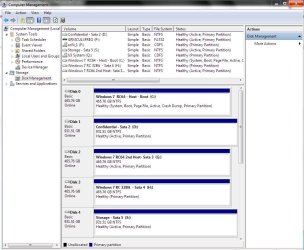
@Frostbite - not sure how to attach image with the partition info (newbies eh) but will give it a try. After the problems started I did try to run CHKDSK from within W7 once - it said it had to unmount the XP partition (seen on W7 as D:) which I agreed to, then it did it's thing but the problems persisted, didn't make any difference. Will try it again and see if I can get hold of a log file detailing what was done.
 

Attachments

  • Partitions.png
    Partitions.png
    13.8 KB · Views: 141

My Computer My Computer

At a glance

Windows 7 Home PremiumAMD Athlon 64 X2 6000+ AM2 3.0GHz6GB Corsair XMS2-6400 CL5Sapphire HD 5750 1GB PCI-E
Computer Manufacturer/Model Number
DIY2007
OS
Windows 7 Home Premium
CPU
AMD Athlon 64 X2 6000+ AM2 3.0GHz
Motherboard
Gigabyte GA-M55S-S3 (rev 2)
Memory
6GB Corsair XMS2-6400 CL5
Graphics Card(s)
Sapphire HD 5750 1GB PCI-E
Monitor(s) Displays
LG 22" and Samsung LE40M86 LCD TV
Screen Resolution
1680x1050
Hard Drives
Samsung SpinPoint F3 1TB SATA (HD103SJ)
Seagate Barracuda 7200.10 500GB SATA
PSU
OCZ 600W StealthXStream
Cooling
Arctic Cooling Freezer 64 Pro PWM
Keyboard
Logitech Cordless Wave
By the looks of the partitioning there you installed 7 on the second partition instead of the first on the new drive as well as leaving unallocated empty drive space at the back end on both. There's inconsistencies resulting in seeing the disk check tool being run on each startup.

What did you use to partition the drives with? The C and E partitions on the second drive would have been better setup as one larger single primary for 7 there. The H partition can be expanded into the large gap seen at the back end of that drive.

The 8mb at the tail end of the XP primary is minor while you wouldn't likely be seeing a dynamic volume since most desktops use the basic type. And no your XP system files are not getting mixed in with the ones for the 7 installation. You'll want to review the excellent tutorial written for setting up a dual boot of XP along with 7. http://www.sevenforums.com/tutorials/8057-dual-boot-installation-windows-7-xp.html

I had both the 32bit and 64bit 7 beta builds setup in a dual boot with XP and Vista(both 32bit) with each 7(32/64) on the second primary of each drive one for XP, one for Vista until the RCs were out. XP is now a forgotten memory while Vista is run on the new Virtual PC beta.

Presently here there are two 64bit installations on separate drives set up in a 3way boot with the 32bit RC along with two other large capacity storage drives. The second 64bit installation(former XP drive) was also a stand alone dual boot setup with the 32bit RC(former Vista drive).
 

Attachments

  • CURRENT PARTITIONS.jpg
    CURRENT PARTITIONS.jpg
    108.4 KB · Views: 122

My Computers My Computers

  • At a glance

    W7 Ultimate x64/W10 Pro x64/W11 Pro Triple Bo...AMD Phenom II X4 975 Deneb 3.6ghz - 965 2nd r...Kingston Hyper X DDR3 1600 1.5v 16gb - Hyper ...MSI HD Radeon 5750 1gb - MSI HD Radeon 6450 o...
    Computer type
    PC/Desktop
    Computer Manufacturer/Model Number
    Custom builds = 2
    OS
    W7 Ultimate x64/W10 Pro x64/W11 Pro Triple Boot - Main PC W7 Remote PC Micro ATX W7 Pro x64/W11 Pro
    CPU
    AMD Phenom II X4 975 Deneb 3.6ghz - 965 2nd remote pc
    Motherboard
    Gigabyte GA-790XTA-UD4-Gigabyte GA-880GM-D2H remote pc
    Memory
    Kingston Hyper X DDR3 1600 1.5v 16gb - Hyper X Fury 8gb 2nd
    Graphics Card(s)
    MSI HD Radeon 5750 1gb - MSI HD Radeon 6450 on mini tower
    Sound Card
    Creative Labs X-Fi Xtreme Audio P - Realtek onooard 2nd case
    Monitor(s) Displays
    ASUS VW199T-P 19" HP 2082a Main-HP 2082a 20" remote pc
    Screen Resolution
    Asus 1440x900 - HP 1600x900
    Hard Drives
    WD Black 1TB HD per OS W7, W10, and pending W11 presently on 500gb OS Drive - Pending Triple 1TB HDs for Spanned Storage/backup volume
    Single 2TB external USB enclosure, single 1TB System 7 Host/Boot drive, Pending 8TB external HD for system image b
    PSU
    Corsair 750TX - primary / Corsair CX600 - second
    Case
    Antec 900-2 - SSD compatible / NZXT Vulcan mini tower
    Cooling
    Zalman CNPS9900A
    Keyboard
    AZIO L70 Backlit Letters Gaming - ONN Cordless/USB
    Mouse
    MSI DS200 Programmable, Logitech Cordless
    Internet Speed
    30mbps upgrade - primary hard wired - mini tower usb WiFi
    Antivirus
    GFI VIPRE Internet Security 2014 on W7 2016 beta on W10,
    Browser
    Cyberfox, WaterFox 64bit FF variants, FireFox x64, Pale Moon
    Other Info
    Accomdata fan cooled usb 2.0 PIDE/Sata II, III external enclosure.
    Sambient usb/eSata PATA/Sata II, III external enclosure.
  • At a glance

    W7 Pro x64/W11 ProAMD Deneb 3.6ghz - 965Kingston Hyper X Fury 8gbMSI HD Radeon 6450 DVI Output
    Computer type
    PC/Desktop
    System Manufacturer/Model Number
    CUSTOM ASSEMBLY
    OS
    W7 Pro x64/W11 Pro
    CPU
    AMD Deneb 3.6ghz - 965
    Motherboard
    Gigabyte GA-880GM-D2H remote pc
    Memory
    Kingston Hyper X Fury 8gb
    Graphics Card(s)
    MSI HD Radeon 6450 DVI Output
    Sound Card
    Realtek onooard Creative or Other separate PENDING
    Monitor(s) Displays
    VIZIO 32" LCD TV Separate LCD Pending
    Screen Resolution
    1600x1080
    Hard Drives
    WD 500GB OS Host/Boot WD Green 1TB Storage/Backup
    PSU
    Corsair 600W - THERMALTAKE 600W spare case
    Case
    NZXT Vulcan mini tower
    Cooling
    Twin 120mm Top Fans - 240mm Side Cover
    Keyboard
    ONN Cordless/USB Logitech Cordless
    Mouse
    ONN USB/Cordless - Logitech Cordless
    Internet Speed
    DSL 5G
    Browser
    MS Edge, FireFox, WaterFox x64, FireFox Nightly
    Other Info
    OS Testing-Remote Access to Main TeamViewer

My Computers My Computers

  • At a glance

    7 X64i5 84002x8gb 3200mhz
    Computer type
    PC/Desktop
    OS
    7 X64
    CPU
    i5 8400
    Motherboard
    gigabyte b365m ds3h
    Memory
    2x8gb 3200mhz
    Hard Drives
    various
    PSU
    pure power 11 400w cm
    Case
    Coolermaster
    Cooling
    cryorig m9i
  • At a glance

    7x64g54008gb ddr4 2400
    Computer type
    PC/Desktop
    OS
    7x64
    CPU
    g5400
    Motherboard
    ga b365m ds3h
    Memory
    8gb ddr4 2400
    PSU
    xfx pro 450w
A few good tips for using the msconfig utility.
 

My Computers My Computers

  • At a glance

    W7 Ultimate x64/W10 Pro x64/W11 Pro Triple Bo...AMD Phenom II X4 975 Deneb 3.6ghz - 965 2nd r...Kingston Hyper X DDR3 1600 1.5v 16gb - Hyper ...MSI HD Radeon 5750 1gb - MSI HD Radeon 6450 o...
    Computer type
    PC/Desktop
    Computer Manufacturer/Model Number
    Custom builds = 2
    OS
    W7 Ultimate x64/W10 Pro x64/W11 Pro Triple Boot - Main PC W7 Remote PC Micro ATX W7 Pro x64/W11 Pro
    CPU
    AMD Phenom II X4 975 Deneb 3.6ghz - 965 2nd remote pc
    Motherboard
    Gigabyte GA-790XTA-UD4-Gigabyte GA-880GM-D2H remote pc
    Memory
    Kingston Hyper X DDR3 1600 1.5v 16gb - Hyper X Fury 8gb 2nd
    Graphics Card(s)
    MSI HD Radeon 5750 1gb - MSI HD Radeon 6450 on mini tower
    Sound Card
    Creative Labs X-Fi Xtreme Audio P - Realtek onooard 2nd case
    Monitor(s) Displays
    ASUS VW199T-P 19" HP 2082a Main-HP 2082a 20" remote pc
    Screen Resolution
    Asus 1440x900 - HP 1600x900
    Hard Drives
    WD Black 1TB HD per OS W7, W10, and pending W11 presently on 500gb OS Drive - Pending Triple 1TB HDs for Spanned Storage/backup volume
    Single 2TB external USB enclosure, single 1TB System 7 Host/Boot drive, Pending 8TB external HD for system image b
    PSU
    Corsair 750TX - primary / Corsair CX600 - second
    Case
    Antec 900-2 - SSD compatible / NZXT Vulcan mini tower
    Cooling
    Zalman CNPS9900A
    Keyboard
    AZIO L70 Backlit Letters Gaming - ONN Cordless/USB
    Mouse
    MSI DS200 Programmable, Logitech Cordless
    Internet Speed
    30mbps upgrade - primary hard wired - mini tower usb WiFi
    Antivirus
    GFI VIPRE Internet Security 2014 on W7 2016 beta on W10,
    Browser
    Cyberfox, WaterFox 64bit FF variants, FireFox x64, Pale Moon
    Other Info
    Accomdata fan cooled usb 2.0 PIDE/Sata II, III external enclosure.
    Sambient usb/eSata PATA/Sata II, III external enclosure.
  • At a glance

    W7 Pro x64/W11 ProAMD Deneb 3.6ghz - 965Kingston Hyper X Fury 8gbMSI HD Radeon 6450 DVI Output
    Computer type
    PC/Desktop
    System Manufacturer/Model Number
    CUSTOM ASSEMBLY
    OS
    W7 Pro x64/W11 Pro
    CPU
    AMD Deneb 3.6ghz - 965
    Motherboard
    Gigabyte GA-880GM-D2H remote pc
    Memory
    Kingston Hyper X Fury 8gb
    Graphics Card(s)
    MSI HD Radeon 6450 DVI Output
    Sound Card
    Realtek onooard Creative or Other separate PENDING
    Monitor(s) Displays
    VIZIO 32" LCD TV Separate LCD Pending
    Screen Resolution
    1600x1080
    Hard Drives
    WD 500GB OS Host/Boot WD Green 1TB Storage/Backup
    PSU
    Corsair 600W - THERMALTAKE 600W spare case
    Case
    NZXT Vulcan mini tower
    Cooling
    Twin 120mm Top Fans - 240mm Side Cover
    Keyboard
    ONN Cordless/USB Logitech Cordless
    Mouse
    ONN USB/Cordless - Logitech Cordless
    Internet Speed
    DSL 5G
    Browser
    MS Edge, FireFox, WaterFox x64, FireFox Nightly
    Other Info
    OS Testing-Remote Access to Main TeamViewer
people still use msconfig with Autoruns around? eek!
 

My Computer My Computer

At a glance

XP, Seven, 2008R2AMD, Intel, VIACorsair, Kingston, etc.ATI, NVIDIA
Computer Manufacturer/Model Number
Too many to list.
OS
XP, Seven, 2008R2
CPU
AMD, Intel, VIA
Motherboard
Various
Memory
Corsair, Kingston, etc.
Graphics Card(s)
ATI, NVIDIA
Monitor(s) Displays
Samsung
Hard Drives
Maxtor, Western Digital
Keyboard
qwerty
Internet Speed
22 Mb/s @ home, 1 Gb/s @ server
Other Info
All of my systems still run fastest on XP 32-bit for the most part. Win7 is fun to play with, but I still prefer XP for raw speed, security, and functionality.
There are other methods to consider like setting services to manual rather then automatic to help out in solving start up problems. With the XP disk in the drive another old tool is the system file checker you run by typing "sfc /scannow" in at the Run command line.

One of the main problems I see right off however is a need to check the fragmentation level on the XP drive as well as the likely need to recall any recent updates like video or sound drivers that went on XP. Taking notes if any errors show up as well as a look in the XP event viewer can often help pinpointing a problem.
 

My Computers My Computers

  • At a glance

    W7 Ultimate x64/W10 Pro x64/W11 Pro Triple Bo...AMD Phenom II X4 975 Deneb 3.6ghz - 965 2nd r...Kingston Hyper X DDR3 1600 1.5v 16gb - Hyper ...MSI HD Radeon 5750 1gb - MSI HD Radeon 6450 o...
    Computer type
    PC/Desktop
    Computer Manufacturer/Model Number
    Custom builds = 2
    OS
    W7 Ultimate x64/W10 Pro x64/W11 Pro Triple Boot - Main PC W7 Remote PC Micro ATX W7 Pro x64/W11 Pro
    CPU
    AMD Phenom II X4 975 Deneb 3.6ghz - 965 2nd remote pc
    Motherboard
    Gigabyte GA-790XTA-UD4-Gigabyte GA-880GM-D2H remote pc
    Memory
    Kingston Hyper X DDR3 1600 1.5v 16gb - Hyper X Fury 8gb 2nd
    Graphics Card(s)
    MSI HD Radeon 5750 1gb - MSI HD Radeon 6450 on mini tower
    Sound Card
    Creative Labs X-Fi Xtreme Audio P - Realtek onooard 2nd case
    Monitor(s) Displays
    ASUS VW199T-P 19" HP 2082a Main-HP 2082a 20" remote pc
    Screen Resolution
    Asus 1440x900 - HP 1600x900
    Hard Drives
    WD Black 1TB HD per OS W7, W10, and pending W11 presently on 500gb OS Drive - Pending Triple 1TB HDs for Spanned Storage/backup volume
    Single 2TB external USB enclosure, single 1TB System 7 Host/Boot drive, Pending 8TB external HD for system image b
    PSU
    Corsair 750TX - primary / Corsair CX600 - second
    Case
    Antec 900-2 - SSD compatible / NZXT Vulcan mini tower
    Cooling
    Zalman CNPS9900A
    Keyboard
    AZIO L70 Backlit Letters Gaming - ONN Cordless/USB
    Mouse
    MSI DS200 Programmable, Logitech Cordless
    Internet Speed
    30mbps upgrade - primary hard wired - mini tower usb WiFi
    Antivirus
    GFI VIPRE Internet Security 2014 on W7 2016 beta on W10,
    Browser
    Cyberfox, WaterFox 64bit FF variants, FireFox x64, Pale Moon
    Other Info
    Accomdata fan cooled usb 2.0 PIDE/Sata II, III external enclosure.
    Sambient usb/eSata PATA/Sata II, III external enclosure.
  • At a glance

    W7 Pro x64/W11 ProAMD Deneb 3.6ghz - 965Kingston Hyper X Fury 8gbMSI HD Radeon 6450 DVI Output
    Computer type
    PC/Desktop
    System Manufacturer/Model Number
    CUSTOM ASSEMBLY
    OS
    W7 Pro x64/W11 Pro
    CPU
    AMD Deneb 3.6ghz - 965
    Motherboard
    Gigabyte GA-880GM-D2H remote pc
    Memory
    Kingston Hyper X Fury 8gb
    Graphics Card(s)
    MSI HD Radeon 6450 DVI Output
    Sound Card
    Realtek onooard Creative or Other separate PENDING
    Monitor(s) Displays
    VIZIO 32" LCD TV Separate LCD Pending
    Screen Resolution
    1600x1080
    Hard Drives
    WD 500GB OS Host/Boot WD Green 1TB Storage/Backup
    PSU
    Corsair 600W - THERMALTAKE 600W spare case
    Case
    NZXT Vulcan mini tower
    Cooling
    Twin 120mm Top Fans - 240mm Side Cover
    Keyboard
    ONN Cordless/USB Logitech Cordless
    Mouse
    ONN USB/Cordless - Logitech Cordless
    Internet Speed
    DSL 5G
    Browser
    MS Edge, FireFox, WaterFox x64, FireFox Nightly
    Other Info
    OS Testing-Remote Access to Main TeamViewer
Night Hawk and SIW2 - thanks for your replies, got some useful info there. I'll go through them again when I get home tonight and post some more info to let you know what happened.

As for the partitions E, C, H on the 2nd HDD:
I created _BKP right after installing the new drive and before installing 7, so I could store some large DVD files as the XP partition was filling up. Didn't think this would cause any problems at the time...
As for _BKP2 I created this once I started having these problems with XP. The _BKP wasn't big enought to salvage all my personal files currently on the XP drive. It's only a temporary measure though - and as soon as I have everything working stable again I may just remove _BKP2 and expand the _Win7 to take the rest of the disk.
 

My Computer My Computer

At a glance

Windows 7 Home PremiumAMD Athlon 64 X2 6000+ AM2 3.0GHz6GB Corsair XMS2-6400 CL5Sapphire HD 5750 1GB PCI-E
Computer Manufacturer/Model Number
DIY2007
OS
Windows 7 Home Premium
CPU
AMD Athlon 64 X2 6000+ AM2 3.0GHz
Motherboard
Gigabyte GA-M55S-S3 (rev 2)
Memory
6GB Corsair XMS2-6400 CL5
Graphics Card(s)
Sapphire HD 5750 1GB PCI-E
Monitor(s) Displays
LG 22" and Samsung LE40M86 LCD TV
Screen Resolution
1680x1050
Hard Drives
Samsung SpinPoint F3 1TB SATA (HD103SJ)
Seagate Barracuda 7200.10 500GB SATA
PSU
OCZ 600W StealthXStream
Cooling
Arctic Cooling Freezer 64 Pro PWM
Keyboard
Logitech Cordless Wave
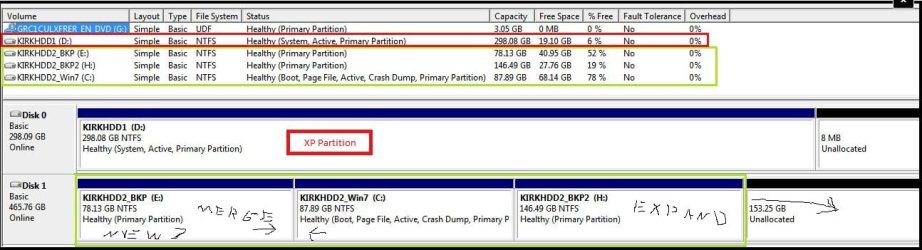
The copy of your partitioning here will show a proposed repartitioning idea to covert the first two partitions into one larger primary for 7 as well utilizing the vacant unallocated drive space at the back end on Drive #2.

You would first expand the last H partition into that space where you then move the contents on E to H. From there you would simply need a new 7 install onto the larger single primary used to replace the present E + C partitions. Once you start loading 7 up with programs you'll want the extra space for the primary there.

Unfortunately the penmanship using a trackball is a little ruff for illustrating things however! :shock::D
 

Attachments

  • KIRKHDD2.jpg
    KIRKHDD2.jpg
    81.1 KB · Views: 22

My Computers My Computers

  • At a glance

    W7 Ultimate x64/W10 Pro x64/W11 Pro Triple Bo...AMD Phenom II X4 975 Deneb 3.6ghz - 965 2nd r...Kingston Hyper X DDR3 1600 1.5v 16gb - Hyper ...MSI HD Radeon 5750 1gb - MSI HD Radeon 6450 o...
    Computer type
    PC/Desktop
    Computer Manufacturer/Model Number
    Custom builds = 2
    OS
    W7 Ultimate x64/W10 Pro x64/W11 Pro Triple Boot - Main PC W7 Remote PC Micro ATX W7 Pro x64/W11 Pro
    CPU
    AMD Phenom II X4 975 Deneb 3.6ghz - 965 2nd remote pc
    Motherboard
    Gigabyte GA-790XTA-UD4-Gigabyte GA-880GM-D2H remote pc
    Memory
    Kingston Hyper X DDR3 1600 1.5v 16gb - Hyper X Fury 8gb 2nd
    Graphics Card(s)
    MSI HD Radeon 5750 1gb - MSI HD Radeon 6450 on mini tower
    Sound Card
    Creative Labs X-Fi Xtreme Audio P - Realtek onooard 2nd case
    Monitor(s) Displays
    ASUS VW199T-P 19" HP 2082a Main-HP 2082a 20" remote pc
    Screen Resolution
    Asus 1440x900 - HP 1600x900
    Hard Drives
    WD Black 1TB HD per OS W7, W10, and pending W11 presently on 500gb OS Drive - Pending Triple 1TB HDs for Spanned Storage/backup volume
    Single 2TB external USB enclosure, single 1TB System 7 Host/Boot drive, Pending 8TB external HD for system image b
    PSU
    Corsair 750TX - primary / Corsair CX600 - second
    Case
    Antec 900-2 - SSD compatible / NZXT Vulcan mini tower
    Cooling
    Zalman CNPS9900A
    Keyboard
    AZIO L70 Backlit Letters Gaming - ONN Cordless/USB
    Mouse
    MSI DS200 Programmable, Logitech Cordless
    Internet Speed
    30mbps upgrade - primary hard wired - mini tower usb WiFi
    Antivirus
    GFI VIPRE Internet Security 2014 on W7 2016 beta on W10,
    Browser
    Cyberfox, WaterFox 64bit FF variants, FireFox x64, Pale Moon
    Other Info
    Accomdata fan cooled usb 2.0 PIDE/Sata II, III external enclosure.
    Sambient usb/eSata PATA/Sata II, III external enclosure.
  • At a glance

    W7 Pro x64/W11 ProAMD Deneb 3.6ghz - 965Kingston Hyper X Fury 8gbMSI HD Radeon 6450 DVI Output
    Computer type
    PC/Desktop
    System Manufacturer/Model Number
    CUSTOM ASSEMBLY
    OS
    W7 Pro x64/W11 Pro
    CPU
    AMD Deneb 3.6ghz - 965
    Motherboard
    Gigabyte GA-880GM-D2H remote pc
    Memory
    Kingston Hyper X Fury 8gb
    Graphics Card(s)
    MSI HD Radeon 6450 DVI Output
    Sound Card
    Realtek onooard Creative or Other separate PENDING
    Monitor(s) Displays
    VIZIO 32" LCD TV Separate LCD Pending
    Screen Resolution
    1600x1080
    Hard Drives
    WD 500GB OS Host/Boot WD Green 1TB Storage/Backup
    PSU
    Corsair 600W - THERMALTAKE 600W spare case
    Case
    NZXT Vulcan mini tower
    Cooling
    Twin 120mm Top Fans - 240mm Side Cover
    Keyboard
    ONN Cordless/USB Logitech Cordless
    Mouse
    ONN USB/Cordless - Logitech Cordless
    Internet Speed
    DSL 5G
    Browser
    MS Edge, FireFox, WaterFox x64, FireFox Nightly
    Other Info
    OS Testing-Remote Access to Main TeamViewer
Thanks for the suggestion Night Hawk, might end up doing that - and you did rather well scribbling with a trackball. hehe.

As for my problems last couple of nights I've been logging into XP in safe mode and checking events, removing things from the startup, ran CHKDSK again and defragged the XP drive, ran SeaTools to check the disk (it passed) - so tonight I'll give XP a proper go again to see if it's still alive. Fingers crossed...

The one thing that caught my attention when looking at the events however was this warning: "An error was detected on device \Device\Harddisk0\D during a paging operation" - had this event 8 times. Trying to find out more on Google, but has anyone seen kind of thing before?

Also, another question: my XP has been updated via MS updates to SP3, but my install disk is a few years old and only up to SP2. Would that cause any problems if I decided to run a Repair installation using that CD? Or would this simply revert my XP back to SP2?

Thanks again for helping me out. Much appreciated.
 

My Computer My Computer

At a glance

Windows 7 Home PremiumAMD Athlon 64 X2 6000+ AM2 3.0GHz6GB Corsair XMS2-6400 CL5Sapphire HD 5750 1GB PCI-E
Computer Manufacturer/Model Number
DIY2007
OS
Windows 7 Home Premium
CPU
AMD Athlon 64 X2 6000+ AM2 3.0GHz
Motherboard
Gigabyte GA-M55S-S3 (rev 2)
Memory
6GB Corsair XMS2-6400 CL5
Graphics Card(s)
Sapphire HD 5750 1GB PCI-E
Monitor(s) Displays
LG 22" and Samsung LE40M86 LCD TV
Screen Resolution
1680x1050
Hard Drives
Samsung SpinPoint F3 1TB SATA (HD103SJ)
Seagate Barracuda 7200.10 500GB SATA
PSU
OCZ 600W StealthXStream
Cooling
Arctic Cooling Freezer 64 Pro PWM
Keyboard
Logitech Cordless Wave
The first thing if a repair install will even work would be rolling the system back from the SP3 update. To effectively perform a repair install with it on you would need an SP3 disk instead.

Each large service makes quite a few changes where a roll back would be the only option to avoid a complete full install if it works. With the paging file error being seen it could also point out the drive getting filled sooner then you realized just before the "out of memory" error comes up or you may some bad sectors on the first drive itself.

One option available and even used by some gamers running XP was to disable the creation of the paging file entirely to see if that helps out any. If you are running out of drive space used for virtual memory that could be part of the problem preventing a normal startup.
 

My Computers My Computers

  • At a glance

    W7 Ultimate x64/W10 Pro x64/W11 Pro Triple Bo...AMD Phenom II X4 975 Deneb 3.6ghz - 965 2nd r...Kingston Hyper X DDR3 1600 1.5v 16gb - Hyper ...MSI HD Radeon 5750 1gb - MSI HD Radeon 6450 o...
    Computer type
    PC/Desktop
    Computer Manufacturer/Model Number
    Custom builds = 2
    OS
    W7 Ultimate x64/W10 Pro x64/W11 Pro Triple Boot - Main PC W7 Remote PC Micro ATX W7 Pro x64/W11 Pro
    CPU
    AMD Phenom II X4 975 Deneb 3.6ghz - 965 2nd remote pc
    Motherboard
    Gigabyte GA-790XTA-UD4-Gigabyte GA-880GM-D2H remote pc
    Memory
    Kingston Hyper X DDR3 1600 1.5v 16gb - Hyper X Fury 8gb 2nd
    Graphics Card(s)
    MSI HD Radeon 5750 1gb - MSI HD Radeon 6450 on mini tower
    Sound Card
    Creative Labs X-Fi Xtreme Audio P - Realtek onooard 2nd case
    Monitor(s) Displays
    ASUS VW199T-P 19" HP 2082a Main-HP 2082a 20" remote pc
    Screen Resolution
    Asus 1440x900 - HP 1600x900
    Hard Drives
    WD Black 1TB HD per OS W7, W10, and pending W11 presently on 500gb OS Drive - Pending Triple 1TB HDs for Spanned Storage/backup volume
    Single 2TB external USB enclosure, single 1TB System 7 Host/Boot drive, Pending 8TB external HD for system image b
    PSU
    Corsair 750TX - primary / Corsair CX600 - second
    Case
    Antec 900-2 - SSD compatible / NZXT Vulcan mini tower
    Cooling
    Zalman CNPS9900A
    Keyboard
    AZIO L70 Backlit Letters Gaming - ONN Cordless/USB
    Mouse
    MSI DS200 Programmable, Logitech Cordless
    Internet Speed
    30mbps upgrade - primary hard wired - mini tower usb WiFi
    Antivirus
    GFI VIPRE Internet Security 2014 on W7 2016 beta on W10,
    Browser
    Cyberfox, WaterFox 64bit FF variants, FireFox x64, Pale Moon
    Other Info
    Accomdata fan cooled usb 2.0 PIDE/Sata II, III external enclosure.
    Sambient usb/eSata PATA/Sata II, III external enclosure.
  • At a glance

    W7 Pro x64/W11 ProAMD Deneb 3.6ghz - 965Kingston Hyper X Fury 8gbMSI HD Radeon 6450 DVI Output
    Computer type
    PC/Desktop
    System Manufacturer/Model Number
    CUSTOM ASSEMBLY
    OS
    W7 Pro x64/W11 Pro
    CPU
    AMD Deneb 3.6ghz - 965
    Motherboard
    Gigabyte GA-880GM-D2H remote pc
    Memory
    Kingston Hyper X Fury 8gb
    Graphics Card(s)
    MSI HD Radeon 6450 DVI Output
    Sound Card
    Realtek onooard Creative or Other separate PENDING
    Monitor(s) Displays
    VIZIO 32" LCD TV Separate LCD Pending
    Screen Resolution
    1600x1080
    Hard Drives
    WD 500GB OS Host/Boot WD Green 1TB Storage/Backup
    PSU
    Corsair 600W - THERMALTAKE 600W spare case
    Case
    NZXT Vulcan mini tower
    Cooling
    Twin 120mm Top Fans - 240mm Side Cover
    Keyboard
    ONN Cordless/USB Logitech Cordless
    Mouse
    ONN USB/Cordless - Logitech Cordless
    Internet Speed
    DSL 5G
    Browser
    MS Edge, FireFox, WaterFox x64, FireFox Nightly
    Other Info
    OS Testing-Remote Access to Main TeamViewer
Back
Top