XPMUser

Akothegreat

New member
Just using my XP mode and got annoyed that auto login stops working after XP mode restarts, so I removed the password for XPMUser. Then I used system restore for some reason. When it restarted, it didn't auto-log in us usual but besides that, XPMUser is not permitted to login now! Tried administrator and guest but both are disabled, so I have no idea how to login if all users are unable to login. I can't and I don't know how to make it boot command line using VPC. So I uninstalled XP mode, to try again...

I'm just downloading right now that 469MB XP mode all over again and reinstall it

Any idea why and how to prevent this problem in the future?
 

My Computer

OS
Windows 7 Ultimate 32-bit
CPU
Intel Core 2 CPU T5500 1.66GHz
Memory
2GB
Graphics Card(s)
ATI Radeon Express Series
Hard Drives
150GB SATA
Hello Ako, welcome to the Seven Forums.

If Virtual PC integration features are installed and enabled, you must have a password to logon to XP Mode. When integration features are not installed, or when they are installed but not enabled, you can logon using a user account with no password.

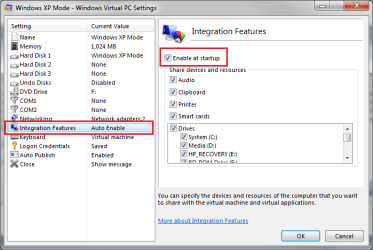
If you have removed the password and can't logon, you have to shut down XP Mode, disable integration features, reboot and log in without password, create a new password and re-enable integration features. To enable or disable integration features, go to XP Mode settings.

IF_auto_enable.png

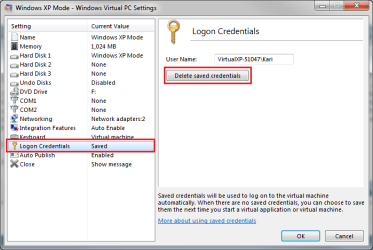
To setup XP Mode auto logon using any user account, go to XP Mode settings and first delete the saved credentials.

logon_credentials.png

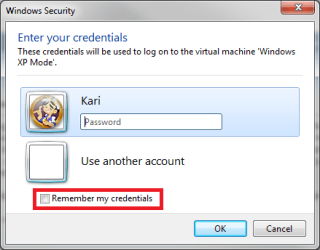
Boot XP Mode, and you should now see this:

save_logon.png

Just choose the account you want to use for auto logon, and choose Remember my credentials.

More about XP mode user accounts:

Kari
 
Last edited:

My Computer

Computer type
Laptop
Computer Manufacturer/Model Number
HP ENVY 17-1150eg
OS
Windows 10 Pro x64 EN-GB
CPU
1.6 GHz Intel Core i7-720QM Processor
Memory
6 GB
Graphics Card(s)
ATI Mobility Radeon HD 5850 Graphics
Sound Card
Beats sound system with integrated subwoofer
Monitor(s) Displays
17" laptop display, 22" LED and 32" Full HD TV through HDMI
Screen Resolution
1600*900 (1), 1920*1080 (2&3)
Hard Drives
Internal: 2 x 500 GB SATA Hard Disk Drive 7200 rpm
External: 2TB for backups, 3TB USB3 network drive for media
Cooling
As Envy runs a bit warm, I have it on a Cooler Master pad
Keyboard
Logitech diNovo Media Desktop Laser (bluetooth)
Mouse
Logitech Performance Mouse MX
Internet Speed
50/10 Mbps VDSL
Antivirus
Windows Defender 4.3.9431.0
Browser
Maxthon 3.5.2., IE11
Thanks, I reinstalled XP mode
My previous problem was answered by you in one of the links you gave
 

My Computer

OS
Windows 7 Ultimate 32-bit
CPU
Intel Core 2 CPU T5500 1.66GHz
Memory
2GB
Graphics Card(s)
ATI Radeon Express Series
Hard Drives
150GB SATA
You are welcome.
 

My Computer

Computer type
Laptop
Computer Manufacturer/Model Number
HP ENVY 17-1150eg
OS
Windows 10 Pro x64 EN-GB
CPU
1.6 GHz Intel Core i7-720QM Processor
Memory
6 GB
Graphics Card(s)
ATI Mobility Radeon HD 5850 Graphics
Sound Card
Beats sound system with integrated subwoofer
Monitor(s) Displays
17" laptop display, 22" LED and 32" Full HD TV through HDMI
Screen Resolution
1600*900 (1), 1920*1080 (2&3)
Hard Drives
Internal: 2 x 500 GB SATA Hard Disk Drive 7200 rpm
External: 2TB for backups, 3TB USB3 network drive for media
Cooling
As Envy runs a bit warm, I have it on a Cooler Master pad
Keyboard
Logitech diNovo Media Desktop Laser (bluetooth)
Mouse
Logitech Performance Mouse MX
Internet Speed
50/10 Mbps VDSL
Antivirus
Windows Defender 4.3.9431.0
Browser
Maxthon 3.5.2., IE11
Why Use The XPMUser

Is there any reason to use the XPMUser account instead of your own one? I thought it would make the 'Folder integration between host and guest' work but it didn't. Is there any benefit from using it?
 

My Computer

Computer Manufacturer/Model Number
HP p6226f
OS
Windows 7 Home Premium 64bit, Windows 7 Ultimate 32bit
CPU
2.7GHz Dual-Core AMD Athlon II X2 215
Motherboard
Whatever Proprietary Crap It Came With
Memory
6GB
Graphics Card(s)
NVIDIA GeForce 9100 Integrated
Sound Card
Some Realtek HD 7.1 Audio Integrated
Monitor(s) Displays
HP 2159m 21.5"
Hard Drives
750GB Whatever came with it
1TB WD My Book
750GB WD My Book
PSU
Whatever Came With It
Case
HP's Crappy Thing That Came With It
Cooling
No Active Cooling
Simply put, the answer is no. It's just a default account, simplifying the installation process. I use XP Mode a lot, have never used XPMUser account after first boot and creating other accounts (except when making screenshots to tutorials).

Kari
 

My Computer

Computer type
Laptop
Computer Manufacturer/Model Number
HP ENVY 17-1150eg
OS
Windows 10 Pro x64 EN-GB
CPU
1.6 GHz Intel Core i7-720QM Processor
Memory
6 GB
Graphics Card(s)
ATI Mobility Radeon HD 5850 Graphics
Sound Card
Beats sound system with integrated subwoofer
Monitor(s) Displays
17" laptop display, 22" LED and 32" Full HD TV through HDMI
Screen Resolution
1600*900 (1), 1920*1080 (2&3)
Hard Drives
Internal: 2 x 500 GB SATA Hard Disk Drive 7200 rpm
External: 2TB for backups, 3TB USB3 network drive for media
Cooling
As Envy runs a bit warm, I have it on a Cooler Master pad
Keyboard
Logitech diNovo Media Desktop Laser (bluetooth)
Mouse
Logitech Performance Mouse MX
Internet Speed
50/10 Mbps VDSL
Antivirus
Windows Defender 4.3.9431.0
Browser
Maxthon 3.5.2., IE11
Thanks. I thought so. But then, How do I get the integrated folders to work?
Windows Virtual PC: Features
It says you can "Access your Windows 7 Known Folders: My Documents, Pictures, Desktop, Music, and Video, from inside the virtual Windows environment, such as Windows XP Mode." but when I'm in XP Mode the only way to access them is by sharing them over the virtual network
 

My Computer

Computer Manufacturer/Model Number
HP p6226f
OS
Windows 7 Home Premium 64bit, Windows 7 Ultimate 32bit
CPU
2.7GHz Dual-Core AMD Athlon II X2 215
Motherboard
Whatever Proprietary Crap It Came With
Memory
6GB
Graphics Card(s)
NVIDIA GeForce 9100 Integrated
Sound Card
Some Realtek HD 7.1 Audio Integrated
Monitor(s) Displays
HP 2159m 21.5"
Hard Drives
750GB Whatever came with it
1TB WD My Book
750GB WD My Book
PSU
Whatever Came With It
Case
HP's Crappy Thing That Came With It
Cooling
No Active Cooling
Thanks. I thought so. But then, How do I get the integrated folders to work?
Windows Virtual PC: Features
It says you can "Access your Windows 7 Known Folders: My Documents, Pictures, Desktop, Music, and Video, from inside the virtual Windows environment, such as Windows XP Mode." but when I'm in XP Mode the only way to access them is by sharing them over the virtual network
There are two ways to do this.

1. Joining the guest (XP Mode) to the same workgroup than host (Windows 7). This way all the network shares, devices and resources are available. This can also be done with integration features not installed and enabled.

Remeber that an XP machine, real or virtual, can not join a Homegroup.

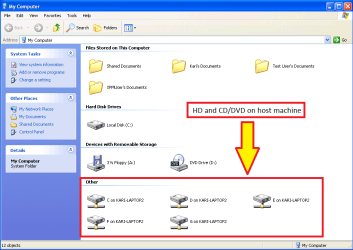
2. Installing and enabling integration features lets a guest system (for instance XP Mode) to use host's drives as if they were directly connected to guest system. The screenshot here shows XP Mode's My Computer when integration is enabled:

Host_drives_on_VPC_Guest.png

Kari
 

My Computer

Computer type
Laptop
Computer Manufacturer/Model Number
HP ENVY 17-1150eg
OS
Windows 10 Pro x64 EN-GB
CPU
1.6 GHz Intel Core i7-720QM Processor
Memory
6 GB
Graphics Card(s)
ATI Mobility Radeon HD 5850 Graphics
Sound Card
Beats sound system with integrated subwoofer
Monitor(s) Displays
17" laptop display, 22" LED and 32" Full HD TV through HDMI
Screen Resolution
1600*900 (1), 1920*1080 (2&3)
Hard Drives
Internal: 2 x 500 GB SATA Hard Disk Drive 7200 rpm
External: 2TB for backups, 3TB USB3 network drive for media
Cooling
As Envy runs a bit warm, I have it on a Cooler Master pad
Keyboard
Logitech diNovo Media Desktop Laser (bluetooth)
Mouse
Logitech Performance Mouse MX
Internet Speed
50/10 Mbps VDSL
Antivirus
Windows Defender 4.3.9431.0
Browser
Maxthon 3.5.2., IE11
So essentially, there is no 'Folder Integration', just the normal virtual network sharing that you can do in any Virtual Machine.

I actually disabled the Integration drives prefering to Map them as Network drives, giving them a Drive letter & allowing them to work like local drives instead of network shares.
 

My Computer

Computer Manufacturer/Model Number
HP p6226f
OS
Windows 7 Home Premium 64bit, Windows 7 Ultimate 32bit
CPU
2.7GHz Dual-Core AMD Athlon II X2 215
Motherboard
Whatever Proprietary Crap It Came With
Memory
6GB
Graphics Card(s)
NVIDIA GeForce 9100 Integrated
Sound Card
Some Realtek HD 7.1 Audio Integrated
Monitor(s) Displays
HP 2159m 21.5"
Hard Drives
750GB Whatever came with it
1TB WD My Book
750GB WD My Book
PSU
Whatever Came With It
Case
HP's Crappy Thing That Came With It
Cooling
No Active Cooling
Back
Top