xpod driver usb 2.0

cool girl

New member
Local time
2:33 PM
Messages
5
i have a problem that i have window 7 professional n xpod xp-097 high end 5.0 pixels usb 2.0 high speed plg n play cam ... and processor is pentium dual core cpu e 5500 2.80 ghzand ram is 1.00 gb 32 bit operating sysytem ...... how i install driver of this cam on my pc .. kindly help me plzzzz .i have also cd driver
 

My Computer

OS
window 7
I'm assuming the CD you mention has the drivers for the xpod.

Firstly, as it's a PNP device, have you actually connected it to a USB port to see whether Windows 7 detects it?

If it doesn't, you can then unplug the device and install the drivers on the CD.

Just insert the CD into your optical drive and the drivers should install automatically.

If the installer doesn't run, leave the CD in the drive and click Start>Run, and then type D:\Setup.exe where D is the drive letter of the CD\DVD drive you're using.

When you've installed the drivers, plug the device into a USB port at the front of your computer if there are any there. If not, use the ones on the back.
 

My Computer

Computer Manufacturer/Model Number
HP Pavilion Elite 495UK
OS
Windows 7 Ultimate SP1 64-Bit
CPU
Intel Core i7 870 @ 2.93GHz
Motherboard
MSI 2A9C (CPU1)
Memory
8Gb Dual-Channel DDR3 @ 664MHz
Graphics Card(s)
nVidia GeForce GTX 460 1024MB dedicated RAM
Sound Card
Realtek HD Audio
Monitor(s) Displays
HP2310i
Screen Resolution
1920 x 1080
Hard Drives
1x1954GB Hitachi HDS22020ALA 330 (RAID), 1x1954GB Hitachi External for backup and storage
PSU
460W
Case
HP Elite
Cooling
Air cooled
Keyboard
Logitech K750 solar-powered keyboard
Mouse
Logitech Wireless M180 mouse
Internet Speed
2Mb
Other Info
Pure Avanti Flow Internet Radio with iPod Dock, 64Gb iPod, HP USB Speakers, Sony MDR-V500 Headphones, Sony Vaio F-Series Laptop
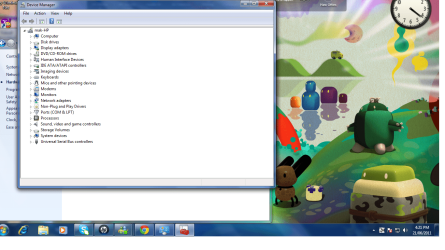
pic of cam.png
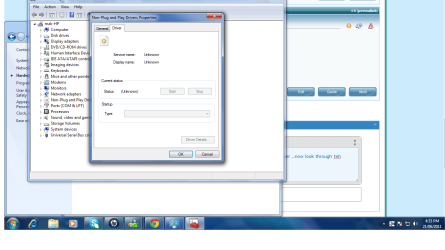
kindly look through this pic ... itz showing in hidden devices but it didnt upadating the driver ..now look through the second pic 222222.png plz help me as soon as possible ....thanks
 
Last edited:

My Computer

OS
window 7
In that case, it's quite possible the device is incompatible with Windows 7.

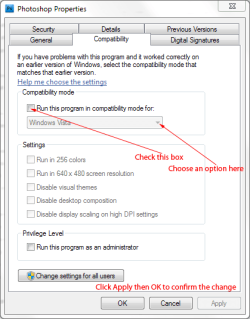
You could try installing it in Compatibility Mode. Just right-click the installer on the driver CD and click Properties then click the Compatibility tab.

PNP.PNG
 

My Computer

Computer Manufacturer/Model Number
HP Pavilion Elite 495UK
OS
Windows 7 Ultimate SP1 64-Bit
CPU
Intel Core i7 870 @ 2.93GHz
Motherboard
MSI 2A9C (CPU1)
Memory
8Gb Dual-Channel DDR3 @ 664MHz
Graphics Card(s)
nVidia GeForce GTX 460 1024MB dedicated RAM
Sound Card
Realtek HD Audio
Monitor(s) Displays
HP2310i
Screen Resolution
1920 x 1080
Hard Drives
1x1954GB Hitachi HDS22020ALA 330 (RAID), 1x1954GB Hitachi External for backup and storage
PSU
460W
Case
HP Elite
Cooling
Air cooled
Keyboard
Logitech K750 solar-powered keyboard
Mouse
Logitech Wireless M180 mouse
Internet Speed
2Mb
Other Info
Pure Avanti Flow Internet Radio with iPod Dock, 64Gb iPod, HP USB Speakers, Sony MDR-V500 Headphones, Sony Vaio F-Series Laptop
Back
Top