yellow folder icon missing when browsing a file

hitomihot18

New member
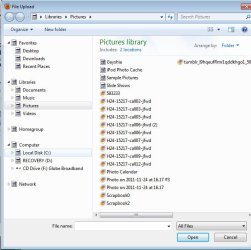
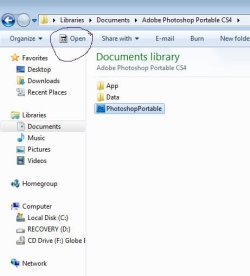
Can anyone help me with this problem..the yellow icon folder is ok when i open a different folder names and files but when im browsing the net to upload pictures my icon folder is missing the yellow design logo..
icon_sad.gif


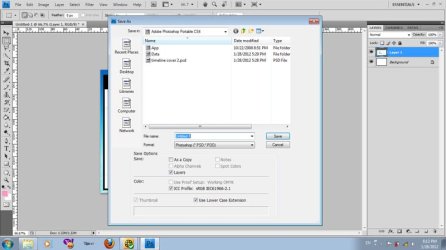
and if im using photoshop to browse files,pic still the same the icon yellow folder is missing like this on the picture but i can upload and download the files and pic ..
what must i do to fix it i just rember last 2weeks ago i clean icon using this method to erase ghost icon on my notification area..

Remove Old Notification Icons In Windows 7

Remove Old Notification Icons In Windows 7

Here is how you can remove old notification icons from the Windows 7 system tray.

* Press [Windows R], type [regedit] and hit [enter]
* Navigate to the Registry key HKCU \Software \Classes \LocalSettings \Software \Microsoft \Windows \CurrentVersion \TrayNotify
* Make a backup of the Registry key by right-clicking on TrayNotify and selecting Export.
* Now delete the following two Registry keys: IconStreams and PastIconsStream
* Open the Windows Task Manager with [Ctrl Shift Esc]
* Terminate the explorer.exe process
* Click on File > New Task Run and enter explorer.exe to reload the explorer process
after i used cc cleaner and pc tools registry this comes out my problem..
icon_sad.gif


thanks in advance who could help me
icon_biggrin.gif
 

Attachments

  • icon-missing.jpg
    icon-missing.jpg
    99.5 KB · Views: 28
  • icon-missing-3.jpg
    icon-missing-3.jpg
    58.8 KB · Views: 21
  • icon-missing2.jpg
    icon-missing2.jpg
    44.7 KB · Views: 18

My Computer

OS
Windows 7 Home Premium 64bit

My Computer

Computer type
PC/Desktop
Computer Manufacturer/Model Number
Self built custom
OS
64-bit Windows 11 Pro for Workstations
CPU
Intel i7-8700K OC'd to 5 GHz
Motherboard
ASUS ROG Maximus XI Formula Z390
Memory
64 GB (4x16GB) G.SKILL TridentZ RGB DDR4 3600 MHz
Graphics Card(s)
ASUS ROG-STRIX-GTX1080TI-O11G-GAMING
Sound Card
Integrated
Monitor(s) Displays
2 x Samsung Odyssey G7 27"
Screen Resolution
2560x1440
Hard Drives
1TB Samsung 990 PRO M.2,
4TB Samsung 990 PRO PRO M.2,
TerraMaster F8 SSD Plus NAS
PSU
Seasonic Prime Titanium 850W
Case
Thermaltake Core P3
Cooling
Corsair Hydro H115i
Keyboard
Logitech wireless K800
Mouse
Logitech MX Master 4
Internet Speed
2 Gb/s Download and 100 Mb/s Upload
Antivirus
Malwarebyte Anti-Malware Premium
Browser
Google Chrome
Other Info
Logitech Z625 speaker system,
Logitech BRIO 4K Pro webcam,
HP Color LaserJet Pro MFP M477fdn,
APC SMART-UPS RT 1000 XL - SURT1000XLI,
Galaxy S23 Plus phone

My Computer

OS
Windows 7 Home Premium 64bit
Hitomihot,

Well, so much for the easier route. You could also do a system restore using a restore point (if available) dated before this happened to hopefully fix it afterwards.

My guess is that it may have been the registry cleaner that you used that caused it. Registry cleaning programs usually cause more problems than what little they may help with since folks do not double check what is to be deleted before allowing it to be deleted. :(
 

My Computer

Computer type
PC/Desktop
Computer Manufacturer/Model Number
Self built custom
OS
64-bit Windows 11 Pro for Workstations
CPU
Intel i7-8700K OC'd to 5 GHz
Motherboard
ASUS ROG Maximus XI Formula Z390
Memory
64 GB (4x16GB) G.SKILL TridentZ RGB DDR4 3600 MHz
Graphics Card(s)
ASUS ROG-STRIX-GTX1080TI-O11G-GAMING
Sound Card
Integrated
Monitor(s) Displays
2 x Samsung Odyssey G7 27"
Screen Resolution
2560x1440
Hard Drives
1TB Samsung 990 PRO M.2,
4TB Samsung 990 PRO PRO M.2,
TerraMaster F8 SSD Plus NAS
PSU
Seasonic Prime Titanium 850W
Case
Thermaltake Core P3
Cooling
Corsair Hydro H115i
Keyboard
Logitech wireless K800
Mouse
Logitech MX Master 4
Internet Speed
2 Gb/s Download and 100 Mb/s Upload
Antivirus
Malwarebyte Anti-Malware Premium
Browser
Google Chrome
Other Info
Logitech Z625 speaker system,
Logitech BRIO 4K Pro webcam,
HP Color LaserJet Pro MFP M477fdn,
APC SMART-UPS RT 1000 XL - SURT1000XLI,
Galaxy S23 Plus phone

My Computer

Computer type
PC/Desktop
Computer Manufacturer/Model Number
Novatech iRush Pro
OS
Windows 7 Ultimate SP1 - 64 Bit
CPU
Intel Core i5 2500k
Motherboard
Foxconn H67M-S/H67M-V/H67
Memory
2x4GB DDR3 1333Hz
Graphics Card(s)
Ati Radeon 6770
Sound Card
None
Monitor(s) Displays
Samsung S22B150
Screen Resolution
1920x1080
Hard Drives
2x500GB
PSU
500W
Cooling
Fan
Keyboard
HP KU0316
Mouse
Wireless Logitech M185
Internet Speed
20MB/s
Antivirus
Avast Free
Browser
Google Chrome
Other Info
Logitech M185 Mouse
KU-M316 Keyboard
Hitomihot,

Well, so much for the easier route. You could also do a system restore using a restore point (if available) dated before this happened to hopefully fix it afterwards.

My guess is that it may have been the registry cleaner that you used that caused it. Registry cleaning programs usually cause more problems than what little they may help with since folks do not double check what is to be deleted before allowing it to be deleted. :(

thanks your right maybe the registry cleaner:(..what must i do?im not good in computer specially in windows 7..:o..i dont have the cd of my windows 7
:(
 

My Computer

OS
Windows 7 Home Premium 64bit
Hitomihot,

Well, so much for the easier route. You could also do a system restore using a restore point (if available) dated before this happened to hopefully fix it afterwards.

My guess is that it may have been the registry cleaner that you used that caused it. Registry cleaning programs usually cause more problems than what little they may help with since folks do not double check what is to be deleted before allowing it to be deleted. :(

thanks your right maybe the registry cleaner:(..what must i do?im not good in computer specially in windows 7..:o..i dont have the cd of my windows 7
:(

Clicking on the link in my post will help show you how to do a system restore (not a factory recovery/restore) if the sfc /scannow command doesn't help. :)
 

My Computer

Computer type
PC/Desktop
Computer Manufacturer/Model Number
Self built custom
OS
64-bit Windows 11 Pro for Workstations
CPU
Intel i7-8700K OC'd to 5 GHz
Motherboard
ASUS ROG Maximus XI Formula Z390
Memory
64 GB (4x16GB) G.SKILL TridentZ RGB DDR4 3600 MHz
Graphics Card(s)
ASUS ROG-STRIX-GTX1080TI-O11G-GAMING
Sound Card
Integrated
Monitor(s) Displays
2 x Samsung Odyssey G7 27"
Screen Resolution
2560x1440
Hard Drives
1TB Samsung 990 PRO M.2,
4TB Samsung 990 PRO PRO M.2,
TerraMaster F8 SSD Plus NAS
PSU
Seasonic Prime Titanium 850W
Case
Thermaltake Core P3
Cooling
Corsair Hydro H115i
Keyboard
Logitech wireless K800
Mouse
Logitech MX Master 4
Internet Speed
2 Gb/s Download and 100 Mb/s Upload
Antivirus
Malwarebyte Anti-Malware Premium
Browser
Google Chrome
Other Info
Logitech Z625 speaker system,
Logitech BRIO 4K Pro webcam,
HP Color LaserJet Pro MFP M477fdn,
APC SMART-UPS RT 1000 XL - SURT1000XLI,
Galaxy S23 Plus phone
Hitomihot,

Well, so much for the easier route. You could also do a system restore using a restore point (if available) dated before this happened to hopefully fix it afterwards.

My guess is that it may have been the registry cleaner that you used that caused it. Registry cleaning programs usually cause more problems than what little they may help with since folks do not double check what is to be deleted before allowing it to be deleted. :(

thanks your right maybe the registry cleaner:(..what must i do?im not good in computer specially in windows 7..:o..i dont have the cd of my windows 7
:(

Clicking on the link in my post will help show you how to do a system restore (not a factory recovery/restore) if the sfc /scannow command doesn't help. :)


thanks again for helping me:D..i will try it again ...;)

in your opinion..do i need to erase my cc cleaner? what best cleaner or pc tuning i must to use to protect my pc?

thanks again..
 

My Computer

OS
Windows 7 Home Premium 64bit
CCleaner is a great program to keep and use, but I would recommend to not use it's registry cleaning feature, and to never use any other registry cleaner.

To protect your computer, I would recommend to have a antivirus program installed. If you do not already have one, then the free MSE (Microsoft Security Essentials) is a good one.
 

My Computer

Computer type
PC/Desktop
Computer Manufacturer/Model Number
Self built custom
OS
64-bit Windows 11 Pro for Workstations
CPU
Intel i7-8700K OC'd to 5 GHz
Motherboard
ASUS ROG Maximus XI Formula Z390
Memory
64 GB (4x16GB) G.SKILL TridentZ RGB DDR4 3600 MHz
Graphics Card(s)
ASUS ROG-STRIX-GTX1080TI-O11G-GAMING
Sound Card
Integrated
Monitor(s) Displays
2 x Samsung Odyssey G7 27"
Screen Resolution
2560x1440
Hard Drives
1TB Samsung 990 PRO M.2,
4TB Samsung 990 PRO PRO M.2,
TerraMaster F8 SSD Plus NAS
PSU
Seasonic Prime Titanium 850W
Case
Thermaltake Core P3
Cooling
Corsair Hydro H115i
Keyboard
Logitech wireless K800
Mouse
Logitech MX Master 4
Internet Speed
2 Gb/s Download and 100 Mb/s Upload
Antivirus
Malwarebyte Anti-Malware Premium
Browser
Google Chrome
Other Info
Logitech Z625 speaker system,
Logitech BRIO 4K Pro webcam,
HP Color LaserJet Pro MFP M477fdn,
APC SMART-UPS RT 1000 XL - SURT1000XLI,
Galaxy S23 Plus phone
CCleaner is a great program to keep and use, but I would recommend to not use it's registry cleaning feature, and to never use any other registry cleaner.

To protect your computer, I would recommend to have a antivirus program installed. If you do not already have one, then the free MSE (Microsoft Security Essentials) is a good one.


thanks..i have a PC Tools Registry Mechanic..do i need to erase it? and i'm using Norton Internet Security..

how about the cc cleaner?
 

My Computer

OS
Windows 7 Home Premium 64bit
Yeah, I would recommend to uninstall "PC Tools Registry Mechanic" since it's a registry cleaning program.

CCleaner is a great program to keep and use, but I would recommend to just not use it's registry cleaning feature. The other features in it are fine.

I personally don't care for Norton, but it'll help protect your computer from malware and viruses.

Were you able to fix your original issue yet?
 

My Computer

Computer type
PC/Desktop
Computer Manufacturer/Model Number
Self built custom
OS
64-bit Windows 11 Pro for Workstations
CPU
Intel i7-8700K OC'd to 5 GHz
Motherboard
ASUS ROG Maximus XI Formula Z390
Memory
64 GB (4x16GB) G.SKILL TridentZ RGB DDR4 3600 MHz
Graphics Card(s)
ASUS ROG-STRIX-GTX1080TI-O11G-GAMING
Sound Card
Integrated
Monitor(s) Displays
2 x Samsung Odyssey G7 27"
Screen Resolution
2560x1440
Hard Drives
1TB Samsung 990 PRO M.2,
4TB Samsung 990 PRO PRO M.2,
TerraMaster F8 SSD Plus NAS
PSU
Seasonic Prime Titanium 850W
Case
Thermaltake Core P3
Cooling
Corsair Hydro H115i
Keyboard
Logitech wireless K800
Mouse
Logitech MX Master 4
Internet Speed
2 Gb/s Download and 100 Mb/s Upload
Antivirus
Malwarebyte Anti-Malware Premium
Browser
Google Chrome
Other Info
Logitech Z625 speaker system,
Logitech BRIO 4K Pro webcam,
HP Color LaserJet Pro MFP M477fdn,
APC SMART-UPS RT 1000 XL - SURT1000XLI,
Galaxy S23 Plus phone
if i do system restore do my pc lost some intalled files?and my setting of this laptop would be Japanese version?because it not English originally , i just bought it from japan then my friends reformat it from English..
 

My Computer

OS
Windows 7 Home Premium 64bit
A system restore (click on link for more on this) is not the same as a factory recovery for what you are describing. A system restore will only take your system back to how it was when a selected restore point was created previously.
 

My Computer

Computer type
PC/Desktop
Computer Manufacturer/Model Number
Self built custom
OS
64-bit Windows 11 Pro for Workstations
CPU
Intel i7-8700K OC'd to 5 GHz
Motherboard
ASUS ROG Maximus XI Formula Z390
Memory
64 GB (4x16GB) G.SKILL TridentZ RGB DDR4 3600 MHz
Graphics Card(s)
ASUS ROG-STRIX-GTX1080TI-O11G-GAMING
Sound Card
Integrated
Monitor(s) Displays
2 x Samsung Odyssey G7 27"
Screen Resolution
2560x1440
Hard Drives
1TB Samsung 990 PRO M.2,
4TB Samsung 990 PRO PRO M.2,
TerraMaster F8 SSD Plus NAS
PSU
Seasonic Prime Titanium 850W
Case
Thermaltake Core P3
Cooling
Corsair Hydro H115i
Keyboard
Logitech wireless K800
Mouse
Logitech MX Master 4
Internet Speed
2 Gb/s Download and 100 Mb/s Upload
Antivirus
Malwarebyte Anti-Malware Premium
Browser
Google Chrome
Other Info
Logitech Z625 speaker system,
Logitech BRIO 4K Pro webcam,
HP Color LaserJet Pro MFP M477fdn,
APC SMART-UPS RT 1000 XL - SURT1000XLI,
Galaxy S23 Plus phone
As a test, create a new administrator account to see if you have the same folder icon issue while logged on to it. This way we will be know if this affects the whole system or just in your current account.
 

My Computer

Computer type
PC/Desktop
Computer Manufacturer/Model Number
Self built custom
OS
64-bit Windows 11 Pro for Workstations
CPU
Intel i7-8700K OC'd to 5 GHz
Motherboard
ASUS ROG Maximus XI Formula Z390
Memory
64 GB (4x16GB) G.SKILL TridentZ RGB DDR4 3600 MHz
Graphics Card(s)
ASUS ROG-STRIX-GTX1080TI-O11G-GAMING
Sound Card
Integrated
Monitor(s) Displays
2 x Samsung Odyssey G7 27"
Screen Resolution
2560x1440
Hard Drives
1TB Samsung 990 PRO M.2,
4TB Samsung 990 PRO PRO M.2,
TerraMaster F8 SSD Plus NAS
PSU
Seasonic Prime Titanium 850W
Case
Thermaltake Core P3
Cooling
Corsair Hydro H115i
Keyboard
Logitech wireless K800
Mouse
Logitech MX Master 4
Internet Speed
2 Gb/s Download and 100 Mb/s Upload
Antivirus
Malwarebyte Anti-Malware Premium
Browser
Google Chrome
Other Info
Logitech Z625 speaker system,
Logitech BRIO 4K Pro webcam,
HP Color LaserJet Pro MFP M477fdn,
APC SMART-UPS RT 1000 XL - SURT1000XLI,
Galaxy S23 Plus phone
Back
Top