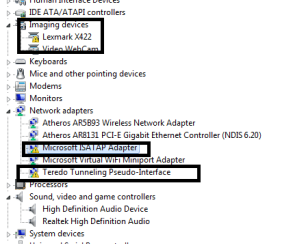
I ianbrylle29 New member Power User Local time 1:19 AM Messages 105 Location Davao City Jan 10, 2012 #1 i want to ask a question regarding this icons on my device manager. there are yellow marks on some of my devices. the question is . . . is this good or bad?? please reply THANKS Attachments 1.png 9 KB · Views: 15 My Computer My Computer OSwindows 10 64bitCPURyzen 3 2200gMotherboardmsi a320m pro-vh plusMemory8.00 GBGraphics Card(s)Vega 8 integrated graphics
i want to ask a question regarding this icons on my device manager. there are yellow marks on some of my devices. the question is . . . is this good or bad?? please reply THANKS
Qdos WYSIWYG Guru Gold Member VIP Local time 7:19 PM Messages 3,255 Location 3rd Rock from the Sun Jan 10, 2012 #2 These icons mean there's a problem with the devices, usually driver related... My Computer My Computer Computer Manufacturer/Model NumberCustom built machineOSW7 x64CPUIntel Q9300 2.5Ghz Quad LGA775 (Would like Q9650)MotherboardGigabyte GA-EP45T-UD3R (F6 Bios)Memory4Gb OCZ Gold 1,333MhzGraphics Card(s)Palit HD4850 O/C Sonic 512Mb DDR3, Dual DViD'sSound CardAzalia to twin Samson 50w Studio MonitorsMonitor(s) DisplaysTwin Dell (E-IPS) U2311H 23.6" ScreensScreen Resolution1920 x 1080 @ 60HzHard DrivesCrucial M4 SSD, archives on twin Western Digital Caviar Black WD2002FAEX, 2TB, 7200rpm HDD's, Samsung Ritemaster CD/DVD Burner...PSUOCZ 600wCaseLian-Li PC8 acoustifoamed' aluminium towerCoolingScythe 140mm ZipangKeyboardCherry PS/2 custom modelMouseLenovo USB laser "Thinkpad" MouseInternet SpeedADSL2+ @14Mbps downstream & Cat6 Gigabit EthernetAntivirusNOD32BrowserOperaOther InfoSilicon Dust HD Homerun Dual FTA (Ethernet) TV Tuners, Dray Tek Vigor 2850Vn router and 8x HP Gigabit Switch. Lian-Li CR26 Card Reader, Canon MF4430 iSensys laser printer/scanner.
whs New member Guru Gold Member VIP Local time 2:19 PM Messages 26,200 Location Florida in winter, Black Forest/Germany Jan 10, 2012 #3 As a first easy step double click on those items, go to the Driver tab and "Update" the driver. If that does nothing, we'll have to look further. My Computer My Computer Computer Manufacturer/Model NumberHP, Dell, Gateway, Toshiba - 4 laptops and 2 desktopsOSVista, Windows7, Mint Mate, Zorin, Windows 8CPUfrom 1.6GHz Duo to i7Monitor(s) Displays2x HP w2207Hard Drives5x HDD, 7x SSD, 12x ExternalsKeyboardwith trackball - no micesMouseTrackball miceInternet SpeedDSL 6000
As a first easy step double click on those items, go to the Driver tab and "Update" the driver. If that does nothing, we'll have to look further.
I ianbrylle29 New member Power User Thread Starter Local time 1:19 AM Messages 105 Location Davao City Jan 10, 2012 #4 whs said: As a first easy step double click on those items, go to the Driver tab and "Update" the driver. If that does nothing, we'll have to look further. Click to expand... sir i tried to update it but it doesn't seem to change. the yellow icon is still there. . is there other way? My Computer My Computer OSwindows 10 64bitCPURyzen 3 2200gMotherboardmsi a320m pro-vh plusMemory8.00 GBGraphics Card(s)Vega 8 integrated graphics
whs said: As a first easy step double click on those items, go to the Driver tab and "Update" the driver. If that does nothing, we'll have to look further. Click to expand... sir i tried to update it but it doesn't seem to change. the yellow icon is still there. . is there other way?
whs New member Guru Gold Member VIP Local time 2:19 PM Messages 26,200 Location Florida in winter, Black Forest/Germany Jan 10, 2012 #5 Then you have to look at the manufacturers websites and download the drivers from there. My Computer My Computer Computer Manufacturer/Model NumberHP, Dell, Gateway, Toshiba - 4 laptops and 2 desktopsOSVista, Windows7, Mint Mate, Zorin, Windows 8CPUfrom 1.6GHz Duo to i7Monitor(s) Displays2x HP w2207Hard Drives5x HDD, 7x SSD, 12x ExternalsKeyboardwith trackball - no micesMouseTrackball miceInternet SpeedDSL 6000
I ianbrylle29 New member Power User Thread Starter Local time 1:19 AM Messages 105 Location Davao City Jan 11, 2012 #6 after i will download the driver . . . i just need to run it? or need a complicated operation? My Computer My Computer OSwindows 10 64bitCPURyzen 3 2200gMotherboardmsi a320m pro-vh plusMemory8.00 GBGraphics Card(s)Vega 8 integrated graphics
whs New member Guru Gold Member VIP Local time 2:19 PM Messages 26,200 Location Florida in winter, Black Forest/Germany Jan 11, 2012 #7 Just run it. My Computer My Computer Computer Manufacturer/Model NumberHP, Dell, Gateway, Toshiba - 4 laptops and 2 desktopsOSVista, Windows7, Mint Mate, Zorin, Windows 8CPUfrom 1.6GHz Duo to i7Monitor(s) Displays2x HP w2207Hard Drives5x HDD, 7x SSD, 12x ExternalsKeyboardwith trackball - no micesMouseTrackball miceInternet SpeedDSL 6000